Update a Record CodeIgniter
Update a record
In this topic, we will learn how we can update existing records in database tables. To update a record, CodeIgniter provides an update() function used with the set() and where() functions as shown below:
- set(): As the name suggests, it is used to set the data to be updated in the database table.
Syntax
set($key [, $value = ‘’[, $escape = NULL]])
It has three parameters;
$key: It defines the fields name, or key/value pairs to be updated.
$value: It defines the fields value, if $key contain a single field.
$escape: This field defines, whether you want to escape value or an identifier.
- where(): A where() function is used to determine the record to be updated in a database table.
Syntax
where($key [, $value = NULL [, $escape = NULL]])
It has three parameters:
$key: It contains the field names to be updated
$value: It contains the value of the field compared to the name of the key defined.
$escape: Determines whether to avoid values ??and identifiers.
- update(): An update() function is used to update a single item received from a database.
Syntax
update([$table_name = “”[, $set = NULL [, $where = NULL[, $limit = NULL ]]]])
It has four parameters:
$table: The first parameter defines a table name.
$set (array): It defines an associative array that contains the fields value to be set in the database table.
$where (string): It defines a particular row to update.
$limit (int): It is used to set a limit in a database table.
 $records = array (
 ‘emp_id’ => ‘1’,
 ‘emp_name’ => ‘David’,
 ‘emp_des’ => ‘Manager’
 );
 $this->db->set($records);
 $this->db->where(“emp_id”, “1”);
 $this->db->update(“emp_tab”, $records);
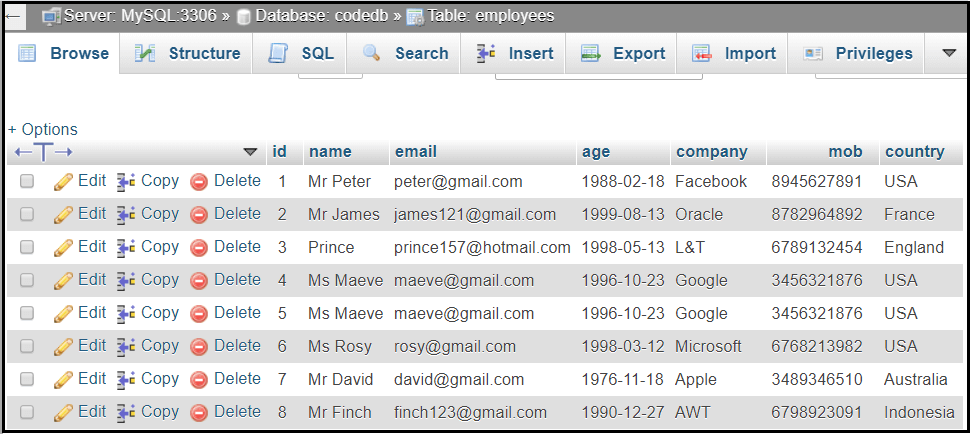
The following are the records of the employees table, that we must update data using the update() function, as shown in the image below.
To update the records in the database table, we need to create the following files, as shown below:
- Employee_controller.php
- Data_Model.php
- update_view.php
Create a controller file Employee_controller.php and save it in application/controller/Employee_controller.php. And write the following program in the controller file.
Employee_controller.php
<?php
 defined('BASEPATH') OR exit( 'No direct script access allowed');
 class Employee_controller extends CI_Controller
 {
  function _construct()
     {
         parent::_construct();
         $this->load->model('Data_Model'); // load model
         $this->load->library('uri'); // load uri library
     }
 public function index()
 {
  $this->load->database();
     $this->load->model('Data_Model');
     $records['read_data'] = $this->Data_Model->read_data(); // read all data from table
   $this->load->view('fetch', $records); // display all fetch data
 }
 public function update_data()
 {
     $this->load->database();
     $this->load->helper('form'); // load form helper
     $this->load->library('form_validation');  // load form_validation library
     $this->load->model('Data_Model');
     $id = $this->uri->segment(3); // get field id
     $this->form_validation->set_rules('name', 'Full Name', 'required');
     $this->form_validation->set_rules('email', 'Email', 'required');
     $this->form_validation->set_rules('age', 'Age', 'required');
     $this->form_validation->set_rules('company', 'Company Name', 'required');
     $this->form_validation->set_rules('mob', 'Mobile No. ', 'required');
   $this->form_validation->set_rules('country', 'Country', 'required');
   if ($this->form_validation->run())
     {
         $this->load->model("Data_Model");
         $records = array(       // receive data from update form
             'name' => $this->input->post('name'),
             'email' => $this->input->post('email'),
             'age' => $this->input->post('age'),
             'company' => $this->input->post('company'),
             'mob' => $this->input->post('mob'),
             'country' => $this->input->post('country')
         );
         if($this->input->post("update"))  /* if data receive from update view, update th record with primary id. */
         {
             $this->Data_Model->update_id($records, $this->input->post("hidden_id"));
    redirect("Employee_controller/updated"); // transfer control to the updated function.
    }
 }
     else
 {
     redirect("Employee_controller/index"); // transfer to index function
    }

 }
 public function updated()
 {
  $this->load->library("form_validation"); // load form_validation library
     $records['message'] = 'Details has been successfully Updated';
 $this->load->view('update_view', $records); // shown updating details to the update_view
 }
 // populate particular Id details of the employee
 public function update_id()
 {
   $this->load->library("form_validation");
     $id = $this->uri->segment(3); // populate id
     $this->load->model("Data_Model");
          $records['user_data'] = $this->Data_Model->fetch_unique($id); // fetch details using id.
     $records['read_data'] = $this->Data_Model->read_data(); // read all table data
     $this->load->view("update_view", $records);  // transfer details to update_view
 }
 }
 ?>
Create a model file Data_Model.php and save it in application/model/Data_Model.php. And write the following program in the model file.
Data_Model.php
<?php
  class Data_Model extends CI_Model{
 public function __construct() {
 parent::__construct();
 $this->load->database();
 }
 public function read_data()
 {
     $this->load->database();
 $this->db->select('*');
 $this->db->order_by('id', 'asc');
 $this->db->from("employees");
 $query = $this->db->get();
 return $query->result_array();
 }
 public function fetch_unique($id)
 {
     $this->db->where("id", $id); // fetch particular id from table
     $query = $this->db->get("employees");
     return $query->result_array();
     //return $query;
 }
 public function update_id($records, $id)
 {
     $this->db->where("id", $id);   update record to the selected id
     $this->db->update("employees", $records);
 }
 }
 ?>
Create a view file update_view.php and save it in application/views/update_view.php. And write the following program in the view file.
update_view.php
<!DOCTYPE>
 <html>
 <head>
 <title>Tutorial and Example </title>
 </head>
 <body>
 <?php echo form_open('Employee_controller/update_data'); ?>
 <div align="center"> <h2>Employee Update Form </h2></div>
 <fieldset width="80%">
 <legend>Details </legend>
 <p style="bgcolor:blue">  <?php if (isset($message)) { ?>
 <CENTER><h2 style="color:green;">Details has been successfully   Updated</h2></CENTER><br>
 <?php } ?> </p>
 <table align="center" width="60%" border="0" bordercolor="green">
 <?php
 if(isset($user_data))
 {
       foreach($user_data as $row)
       {
 ?>
 <input type="hidden"  name="hidden_id" value="<?php echo $row['id']; ?>">
 <tr><td align="left" valign="top" width="50%">
       Full Name :<span class="error" style="color:red">* </span></td>
       <td > <span style="color:red"> <?php echo form_error('name'); ?>
 </span><input type="text" name="name" value="<?php echo $row['name'];  ?>"
       style= "width:100%"placeholder="Enter the Name"
       title="Please, Provide  Your Full Name !">
 </td> </tr>
 <tr> <td align="left" valign="top" width="50%">
       Your Email-ID : <span class="error" style="color:red">* </span>  </td>
       <td > <span style="color:red"> <?php echo form_error('email'); ?> </span>
 <input type="email" name="email" size="30" value="<?php echo $row['email']; ?>"
        style= "width:100%" placeholder="Enter the email id"
                   title="Please, Provide Your Personal Email-ID !">
 </td> </tr>
 <tr>
 <td align="left" valign="top" width="50%">
  Employee Age :<span style="color:red">*</span>:</td>
 <td > <span style="color:red"> <?php echo form_error('age'); ?> </span>
                    <input type="date" value="<?php echo $row['age']; ?>"
       placeholder="Your Age....." name="age" style= "width:100%"; ></td></tr>
 <tr><td align="left" valign="top" width="50%">
       Company : <span class="error" style="color:red">* </span> </td>
 <td > <span style="color:red"> <?php echo form_error('company'); ?>  </span>
 <input type= "text" placeholder= "Enter the Organization name"  name="company" value="<?php echo $row['company']; ?>"
       style= "width:100%" title="Only Current company name">
 </td></tr>
 <tr><td align="left" valign="top" width="50%">
       Mobile No. :<span class="error" style="color:red">* </span>  </td>
       <td > <span style="color:red"> <?php echo form_error('mob'); ?> </span>
 <input type="number" name="mob" value="<?php echo $row['mob']; ?>" style= "width:100%"
 placeholder="83685********" title="Please, Provide only Your Personal Contact Number !">
 </td> </tr>
 <tr><td align="left" valign="top" width="50%">
       Country :<span class="error" style="color:red">* </span> </td>
       <td > <span style="color:red"> <?php echo form_error('country'); ?> </span>
  <input type="text" name="country" style= "width:100%" value="<?php echo $row['country']; ?>" placeholder="Enter the country name" >
 </td></tr>
 </table>
    <div align="center"> <input type="submit" value="Update" name="update"  style="color:Blue" />
 <input type="reset" value="RESET" ></div>
 <?php
       }
 }
 ?>
 </fieldset>
 <?php echo form_close(); ?>
 </body>
 <div class="container"> <p> <b> <?php echo anchor('Employee_controller', 'See  Update'); ?> </b> </p> </div>
 </html>
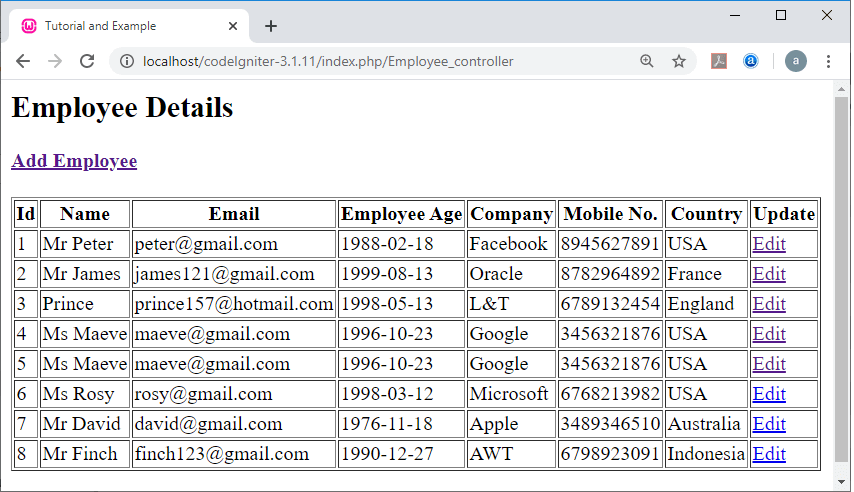
To run the program in the localhost by invoking the URL localhost/CodeIgniter-3.1.11/index.php/Employee_controller function; It shows the output as shown below.
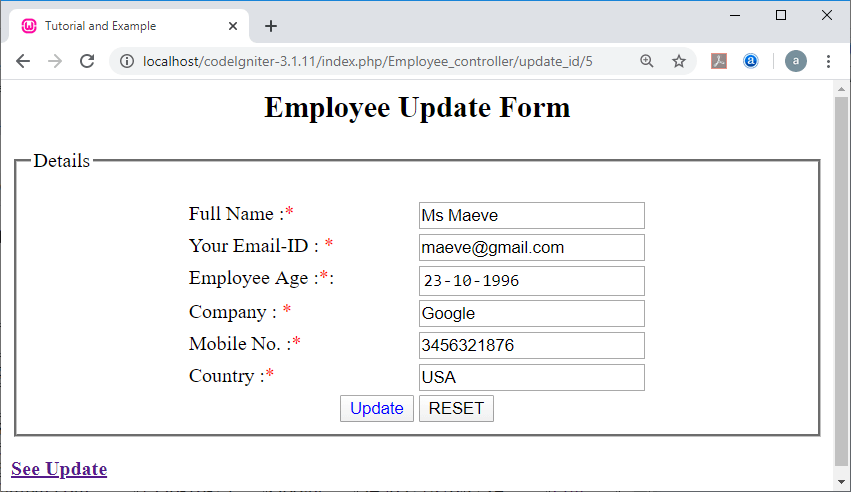
Now click on any edit link, it redirects you to the update form, as shown below. Suppose, we clicked on the Edit link of the Id no. 5, it redirects and receives all the details of the Id no.5 in the Employee Update Form, as shown in the below image.
Now update some fields of the Id no5.
For Example:
Ms Maeve to Ms Maeve Wiley,
maeve@gmail.com to maevewiley@gmail.com
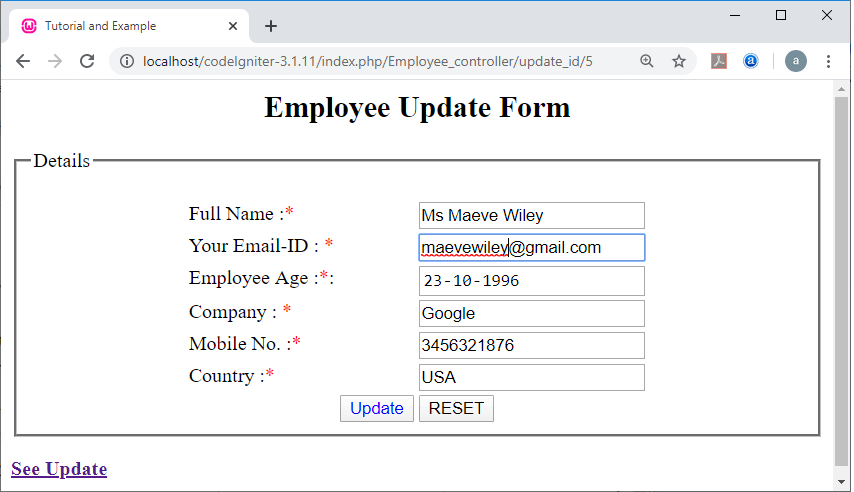
After updating the details, click the update button, and then, it displays a successful message, as shown in the image below.
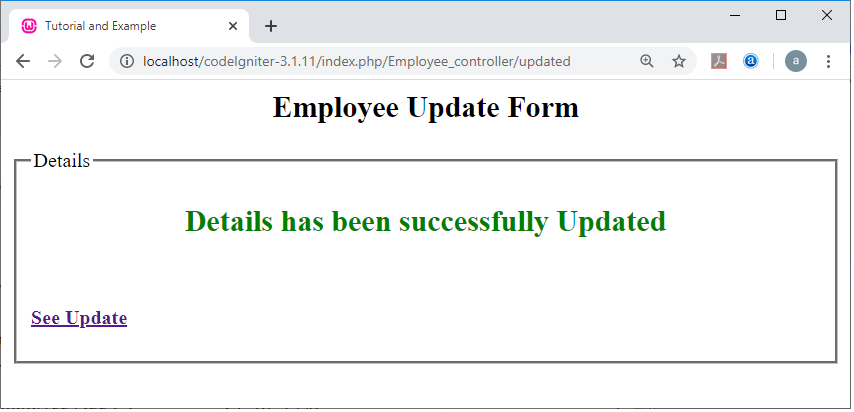
If you want to check, that your details have been updated in your main (Employee_controller) page, click on the See Update link, it redirects you to the main Controller page, as shown below.
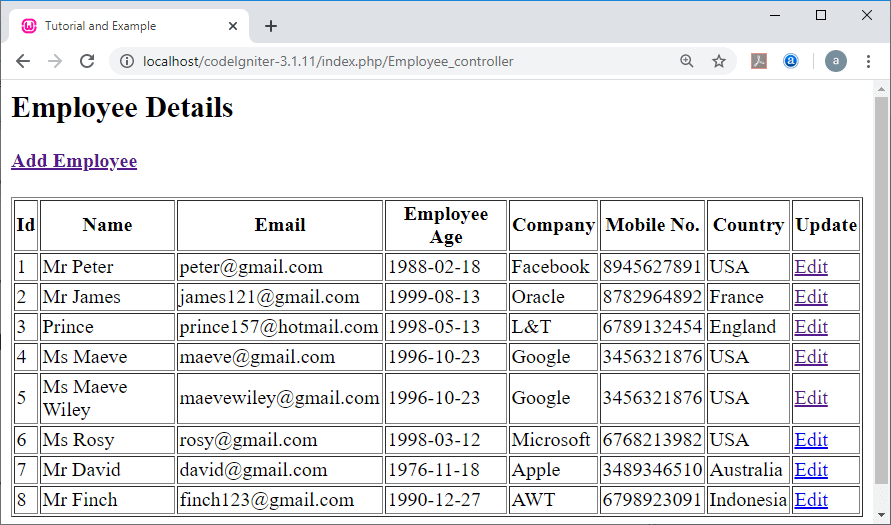
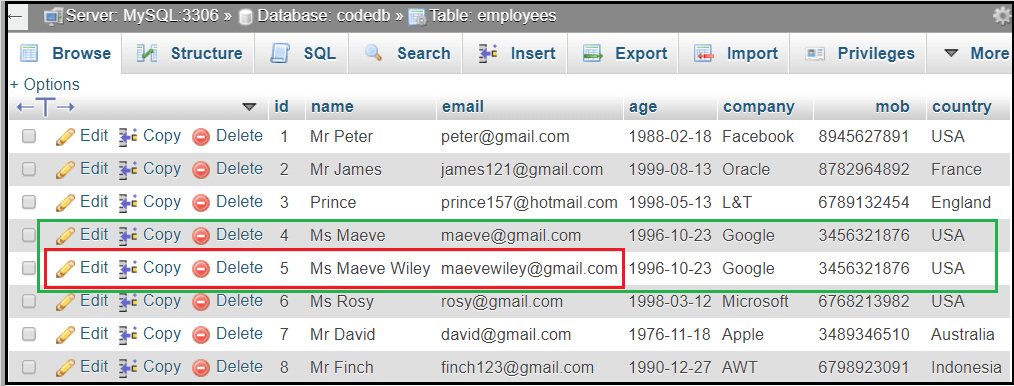
And you can also verify the update details in the phpMyAdmin database, as shown in the image below.