
×

Ethernet Networks in Review

Ethernet Networks in Review

Today, Ethernet is the most used technology for the LANs. It is described as IEEE 802.3 standard. Ethernet is a connection-based media access method i.e., Carrier Sense Multiple Access with Collision Detection (CSMA/CD) that allows all the hosts on a network to share the same bandwidth of a link.

Ethernet uses coaxial, twisted pair and fiber optic cables.

CSMA/CD

CSMA/CD stands for – Carrier Sense Multiple Access with Collision Detection. It is a protocol that helps devices to share the same bandwidth. CSMA/CD was created to reduce the problem of collisions that occur when data are transmitted simultaneously from different nodes.

In CSMA/CD, when a node is transmitting data, all the other nodes on a network receive and examine that transmission.

How does the CSMA/CD work?

When a host wants to transmit data over the network, it first checks for the presence of a digital signal on the network. If no other host is transmitting, the host will then proceed with its transmission. The transmitting host continuously monitors the network to make sure no other hosts begin transmitting. If the host detects another signal on the network, it sends out an extended jam signal that causes all nodes to stop sending data.

We use Backoff algorithms to determine when the colliding stations can retransmit.

When a collision occurs on an Ethernet, the following things happen:

  • A jam signal informs all devices that a collision occurred.
  • Collision invokes a backoff algorithm.
  • Each device on the Ethernet stops transmitting for a short time until their backoff timers expire.
  • All hosts have equal priority to transmit after the timers are expired.

Collision Domain

  • It is a network segment in which two or more devices are sharing the same bandwidth.
  • Collision domain can slow down network performance along with it security threat.
  • Hub has a single collision domain.
  • The switch has per-port collision domain.
  • The router has per-port collision domain.

Broadcast Domain

  • It is a set of devices in which one device sends a broadcast frame, and all other devices will receive that frame in the same broadcast domain.
  • A broadcast domain can improve network performance.
  • A broadcast message goes to every PC and network device.
  • Hub has a single broadcast domain.
  • Switch has a single broadcast domain by default.
  • The router has a per-port broadcast domain.


Problem Statement

Find the number of collision domains and broadcast domains.
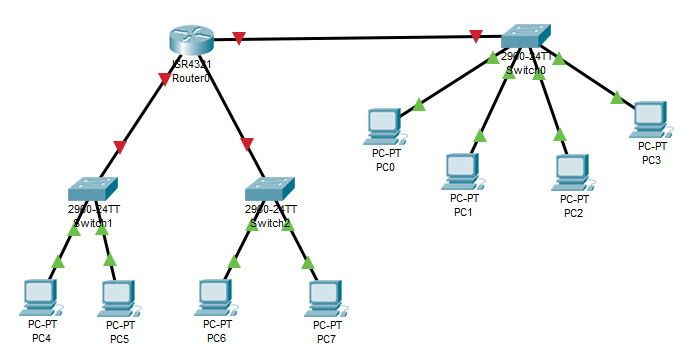
collision domains and broadcast domains

Solution:

The number of the collision domain is 11

The number of the broadcast domain is 3


Related Topics

IP Addressing

IP Addressing IP Addressing is designed to allow hosts on a network to communicate with another host on a different network. There are two types of IP address: IPv4 IPv4 addresses are 32-bits long. It allows...

2 minutes read.

The OSI Reference Model

OSI Reference Model OSI stands for Open System Interconnection. OSI provides a framework for creating and implementing networking standards, devices, and internetworking schemes. The following devices operate at the OSI model: Network...

6 minutes read.

Classes of IP Addresses

Classes of IP Addresses There are following five classes of IP Addresses: Class A – It is used for allocating an IP address.Class B - It is used for allocating an IP address.Class C – It...

6 minutes read.

Saving, Erasing, and Verifying Configuration

Saving Configuration Cisco device store commands information into two configuration files: running configurationstartup configuration running configuration In the running configuration, you can manually save the data from RAM to NVRAM by typing the copy running-config startup-config command. When you...

3 minutes read.

Static Routing

Static Routing Static Routing is the process in which static routes are manually added to the routing table through the direct configuration. Static routing is configured in the global configuration mode using syntax: Router(config)#ip route...

3 minutes read.

Ethernet Networks in Review

Ethernet Networks in Review Today, Ethernet is the most used technology for the LANs. It is described as IEEE 802.3 standard. Ethernet is a connection-based media access method i.e., Carrier Sense...

2 minutes read.

Checking Network Connectivity and Troubleshooting

As a Network Engineer, you must know that how to check network connectivity and troubleshoot a network. There are following commands are used in the network to check and troubleshoot the network connectivity – 1)...

3 minutes read.

Configuring OSPF

Consider the topology given below – The initial IP configuration table is given below: Devices Interface IP address Router1 ...

2 minutes read.

Configure DHCP

 DHCP DHCP stands for Dynamic Host Configuration Protocol.It is a client server-based architecture which involves DHCP client and DHCP server.It is a messaging system for the communication between the DHCP server and DHCP client.It...

3 minutes read.

Routing Basics

Routing is the process of delivering a message across one or more networks by choosing the most appropriate path.It is performed by many kinds of networks like telephone network (Circuit Switching), electronic data networks...

2 minutes read.

Configuring IP Routing in Our Network

There are 3 types of IP routing that we can configure in our network. Default RoutingStatic RoutingDynamic Routing Default Routing Default Routing is used to configure unknown destination networks.It is used on stub networks. Stub networks are...

3 minutes read.

Internetworking Basics

What is a Network? A network is a group of two or more devices connected by some transmission media, i.e., cables. The purpose of designing a network is to enable the sharing...

4 minutes read.

Banner config

Banner config The banner is a little pool which is used in Cisco systems and also in other systems like Unix, Linux and so no.It permits a text that is displayed when you log in a...

1 minute read.

Open Shortest Path First (OSPF) Basics

Open Shortest Path First(OSPF) is a classless routing protocol. It uses a link-state routing protocol, which means that the routers exchange topology information with their nearest neighbors. The OSPF maintains three separate tables that...

3 minutes read.

Configuring Catalyst Switches

When you power on a new purchased Switch for the first time, it runs a series of Power-On Self Tests (POSTs) operations. A  POST is designed to verify the basic operations of the...

3 minutes read.

Getting familiar with the IOS modes

  There are following primary modes of operation in IOS. Setup ModeUser Exec ModePrivileged Exec ModeGlobal Configuration ModeInterface Configuration ModeRommon Mode Setup Mode In router or switches, all configurations are saved in NVRAM.If there is no...

3 minutes read.

Configure IP address to Router and PC in Packet Tracer

Configure IP address to Router and PC in Packet Tracer As a Network Engineer, it is compulsory to know how to configure an IP Address on networking devices like Router, Switch, PC, and Server.Assigning...

3 minutes read.

EIGRP Basics

EIGRP stands for Enhanced Interior Gateway Routing Protocol. It is also called as the Hybrid routing protocol. It contains the features of both distance vector and link-state routing protocols. Characteristics of EIGRP There are the...

5 minutes read.

Power on a Cisco device

Power on a Cisco device When you power on a new purchased Cisco device for the first time, it performs a power-on-self-test (POST) operation to identify the hardware components and to verify that all...

1 minute read.

Switching

A switch is a network device which is used to connect multiple devices (routers, computers) inside the LAN (Local Area Network). It operates at Data Link Layer (Layer 2) of the OSI reference...

3 minutes read.