
×

React Conditional Rendering

React Conditional Rendering

In React, the working of the conditional rendering is similar to the condition works in JavaScript. We use JavaScript operators for creating elements that represent the current state, and then the React component updates the UI to match them.

There are several ways to do Conditional Rendering in React that are as follows:

  • If
  • Ternary operator
  • Logical && operator
  • Switch case operator
  • Conditional Rendering with enums

if

It is the simplest way to do a conditional rendering in React. It does not apply to the total block of the component. If the condition is true, it will return the rendered element. It can be clear with the following example:

Example:

function UserLogin(props) { 
  return 

Hello World!!

; } function GuestLogin(props) { return

Sign Up First.

; } function SignUp(props) { const isLoggedIn = props.isLoggedIn; if (isLoggedIn) { return ; } return ; } ReactDOM.render( , document.getElementById('root') );

Logical && Operator

It is a Logical && (AND) operator, which is also used for condition check. If you are using it with if operator, then it checks both conditions, i.e., if the first condition will true, then it will check the second condition, but if the first condition is false, then it will skip the second condition. It happens because AND (&&) operator will give you the output only when both of the conditions are true.

If you are not using it with if the operator and treat the second statement as an output statement, then, you will only get the output when your first conditional statement is true. If your conditional statement is false, then it will skip your second statement.

Example:                                                                                                                                                     

The following example will show you the use of && (AND) operator with if operator:

import React from 'react'; 
import ReactDOM from 'react-dom'; 
class App extends React.Component
{
render()
{ if((10 > 5) && (5>4))
{
return(

Hello

); } } } export default App;

Output:

Logical && Operator

Another example of AND (&&) operator in which the second statement works as output statement:

import React from 'react'; 
import ReactDOM from 'react-dom';   
class App extends React.Component
{
render()
{ 
return(<div>   
{   
(8 > 4) && alert('!!!! Hello World !!!!')  
}   
</div>   
);   
}
}  
export default App; 

Output:

example of AND (&&) operator

Ternary Operator

This operator makes the if-else statement much brief. This ternary operator is used when two alternate blocks give a particular condition.

The syntax of the ternary operator is as follows:

Syntax:

condition ? true : false 

If the condition is true, then statement1 (true statement) will beconsidered as a result, but if the condition is false, then the statement2 (false statement) will be considered as a result.

It will be clear will the following example:

Example:

  • When the condition is true, it will render statement1.
import React from 'react';
import ReactDOM from 'react-dom'; 
class App extends React.Component
{
render()
{
return (

{10>5 ? 'Condition is True' : 'Condition is False'}.

); } } export default App;

                Output:

Ternary Operator
  • When the condition is false, then it will render statement2.
import React from 'react'; 
import ReactDOM from 'react-dom'; 
class App extends React.Component
{
render()
{ 
return ( 

{10<5 ? 'Condition is True' : 'Condition is False'}.

); } } export default App;

Output:

When the condition is false

Switch case Operator

This operator is used when you have multiple conditional renderings.

The example of switch case is as follows:

Example:

import React from 'react';
import ReactDOM from 'react-dom'; 
class App extends React.Component
{
render()
{ 
var i=2; 
switch(i) 
{ 
case 0: 
return 

Sunday

; case 1: return

Monday

; case 2: return

Tuesday

; case 3: return

Wednesday

; case 4: return

Thursday

; case 5: return

Friday

; case 6: return

Saturday

; default: return null; } } } export default App;

Output:

Switch case Operator

Conditional Rendering with Enums

Enums is the short word for ‘enumerations,' and a right way for the multiple conditional rendering. It provides more readability than the switch-case operator. It is a suitable option for mapping between different states and also mapping in more than one condition.

Example:

function NotificationMsg({ text, state }) { 
  return ( 
  
{{ info: , warning: , }[state]}
); }

Example of Conditional Rendering

The below example will show you the use of conditional rendering.

Example:

import React, { Component } from 'react';
 // Message Component 
 function Message(props) 
 { 
  if (props.isClicked) 
  return 

!!!! Hello World !!!!

; else return

!!! It is an example of Conditional Rendering in React!!!

; } // Click Component function Click(props) { return(
); } // Clicked Component function Clicked(props) { return(
); } class App extends Component{ constructor(props) { super(props); this.handleClick = this.handleClick.bind(this); this.handleClicked = this.handleClicked.bind(this); this.state = {isClicked : false}; } handleClick() { this.setState({isClicked : true}); } handleClicked() { this.setState({isClicked : false}); } render(){ return(

Conditional Rendering Example

{ (this.state.isClicked)?( ) : ( ) }
); } } export default App;

Output:

Once the above code gets successfully compiled, you will get the following output:
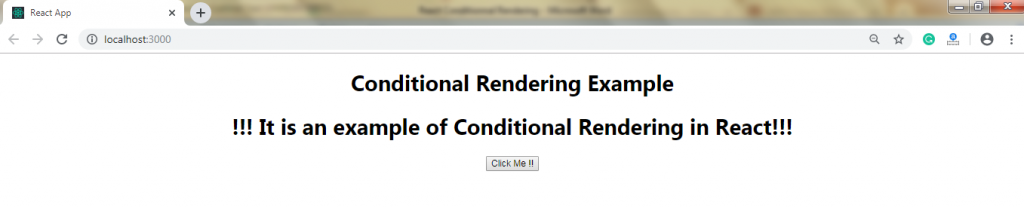
Example of Conditional Rendering

After clicking the button, you will get the following output:

use of conditional rendering.

Related Topics

React State

React State The state is an updatable structure which is used for containing data or information about the component. The state in a component can be changed over time. The change...

3 minutes read.

React Router

What is React Router? Routing is a process by which a user can direct to different pages based on their actions and requests. ReactJS router is generally used to develop single...

10 minutes read.

React Props Validation

React Props Validation As we know, props are a suitable mechanism for passing the read-only attributes to react components. The props are required to be correctly used in the component. If it is...

5 minutes read.

Comparison between React and Vue

Comparison between React and Vue React, and Vue both are the two most famous libraries of JavaScript that are used for creating thousands of websites today. The React and Vue both...

3 minutes read.

ReactJS vs AngularJS

Difference between ReactJS and AngularJS AngularJS AngularJS is the JavaScript framework that is open source, and it is also used to build a dynamic web application. It is developed in 2009 by...

5 minutes read.

Features of ReactJS

ReactJS Features As of now, within the developers, ReactJS is gaining much popularity as the best JavaScript framework. It is crucial for the front-end ecosystem. There are some of the crucial features of ReactJS that are...

2 minutes read.

React Component API

React Component API It is a top-level API. It provides reusability to the code in the application and makes it completely individual. It has several methods for: Creating Elements.Transforming Elements.Fragments. Now, we are explaining the three...

2 minutes read.

React Components

React Components Former, the developers used to write more than thousands of lines of code to develop a single-page application. These applications follow the structure of traditional DOM, and it was very challenging to make...

2 minutes read.

React Code Splitting

React Code Splitting React Code Splitting is the procedure of splitting the bundle files by which the files get easily loaded on the webpage. The react application bundles the files by using...

4 minutes read.

React Environment Setup Step by Step

React Environment Setup This section will provide you the information about how to set up an environment for the successful development of ReactJS application: Pre-Requisite for ReactJS NodeJS and NPMReact and React DOMWebpackBabel There are two...

5 minutes read.

React CSS

What is React CSS React CSS is used to provide the style to the React applications. The style attribute adds dynamically-computed styles at render time, and it is one of the most used...

5 minutes read.

React Error Boundaries

React Error Boundaries In the past, the errors of JavaScript within the components were used to corrupt the internal state of react and cause it to emit the cryptic errors on the next...

3 minutes read.

React Higher-Order Components

React Higher-Order Components In short form, Higher-Order Components are represented as HOC. The Higher-order component is an advanced technique to use component logic. HOC is a function that takes the component and returns the new...

2 minutes read.

React Flux

React Flux Introduction It is an application architecture that is internally used by Facebook to build the client-web application with react. It is useful when the project includes dynamic data, and...

2 minutes read.

React Bootstrap

React Bootstrap React has a widely used JavaScript framework for creating web applications, and Bootstrap has become the most popular CSS framework. Single-page apps have become popular from the last few...

9 minutes read.

React Table

React Table The table represents an arrangement that organizes the information in the form of rows and columns. The table is mainly used for storing and displaying the data within a structured format. Features of...

2 minutes read.

React Map

React Map The map() is the standard function of JavaScript, which can be called at any array. The map() method is used for traversing and displaying a list of the similar objects of...

2 minutes read.

React Redux

How to Use Redux with React Hooks It is an open-source library of JavaScript which is used for managing the application state. React uses the Redux to build the user interface....

5 minutes read.

React Component Life-Cycle

React Component Life-Cycle In ReactJS, the creation process of every component includes several lifecycle methods. These methods, together stated as component's lifecycle. Four phases of the component's life cycle are as...

4 minutes read.

Difference Between React Flux and MVC

React Flux vs MVC MVC MVC is an acronym of 'Model View Controller.' It is the architectural pattern that is used to develop the user interface. It has three different logical components: The...

2 minutes read.
