
×

React Error Boundaries

React Error Boundaries

In the past, the errors of JavaScript within the components were used to corrupt the internal state of react and cause it to emit the cryptic errors on the next renders. These errors were always because of a previous error in the application code, but there was not any way in react to handle them gracefully in components, and also we could not recover them.

React 16 introduces the new concept of handling the errors is by Error Boundaries. Error boundaries are the components of react that catch the errors of JavaScript anywhere in their child component tree, log those errors, and will display a fallback UI rather than the component tree that crashed.

Error boundaries catch errors during rendering, within lifecycle methods, and in the constructors of the whole tree below them.

Error boundaries do not catch the errors for Event handlers, Asynchronous code, server-side rendering, errors thrown in the error boundary itself.

For a simple application of react, you can declare the error boundary once and can use it for the complete application. For complex applications having multiple components, you can declare multiple error boundaries to recover every part of the entire application.

Error Boundary in class

A class will be an error boundary if it defines both of the lifecycle methods static getDerivedStateFromError() or componentDidCatch(). The use of static getDerivedStateFromError() is for rendering a fallback UI after an error has been thrown. The use of componentDidCatch() is for logging the error information.

For the components, Error boundaries work as a catch {} block of JavaScript. Only the class components can be error boundaries. An error boundary cannot catch the error within itself. If the error boundary fails in the rendering of an error message, then the error will propagate to the nearest error boundary above it. This is also similar to how the catch {} block works in JavaScript.

Implementation of Error Boundaries

Let us try to understand the implementation of error boundaries by using the following example:

class ErrorBoundaryExample extends React.Component {
constructor(props) {
super(props);
this.state = { hasError: false };
}
static getDerivedStateFromError(error) {
// Update the state so the next render show the fallback UI.
return { hasError: true };
}
componentDidCatch(error, errorInfo) {
// We can also log the error for an error reporting service
logErrorToMyService(error, errorInfo);
}
render() {
if (this.state.hasError) {
// You can render any custom fallback UI 
return <div>Something went wrong.</div>;
}
return this.props.children; 
}
} 

Now, you can use it as a regular component. Add the new component in HTML, which you require to add in the error boundary. In this example, we are adding a Widget component.


Where to Place Error Boundaries

The error boundary entirely depends on you. You can use the error-boundaries at the top-level of the application components or wrap it on the individual components for protecting them from the breaking of other parts of the application.

Example of using Error-boundary:

Let us see an example of it:

App.js

import React, { Component } from 'react';
import './App.css';
import Actors from './Actors';
class App extends Component {
render() {
return (

Actors Performing at Tonight in the show

); } } export default App;

Actors.js

import React from 'react';
function Actors({actorName}) {
if (actorName === 'Govinda') {
throw new Error ('not performing tonight!')
}
return (
{actorName}
) } export default Actors;

Output:
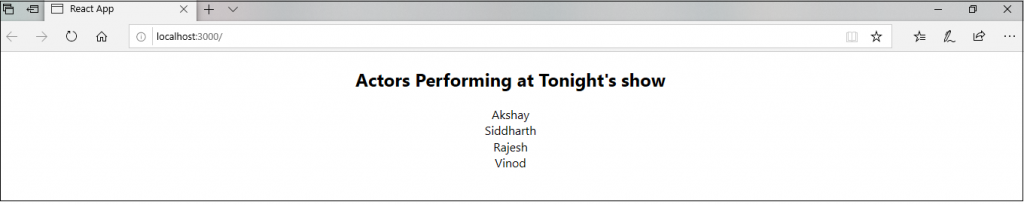
Actor Performing tonight show

If you change one of the artist names to 'Govinda’ like <Actors actorName='Govinda'></Actors> then you will see the following:
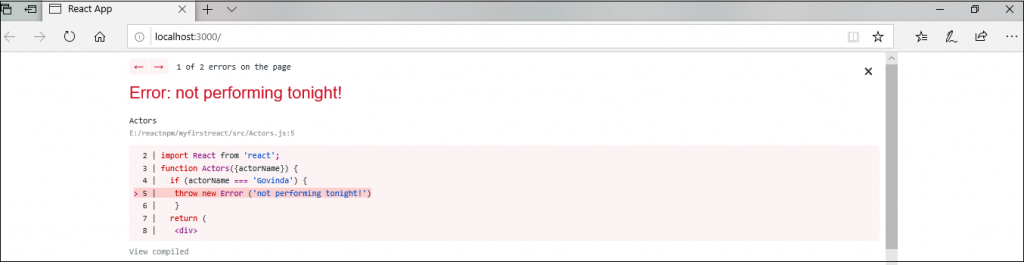
Where to Place Error Boundaries

New Behavior for uncaught errors

If the error doesn't catch by any error boundary, it will result in the unmounting of the complete React application. It is the new implication in the error boundaries.

Error Boundaries inside Event Handlers

As stated above, error boundaries do not catch the errors in event handlers. React does not require any error boundary to recover from errors inside event handlers.

If you have to catch the error within the event handler, you should use the regular JavaScript try/catch statement as shown in the following example:

class App extends React.Component {
constructor(props) {
super(props);
this.state = { error: null };
this.handleClick = this.handleClick.bind(this);
}
handleClick() { 
try {
// Do something that can throw the error
} catch (error) {
this.setState({ error });
}
}
render() {
if (this.state.error) {
return 

Caught an error.

} return
Click Me
} }

It is to be noted that the above example is demonstrating the behavior of regular JavaScript and does not use the error boundaries.


Related Topics

Features of ReactJS

ReactJS Features As of now, within the developers, ReactJS is gaining much popularity as the best JavaScript framework. It is crucial for the front-end ecosystem. There are some of the crucial features of ReactJS that are...

2 minutes read.

React JSX

React JSX As we know, all of the React components include a render function. The Render function specifies the HTML output of a React component. JSX is an acronym of JavaScript extension that...

3 minutes read.

React Forms

React Forms Forms are the important part of any web application. It allows the interaction of the user with the app as well as the gathering of the information from the...

3 minutes read.

React Redux

How to Use Redux with React Hooks It is an open-source library of JavaScript which is used for managing the application state. React uses the Redux to build the user interface....

5 minutes read.

React Map

React Map The map() is the standard function of JavaScript, which can be called at any array. The map() method is used for traversing and displaying a list of the similar objects of...

2 minutes read.

React Lists

React Lists Lists are used for displaying the data in an ordered format and mainly used to display the menus on websites. The creating of lists in React is as similar...

2 minutes read.

How to use React Context

React Context React Context is used to pass the data through the component tree without passing the props down manually at the every level. In React Application, the data is passed in a top-down approach...

4 minutes read.

React Higher-Order Components

React Higher-Order Components In short form, Higher-Order Components are represented as HOC. The Higher-order component is an advanced technique to use component logic. HOC is a function that takes the component and returns the new...

2 minutes read.

Difference Between React Flux and MVC

React Flux vs MVC MVC MVC is an acronym of 'Model View Controller.' It is the architectural pattern that is used to develop the user interface. It has three different logical components: The...

2 minutes read.

React Hooks

React Hooks The Hooks were introduced in React 16.8. By using React Hooks, you can use the state and other features of the React without writing a class. Hooks do not work within the classes....

5 minutes read.

React Native vs ReactJS

Difference between React Native and ReactJS React Native React Native is also an open-source JavaScript framework that is used for the development of a mobile application for iOS Android and Windows. It...

6 minutes read.

React Props Validation

React Props Validation As we know, props are a suitable mechanism for passing the read-only attributes to react components. The props are required to be correctly used in the component. If it is...

5 minutes read.

ReactJS Tutorial

ReactJS Introduction React Tutorial helps you to understand the basic and some advanced concepts of ReactJS. As of now, it is the essential front-end library that is developed by a...

3 minutes read.

Comparison between React and Vue

Comparison between React and Vue React, and Vue both are the two most famous libraries of JavaScript that are used for creating thousands of websites today. The React and Vue both...

3 minutes read.

React Router

What is React Router? Routing is a process by which a user can direct to different pages based on their actions and requests. ReactJS router is generally used to develop single...

10 minutes read.

Pros and Cons of ReactJS

Pros and Cons of ReactJS There are various advantages, and disadvantages of ReactJS are as follows: Benefits of ReactJS 1. Easy to Learn and Use: ReactJS is very easy to use and learn. It has a good...

3 minutes read.

React Component Life-Cycle

React Component Life-Cycle In ReactJS, the creation process of every component includes several lifecycle methods. These methods, together stated as component's lifecycle. Four phases of the component's life cycle are as...

4 minutes read.

Difference between Controlled and Uncontrolled component in ReactJs

Controlled Component In the controlled component, the input of the form element is handled by the component rather than the DOM. Controlled components have the functions that govern the data, which...

2 minutes read.

React Error Boundaries

React Error Boundaries In the past, the errors of JavaScript within the components were used to corrupt the internal state of react and cause it to emit the cryptic errors on the next...

3 minutes read.

React State

React State The state is an updatable structure which is used for containing data or information about the component. The state in a component can be changed over time. The change...

3 minutes read.