
×

Selenium-IDE Locators

Selenium-IDE Locators: Before we start learning about Selenium –IDE Locators, firstly we have to learn about UI elements.

UI Elements -UI elements are the elements which are displayed on the web application. Some of the UI elements are as follows –Checkboxes, Radio Buttons, Paragraph Text, Buttons, Menu, Menu Options, Dropdown field, Multi-selection Box, field Dropdown field, Option Text Box Field, Text Box Field Label, Text Area Field, Images, Hyperlinks, Page Headings etc.

Let see one snapshot where we can clearly understand about UI elements of Web applications.
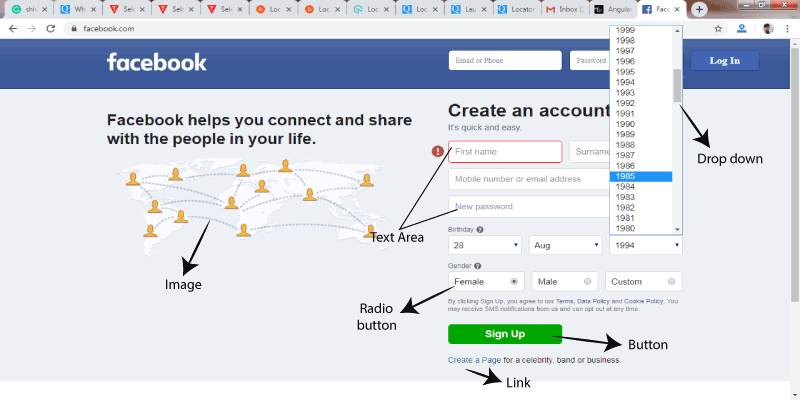
Selenium-IDE Locators

Locator is a concept or a feature available in all selenium tools.

Locators used to identify any element in GUI (text box, buttons, checkbox, images, hyperlinks, etc.) based on their html source code.

Locators are k sensitive. Identify the GUI elements correctly is more complicated than it sounds.

That’s why selenium implements multiple locators to find the correct GUI element in the application.

Some of the locators for finding GUI elements are as follows:-
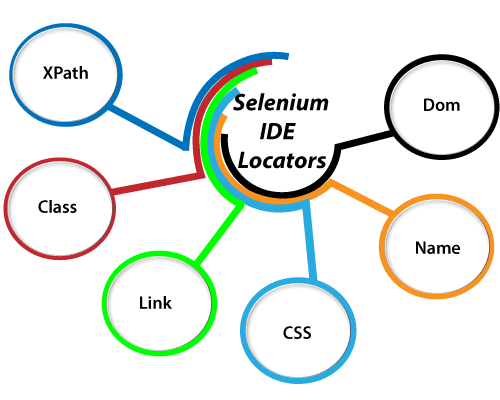
GUI elements

Before we move to learn about the locators in detail, we should have complete knowledge in HTML and CSS to find the GUI elements.

To get the complete knowledge of HTML and CSS tutorial you can refer the below links:

Complete HTML tutorial:  https://www.tutorialandexample.com/html-tutorial/

Complete CSS tutorial: https://www.tutorialandexample.com/css-tutorial


Related Topics

Selenium-IDE Login test

Login test for Selenium-IDE Now we are learning, how to create a Login/sign-up Test case in Selenium IDE. For our testing purpose, we are going to test the login page provided by...

2 minutes read.

Selenium Tutorial

What is Selenium? Selenium is a functional testing tool and compatible with the non-functional testing tools also. Selenium is free and does not require any licensing. Functional tests script executed by...

6 minutes read.

Selenium WebDriver-CSS Selector locator

Selenium WebDriver-CSS Selector locator A CSS selector is used to identify the web element based on their “# id” and “. Class”, Html tags, and attributes. A CSS stands for Cascading Style...

1 minute read.

Selenium-IDE Installation in Chrome

Selenium-IDE Installation Since Selenium IDE is designed only for Firefox and Chrome plug-in, we are assuming that you have already installed the Google Chrome browser in your system. However, you can...

1 minute read.

Verification Controls Methods in Selenium WebDriver

Verification Controls Methods  The verification controls methods are used to check whether the web element is displayed, enabled, and selected. Some of the most commonly used verification controls are as follow: Verification controls Description Return...

4 minutes read.

Selenium WebDriver-CSS Selector: Substring Matching

CSS Selector: Substring Matching Selenium WebDriver In this tutorial, we will learn how to identify the web element using the substring method. A Sub-string contains three methods for identifying the web element...

9 minutes read.

WebDriver-Partial Link Text locator

WebDriver-Partial Link Text locator In selenium WebDriver, there is an additional way to find a web link element with the help of partial link text locator. The partial link text is used...

4 minutes read.

Selenium WebDriver - IE [Internet Explorer] browser

Selenium WebDriver - IE [Internet Explorer] browser In this segment, we will understand how to run a test script with the help of the IE (Internet Explorer) browser. It is a standalone...

4 minutes read.

Mouse and Keyboard Controls in Selenium WebDriver

Mouse and Keyboard Controls in Selenium WebDriver In this tutorial, we will learn about how to handle mouse and keyboard event using action class in selenium WebDriver. Action Class in Selenium WebDriver: Action...

13 minutes read.

Characteristics of Selenium IDE

Characteristics of Selenium IDE Selenium IDE is separated into different parts, each having their features and functionalities. The seven various components of Selenium IDE are as follows: MENU BAR: The menu bar is...

3 minutes read.

Selenium WebDriver-XPath Locator

Selenium WebDriver-XPath Locator The locators can make the object identification of all the selenium tools. There are eight locators available in selenium web driver, but most of the time we go for...

14 minutes read.

Selenium WebDriver Characteristics

Characteristics of Selenium WebDriver Some of the essential characteristics of Selenium WebDriver are as follows: Multiple Operating System Support Selenium Webdriver supports multiple operating systems like: Desktop OS: Window, Linux, and macOS Mobile OS:...

2 minutes read.

CSS Selector: ID/Class and Attribute in Selenium IDE

CSS SELECTOR: ID/Class and Attribute The Id, class, and attribute of CSS selector are used to identify the web element to access the web pages.  Syntax for Id/Class and Attribute: css= <./#> {[attribute=Value of...

2 minutes read.

Xpath locator in Selenium IDE

X PATH LOCATOR: Xpath is used to identify the element using any attribute or visible test. Syntax for X PATH:- //html tag [@attribute=’value’] e.g. - //div [@class=’label’]                    OR //html tag [text () =’Visible Text’] e.g.-//div [text...

2 minutes read.

WebDriver-Name Locator:

WebDriver-Name Locator: The name locator is used to identify any element in UI with the help of the name backend attribute. The Syntax of the name attribute is as below: driver.findElement(By.name(“value of the...

4 minutes read.

WebDriver Interface | Class Diagram

WebDriver interface/class diagram: The interface of WebDriver includes the following stages, which is as follows: Search Context Web driver Remote web driver Driver class Search Context  The first interface of the web driver class is search Context,...

2 minutes read.

Selenium WebDriver-CSS Selector: Tag and ID

Selenium WebDriver-CSS Selector: Tag and ID We will locate the web element with the help of tag and id CSS selector in this section of the tutorials Where Tag and id are...

4 minutes read.

Drag and Drop Event Handling

Drag and Drop Event Handling: In this tutorial, we will learn how to handle the drag and drop event in selenium WebDriver using the action class. Before going further in this tutorial...

6 minutes read.

Advantages and Disadvantages of Selenium-IDE

Advantages and Disadvantages of Selenium-IDE Advantages of Selenium IDE: UI based record and playback tool. Easy to understand & developed a test script. Selenium-IDE test script export into web driver code & Selenium–RC It is...

1 minute read.

WebDriver-Link Text locator

WebDriver-Link Text locator The Link text locator is used to identify only web link elements based on the value of the link. The Link text locators cannot be used for other than...

4 minutes read.