
Angular 8 Unit Testing
What is unit testing?
Unit testing is a type of software testing where individual components of the software are tested. It is done during the development of any application. A unit may be a particular program, function, procedure etc.
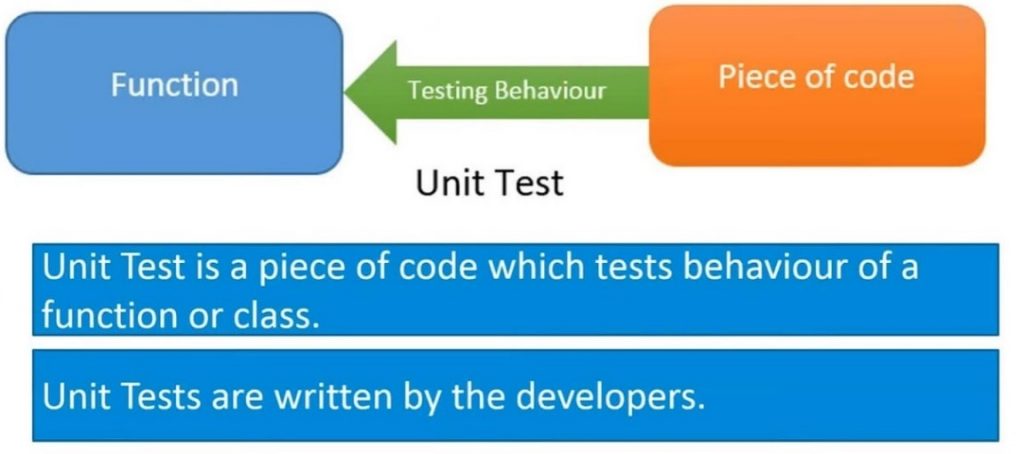
In Angular 8, Unit testing created with the help of Angular CLI. This sample application and all tests in this guide are available for inspection and experimentation:
Setup
The Angular CLI downloads and install everything we need to test an Angular app with the Jasmine test framework.
The project we create with the help of CLI is immediately ready to test. Just run the ng test CLI (command line interface).
ng test
The ng test command built the app in silent mode and launched the Karma test runner in the file.
The console output looks like below code:
10% building modules 1/1 modules
...INFO [karma]: Karma v1.7.1 server has started in the localhost http://0.0.0.0:9876/
...INFO [launcher]: Launch the browser Chrome ...
...INFO [launcher]: Start the browser Chrome
...INFO [Chrome ...]: Connect on the socket ...
Chrome ..: Executed 3 of 3 SUCCESS (0.185 secs / 0.303 secs)
The final line of the log is essential. It shows that the Karma ran three tests which passed in the test.
A chrome browser also displays the test output in the "jasmine HTML Reporter".
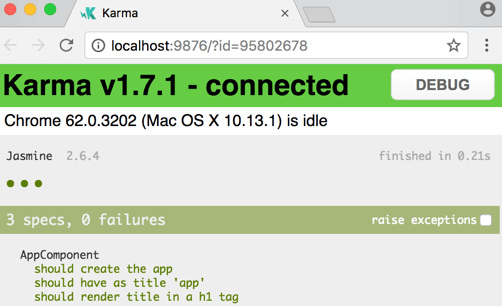
Most people find this browser output more comfortable to read than the console log. We can click on a test row to re-run just that test or click on a description to re-run the criteria in the selected test group (“test suite”).
To see this action, make a small change in app.component.ts and save. The tests run again, and then the browser refreshes, and the new test results appear.
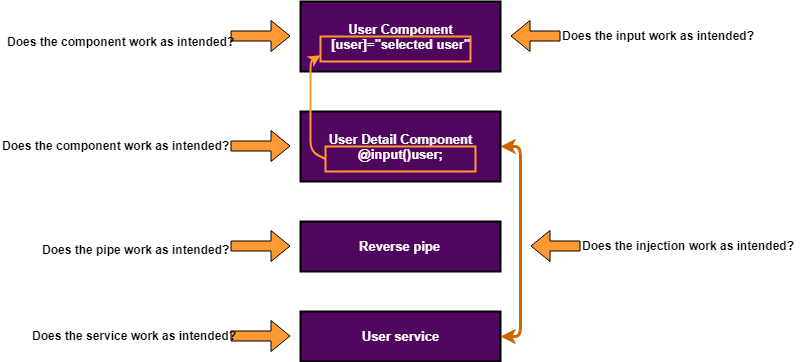
Why we use unit testing in Angular 8?
Configure the project for circle CI
The CLI take care of Jasmine and Karma configuration.
Step 1: Create a folder named .circle ci in the project root file.
Step 2: In a new folder, create a file named config.yml with the given below content:
version: 2
 jobs:
 build:
     working_directory: ~/my-project
     docker:
       - image: circleci/node:10-browsers
     steps:
       - checkout
       - restore_cache:
           key: my-project-{{ .Branch }}-{{ checksum "package-lock.json" }}
       - run: npm install
       - save_cache:
           key: my-project-{{ .Branch }}-{{ checksum "package-lock.json" }}
 paths:
 - "node_modules"
 - run: npm run test -- --no-watch --no-progress --browsers=ChromeHeadlessCI
 - run: npm run e2e -- --protractor-config=e2e/Protractor-ci.conf.js
This configuration cache node_modules/and uses npm to run CLI commands, because @angular/cli is not installed globally. The double dash (--) is needed to pss arguments into the npm script.
Step 3: Commit our changes and push them to your repository.
Step 4: Sign up Circle CI and add our project, our project should start building.
Configuring project for Travis CI file
Step 1: firstly, create a file called .travis.yml at the project root, with the below content:
dist: trusty
 sudo: false
 language: node_js
 node_js:
   - "10"
 addons:
   apt:
     sources:
       - google-chrome
     packages:
       - google-chrome-stable
 cache:
   directories:
      - ./node_modules
 install:
   - npm install
 script:
   - npm run test ----no-watch --no-progress --browsers=ChromeHeadlessCI
   - npm run e2e ----protractor-config=e2e/protractor-ci.conf.js
It does the same things like the circle CI configuration, except that Travis doesn't come with chrome, so we use chromium instead.
Step 2: Commit our changes and push them to our repository.
Step 3: Sign up the Travis CI and add our project.
Configure CLI for CI testing in the Chrome
When both CLI commands ng test and ng e2e are running in CI test in the environment, we have to adjust the configuration to run into the Chrome browser test.
There are configuration files for both Karma JavaScript test runner and Protractor end-to-end testing tool, which we must adjust to starting Chrome without sandboxing.
browsers: ['Chrome'],
 customLaunchers: {
   ChromeHeadlessCI: {
     base: 'ChromeHeadless',
     flags: ['--no-sandbox']
   }
 },
- In the root folder of our e2e tests project, create a new file named proctractor-ci.config.js. This new file can extends the original protractor.conf.js.
const config = require('./protractor.conf').config;
 config.capabilities = {
   browserName: 'chrome',
   chromeOptions: {
     args: ['--headless', '--no-sandbox']
   }
 };
 exports.config = config;
Service Tests
Services are often the earliest files to unit test. There are some synchronous and asynchronous unit tests of the ValueService written without assistance from Angular testing utilities.
app/demo/demo.spec.ts
// Straight Jasmine testing without Angular's test
 describes('ValueService', () => {
 let service: ValueService;
 beforeEach(() => { service = new ValueService(); });
 it('#getValue should return real value', () => {
 expect(service.getValue()).toBe('real value');
   });
 it('#getObservableValue should return value from observables'
 (done: DoneFn) => {
 service.getObservableValue().subscribe(value => {
 expect(value).tobe('observablevalue');
 done();
 });
 });
  it('#getPromiseValue should return value from promise',
     (done: DoneFn) => {
     service.getPromiseValue().then(value => {
       expect(value).toBe('promise value');
       done();
  });
  });
 });
Services with dependencies
Services depend on other services where Angular injects into the constructor. In many cases, it is easy to create and inject these dependency by hand while calling the service's constructor.
This is a simple example:
@Injectable()
 export class MasterService {
   constructor(private valueService: ValueService) { }
   getValue() { return this.valueService.getValue(); }
 }
MasterService delegates only method, getValue, to the injected ValueService.
Here are several ways to test it.
app/demo/demo.spec.ts
describe('MasterService without Angular testing support', () => {
   let masterService: Master Service;
  it('#getValue can return real value from real service', ( ) => {
     masterService = new MasterService(new ValueService( ));
     expect(masterService.getValue()).tobe('real value');
   });
   it('#getValue should return fakevalue from a fake Service', () => {
     masterService = new MasterService(new FakeValueService());
     expect(masterService.getValue()).toBe('fake service value');
   });
 it('#getValue should return fake value from a fake object', () => {
     const fake =  { getValue: () => 'fake value' };
     masterService = new MasterService(fake as ValueService);
     expect(masterService.getValue()).toBe('fake value');
   });
 it('#getValue should return stub value from a spy', () => {
 const valueServiceSpy =
 jasmine.createSpyObj('ValueService', ['getValue']);
    const stubValue = 'stub value';
     valueServiceSpy.getValue.and.returnValue(stubValue);
  masterService = new MasterService(valueServiceSpy);
 expect(masterService.getValue())
       .toBe(stubValue, 'service returned stub value');
     expect(valueServiceSpy.getValue.calls.count())
       .toBe(1, 'spy method was called once');
     expect(valueServiceSpy.getValue.calls.mostRecent().returnValue)
       .toBe(stubValue);
   });
 });
Testing Services with the TestBed
When a service has a dependency service, DI (dependency injection) finds or creates that dependent service.
Angular TestBed
The TestBed is most famous for the Angular testing utilities. The TestBed creates a dynamic-constructed Angular test module that emulates an Angular @NgModule.
To test service, we set the providers metadata property with an array of the services that we will verify or mock.
Let service: ValueService;
beforeEach(() => {
  TestBed.configureTestingModule({ providers: [ValueService] });
});
Then inject it in a test by calling TestBed.get() with the service class as the argument.
it('should use ValueService', () => {
  service = TestBed.get(ValueService);
  expect(service.getValue()).toBe('real value');
 });
Or it use inside beforeEach( ) if we prefer to inject the service as part of our setup.
beforeEach(() => {
   TestBed.configureTestingModule({ providers: [ValueService] });
   service = TestBed.get(ValueService);
 });
When testing a service with any dependency, get the mock in the providers array.