Struts 2 Iterator tag
In the struts web application, the Iterator tag is used to iterate through any collection to print values present in it. Iterator tag iterate over each element in the collection and print values for each element in the collection.
Struts Control tag- Iterator tag Example:
To get input from the user create the index.jsp file:
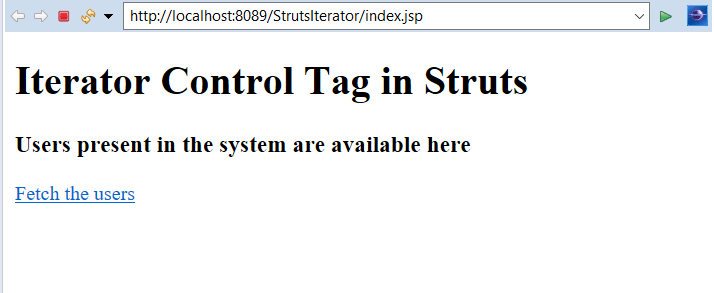
The index.jsp page takes the input from the user. The user will see a label telling Users present in the system are available here. Then after clicking on the link Fetch the users, it will redirect to the next resource to show all the users present in the system.
<%@ page language = "java" contentType = "text/html; charset = ISO-8859-1"
  pageEncoding = "ISO-8859-1"%>
<%@ taglib prefix = "s" uri = "/struts-tags"%>
<!DOCTYPE html PUBLIC "-//W3C//DTD HTML 4.01 Transitional//EN"
   "http://www.w3.org/TR/html4/loose.dtd">


<html>
   <head>
      <title> Iterator control Tag Example</title>
   </head>

   <body>
      <h1>Iterator Control Tag in Struts</h1>
      <h3>Users present in the system are available here</h3>
      <a href="fetch">Fetch the users</a>


   </body>
</html>
Create welcome.jsp file to denote success:
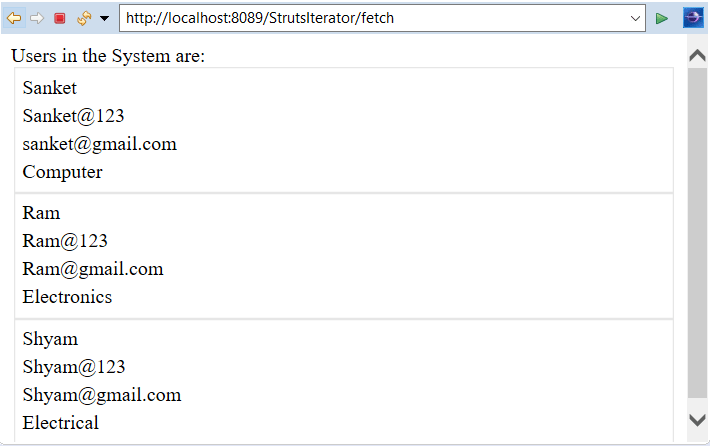
The welcome.jsp page displays different users present in the system in the table format by using property and retrieving values of the same. It displays user name, password, email and department.
<%@ taglib uri="/struts-tags" prefix="s" %>
Users in the System are:<br/>
<s:iterator value="list">
<fieldset>
<table width="50%">
<tr><td><s:property value="userName"/></td></tr>
<tr><td><s:property value="userPass"/></td></tr>
<tr><td><s:property value="email"/></td></tr>
<tr><td><s:property value="dept"/></td></tr>
</table>
</fieldset>
</s:iterator>
Create error.jsp file to denote failure:
The error.jsp page displays Sorry wrong Name if any exception or error is thrown by the application.
<%@ page language="java" contentType="text/html; charset=ISO-8859-1"
    pageEncoding="ISO-8859-1"%>
<!DOCTYPE html PUBLIC "-//W3C//DTD HTML 4.01 Transitional//EN" "http://www.w3.org/TR/html4/loose.dtd">
<html>
<head>
<meta http-equiv="Content-Type" content="text/html; charset=ISO-8859-1">
<title>Error page</title>
</head>
<body>
Sorry wrong name
</body>
</html>
Create the User.java class:
This class contains 4 fields, name, email, password, and department with their getters and setters to store and retrieve the values.
public class User
{
private String userName,userPass,email,dept;
public String getUserName()
 {
    return userName;
}
public void setUserName(String userName)
{
    this.userName = userName;
}
public String getUserPass()
 {
    return userPass;
}
public String getDept()
 {
return dept;
}
public void setDept(String dept)
 {
this.dept = dept;
}
public void setUserPass(String userPass)
{
    this.userPass = userPass;
}
public String getEmail()
{
    return email;
}
public void setEmail(String email)
{
    this.email = email;
}
}
Create the action class Register.java:
The Action class contains one execute method which will return a success string on successful execution and it is used to set user attributes such as name, email, password, and department. It creates one list and stores all the user values in that list. There are 3 users in the system stored in one list.
import java.util.ArrayList;
public class Register
{
private ArrayList list=new ArrayList();
public ArrayList getList()
 {
    return list;
}
public void setList(ArrayList list)
{
    this.list = list;
}

public String execute()
{
    User u1=new User();
    u1.setUserName("Sanket");
    u1.setUserPass("Sanket@123");
    u1.setEmail("sanket@gmail.com");
    u1.setDept("Computer");

    User u2=new User();
    u2.setUserName("Ram");
    u2.setUserPass("Ram@123");
    u2.setEmail("Ram@gmail.com");
    u1.setDept("Electronics");


    User u3=new User();
    u3.setUserName("Shyam");
    u3.setUserPass("Shyam@123");
    u3.setEmail("Shyam@gmail.com");
    u3.setDept("Electrical");


    list.add(u1);
    list.add(u2);
    list.add(u3);


    return "success";
}
}
web.xml file is created inside WEB-INF folder in WebContent folder:
The web.xml file defines how elements are processed. The entry of FilterDispatcher is done in the web.xml file. This file is created in WebContent->WEB-INF folder. /* specifies all urls will be parsed. This task is done by struts filter.
<?xml version="1.0" encoding="UTF-8"?>
<web-app xmlns:xsi="http://www.w3.org/2001/XMLSchema-instance" xmlns="http://java.sun.com/xml/ns/javaee" xsi:schemaLocation="http://java.sun.com/xml/ns/javaee http://java.sun.com/xml/ns/javaee/web-app_3_0.xsd" id="WebApp_ID" version="3.0">
  <display-name>StrutsIterator</display-name>
  <welcome-file-list>
    <welcome-file>index.html</welcome-file>
    <welcome-file>index.htm</welcome-file>
    <welcome-file>index.jsp</welcome-file>
    <welcome-file>default.html</welcome-file>
    <welcome-file>default.htm</welcome-file>
    <welcome-file>default.jsp</welcome-file>
  </welcome-file-list>
  <filter>
    <filter-name>struts2</filter-name>
    <filter-class>
    org.apache.struts2.dispatcher.ng.filter.StrutsPrepareAndExecuteFilter
   </filter-class>
  </filter>
  <filter-mapping>
    <filter-name>struts2</filter-name>
    <url-pattern>/*</url-pattern>
  </filter-mapping>
</web-app>
Construct struts.xml file:
In the struts.xml file, make the entry of the action class HelloWorldAction and link for it and result pages. The result determines what browser will display after the execution of the action. Results have optional names like success and error.
<?xml version="1.0" encoding="UTF-8" ?>
<!DOCTYPE struts PUBLIC "-//Apache Software Foundation//DTD Struts Configuration 2.1//EN"
"http://struts.apache.org/dtds/struts-2.1.dtd">
<struts>
<package name="arr" extends="struts-default">
<action name="fetch" class="Register" method="execute">
<result name="success">welcome.jsp</result>
<result name="error">error.jsp</result>
</action>
</package>
</struts>
Output:
In order to run the application, right-click on the project -> Click on the option Run As -> then select Run on Server. It will show the label for all users in the system and link to fetch all users. Click on the link.
After clicking on the link it will show all the users in the system in table format.