Struts 2 property tag
The property tag in struts is used to get values of the fields set in the bean class.
Struts Data tags- Property tag Example:
Create the index.jsp file showing the use of property tag:
The index.jsp page is created with the heading Struts 2 property tag example. Then heading is displayed for showing the name of the tag used in the struts application from PropertyTag class. Also, the name of the programmer is displayed using the name property of the Person class.
<%@ page language= "java" contentType= "text/html; charset= ISO-8859-1"
    pageEncoding= "ISO-8859-1"%>
<!DOCTYPE html PUBLIC "-//W3C//DTD HTML 4.01 Transitional//EN" "http://www.w3.org/TR/html4/loose.dtd">
<html>
<head>
<title> Index page </title>
</head>

<body>
<h2> Struts 2 property tag example </h2>


<h2> Name of the tag used in struts web application: </h2>
<s:property value="name" />


<h2> Name of the programmer specified in Person bean class: </h2>
<s:bean name= "Person"  var= "personBean" />
<s:property value= "#personBean.name" />


</body>
</html>
Create error.jsp file to denote failure:
The error.jsp page will display Sorry something went wrong !!! if something went wrong.
<%@ page language="java" contentType="text/html; charset=ISO-8859-1"
    pageEncoding="ISO-8859-1"%>
<!DOCTYPE html PUBLIC "-//W3C//DTD HTML 4.01 Transitional//EN" "http://www.w3.org/TR/html4/loose.dtd">
<html>
<head>
<meta http-equiv="Content-Type" content="text/html; charset=ISO-8859-1">
<title> Error page </title>
</head>
<body>
Sorry something went wrong !!!
</body>
</html>
Create the class to include execute method:
PropertyTag class is created in which name field is initialized to Property Tag in Struts web application. For that name, a field getter is created which will return the name field value. It also includes execute() method which will return a success string if all the things execute properly.
import com.opensymphony.xwork2.ActionSupport;

public class PropertyTag extends ActionSupport
{

    private String name = " Property Tag in Struts web application. ";

    public String getName()
    {


        return name;
    }


    public String execute() throws Exception
  {

        return SUCCESS;
    }
}
Create Bean class Person:
Create Bean class Person to set and retrieve the value of the name field in the class. The name field is initialized value as the name of the programmer and its value can be retrieved using getter.
public class Person
{

    private String name = " Sanket Chaudhari Technical Content Writer at Javatpoint";

    public String getName()
  {
        return name;
    }


}
Construct struts.xml file:
In the struts.xml file, make the entry of the action class and link for it and result pages. The result determines what browser will display after the execution of the action. Results have optional names like success and error. On success it will redirect to index.jsp and on error it will redirect to error.jsp.
<?xml version="1.0" encoding="UTF-8" ?>
<!DOCTYPE struts PUBLIC "-//Apache Software Foundation//DTD Struts Configuration 2.1//EN" "http://struts.apache.org/dtds/struts-2.1.dtd">
<struts>
  <constant name= "struts.devMode" value= "true" />
    <package name= "default" namespace="/" extends="struts-default">

        <action name= "property"
            class="PropertyTag" >
            <result name="success"> /index.jsp</result>
            <result name="error"> /error.jsp</result>


        </action>

    </package>
</struts>
web.xml file is created inside WEB-INF folder in WebContent folder:
The web.xml file in the WEB-INF folder specify how elements are processed. The entry of FilterDispatcher or StrutsPrepareAndExecuteFilter is done in the web.xml file. /* specifies all urls will be parsed. This task is done by struts filter.
<?xml version="1.0" encoding="UTF-8"?>
<web-app xmlns:xsi="http://www.w3.org/2001/XMLSchema-instance" xmlns="http://java.sun.com/xml/ns/javaee" xsi:schemaLocation="http://java.sun.com/xml/ns/javaee http://java.sun.com/xml/ns/javaee/web-app_3_0.xsd" id="WebApp_ID" version="3.0">
  <display-name> StrutsProperty </display-name>
  <welcome-file-list>
    <welcome-file> index.html </welcome-file>
    <welcome-file> index.htm </welcome-file>
    <welcome-file> index.jsp </welcome-file>
    <welcome-file> default.html </welcome-file>
    <welcome-file> default.htm </welcome-file>
    <welcome-file> default.jsp </welcome-file>
  </welcome-file-list>
  <filter>
    <filter-name>  struts2  </filter-name>
    <filter-class>
    org.apache.struts2.dispatcher.ng.filter.StrutsPrepareAndExecuteFilter
   </filter-class>
  </filter>
  <filter-mapping>
    <filter-name> struts2 </filter-name>
    <url-pattern>/*</url-pattern>
  </filter-mapping>
</web-app>
Output:
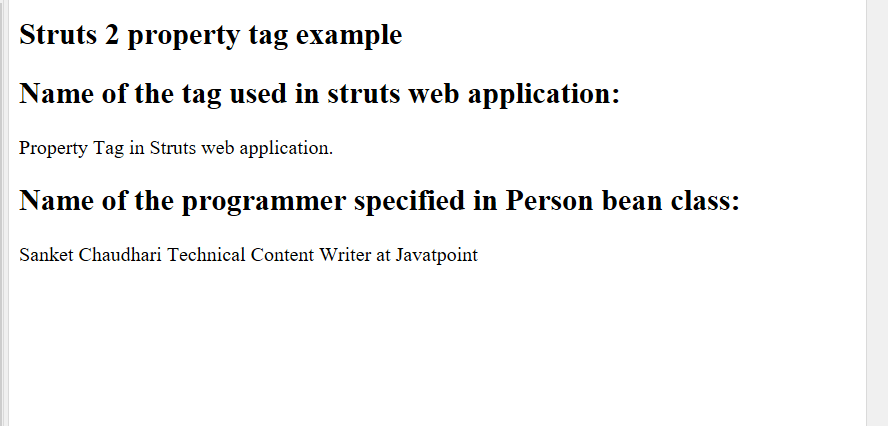
In order to run the application, right-click on the project -> Click on the option Run As -> then select Run on Server. After that run the url, http://localhost:8080/StrutsProperty/property.action. It will show the content of the index.jsp page, Struts 2 property tag example and then heading is displayed, Name of the tag used in struts web application: This heading will show value of the name field in PropertyTag class. As the value of name field is Property Tag in Struts web application, it will display the same. Also, it display heading for Name of the programmer specified in Person bean class: and display its value as Sanket Chaudhari Technical Content Writer at Javatpoint.