
Operating System Tutorial
What is an Operating System?
An Operating System is a System Software that handles the resources of a computer such as computer hardware and software and offers frequent services to the computer programs. In other words, an operating system is defined as a software that creates an interface between the user and computer hardware.
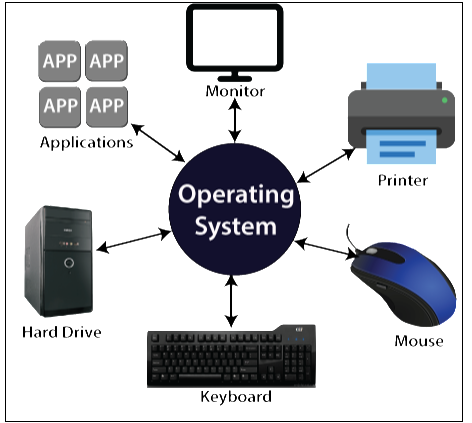
In the computer system, to run any program, at least one operating system is a must. An application such as MS word, chrome, games, etc. requires an environment so that the application can run and perform its functions. Through the operating system, communication is done easily with the computer without knowing computer languages. Without the operating system, it is not possible to use any computer or mobile device.
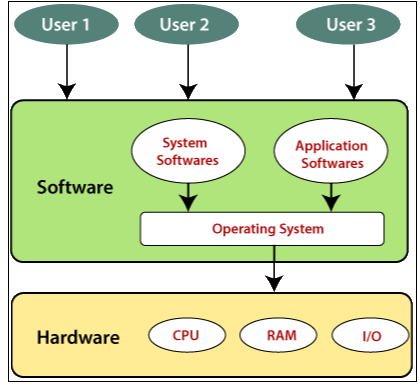
The operating system is useful to monitor and handle the execution of other programs that are present in the computer, consisting of applications and system software. The main objective of the operating system is to offer an environment so that the user can appropriately execute a program.
Objective of the Operating System
The objectives of the operating system are:
- The operating system offers users an appropriate interface to use the computer system.
- It helps us to hide the information related to the hardware resources from the users.
- The operating system provides the sharing of resources among users and programs in an efficient way.
- The operating system helps us to manage the computer system resources.
- The operating system offers convenient and impartial sharing of resources between the users and programs.
Features of Operating System
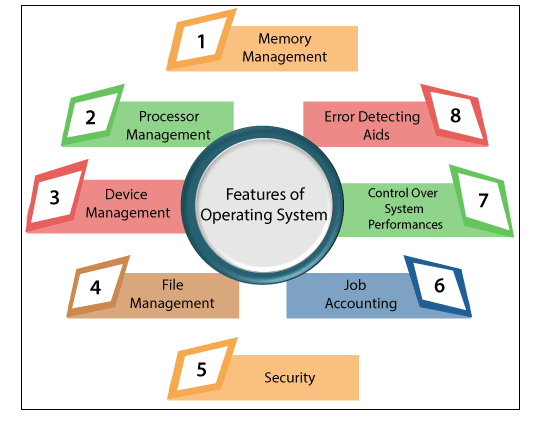
- Memory management: - Operating system keep track of the primary memory, means it keeps track of what part of memory is used, what part is not in use, and also helps to allocate the memory when a process requests it.
- Processor management: - Processor management means allocating processors to the process when the process needs and also deallocates the processor when the process does not require the processor.
- Device management: - The operating system also maintains the track of all the devices, which means an operating system decides which process should get the device, when and for how much time.
- File management: - The operating system provides the facility of file management.
- Security: - The operating system prevents programs and data from unauthorized access by using passwords and some other techniques.
- Job accounting: - It also keeps track of resources and time used by different jobs.
- Control over system performance: - It also helps to keep the recovery delays among the request for a service and from the system.
- Error-detecting Aids: - The operating system also provides the facility of error detection by the production of dumps, traces, error messages, and by using different debugging and error detecting techniques.
History of the Operating System
- The first operating system was developed in the late 1950s to manage the tape storage.
- In 1950, IBM 701-the general motors research lab developed the first operating system.
- In the 1960s, disks were used in the operating system, and the primary version of the Unix operating system was developed.
- Microsoft’s first developed Operating System was DOS. It was developed in 1981 by purchasing a Seattle company 86-DOS software.
- In 1985, the time when the GUI was developed and combined with MS-DOS, the current popular window OS first came into being.
Basic elements of the Operating System
The basic elements of the Operating System are:
- Main Memory
- Processor
- System bus
- I/O modules
Main Memory: - Main memory is also called Primary memory or Volatile memory. Main memory stores data and programs. The main memory is called volatile memory because when the system is turned off, then the content of the memory is erased automatically, or content is lost.
Processor: - A processor is defined as an integrated electronic circuit which performs the job of calculations in the computer. It performs input/output(I/O), arithmetical logical operations, and basic instructions that are passed from an operating system. The task of the processor is to control the processes in the computer and also perform data processing functions. If there is only one processor, then it is called a central processing unit (CPU), which you all know.
A processor may consist Arithmetical logical unit and control unit, which measures the capability in terms of the following.
- Maximum number of bits/instructions.
- Relative clock speed.
- Capability to process instructions at a given time
System bus: - System bus is the element of the operating system which is responsible for communication between the processors, I/O modules, and main memory.
I/O Modules: - The task of I/O modules is to move the data within the computer to its peripheral external environment. The external environment consists of various types of devices like secondary memory like pen drives, CDs, etc. communications equipment like (LAN cable), terminals, etc.
Operating System Tutorial
- Operating System Tutorial
- Types of Operating System
- Evolution of Operating System
- Functions of Operating System
- Operating System Properties
- Operating System Services
- Components of Operating System
- Needs of the Operating System
Operating Systems
- Linux Operating System
- Unix Operating System
- Ubuntu Operating System
- Chrome Operating Systems
- Fedora Operating System
- MAC Operating System
- MS Windows Operating System
- Solaris Operating System
- Cooperative Operating System
- CorelDRAW Operating System
- CentOS
- FreeBSD Operating Systems
- Batch Operating System
- MS-DOS Operating System
- Commercial Mobile Operating Systems
Differences
- Difference Between Multi-programming and Multitasking
- Difference between C-LOOK and C-SCAN
- Difference between Rotational Latency and Disk Assess Time
- Trap vs Interrupt
- Difference between C-SCAN and SSTF
- Difference between SCAN and FCFS
- Difference between Seek Time and Disk Access Time
- Difference between SSTF and LOOK
- Difference between Process and Program in the Operating System
- Difference between Protection and Security in Operating System
How To
Questions
- What is Kernel and Types of Kernel
- What is DOS Operating System
- What is Thread and Types of Thread
- What is Process Scheduler and Process Queue
- What is Context Switching
- What is CPU Scheduling
- What is Producer-Consumer Problem
- What is Semaphore in Operating System
- Monitors in Operating System
- What is Deadlock
- What is Paging and Segmentation
- What is Demand Paging
- What is Virtual Memory
- What is a Long term Scheduler
- What is Page Replacement in Operating System
- What is BSR Mode
- What is Convoy Effect
- What is Job Sequencing in Operating System
- Why is it critical for the Scheduler to distinguish between I/O-bound and CPU-bound programs
- Why is there a Need for an Operating System
Misc
- Process Management
- Process State
- Scheduling Algorithm
- FCFS (First-come-First-Serve) Scheduling
- SJF (Shortest Job First) Scheduling
- Round-Robin CPU Scheduling
- Priority Based Scheduling
- HRRN (Highest Response Ratio Next) Scheduling
- Process Synchronization
- Lock Variable Mechanism
- TSL Mechanism
- Turn Variable Mechanism
- Interested Variable Mechanism
- Deadlock Avoidance
- Strategies for Handling Deadlock
- Deadlock Prevention
- Deadlock Detection and Recovery
- Resource Allocation Graph
- Banker’s Algorithm in Operating System
- Fixed Partitioning and Dynamic Partitioning
- Partitioning Algorithms
- Disk Scheduling Algorithms
- FCFS and SSTF Disk Scheduling Algorithm
- SCAN and C-SCAN Disk Scheduling Algorithm
- Look and C-Look Disk Scheduling Algorithm
- File in Operating System
- File Access Methods in Operating System
- File Allocation Method
- Directory Structure in Operating System
- N-Step-SCAN Disk Scheduling
- Feedback Queue in Operating System
- Contiguous Memory Allocation in Operating System
- Real-time Operating System
- Starvation in Operating System
- Thrashing in Operating System
- 5 Goals of Operating System
- Advantages of Operating System
- Advantages of UNIX Operating System
- Bit Vector in Operating System
- Booting Process in Operating System
- Can a Computer Run Without the Operating System
- Dining Philosophers Problem in Operating System
- Free Space Management in Operating System
- Inter Process Communication in Operating System
- Swapping in Operating System
- Memory Management in Operating System
- Multiprogramming Operating System
- Multitasking Operating Systems
- Multi-user Operating Systems
- Non-Contiguous Memory Allocation in Operating System
- Page Table in Operating System
- Process Scheduling in Operating System
- Segmentation in Operating System
- Simple Structure in Operating System
- Single-User Operating System
- Two Phase Locking Protocol
- Advantages and Disadvantages of Operating System
- Arithmetic operations in binary number system
- Assemblers in the operating system
- Bakery Algorithm in Operating System
- Benefits of Ubuntu Operating System
- CPU Scheduling Criteria in Operating System
- Critical Section in Operating System
- Device Management in Operating System
- Linux Scheduler in Operating System
- Long Term Scheduler in Operating System
- Mutex in Operating System
- Operating System Failure
- Peterson's Solution in Operating System
- Privileged and Non-Privileged Instructions in Operating System
- Swapping in Operating System
- Types of Operating System
- Zombie and Orphan Process in Operating System
- 62-bit operating system
- Advantages and Disadvantages of Batch Operating System
- Boot Block and Bad Block in Operating System
- Contiguous and Non - Contiguous Memory Allocation in Operating System
- Control and Distribution Systems in Operations Management
- Control Program in Operating System
- Convergent Technologies in Operating System
- Convoy Effect in Operating System
- Copy Operating Systems to SSD
- Core Components of Operating System
- Core of UNIX Operating System
- Correct Value to return to the Operating System
- Corrupted Operating System
- Cos is Smart Card Operating System
- Cosmos Operating Systems Examples
- Generation of Operating System
- Hardware Solution in Operating System
- Process Control Block in Operating System
- Function of Kernel in Operating System
- Operating System Layers
- History of Debian Operating Systems
- Branches and Architecture of Debian Operating Systems
- Features and Packages of Debian Operating Systems
- Installation of Operating System on a New PC
- Organizational Structure and Development in Debian Operating Systems
- User Interface in Operating System
- Types Of Memory in OS
- Operating System in Nokia
- Multilevel Paging in OS
- Memory Mapping Techniques in OS
- Memory Layout of a Process in Operating System
- Hardware Protection in Operating System
- Functions of File Management in Operating System
- Core of Linux Operating System
- Cache Replacement Policy in Operating System
- Cache Line and Cache Size in Operating System