
×

Linux rmdir command

The default use case of the rmdir command in the Linux system is to delete an empty directory. The below screenshot shows how to delete the empty directory. First, we created an empty directory with the help of mkdir and then deleted it using the rmdir command.
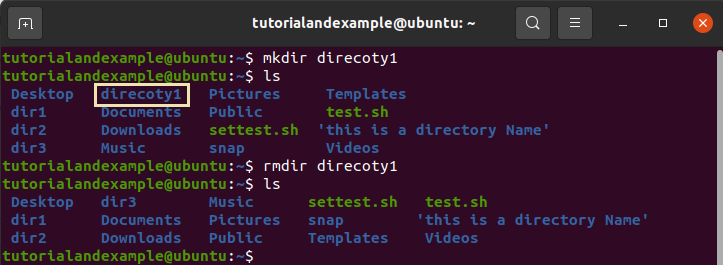
Linux Rmdir Command

Now, let us see what will happen? If the user tries to delete a non-empty directory using this command. We had a non-empty directory dir1, and it gave an error while deleting the directory.
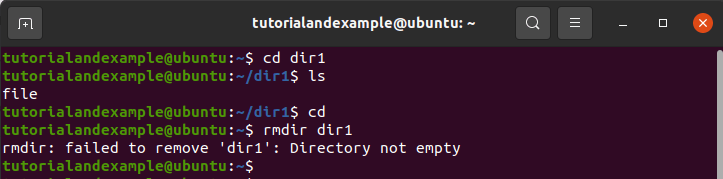
Linux Rmdir Command

If you want to delete all the directory ancestors, we have a particular option for this task.
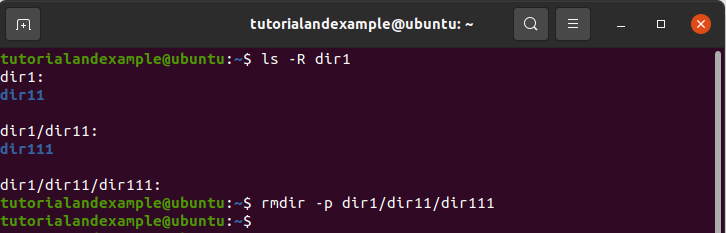
Linux Rmdir Command

You can also check the version of the rmdir command in your Linux system using the below command option.
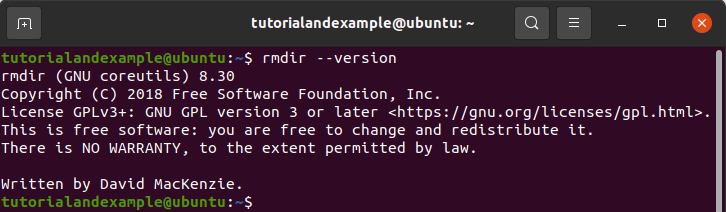
Linux Rmdir Command

Related Topics

unzip Command in Linux/Unix with Examples

The 'unzip' command in Linux is used to extract files from a ZIP archive file. The command allows you to decompress and extract the files and directories stored in a...

3 minutes read.

rename Command in Linux/Unix with Examples

The rename command in Linux is used to rename multiple files at once, using a specified pattern. The command is also known as rename, ren, and mv. This command is...

3 minutes read.

Linux SCP Command

SCP stands for secure copy protocol. It is a command-line application for copying files and directories safely between two places. Command-line utilities are programs that operate on a computer's command...

3 minutes read.

Linux Bash

Linux Bash In this tutorial, we are going to learn what the shell is? And how many various shells we have, we have also covered most of the bash shell features....

4 minutes read.

cut Command in Linux/Unix with Examples

The "cut" command in Linux (and other Unix-like operating systems) is used to remove sections from each line of a file or stream of data. The cut command is often...

3 minutes read.

addgroup Command in Linux with Examples

What is the addgroup command? It is a command in Linux to create a new group using specified command lined and the system’s default values. How to add groups Adding a user group:...

4 minutes read.

ssh Command in Linux/Unix with Examples

The ssh (Secure Shell) command in Linux is used to remotely access and control another computer or device over a network. It provides a secure and encrypted connection between the...

6 minutes read.

curl Command in Linux/Unix with Examples

The 'curl' command in Linux is a command-line tool that allows you to transfer data from or to a server using various protocols, including HTTP, HTTPS, FTP, and many more....

3 minutes read.

tar Command in Linux/Unix with Examples

The 'tar' command in Linux is used to create, maintain, and extract files from archive files called tarballs. The command stands for "tape archive" and it allows you to combine...

4 minutes read.

cat Command in Linux/Unix with Examples

The cat command in Linux is a command-line utility that is used to display the contents of a text file. It stands for "concatenate" and it is used to view...

4 minutes read.

mv Command in Linux/Unix with Examples

The 'mv' command in Linux is used to move or rename files and directories. The command stands for "move" and it allows you to move files and directories from one...

3 minutes read.

ps Command in Linux/Unix with Examples

The 'ps' command in Linux is used to display information about the running processes on a system. The command stands for "process status" and it allows you to view details...

4 minutes read.

Linux Admin Tutorial

In publishing and graphic design, lorem ipsum is a placeholder text commonly used to demonstrate the visual form of a document without relying on meaningful content....

1 minute read.

mkdir Command in Linux/Unix with Examples

The "mkdir" command in Linux (and other Unix-like operating systems) is used to create new directories. The "mkdir" command stands for "make directory" and it is used to create a...

3 minutes read.

adduser Command in Linux with Examples

What is the adduser command? The adduser command creates a new user, and this command may be used to add apre-existing user to a group that already exists. How to use the...

4 minutes read.

How to change the ApacheHTTP port in Linux

What is an Apache HTTP server in Linux? When we talk about the most commonly used web servers, one of the web servers that cannot be missed is Apache. With the...

4 minutes read.

cd Command in Linux/Unix with Examples

The 'cd' command in Linux is used to change the current working directory. The command stands for "change directory" and it is used to navigate the file system on a...

3 minutes read.

cp Command in Linux/Unix with Examples

The cp (copy) command in Linux is a command-line utility that is used to copy files and directories. It is one of the most basic and commonly used commands in...

5 minutes read.

Linux Tutorial for Beginners

What is Linux? Linux is an open source Operating System like Windows, Android, Mac OS, and iOS. An operating system is a software that enables communication between the user and the...

12 minutes read.

touch Command in Linux/Unix with Examples

The "touch" command in Linux (and other Unix-like operating systems) is used to create new empty files or update the timestamps of existing files. The touch command is a simple...

4 minutes read.