
Spring - Bean Scope
Spring - Bean Scope
Bean Scope refers to a lifecycle of the bean. It allows us to have control over the creation of bean objects. It is a very powerful approach and provides the flexibility to choose the required bean scope.
Types of Bean Scope
There are five types of bean scope available in Spring, from which three out of five scopes are available only if we use the Web-Application. The request, session, and global session are the scopes used with the web-app.
| Scope | Description |
| Singleton | It scopes a single bean definition into a single object instance per Spring IoC Container. It is the default scope type. |
| Prototype | It scopes a single bean definition into any number of object instances (required amount). |
| Request | Itscopes a single bean definition to the lifecycle of a single HTTP request. It is used only with the web-aware applications. |
| Session | Itscopes a single bean definition to the lifecycle of an HTTP session. It is used only with the web-aware applications. |
| global session | Itscopes a single bean definition to the lifecycle of a global HTTP session. It is used only with the web-aware applications. |
- The singleton scope
When we define a bean using the singleton scope, only one shared bean instance is created. All the requests to that bean will return a shared reference to that same bean. It is the default bean scope. If there is no bean scope defined in the bean-config file, the IoC container will treat it as a singleton scope. It can be used in a standalone Spring application and also cached in the memory.
Following code shows how to use a singleton bean scope:
<!—Defining the Scope in the bean -->
 <bean
      id = "…"
      class = "…"
      scope = "singleton">
 </bean>
OR
<!—Defining the Scope in the bean -->
 <bean
      id = "…"
      class = "…"
 </bean>
Example of Singleton Bean Scope
Coach.java
public interface Coach {
             public String training();
 }
VolleyBall_Coach.java
public class VolleyBall_Coach implements Coach {
             public String training() {
                         return "10 rounds of the ground daily";
             }
 }
applicationContext.xml
<?xml version = "1.0" encoding = "UTF-8"?>
  <beans xmlns = “http://www.springframework.org/schema/beans"
         xmlns:xsi = "http://www.w3.org/2001/XMLSchema-instance"
         xmlns:p = "http://www.springframework.org/schema/p"
         xsi:schemaLocation = "http://www.springframework.org/schema/beans
 http://www.springframework.org/schema/beans/spring-beans-3.0.xsd">
 <!--Define the dependency  -->
 <bean id = "mycoach" class ="com.app.Bean_Scopes.VolleyBall_Coach" scope ="singleton" >
 </bean>
 </beans>
App.java
import org.springframework.context.ApplicationContext;
 import org.springframework.context.support.ClassPathXmlApplicationContext;
 public class App
 {
     public static void main( String[] args )
     {
                 ClassPathXmlApplicationContext appcon = new ClassPathXmlApplicationContext("applicationContext.xml");
         Coach coach = appcon.getBean("mycoach", Coach.class);
         Coach myCoach = appcon.getBean("mycoach", Coach.class);
         //check if these are the same beans
         Boolean rslt = (coach == myCoach);
         System.out.println("Pointing to the same object:" +"  " + rslt);
         // shows the memory location of the objects
         System.out.println("location of coach : " + coach);
         System.out.println("location of coach : " + myCoach);
     }
 }
Output
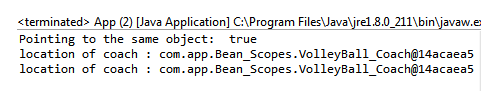
- The prototype scope
When we set the bean scope to prototype, a new instance of the object is created every time a request is made.As a predefined rule, the prototype scope is used for all stateful beans, whereas a singleton scope is used for all stateless beans. The prototype scope can also be used in a standalone application.
Following code shows how to use a prototype bean scope:
<!—Defining the Scope in the bean -->
 <bean
      id = "…"
      class = "…"
      scope = "prototype">
 </bean>
Example of Prototype Bean Scope
Coach.java
public interface Coach {
             public String training();
 }
VolleyBall_Coach.java
public class VolleyBall_Coach implements Coach {
             public String training() {
                         return "10 rounds of the ground daily";
             }
 }
applicationContext.xml
<?xml version = "1.0" encoding = "UTF-8"?>
  <beans xmlns = “http://www.springframework.org/schema/beans"
         xmlns:xsi = "http://www.w3.org/2001/XMLSchema-instance"
         xmlns:p = "http://www.springframework.org/schema/p"
         xsi:schemaLocation = "http://www.springframework.org/schema/beans
 http://www.springframework.org/schema/beans/spring-beans-3.0.xsd">
 <!--Define the dependency  -->
 <bean id = "mycoach" class ="com.app.Bean_Scopes.VolleyBall_Coach" scope ="prototype" >
 </bean>
 </beans>
App.java
import org.springframework.context.ApplicationContext;
 import org.springframework.context.support.ClassPathXmlApplicationContext;
 public class App
 {
     public static void main( String[] args )
     {
         ApplicationContext appcon = new ClassPathXmlApplicationContext("applicationContext.xml");
         Coach coach = appcon.getBean("mycoach", Coach.class);
         Coach myCoach = appcon.getBean("mycoach", Coach.class);
         //check if these are the same beans
         Boolean rslt = (coach == myCoach);
         System.out.println("Pointing to the same object:" +"  " + rslt);
         // shows the memory location of the objects
         System.out.println("location of coach : " + coach);
         System.out.println("location of coach : " + myCoach);
     }
 }
Output

- The request scope
The request bean scope is used with the web-aware applications. When we set the bean scope to request, a new instance is created for each HTTP request.
Following code shows how to use a request bean scope:
<!—Defining the Scope in the bean -->
 <bean
      id = "…"
      class = "…"
      scope = "request">
 </bean>
- The session scope
The session bean scope is used with web-aware applications. When we set the bean scope to a session, a new instance is created for each HTTP request. When the HTTP session is terminated, the bean scoped with that session is also terminated.
Following code shows how to use a session bean scope:
<!—Defining the Scope in the bean -->
 <bean
      id = "…"
      class = "…"
      scope = "session">
 </bean>
- The global session scope
The global session bean scope is used with portal-based web applications. When we set the bean scope to a global session, a new instance is created for each HTTP request. It is similar to the session scope.
Following code shows how to use a global session bean scope:
<!—Defining the Scope in the bean -->
 <bean
      id = "…"
      class = "…"
      scope = "globalSession">
 </bean>