
×

Selenium Testing

Selenium is a functional testing tool and compatible with non–functional testing tool. Selenium is free and not required any licensing.

There are specified types of testing that can be automated using Selenium:-

  Functional Testing:

  • Checking every component of a module individually in an application is known as functional testing. It is critical to any software, as it verifies that it is ready for Release.
  • Selenium automates the functional test cases mainly at the UI layer of the Web Application under testing.

Types of Functional Testing that can be automated using Selenium:
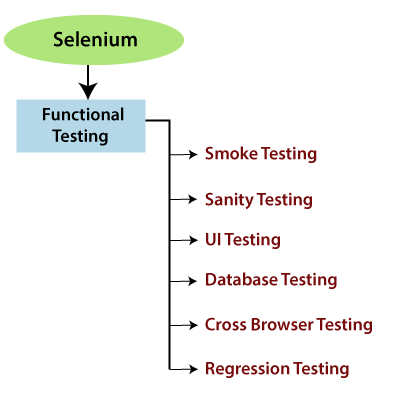
Types of Functional Testing

Smoke Testing: 

  • Checking the essential & critical features of an application before processing with in-depth regressing testing is known as smoke testing.
    • In smoke testing, we only review the positive flow of an application to check if the build is testable or not. A blocker bug can be identified at very early stages in smoke testing.
    • Generally, we do smoke testing whenever a new build is installed. Whenever the stable build installed anywhere like UAT [user acceptance testing], test server and production server, test engineer do one round of smoke testing to find any Blocker bug.
    • A smoke test case is always automated and executed on every new build when it is installed because smoke testing is a repetitive task.

Sanity Testing: 

  • When the production deployment is required to fix a critical bug immediately on a build, test engineer do one round of sanity testing. For detailed testing of some limited features, sanity testing follows the narrow and deep approach.
  • It is a subset of regression testing, and it is typically non-scripting. 
  • If the build failed, the test engineer should reject the build to avoid wasting time and cost involved in testing.
  • Build level regression testing is also knowns sanity testing.

UI Testing:

  • UI testing involves testing the GUI [Graphical User Interface] elements of the Application like check-box options, buttons, menus, text alignments, etc. are correctly displayed.
    • Web-based Applications are those applications which can be accessed through a URL.

In such applications, we mainly test the front end of the Application, which is used by the end-user.

  • UI testing is also known as front-end testing or Application testing.
    • A test engineer has a good understanding of business requirements, coding, functional knowledge, etc. to perform UI testing.

 Database Testing:  

  • Check whether the data is posted and updated in the UI of Application is in sync with data stored in the database of the Application. It is also knowns as back-end testing or data testing because back-end components are not visible to the user.
  • Checking the schema, tables, columns, key and indexes, triggers and stored procedures, etc. of the database is called database testing. Database testing is used to check data integrity and consistency.

 Cross Browser Testing: 

  • Testing the Application in all the supported web browsers, is called cross-browser testing.
    • Cross-browser testing is used for both web and mobile applications.
    • Cross Browser testing is used to test your web application in multiple browsers, and it works consistently, and there is no compromise in the quality of the product.
    • It is running the same set of test cases various times on different browsers.

 Regression Testing:

  • Whenever code changes due to the enhancement of bug fixes and to make sure that existing features are not affecting, is known as regression testing.
  • Whenever there is new Release for some project, then we go for Regression Testing because the new feature may change the old features in the previous releases.
  • Regression testing is used to verify that the bug fixes and the newly added functionality do not create any problem in the earlier version of the product.
  • It is not dependent on any programming language like Java, C++, C#, etc. 

Related Topics

Selenium Tool Suite

The selenium tool suite is a combination of multiple software tools, and the entire tools having a different approach to support automation testing. Selenium test tool suites are as follows- Selenium...

2 minutes read.

Selenium WebDriver-Locators

Selenium WebDriver-Locators The WebDriver uses the same set of locating strategies like selenium -IDE for specifying the location of the web element. Each locating strategy has its command in Java to locate...

1 minute read.

Drawback or Limitations of Selenium

Drawback or Limitations of Selenium Followings are the Drawback or limitations of Selenium:- Drawback /LimitationsDescriptionDesktop applications cannot be automated by Selenium.To test the desktop application, we have tools like Test Complete, Winnium, and...

2 minutes read.

WebDriver Interface | Class Diagram

WebDriver interface/class diagram: The interface of WebDriver includes the following stages, which is as follows: Search Context Web driver Remote web driver Driver class Search Context  The first interface of the web driver class is search Context,...

2 minutes read.

Selenium WebDriver-Alert Popup

Selenium WebDriver-Alert Popup  An alert popup is one of the small message boxes, which used to give some information to the user that displays on the browser. The Alert popup will be...

6 minutes read.

Selenium Wait

In this tutorial, we will understand how we can avoid synchronization issues while executing the test script in a selenium WebDriver. Before going further in this tutorial, first, we will understand that...

10 minutes read.

Selenium WebDriver Characteristics

Characteristics of Selenium WebDriver Some of the essential characteristics of Selenium WebDriver are as follows: Multiple Operating System Support Selenium Webdriver supports multiple operating systems like: Desktop OS: Window, Linux, and macOS Mobile OS:...

2 minutes read.

Selenium IDE Commands

Selenium –IDE Commands (SELENESE): Selenese commands are the set of commands used in Selenium IDE. Selenese command has two parameters target and value. Selenese command tests the existence of UI elements based on their HTML tags,...

3 minutes read.

Xpath locator in Selenium IDE

X PATH LOCATOR: Xpath is used to identify the element using any attribute or visible test. Syntax for X PATH:- //html tag [@attribute=’value’] e.g. - //div [@class=’label’]                    OR //html tag [text () =’Visible Text’] e.g.-//div [text...

2 minutes read.

Drag and Drop Event Handling

Drag and Drop Event Handling: In this tutorial, we will learn how to handle the drag and drop event in selenium WebDriver using the action class. Before going further in this tutorial...

6 minutes read.

Advantages and Disadvantages of Selenium-IDE

Advantages and Disadvantages of Selenium-IDE Advantages of Selenium IDE: UI based record and playback tool. Easy to understand & developed a test script. Selenium-IDE test script export into web driver code & Selenium–RC It is...

1 minute read.

Verification Controls Methods in Selenium WebDriver

Verification Controls Methods  The verification controls methods are used to check whether the web element is displayed, enabled, and selected. Some of the most commonly used verification controls are as follow: Verification controls Description Return...

4 minutes read.

Selenium WebDriver- Radio button handling

Selenium WebDriver- Radio button handling In this tutorial, we will be learning about handling the radio button in selenium WebDriver. Let us take one example to give you a better understanding of...

3 minutes read.

Selenium Testing

Selenium is a functional testing tool and compatible with non–functional testing tool. Selenium is free and not required any licensing. There are specified types of testing that can be automated using Selenium:-   Functional Testing: Checking every component...

3 minutes read.

Selenium WebDriver - Browser Controls Commands

Selenium WebDriver - Browser Controls Commands WebDriver includes operations like opening a browser, fetch the title, and closing the browser, etc. Some of the most commonly used Browser controls commands for Selenium WebDriver...

6 minutes read.

Selenium WebDriver-CSS Selector: Tag and ID

Selenium WebDriver-CSS Selector: Tag and ID We will locate the web element with the help of tag and id CSS selector in this section of the tutorials Where Tag and id are...

4 minutes read.

Selenium WebDriver - IE [Internet Explorer] browser

Selenium WebDriver - IE [Internet Explorer] browser In this segment, we will understand how to run a test script with the help of the IE (Internet Explorer) browser. It is a standalone...

4 minutes read.

Selenium WebDriver- Microsoft Edge Browser

Selenium WebDriver- Microsoft Edge Browser: In this tutorial, we will learn how to launch the Microsoft Edge browser in the Selenium WebDriver. Before we start automating our test script with Microsoft Edge...

4 minutes read.

CSS Selector: Inner text in Selenium IDE

CSS Selector: Inner text The inner text is used to identify and create a CSS Selector using a string pattern of the HTML tag which is displayed on the web page. Syntax...

1 minute read.

Id Locator in Selenium IDE

Id Locator Id locator is used to find the web element by the help of id of that element because ID is likely to be unique for each web element. Target Format: Id=id of the...

2 minutes read.