
Selenium Tutorial
What is Selenium?
Selenium is a functional testing tool and compatible with the non-functional testing tools also. Selenium is free and does not require any licensing. Functional tests script executed by selenium. Selenium is combined with many automation testing tools such as Maven, Jenkins, to achieve continuous testing. Selenium can be connected with tools like TestNG, & JUnit for managing test cases & generating reports.
Thought Works Company introduced Selenium community in 2004.
Before going further with Selenium Tutorial, let us first understand some of the key concepts associated with Automation testing of an application.
- Each software development group need to carry out several tests before launching the final product into the market.
- Manual Test engineers seek to catch the fault or bugs before the product released in the market, yet delivered software always has defects. And there is a possibility that the final software product is left with a defect or unable to meet the customer requirement, even the manual test engineer do their best.
- Automation testing is the best way to increase the effectiveness, efficiency, and coverage of Software testing.
- Automation testing uses particular tools to automate manual design test cases without any human interference. These testing tools can access the test data, controls the execution of tests, and compares the actual result against the expected result.
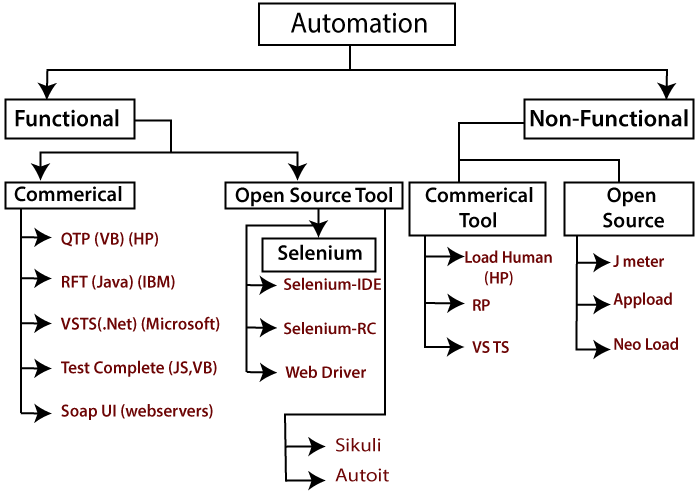
It has both functional and non-functional tests on an application.
Functional Automation Testing
To automate the functional test cases, test engineer use functional automation testing.
e.g.-: Repetitive Regression tests are automated.
Non-functional Automation Testing
To automate the non-functional performance test cases.
e.g.-: Checking the response time of the application under considerable (say 100 users) load.
Automation Testing Process
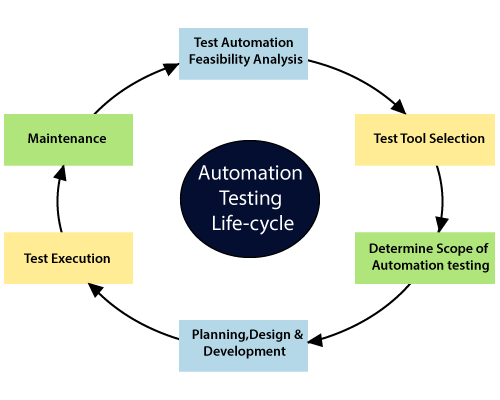
It is the process of converting any manual test cases into a test script using automation tools, and scripting or programming language is called automation testing process.
- Generally, we go for automation testing whenever there are multiple releases or multiple regression cycle or repetitive task.
- The process of testing the application by using some tools is known as automation testing.
- When the new release (Release #1) starts we don’t go for automation testing process, because there is no concept of regression testing and regression test cases( test cases are new itself)
- When the new release and some enhancement are going on, we have the manual team as well automation team.
- The manual teams go through the requirement and also identify the impact area and hands over the regression test suite to the automation team.
- After handed over the manual team, start working on the new feature and the automation team starts working on the new feature, starts creating the test script and automating the test cases. Means (convert the regression test cases into the test script).
- Before going to the further process, the automation team starts automating the test cases and analyze the cases which can be automated and which cannot be automated.
- Based on the review, they start the automation testing process, i.e., convert each regression case into test scripts.
- During this process, they need regression case because they don’t have product knowledge as well the tool and the application.
- Once the test script is ready, they start the execution of this script on the new application, but the old feature.
- Since the script is written for regression feature or the old feature
- Once the implementation complete, we get different status like pass/fail.
- If the status failed, that needs to be re-confirmed manually, and if the bugs exist, report to the developer, they will fix.
- After the bug fixes done, the bug needs to be re-tested along with the impact area by the manual test engineer.
- And the test script needs to be executed by the automation test engineer.
- This process goes on until all the new features, and regression features status gets passed.
The advantage of doing regression testing by automation test engineer
- Time saving: the execution is always faster than the manual.
- Batch Execution: batch execution is possible using automation testing, i.e., all the written script can execute parallel or simultaneously.
- Re-used: the script can be reused across multiple releases.
- Even though the number of regression test cases increases the number of releases, we don’t have to increase the automation resource since some regression case already automated from the previous release.
- Accuracy always exists because the task is done by tools and tools never get bored or tired.
Features of Selenium
Selenium is just a chemical name which can remove or kill Mercury from the body (Mercury is the vendor of QTP tool).
Some of the essential features of Selenium are as follows:
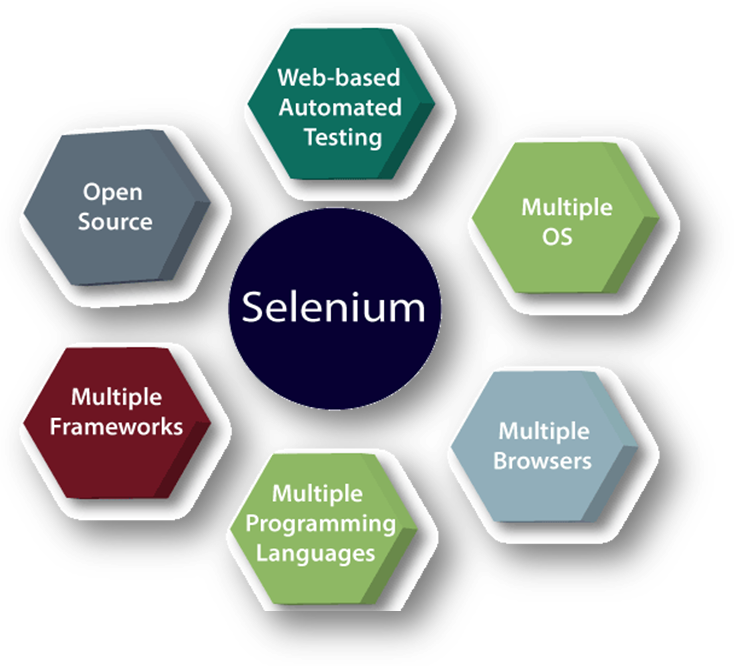
Web-based automation testing:
- All selenium tools support only web application. The application which is opened by browser or URL is called web application, e.g., - Gmail, Amazon, IRCTC.
Multiple OS
- Selenium supports multiple operating systems, E.g., Window, Linux, and macOS with Selenium Suite of solutions. For instance, we can create test cases using Windows OS and run it with ease on a Linux based system.
Multiple Browser
- Selenium supports multiple browsers like- Internet Explorer, Mozilla Firefox, Google Chrome, and Safari. And it becomes highly resourceful while we were executing the tests script and testing it across various browsers simultaneously. E.g., Selenium-IDE can be used with Firefox as a plug-in and Selenium-RC, and Web driver supports different browsers such as Internet Explorer, Chrome browser.
Multiple programming Language
- Selenium supports multiple programming languages like-C#, Java, Perl, PHP, Python, and Ruby.
- Selenium can work with various languages, so developers/testers can use any of the above languages in which they feel comfortable.
Multiple Frameworks
Some testing frameworks that can be used for Selenium are as follows:
| Languages | Available Framework |
| Java | JUnit, TestNG |
| C# | NUnit |
| JavaScript | WebdriverJS, webdriverIO,NemoJSNightwatchJS |
| PHP | Behat+Mink |
| Python | Py.test, robot framework, Unittest, pyunit |
| Ruby | RSpec |
Open Source:
- Selenium tool can be downloaded free because it is an open-source tool and freely available in the market.
- The most significant advantage of Selenium is that it is a freeware and a portable device.
Some additional features of Selenium are as follows:
- Selenium Webdriver is more powerful because it supports multiple browsers, multiple operating systems, multiple mobile applications like- iPhone, ANDRIOD.
- All selenium tools do not support the standalone application, the application which is not opened by browser or URL is called standalone application, e.g. - Notepad, Excel Sheet, Ms-Word, Calculator, Skype
- All selenium tools will identify the element in GUI based on HTML Source of the component.
- Selenium has capabilities to support Selenium IDE, Selenium Grid, and Selenium Remote Control (RC).
- Selenium has a user-friendly interface that helps to create and execute tests efficiently and effectively.
Selenium Index
- Selenium Tool Suit
- Versions of Selenium
- Selenium Testing
- Difference Between Selenium and QTP
- Advantage and Disadvantage of Selenium
Selenium IDE Topics
- Selenium-IDE Introduction
- Installation /download Selenium–IDE (Firefox)
- Installation /download Selenium–IDE (Google Chrome)
- Characteristics of Selenium-IDE
- First test case of Selenium-IDE
- Login test for Selenium-IDE
- Selenium-IDE commands
- Selenium-IDE locators
- Id locator
- Name Locator
- X Path Locator
- CSS Selector Locator
- Locating by ID
- Locating by Class
- Locating by Attribute
- Locating by ID/Class & Attribute
- Locating by Sub-string
- Locating by inner text
- Link Text Locator
- DOM Locator
- Advantage and Disadvantage of Selenium-IDE
Selenium WebDriver Topics
- WebDriver introduction
- Characteristics of WebDriver
- Difference Between Selenium RC and WebDriver
- Installation steps of WebDriver
- WebDriver Class Diagram/ Architecture
- WebDriver control commands
- Browser control
- Navigation control
- Web element control
- Operational control
- Data capture control
- Verification control
- WebDriver working with multiple browser
- WebDriver working with chrome browser
- WebDriver working with Firefox browser
- WebDriver working with internet explorer browser
- WebDriver working with Microsoft Edge browser
- WebDriver locator
- Id Locator
- Name Locator
- Class name Locator
- Xpath Locator
- XPath function
- XPath axes
- Link text Locator
- Partial link text Locator
- Tag name Locator
- Css Selector
- Tag and Id
- Tag and Class
- Tag and Attribute
- Tag, class, and Attribute
- Sub string matches
- WebDriver wait statements
- Drop down handling
- Mouse and keyboard controls
- Drag and drop Event Handling
- Window Handling: New tab/new window
- Alert pop up Handling
- Checkbox Handling
- Radio button Handling
- Selenium Assertion
Interview Questions
- Selenium Interview Questions