
Basic Terminologies Related to COA
Some Basic Terminologies Related to COA
Computer organization and architecture is the detailed study of the internal components of the computer with their functionality. It describes how components arranged together and functionality of the components (COA =Computer Components + Functionality). It gives answer of questions like:-
- How CPU is designed?
- How Instructions are carried out?
- How Addressing modes works?
- How Data is formatted?
- How Input/ Output Organization works?
- How Memory Organization works?
- Tells about the performance of system?
What is a Computer?
A computer is a machine/ an electronic device designed to store, retrieve and process data and a device that can manipulate information or data. A computer is a computational machine whose functionality depends on the user program. The execution of a program is the main functionality of the System.
Computer Types
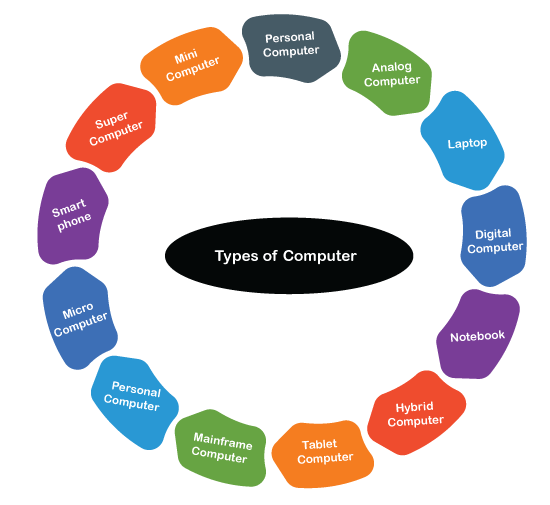
Major types of computers are following: -
- Analog computer – Analog computer works on continuous data like an electric current, mechanical energy. The types of analog computers are Speedometer, thermometer, pressure, telephone lines, voltage, frequency of signal etc.
- Digital computer- A system operates with numbers expressed in digits as output.
- Hybrid computer – A computer system which has the quality of both analog and digital System.
- Laptop - Commonly used nowadays in day to day life. It reduces the use of desktop computers due to its portable quality. It's like a briefcase one can carry it along anywhere.
- Mainframe – It is a big Iron centralized computer used by large-scale organizations to manage and process data.
- Microcomputer – The second name of a PC (personal computer) uses the single integrated semiconductor chip microprocessor.
- Minicomputer – Minicomputer is larger than a microcomputer and smaller than a mainframe computer.
- Notebook- A computer smaller than a Laptop.
- Personal computer (PC) – Personal computer was designed for the use of a single person. IBM produced the first PC for single person use.
- Smartphone – A handy phone designed with an integrated computer.
- Supercomputer – A supercomputer performed at high speed and used scientifically for research and storage.
- Tablet computer (tablet PC) – This computer is bigger than a smartphone and smaller than a laptop. It's handy and slim, i.e., easily portable.
Evolution/ Generations of Computer
The computer is the result of the invention, and its evolution is the result of the necessity to ease and reduce human work and efforts. Charles Babbage is known as the “Father of Computer." He originated the machine that contained ALU( arithmetic Logic Unit), Integrated Memory and basic flow control in 1940, famous as First generation computer. The different implementations have given a new range of digital computers to humans from their various experiments and years of research. Nowadays, Computers are ruling all around the world. The following are the generations of the computer till now.
- First Generation (1940- 1956)- The computers are large in size, use of vacuum tube as switches and amplifiers and magnetic drums for the memory.
- Second Generation (1956-1963)- Size was smaller than previous, and transistors were used instead of vacuum tubes, which helped the prevention of heat and electricity.
- Third Generation (1964 – 1961)- Number of transistors was packed on silicon chips to increase speed and make them less expensive and more powerful. Keyboards and monitors were used for user interaction with the machine.
- Fourth Generation (1972- 2010)- Boom in the technology where millions of transistors were placed on a single circuit chip called monolithic integrated circuit technology. In the 1990s, the Internet was accessed on personal computers, and handy computers such as laptops came into the market. Speed and memory were increased at a tremendous level, and System interacted with GUI's help ( Graphical User Interface).
- Fifth Generation (2010 – Future years) – It's a big question to define the fifth Generation as research is still going on to make computers more powerful, fast and advanced with Nanotechnology, Artificial Intelligence and quantum computation.
Various Units of Computer
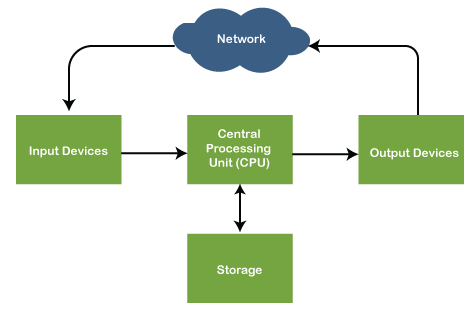
In computers, information is entered, processed, stored and retrieved by various devices, which are also called functional units of the computer system. The following are the Units of computers:
Input Unit
- Input Units are the input devices of the System through which data is entered. Keyboard, mouse, trackballs, joysticks, microphones, etc. are some well-known input devices.
- The most commonly used and the well-known device is the Keyboard having several different purpose keys like Numeric keys(0-9), Alphabet keys( A to Z), Functional keys(F1 to F12), and special keys like Spacebar, Shift etc. Every key has its Binary number; when the key is pressed, the corresponding digit or alphabet is transmitted over a cable or the processor.
Central Processing Unit
- The Central Processing Unit (CPU) is the computer system's main functional unit. It consists of an electronic circuit that carries instruction given by the user through a computer program. It processes it using the Arithmetic Logic Unit, various controls, Applies logic and input/ output operations. CPU contains a motherboard, CD/ CVD, Input slots for Pen drives or cables. The motherboard has almost everything for the computer system, whether it's circuit, serial and parallel ports, central processor, interface connectors, registers, transistors, etc.
Memory Unit
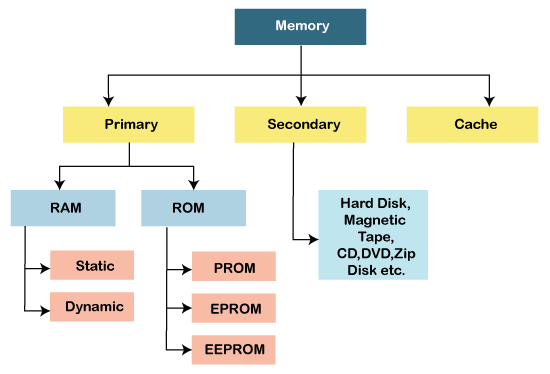
- In computers, memory is stored in the CPU similar to the memory stores in the human’s brain. Memory unit is used to store and fetch all the data or information.
- Memory is classified in the following ways: -
- Primary Memory - Memory used to store data on the computer system is primary memory, mostly known as Internal Memory and main memory. Semiconductor devices are used for primary memory. Examples of primary memory are- RAM, ROM, REGISTERS, PROM, EPROM.
- Secondary Memory- Secondary memory is an external or extra memory used to store a large amount of data permanently for the long term. For example, the magnetic disk, optical disks, magnetic tapes etc.
- Cache Memory- Cache memory is the smaller, fastest memory used to reduce the average time to access the data from the CPU's main memory. It acts as a buffer located near a processor core, used to store copies of data.
- These storage memories have some storage capacities, which are standardized in units called "Memory Unit." The memory unit is the collection of cells used to store the data or information. It is a storage area which keeps all the data that requires to run the program.
- Memory is classified into the standards units which is shown in the below table:
| Sr. No. | Units | Describe |
| 1 | Bit | Data is stored in 0’s and 1’s binary digits. Digit is stored in one place called a Bit. |
| 2 | Nibble | 4 bits is equal to 1 Nibble |
| 3 | Byte | Eight bits are equal to 1 Byte. It represents a data item or character. |
| 4 | 2 byte | 16 bits |
| 5. | 4 byte | 32 bits |
| 6 | 8 byte | 64 bits |
| 7 | 1 KB( kilo byte) | 1024 Bytes |
| 8 | 1 MB( mega byte) | 1024 KB |
| 9 | 1 GB( giga byte) | 1024 MB |
| 10 | 1 TB(tera byte) | 1024 GB |
| 11 | 1 PB( petta byte) | 1024 TB |
| 12 | 1 ZB( zetta byte) | 1024 PB |
| 13 | 1 YB ( yotta byte) | 1024 ZB |
Arithmetic & Logical Unit
- ALU is present in the CPU which helps in computing the command given by the user. It performs a logical operation( AND, OR, NOT) and Arithmetic operation like addition, subtraction, multiplication and division.
Control Unit
- As the name defined, the control unit has the controlling power as the nerve center of a computer system. It coordinates and controls all the operations in the CPU as it guides the computer's memory, arithmetic logic unit and input and output unit device how to respond to a program's instructions.
- As a result, the output has to go through several steps internally in the processor, which is step by step conducted by Control Unit.
- The control unit is a component of a computer's central processing unit that coordinates the processor's operation. It tells the computer's memory, arithmetic/logic unit and input and output devices to respond to a program's instructions.
Output Unit
- The result of the input processed command is displayed on the device called an output device. The output unit's primary work is to show the result on the screen, hardcopy or digitally.
- The most common output is the Monitor and printer.
What is the Program?
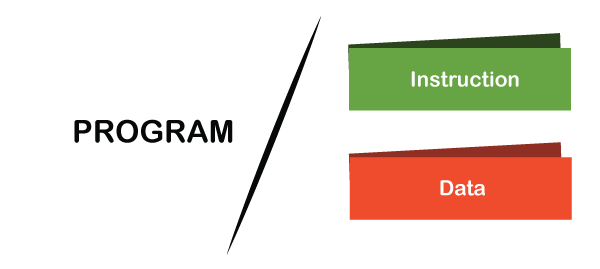
In computer terms, program is called a set of Instructions. A program is an executable software consisting of compiled codes that runs on a computer’s operating system. Programs are the applications or software programs created by program developers to run on Windows having .EXE file extension. Developers write source codes (functions and commands) that contain the instruction about the working of applications on the System. These source code files are compiled into an executable program.
What is Instruction?
Instruction is the direction or way of furnishing a task.
In Computers, instructions are the command or data given to a computer to carry out the operation in a particular manner. In Computers, Instructions are called Binary Codes inside the processor to perform some operations. When Binary Codes are Bound with Operations, they are called as instructions.
What is Data?
Data refers to the raw information stored in the memory of the Computer system. Let’s discuss few necessary question about data.
In which format data is stored in the Memory?
- We can store every single data in binary format only. The binary numbers are 0 and 1 in which the data is stored in the memory.
What type of data can be stored for instruction execution and process execution in the memory?
- There are two kinds of data we can store in memory – Numbers (0-9) & Characters(a-z). Data can be in number form or character form. The representation of both numbers and characters is different in the computer memory.