
×

Use Case Diagram for the online bank system

What is a Use Case Diagram?

A tool is called a Use Case Diagram which is used to create, present, and comprehend the functional requirements for a system. The Use Case Diagram also specifies the particular context of use for the product that is being developed. Because of this, it does not specify the sequence in which the tasks must be finished.

Use Case Diagrams are representations of potential user interactions with programs. A Use Case Diagram also shows many use cases and user types for the system, the ellipses or circles that were utilized to represent the use cases.

A system of software tools and procedures used by banks to manage risk, technology, customer interactions, and cash flow is known as the bank management system. Banks utilize management systems for a variety of reasons, and these systems are in charge of making sure the bank manages itself to increase efficiencies and make better long-term decisions.

The bank management system is used to track information about clients, staff members, and other elements. It is an application that keeps track of a customer's bank account. The customer can do this to open an account, make deposits or withdrawals, and view reports for all accounts in the system.

A bank management system's Use Case Diagram makes use of the words include and extend. The terms expand and include are used as indications in the Use Case Diagram.

The word "including" is used to denote that the task cannot be completed until the sub-processes of the main processes are included. On the other hand, the Extend states that the sub-processes can only be used when necessary.

Here are some potential characteristics of the Bank Management System Use Case Diagram:

  • Control customer information and status
  • Note every transaction
  • Control saving and withdrawing transactions
  • Organize and update applicant accounts

Most frequently, Use Case Diagrams are used to demonstrate how things operate in general. There are Use Case Diagrams that demonstrate how the key components of the system interact and how data is transferred between them.
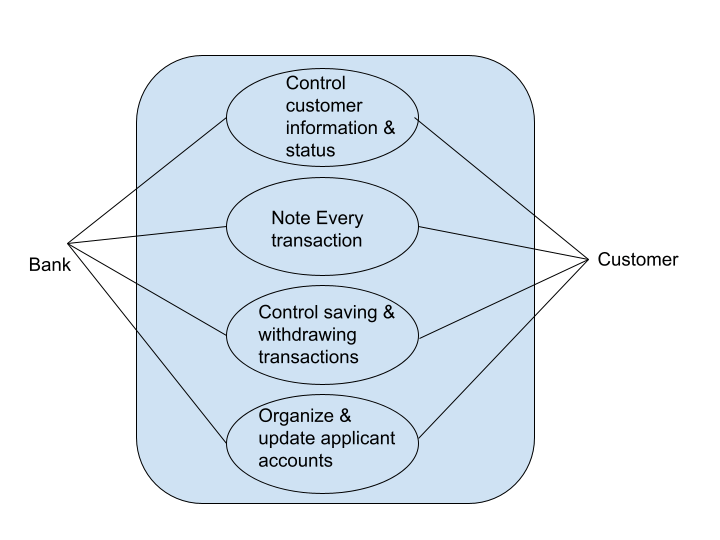
Use Case Diagram for the online bank system

Control customer information and status

Here, the bank administrator handles the vital client data that will be used as a foundation     when a client does a transaction and updates their status.

They were able to track the client's transactions and the service provided thanks to this method. Information about the clients is encoded into the system. The system will then keep track of these details to confirm them before saving the data.
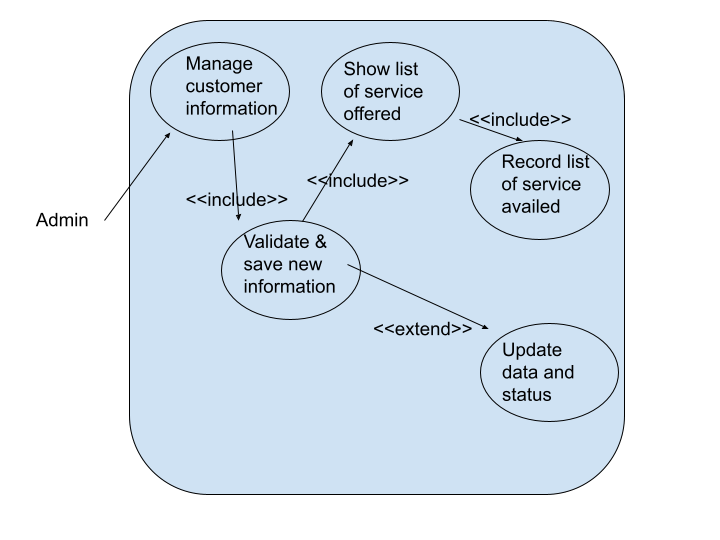
Use Case Diagram for the online bank system

Control saving and withdrawing transactions

The administrator will be responsible for overseeing customer withdrawals and savings during this procedure. In order to update the client account balance, the customer information must be saved.
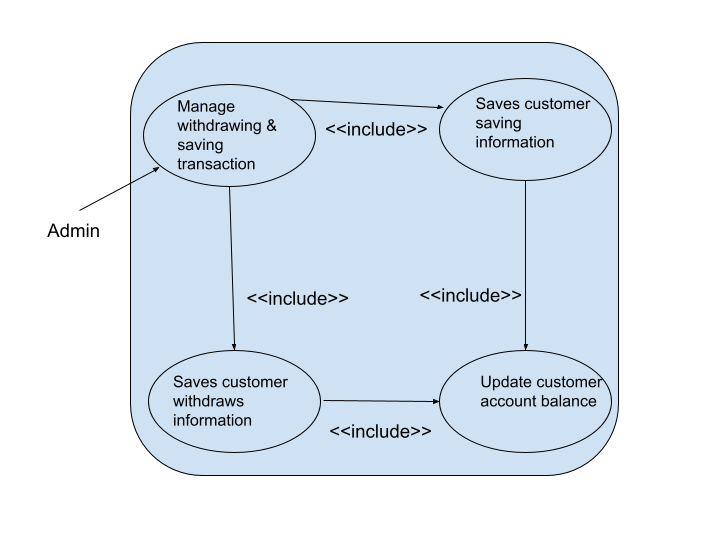
Use Case Diagram for the online bank system

Other use cases in online bank management system

  • To use the services provided by the Bank, a Customer must first set up an account. For each new customer, the bank checks the information and opens a new account. Each client is a player in the Use-Case. Diagram and Use-Case functionality for adding accounts are provided by the online banking system.
  • Each customer has the option to examine their account balance and request a transfer of funds across different bank offices. An employee of a bank who assists customer service is known as a cashier.
  • Customers can carry out cash transactions in which they must either deposit or take cash from their bank accounts. Cash can be used to successfully complete one or more transactions using either debit or credit, or both.
  • Customers may or may not wish to get information for further action after each successful transaction. To verify and validate information, the manager can examine the interest value for each account associated with the transaction.
  • A consumer may also apply for a loan at a bank, but they must provide the necessary information in their loan request.
  • The customer must offer the type of loan in line with the reason for the loan, the need for the loan, and the period or length of time to repay the loan.
  • The manager of each bank branch has the option of accepting or approving the loan to start the process further or simply rejecting the loan request depending on the terms and conditions.
  • Bank keeps a record of every employee, and Bank is in charge of all Bank employees in every Bank branch. Each branch manager is free to decide whether to give bonuses to the staff. Remember that while every employee receives compensation as part of staff management, not every employee will necessarily receive a promotion or bonus.

Related Topics

BCD to 7 Segment Decoder

What is BCD? BCD is called Binary Coded Decimal. As you know there are a lot of forms in which we can represent the number like Binary, decimal, hexadecimal, and octal...

3 minutes read.

8086 Microprocessor Pin Configurations

8086 microprocessor is invented and developed by Intel in 1976. The 8086 Microprocessor is an enhanced version of the 8085 Microprocessor. There are 20 address lines and 16 data lines...

6 minutes read.

Local Broadcast Address and loopback address

In computer networking, if you send the data from one source to another source or group of sources in the form of packets, then this is called casting. We can categorize...

3 minutes read.

8085 Arithmetic Instructions

Arithmetic instructions are a type of instruction in a computer's instruction set that perform arithmetic operations on data. These operations can include addition, subtraction, multiplication, and division. Arithmetic instructions can...

4 minutes read.

Control Signals in 8155 Microprocessor

Intel designed the chip 8155 used to interface with I/O devices. Basically, the 8085 microprocessor is directly unable to deal with its peripheral input output devices for reading data or...

3 minutes read.

COA: Interrupt and its types

Introduction: In general terms, the word interrupt means to stop the progress of ongoing work in between or to break the continuation of the work. In early digital computing, the...

5 minutes read.

Machine Instructions

What is a Digital Computer? A computer that takes input in a binary form and produces output in binary form. The question arises of what kind of input the computer takes...

4 minutes read.

Convert a number from base 2 to base 6

Base 2 Base 2 is the format where you can represent any number with just two values which are 0 and 1. With the help of 0s and 1s, we can...

4 minutes read.

Advantages and Disadvantages of Flash Memory

What is Flash Memory? Electrically Erasable Programmable Read-Only Memory (EEPROM) and Erasable Programmable Read-Only Memory (EPROM) are used for flash memory (EEPROM). Although technically the word flash is used in the industry...

3 minutes read.

Data Transfer and Manipulation

What is Data Transfer? In computer architecture, data transfer refers to the movement of data between different components within a computer system. These components can include the central processing unit (CPU),...

6 minutes read.

74138 IC DECODER

74138 DECODER Decoder A combinational circuit called a decoder can have up to 2n output lines and 'n' input lines. When a decoder is enabled, depending on the mix of inputs,...

4 minutes read.

8255 Microprocessor Operating Modes

8255 microprocessor was invented by intel in the year 1980s. 8255 microprocessor is a general-purpose microprocessor that can be programmed. 8255 is mostly used as an interface between devices like...

3 minutes read.

Ethernet Frame Format

What is Ethernet? As we know in computer networking, LAN (Local Area Network) is used to connect devices in limited geographical areas like schools or a building.LAN uses different topologies (arrangement...

3 minutes read.

Pipelining: Computer Organization and Architecture

Introduction to Pipelining Before learning pipeline, we have to understand about the Parallel processing. Parallel processing is the processing of data simultaneously. There are three techniques of parallel processing. Types of Processing: Vector ProcessingArray...

7 minutes read.

Instruction Pipelining and Pipeline Hazards

Instruction Pipelining and Pipeline Hazards To apply pipeline, the prerequisite is to perform the same processing over multiple inputs, then pipelining is important. So instruction execution is the best example for...

10 minutes read.

Digital Number System

Digital Number System: The computer understands digital language only. Many number systems are used in digital technology. The most common are Decimal, Binary, Octal and Hexadecimal number systems. Types of the...

7 minutes read.

Biconnectivity in a Graph

What is a Graph? A graph is a structure where values are stored at the vertex, and the relation between vertices is denoted by edges. In a graph, if there is only...

4 minutes read.

Computer Organization and Architecture Tutorial

Introduction to Computer Organization and Architecture In this modern era, or we can say computer era, Technology from all around surrounds us. Human is conserved, connected and absorbed by Technology. From...

4 minutes read.

Control Unit Organization

Control Unit Organization The Control Unit is the unit in the CPU, which controls the various components like input  & output devices, logic unit and memory. The Control Unit is the...

7 minutes read.

Types of Microprocessors

Introduction:Microprocessor is known as the computer processor. The IC or integrated Circuit makes the microprocessor. That is the brain of the computer machine.  The microprocessor is the Processor or CPU (Central...

3 minutes read.