
React Native API
API
API stands for an Application programming interface. API allows communication between two software and is also responsible for data sharing. It takes the asked data from the server and delivers it to the application.
Let us understand API with an example-
Here we can consider that API(Application programming interface) works as a mode of transferring information. suppose you went to a tea stall for having a cup of tea. so what will do? will you make tea by yourself ? or you will ask the waiter to serve tea ? obviously you will not make tea by yourself. you will be asking the waiter to serve you tea here waiter can be considered as API you just asked him to provide you tea and he went and served you tea. That's exactly what API does you just need to call it and it will provide you your asked information.
Simplified working of API :
- API is called by the client /user by some specific action.
- If the call is valid then API makes calls to another program/server.
- The server gives the necessary data to API.
- API transfers data to the user
React native Alert: It displays an alert with a particular message. The Alert () method is used to execute this process. Usually, it is a popup.
React native allows three types of alerts -
- Simple Alert
- Two options alert
- Three options alert
React native geolocation API
It is used for getting location or geological location however it is slow and inaccurate. We do not need to import it. It is by default present in-app. It has different methods that are useful in web applications. Whenever we call this API, it returns the method. We will be discussing methods shortly. It is a very useful API, and as we get it by default from the react-native side, this makes it proficient because if you know about API integration, you must know how problematic it is. We often face various problems when trying to integrate an API into our app. It is also time-consuming. There are so many API available, some are paid, and some are unpaid, which will be good and provide accurate information, It is hard to identify, and some engineers charge a lot just for API integration, so having something like Geolocation API within react native is nothing less than a blessing. Let's see how to use this API by constructing an App:
App.js code:
import React, { Component } from 'react';
import { StyleSheet, Text, View, TouchableOpacity,Alert } from 'react-native';
export default class App extends Component {
    state = {
        location: null
    };


    find_Coordinates_of_mine = () => {
        navigator.geolocation.getCurrentPosition(
          locations => {
                const location = JSON.stringify(locations);
               this.setState({ location });
            },
            error => Alert.alert(error.message.has.arrived),
            { enableHighAccuracy: true, timeout: 2000, maximumAge: 2000 }
        );
    };


    render() {
        return (
            <View style={styles.container}>
                <TouchableOpacity onPress={this.findCoordinates}>
                    <Text style={styles.welcome}>Find My location :)</Text>
                    <Text>Location: {this.state.location}</Text>
                </TouchableOpacity>
            </View>
        );
    }
}


const styles = StyleSheet.create({
    container: {
        flex: 1,
        justifyContent: 'center',
        alignItems: 'center',
        backgroundColor: 'pink'
    },
    welcome: {
      flex:1,
        fontSize: 25,
        textAlign: 'center',
        margin: 15
    }
}
)
Output :
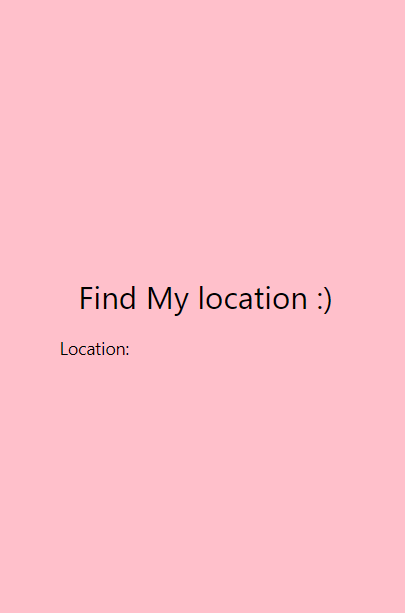
Find my location is touchable. When you click there, you will get an alert. Therefore, you will get the coordinates of your location.
Explanation:
firstly, We have imported all the components which we will need during app construction.
    state = {
        location: null
    };
we have initialize location as null to avoid wrong answers.
find_Coordinates_of_mine = () => {
        navigator.geolocation.getCurrentPosition(
          locations => {
                const location = JSON.stringify(locations);
               this.setState({ location });
            },
This is where API is called. And the JSON file gives the user's location, but firstly it will ask whether the user gives this app permission to fetch his/her location. If the user press yes, then it will only fetch the location. after fetching, we have again initialized the location but not will null. We have given the fetched value to the location.
 error => Alert.alert(error.message.has.arrived),
            { enable high accuracy: true, timeout: 2000, maximum: 2000 }
There can be a scenario where API cannot fetch the location for some reason. Well, in that case, we need to tell the user that the error happened, so we will use an error alert to inform the user that API was unable to fetch the location this time. So the user can try again or check the API that whether everything is okay or not, then the user can move forward with the location.
<TouchableOpacity onPress={this.findCoordinates}>
                    <Text style={styles.welcome}>Find My location :)</Text>
                    <Text>Location: {this.state.location}</Text>
                </TouchableOpacity>
Here we have made a button and it is responsive as said earlier and we have given title to them using the Text component.
This is for styling purposes.
Example- 2
App.js code:
import {
  SafeAreaView,
  View,
  Text,
  StyleSheet,
  Image,
  Platform,
  Button,
} from 'react-native';
import React, {useState, useEffect} from 'react';
import Geolocation from '@react-native-community/geolocation';
 const App_mine = () => {
  const [
    currentLongitude,
    setCurrentLongitude
  ] = useState('...');
  const [
    currentLatitude,
    setCurrentLatitude
  ] = useState('...');
  const [
    locationStatus,
    setLocationStatus
  ] = useState('');

  useEffect(() => {
    const requestLocationPermission = async () => {
      if (Platform.OS === 'ios') {
        getOneTimeLocation();
        subscribeLocationLocation();
      } else {
        try {
          const granted = await PermissionsAndroid.request(
            PermissionsAndroid.PERMISSIONS.ACCESS_FINE_LOCATION,
            {
              title: 'Location Access Required for information',
              message: 'App needs to Access your location allow please',
            },
          );
          if (granted === PermissionsAndroid.RESULTS.GRANTED) {


            getOneTimeLocation();
            subscribeLocationLocation();
          } else {
            setLocationStatus('Permission Denied');
          }
        } catch (err) {
          console.warn(err);
        }
      }
    };
    requestLocationPermission();
    return () => {
      Geolocation.clearWatch(watchID);
    };
  }, []);

  const getOneTimeLocation = () => {
    setLocationStatus('Getting Location ...');
    Geolocation.getCurrentPosition(
      (position) => {
        setLocationStatus('your location longitude and latitude are following -  ');
        const currentLongitude =
          JSON.stringify(position.coords.longitude);
        const currentLatitude =
          JSON.stringify(position.coords.latitude);
        setCurrentLongitude(currentLongitude);
        setCurrentLatitude(currentLatitude);
      },
      (error) => {
        setLocationStatus(error.message);
      },
      {
        enableHighAccuracy: false,
        timeout: 30000,
        maximumAge: 1000
      },
    );
  };
 const subscribeLocationLocation = () => {
    watchID = Geolocation.watchPosition(
      (position) => {

        setLocationStatus('Your location');
        console.log(position);
        const currentLongitude =
          JSON.stringify(position.coords.longitude);
        const currentLatitude =
          JSON.stringify(position.coords.latitude);
        setCurrentLongitude(currentLongitude);
        setCurrentLatitude(currentLatitude);
      },
      (error) => {
        setLocationStatus(error.message);
      },
      {
        enableHighAccuracy: false,
        maximumAge: 1000
      },
    );
  };

  return (
    <SafeAreaView style={{flex: 1}}>
      <View style={styles.container}>
        <View style={styles.container}>
          <Text style={styles.boldText}>
            {locationStatus}
          </Text>
          <Text
            style={{
              flex:1,
             marginTop: 10,
            }}>
            Longitude: {currentLongitude}
          </Text>
          <Text
            style={{
              justifyContent: 'center',
              alignItems: 'center',
              marginTop: 26,
            }}>
            Latitude: {currentLatitude}
          </Text>
          <View style={{marginTop: 10}}>
            <Button
              title="press me "
              onPress={getOneTimeLocation}
            />
          </View>
        </View>
        <Text
          style={{
            fontSize: 18,
            textAlign: 'center',
            color: 'grey'
          }}>
        </Text>
        <Text
          style={{
            fontSize: 16,
            textAlign: 'center',
            color: 'pink'
          }}>
        </Text>
      </View>
    </SafeAreaView>
  );
};

const styles = StyleSheet.create({
  container: {
    flex: 1,
    backgroundColor: 'gray',
    padding: 20,
    alignItems: 'center',
    justifyContent: 'center',
  },
  boldText: {
    fontSize: 20,
    color: 'pink',
    marginVertical: 26,
  },
});

export default App_mine;
Output:
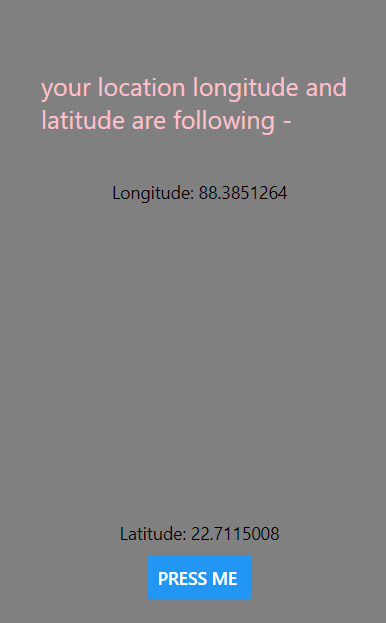
Explanation :
import Geolocation from '@react-native-community/geolocation';
We are importing components as per our need, additionally, we are importing geolocation from the react-native community.
Next, we have used useState for basic initialization and constants.
PermissionsAndroid.PERMISSIONS.ACCESS_FINE_LOCATION,
            {
              title: 'Location Access Required for information',
              message: 'App needs to Access your location allow please',
            },
          );
          if (granted === PermissionsAndroid.RESULTS.GRANTED) {
This is for permission because we know accessing any user's address without permission can be a crime.
Next, we have used lifecycle methods for the smooth working of code, and then API is called, and longitude and Lattitude are fetched in JSON format, and both of them are separated and displayed in output if it is fetched. There can be another case in which API will fail to fetch the longitude and latitude. In that case, we need to inform the user that an error is generated.
 (error) => {
        setLocationStatus(error.message);
      },
      {
        enableHighAccuracy: false,
        maximumAge: 1000
      },
    );
  };
This part is used for error handling. If API will fail to load the location then we will show errors in the place of longitude and latitude. This will help to know that we need to troubleshoot the problem otherwise we would be getting some wrong and inaccurate locations without knowing that something wrong has happened with API.
 setLocationStatus('Your location');
        console.log(position);
        const currentLongitude =
          JSON.stringify(position.coords.longitude);
        const currentLatitude =
          JSON.stringify(position.coords.latitude);
        setCurrentLongitude(currentLongitude);
        setCurrentLatitude(currentLatitude);
This is for initializing the longitude and latitude after the API fetches details.it gives us some broad co-ordinates and we need only longitude and latitude so we filter it using
JSON.stringify(position.coords.longitude); and JSON.stringify(position.coords.latitude);And then, we initialize them with respective values.
So here we have learned about the API of react-native. Both Alert and geo-locations are important to know. There are some other APIs. Too we will be learning about them in further parts. If you will understand the terminology or work and handling these APIs, then using other APIs in your app will be quite simple for you.