React Native Pressable

It manages all the touch inputs, and it is one of the core wrappers introduced in July 2022.

The Two important features of pressable are listed below-

  • onPressIn
  • onPressOut

onpressIn: We already know the work feature of onpress,onpressIn is a bit different from conventional onpress. Whenever the button is pressed, it is called.

onPressOut: The name has already given you a basic idea because we have just learned about onPressIn. So, it is called when the touch is removed or deactivated.

Props of Pressable:

Andriod_disableSound: We know that we get a default sound when we click on a button. If you want to remove or disable that well, then this prop can be used. It generally takes a boolean value. if it is true, then no sound will be played else

Sound will be played.

Android_ripple: We can enable or disable the rippling property of any app using this prop. It generally takes a boolean value.

Children: It is nothing but a function that receives the props whether the component is pressed or not.

Disable: If you want to disable the press property, then disable will be used. It generally takes a boolean value. If it is true, then the user cannot press the component.

Hitslop: It can be used to set additional distance outside of the component in which a press/touch can be detected.

Onpress: It is a well-known prop which is called after onpressout.

onpressIn: We already know the work feature of onpress,onpressIn is a bit different from conventional onpress. Whenever the button is pressed, it is called.

onPressOut: The name has already given you a basic idea because we have just learned about onPressIn. So, It is called when the touch is removed or deactivated.

Let's see one example -

App.js code:

import React, { useState } from 'react';
import { Pressable, StyleSheet, Text, View } from 'react-native';


const App = () => {
  const [times_Pressed, setTimesPressed] = useState(0);


  let textLog = '';
  if (times_Pressed > 1) {
    textLog = times_Pressed + ' times Pressed by user';
  } else if (times_Pressed > 0) {
    textLog = 'onPress';
  }


  return (
    <View style={{backgroundColor:'gray'}}>
      <Pressable
        onPress={() => {
          setTimesPressed((current) => current + 1);
        }}
        style={({ pressed }) => [
          {
            backgroundColor:'pink'
            
          },
          styles.wrapperCustom
        ]}>
        {({ pressed }) => (
          <Text style={styles.text}>
            {pressed ? 'yes Pressed!' : 'hello Press Me'}
          </Text>
        )}
      </Pressable>
      <View style={styles.logBox}>
        <Text testID="pressable_press_console">{textLog}</Text>
      </View>
    </View>
  );
};


const styles = StyleSheet.create({
  text: {
    fontSize: 16
  },
  wrapperCustom: {
    borderRadius: 8,
    padding: 6
  },
  logBox: {
    
    margin: 20,
    padding: 35,
    borderWidth: StyleSheet.hairlineWidth,
    borderColor: 'white',
    backgroundColor: 'white'
  }
});


export default App;

Output: 
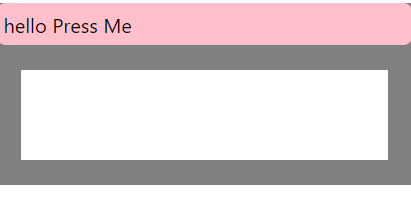
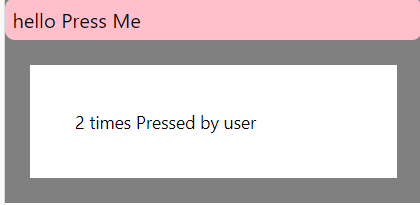
React native Pressable

Explanation :

We use useState hooks here.

if (times_Pressed > 1) {
    textLog = times_Pressed + ' times Pressed by user';
  } else if (times_Pressed > 0) {
    textLog = 'onPress';
  }

This part of the code is for displaying the difference when the button is pressed multiple times. If pressed time is greater than 1, then it will show total pressed time + “times pressed by the user”. Example- if user presses it 2 times then the output will be “2 times pressed by the user”.

And if not greater than 1 then it will show only basic text.

<Pressable
        onPress={() => {
          setTimesPressed((current) => current + 1);
        }}

 This part of the code is responsible for the simultaneous counting of numbers when the button is pressed.

Then we will be constructing a header for the app, A header that will be displayed above the button. You can see in the output that it shows 'hello press me'.

  logBox: {
        margin: 20,
    padding: 35,
    borderWidth: StyleSheet.hairlineWidth,
    borderColor: 'white',
    backgroundColor: 'white'
  }
});

This is the styling part. The logbox is styling for the box of white color that you can clearly see in the output, and the rest is for full-page styling like background color, padding, etc. Possibility API is generally used in Pressable.

This was all about react-native pressable. Next, we will be learning touchable opacity.


Related Topics

React Native Components

React Native components are the same as ordinary react components, but they are different in terms of rendering and styling. All react code lives in react components. They are independent...

16 minutes read.

React Native Pressable

It manages all the touch inputs, and it is one of the core wrappers introduced in July 2022. The Two important features of pressable are listed below- onPressInonPressOut onpressIn: We already know the...

3 minutes read.

React Native Fonts

The font is one of the important essences of any good UI(User Interface). It is very important to have a clear and beautiful font in your app. In this module,...

4 minutes read.

React Native stack navigation

You must know about the stack data structure. Stack is one of the important data structures which works in the FILO(first in last out) method. As you know, mobile apps are...

4 minutes read.

React Native Sound

It is a great way to connect to the user. Just a tiny "ting" of any email received, or some sound for deleting a file or sound for sending a...

8 minutes read.

What is a Bridge in React Native?

A React Native is generally composed of two fields or two parts: The first part is the code of JavaScript.The second one is native code. The ability to build a bridge between...

3 minutes read.

React Native Alert

In this part of the tutorial, we will learn about react-native's alert API. It is compatible with both android and IOS. What is API? Answer - API stands for Application programming interface,...

4 minutes read.

React Native indicator

React native activity indicator : React native activity indicator is one of the react-native components. We all have seen it several times. It's the loader. Look at the picture below - So now...

4 minutes read.

Basic knowledge of firebase for React Native

Firebase for react-native : Firebase is a mobile and web application development platform which is created in 2014 by google. It is a product of google which is offered to developers...

7 minutes read.

React Native Toast

Introduction: It is a message that will be displayed on the screen for a short span of time to interrupt the user. Primarily it is displayed by any user action....

5 minutes read.

TouchableOpacity in React Native

Touchable opacity is the most suited example if you want to make views respond to proper touch. If you want to control the opacity then it can be done by...

3 minutes read.

Redux in React Native

 It is a really amazing library of javascript, react, and react-native. It is very popular in react native domain. Every react and react native developer must know the redux it...

7 minutes read.

Why to Learn React Native

The demand for smartphone applications is ever-changing. The elder ones disappear from our remembrances, and smartphones and new applications come each day. In this turbulent ecosystem, it is struggling for...

4 minutes read.

React native calender

In this article, we will be learning to add calendar features to react native app. So before creating the calendar, we do need to install a few packages or add some...

3 minutes read.

React Native Animations

Animation: animation is a method in which puppets, figures, drawings, etc., appear as moving creatures, making an illusion that things are moving. It is a unique way of expressing something...

6 minutes read.

Difference Between React.js and React Native

React js vs. React-native React native:  react-native is an open-source javascript framework that can be used to develop native mobile apps for IOS and android. Facebook released it in 2015 and witnessed...

3 minutes read.

React Native Tutorial

Introduction to react native : React-native is an open-source javascript framework that can be used to develop native mobile apps for IOS and android. It is released by Facebook in 2015...

4 minutes read.

React Native navigation bar and button

Here we will be focusing on header navigation. We will add buttons to the header, which is the best way to interact with a header. We have already learned about...

4 minutes read.

HTTP in React Native

Networking HTTP in React-native: we all are aware that react native is a javascript framework.HTTP is nothing but an API request, and you might think that what is the need for an...

4 minutes read.

How Does React Native Work

Working of React Native React Native is a framework that lets us write android and iOS mobile applications using JavaScript. It is interesting to see how easy it is to develop...

4 minutes read.