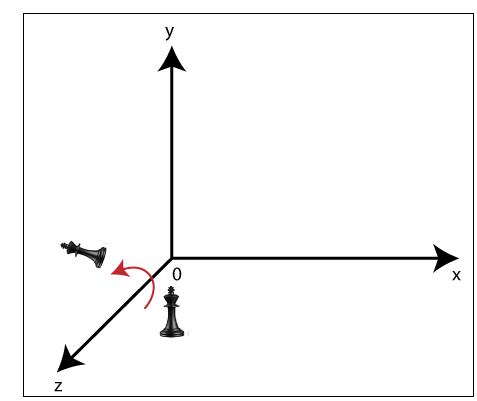
3D Rotation

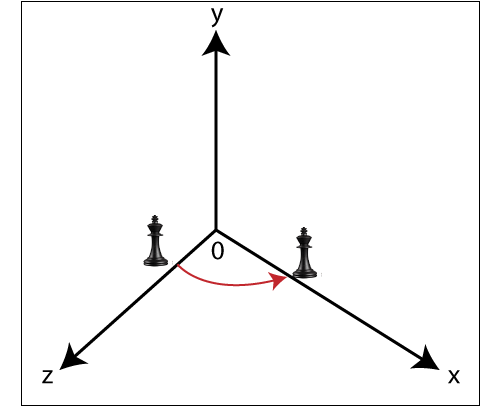
The 3D rotation is different from 2D rotation. In 3D Rotation we also have to define the angle of Rotation with the axis of Rotation.

For Example- Let us assume,

The initial coordinates of an object = (x0, y0, z0)

The Initial angle from origin = β

The Rotation angle = θ

The new coordinates after Rotation = (x1, y1, z1)

In Three-dimensional plane we can define Rotation by following three ways-

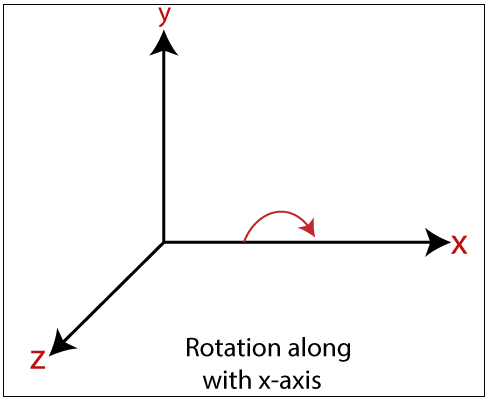
  • X-axis Rotation: We can rotate the object along x-axis. We can rotate an object by using following equation-3d Rotation

We can represent 3D rotation in the form of matrix-
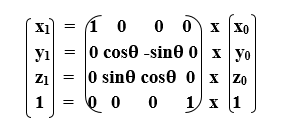
3d Rotation 3d Rotation 3d Rotation
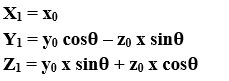
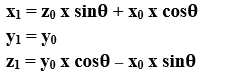
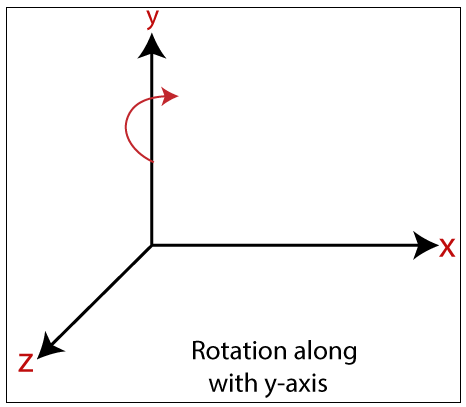
  • Y-axis Rotation: We can rotate the object along y-axis. We can rotate an object by using following equation-3d Rotation

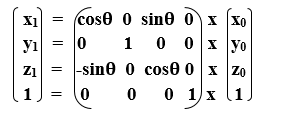
We can represent 3D rotation in the form of matrix-
3d Rotation 3d Rotation 3d Rotation
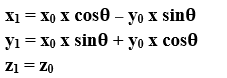
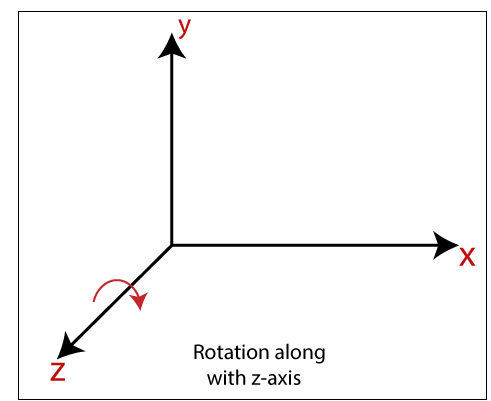
  • Z-axis Rotation: We can rotate the object along z-axis. We can rotate an object by using following equation-3d Rotation

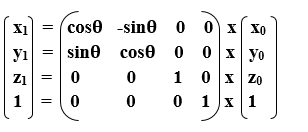
We can represent 3D rotation in the form of matrix-
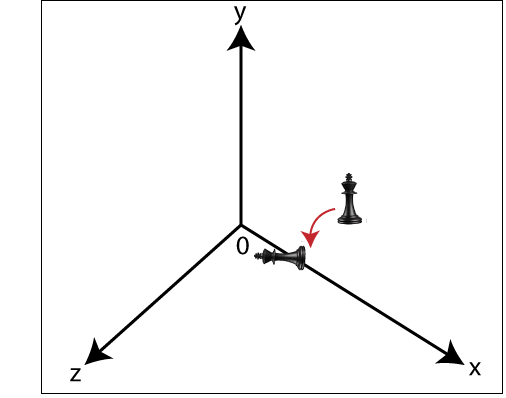
3d Rotation 3d Rotation 3d Rotation

Example: A Point has coordinates P (2, 3, 4) in x, y, z-direction. The Rotation angle is 90 degrees. Apply the rotation in x, y, z direction, and find out the new coordinates of the point?

Solution: The initial coordinates of point = P (x0, y0, z0) = (2, 3, 4)

Rotation angle (θ) = 90°

For x-axis-

Let the new coordinates = (x1, y1, z1) then,

x1= x0 = 2

y1= y0 x cosθ – z0 x sinθ = 3 x cos90°– 4 x sin90° = 3 x 0 – 4 x 1 = -4

z1= y0 x sinθ + z0 x cosθ = 3 x sin90°+ 4 x cos90° = 3 x 1 + 4 x 0 = 3

The new coordinates of point = (2, -4, 3)

For y-axis-

Let the new coordinates = (x1, y1, z1) then,

X1= z0 x sinθ + x0 x cosθ = 4 x sin90° + 2 x cos90° = 4 x 1 + 2 x 0 = 4

y1= y0 = 3

z1= y0 x cosθ – x0 x sinθ = 3 x cos90°– 2 x sin90° = 3 x 0 – 4 x 0 = 0

The new coordinates of point = (4, 3, 0)

For z-axis-

Let the new coordinates = (x1, y1, z1) then,

x1= x0 x cosθ – y0 x sinθ = 2 x cos90° – 3 x sin90° = 2 x 0 + 3 x 1 = 3

y1= x0 x sinθ + y0 x cosθ = 2 x sin90° ­+ 3 x cos90° = 2 x 1 + 3 x 0 = 2

z1= z0 =4

The New Coordinates of points = (3, 2, 4)


Related Topics

2D Scaling

In scaling, we can expend or compress the size of any object. We can apply scaling on the object by multiplying the original coordinates with scaling factors. The term scaling factor...

2 minutes read.

Line Drawing Algorithm in Computer Graphics

“The Line drawing algorithm is a graphical algorithm which is used to represent the line segment on discrete graphical media, i.e., printer and pixel-based media.” A line contains two points....

3 minutes read.

Illumination Model in Computer Graphics

Illumination Model in Computer Graphics The series of methods used to depict light in computer graphics scenarios is computer graphics illumination. Although lighting strategies provide versatility in the degree of detail...

8 minutes read.

Bresenham’s Circle Drawing Algorithm in Computer Graphics

Bresenham’s algorithm is also used for circle drawing. It is known as Bresenham’s circle drawing algorithm. It helps us to draw a circle. The circle generation is more complicated than...

11 minutes read.

Filled Area Primitives Computer Graphics

Filled Area Primitives: Area filling is a method or process that helps us to fill an object, area, or image. We can easily fill the polygon. The polygon filling is...

4 minutes read.

Line Clipping in Computer Graphics

The line clipping is a process in which we can cut the part of the line, which lies outside the view pane. Only those lines are visible, which lie inside the view pane....

13 minutes read.

3D Translation

A 3D Translation process contains the x-axis, y-axis, and z-axis. We can move any object from one place to another without changing the shape of the object. For Example-Translation of a...

1 minute read.

Point Clipping

“Point clipping is a process which is used to define the point position.” The point is either inside the view pane (window) or outside the view pane. In computer graphics, the computer...

2 minutes read.

3D Shearing

We can denote shearing with ‘SHx,’ ‘SHy,’ and ‘SHz.’ These ‘SHx,’ ‘SHy,’ ‘SHz’ are called “Shearing factor.” The basic difference between 2D and 3D Shearing is that the 3D plane also...

1 minute read.

3d Scaling

The 2D and 3D scaling are similar, but the key difference is that the 3D plane also includes the z-axis along with the x and y-axis. In scaling, we can expend...

2 minutes read.

History of Computer Graphics

History of Computer Graphics Computer Graphics (CG) was first developed as a visualization tool. Computer graphics were basically introduced for scientists and engineers in government and corporate research centers, i.e., Bell Labs and Boeing...

4 minutes read.

Output Devices in Computer Graphics

Computer Graphics Output Devices An output device is a component of hardware or the main physical part of a computer that can be touched and seen. An output device is an electromechanical device. “The...

5 minutes read.

Scan Conversion of an Ellipse Computer Graphics

Scan Conversion of an Ellipse: An ellipse can be defined as a closed plane curve, which is a collection of points. It is the cause of the intersection of a...

8 minutes read.

3D Reflection

The Reflection is a mirror image of the original object. We can differentiate 2D and 3D reflection by adding Z-axis. The Z-axis shows the depth of the surface. In the...

1 minute read.

Computer Graphics Tutorial

Introduction to Computer Graphics Computer graphics is commonly seen as a computer science branch that deals with the computerized image fusion theory and technology. As simple as a triangle outline, a...

6 minutes read.

Anti-aliasing in Computer Graphics

Anti-aliasing in Computer Graphics “Anti-aliasing is a method for eliminating the aliasing effect used in computer graphics. In a 2-dimensional object, the ambient occlusion impact is the existence of sharp edges...

7 minutes read.

Animation in Computer Graphics

The word Animation is extracted from a Latin language, "Anima," which means "Soul." TheAnimation is a technology that allows any image object, an entity to walk, talk, or do some...

3 minutes read.

Polygon Clipping in Computer Graphics

“A Polygon can be described as the enclosed collection or group of the lines.” In a polygon, all lines are connected. Lines can be a combination of edges and vertices,...

4 minutes read.

2D Reflection

The Reflection is a mirror image of the original object. In the Reflection process, the size of the object does not change. We can represent Reflection by using four ways- Reflection along...

2 minutes read.

Types of Computer Graphics

Types of Computer Graphics The computer graphics contains two types. They are- Raster (Bitmap) graphicsVector graphics Many individuals are likely to consider pictures on computers (or phones, tablets, or some other electronic gadget...

5 minutes read.