
Composite Transformation in Computer Graphics

Composite transformation in Computer Graphics

It is possible to integrate a range of transformations or series of transformations into some kind of a single one which is known as composition. The combined matrix is known as the resultant matrix. The merger procedure is termed as concatenation.

Assume that we want to execute rotation around an arbitrary point, and we'll do it through a series of following three transformations.

  • Translation
  • Rotation
  • Reverse Translation

The arranging pattern of these transformation numbers should not be modified. If a matrix is expressed in a column’s format, the composite transformation is carried out, by multiplying the sequence of the matrix from the right-hand side to the left-hand side. The output of the former matrix is multiplied by the new matrix that will come.

Instances of Composite Transformation

The enhancement has to do with the center. The following series of transformations will also be carried out and all will be integrated into a single one.

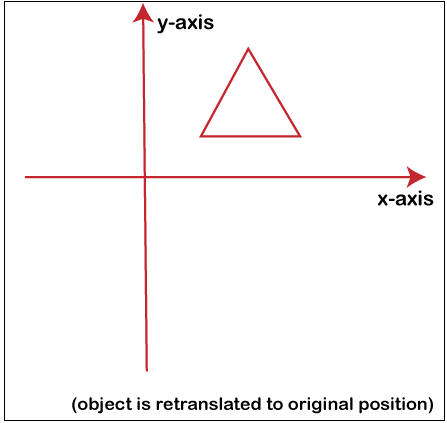
Phase 1: As shown in the image (1), the entity is preserved in its location
Composite transformation in Computer Graphics

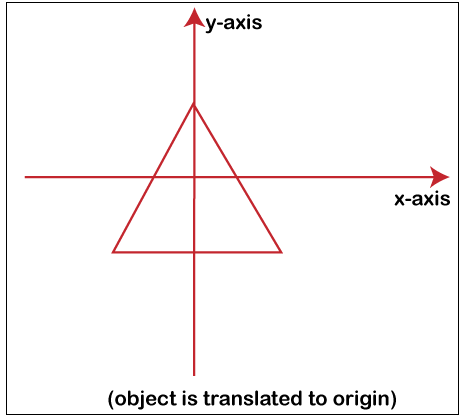
Phase 2: The entity is transformed so that, as displayed in the image (2), its center correlates with the origin.
Composite transformation in Computer Graphics

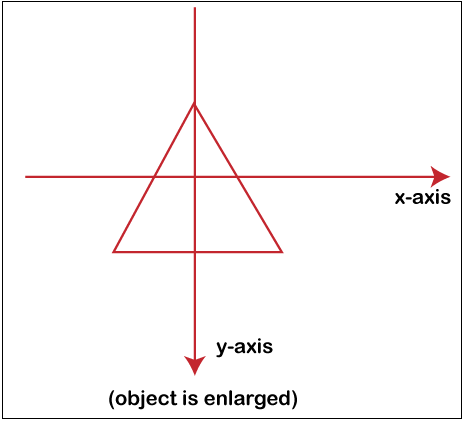
Phase 3: The scaling of an entity is accomplished in Image (3) by holding the entity at its source.
Composite transformation in Computer Graphics

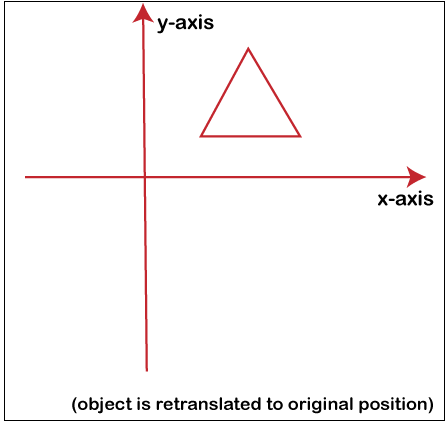
Phase 4: The translation is completed once again. The next translation is known as a reverse translation. It will place the entity at the location of its center point.
Composite transformation in Computer Graphics

The above­-given transformation can be defined as Tv.STv-1.

Important Point:

For expressing matrices, two kinds of rotations are used: one will be the column form. The Row Method will be another form.

Here we will discuss both formats one by one.

  • Column Format

The matrix of the column method is-

  1. Translation

           1    0     Tx

           0    1     Ty                     

           0    0     1

  • Scaling

           1    0     Sx

           0    1     Sy                     

           0    0     1

  • Row Format

The matrix of the row method is-

  1. Translation

           1     0      0

           0     1      0                     

           Tx   Tx    1

  • Scaling

           1      0      0

           0      1      0                     

           Sx     Sy    1

Benefits of Combined or Concatenated matrix

  • The adjustments are lightweight.
  • It will decrease operations.
  • In contrast to the matrix, the principles used for describing transformation in the form of equations are complicated.

Assembling of two translations

Let the translation equations be T1 T2 T3 T4. These are the two Q1 and Q2 translations. The following matrix of Q1 and Q2 is given. Using homogeneous matrices, Q1 and Q2 are described, and Q will be the last transformation matrix received after multiplication.

            1     0      T1                                                                 1     0      T3  

Q1 =     0     1      T2                            Q2 =         0     1      T4                    

            0     0      1                                               0     0      1   

                                                 1      0      T1 + T2

   Q =      0      1      T3 + T4                     

                                                 0      0          1

The resulting matrix mentioned above demonstrates that two consecutive translations are complementary.

Two Rotation concentration: Two Rotations are both additives.  

Composition of two scaling

There is a multiplicative combination of 2 scaling. Let the whole matrix be multiplied by R11 and R12.

             R1      0      0                          S3      0      0 

 R11 =    0       R2     0            R12 =     0       S4     1

              0       1      0                           0       0      1

R = R11 ­* R12 = R11 (R1.R2). R12 (R3. R4) = R (R1. R2. R3. R4)       


Related Topics

Display Devices in Computer Graphics

The display device is an output device used to represent the information in the form of images (visual form). Display systems are mostly called a video monitor or Video display unit (VDU). Display devices are designed to model, display, view, or display information. The...

6 minutes read.

Homogenous Coordinates in Computer Graphics

Homogenous Coordinates in Computer Graphics The orbit of a point, a line graph or the whole picture on the computer, a point besides the origin, is accomplished by first shifting the...

7 minutes read.

Line Drawing Algorithm in Computer Graphics

“The Line drawing algorithm is a graphical algorithm which is used to represent the line segment on discrete graphical media, i.e., printer and pixel-based media.” A line contains two points....

3 minutes read.

Aspect Ratio in Computer Graphics

Aspect Ratio in Computer Graphics You might well understand the concept of Aspect ratio as of now if you know regarding aerial photography or see the configuration portion of any computer...

5 minutes read.

Projection in Computer Graphics

Projection Introduction: The technique projection was invented by the Swiss mathematician, engineer, and astronomer "Leonhard Euler Around" in 1756. The "Episcope" was the first projection system. “Projection is a technique or process which...

4 minutes read.

Applications of Computer Graphics

Applications of Computer Graphics Some applications of computer graphics are mentioned below- Graphical User Interface (GUI): It is a way of interacting with a computer using the icon, ...

2 minutes read.

DDA line Drawing Algorithm in Computer Graphics

DDA (Digital Differential Analyzer) Line Drawing Algorithm The Digital Differential Analyzer helps us to interpolate the variables on an interval from one point to another point. We can use the digital Differential Analyzer algorithm...

5 minutes read.

Scan Conversion in Computer Graphics

“When we represent regular objects in the form of discrete pixels, it is called Scan Conversion.” Every graphics system must transform the primitives into a collection of pixels. The scan conversion is also...

2 minutes read.

Point Clipping

“Point clipping is a process which is used to define the point position.” The point is either inside the view pane (window) or outside the view pane. In computer graphics, the computer...

2 minutes read.

Anti-aliasing in Computer Graphics

Anti-aliasing in Computer Graphics “Anti-aliasing is a method for eliminating the aliasing effect used in computer graphics. In a 2-dimensional object, the ambient occlusion impact is the existence of sharp edges...

7 minutes read.

Zooming

In computer graphics, the term “Zoom is referred as a function, focuses on a particular portion or part of an image and also enlarging the image’s size for greater details.” In windows...

2 minutes read.

3d Scaling

The 2D and 3D scaling are similar, but the key difference is that the 3D plane also includes the z-axis along with the x and y-axis. In scaling, we can expend...

2 minutes read.

2D Scaling

In scaling, we can expend or compress the size of any object. We can apply scaling on the object by multiplying the original coordinates with scaling factors. The term scaling factor...

2 minutes read.

Panning

“Panning is a process or photographic technique that is used to combine slow shutter speed with camera movement to make a speed sense around the moving object.” We can define panning as...

2 minutes read.

Display Processor

It is a part of hardware or interpreter which is used to transform display processor code into pictures. It is used to convert digital information from CPU to analog data. It...

4 minutes read.

Input Devices in Computer Graphics

An Input device is the piece of computer hardware equipment used to give input to the computer. The input can be in the form of graphics, text, sound, audio, video,...

7 minutes read.

Transformation

Introduction The term Transformation is generally referred to as converting a graphic into another graphic by applying some rules or algorithms. Sometimes an image or picture can be a combination of lines, rectangle,...

2 minutes read.

2D Reflection

The Reflection is a mirror image of the original object. In the Reflection process, the size of the object does not change. We can represent Reflection by using four ways- Reflection along...

2 minutes read.

History of Computer Graphics

History of Computer Graphics Computer Graphics (CG) was first developed as a visualization tool. Computer graphics were basically introduced for scientists and engineers in government and corporate research centers, i.e., Bell Labs and Boeing...

4 minutes read.

Computer Graphics Window

“The process of selecting and viewing an image with different views, called windowing.” All the objects in the real world have a size. We can measure the size and location of...

4 minutes read.