
DDA line Drawing Algorithm in Computer Graphics

DDA (Digital Differential Analyzer) Line Drawing Algorithm

The Digital Differential Analyzer helps us to interpolate the variables on an interval from one point to another point. We can use the digital Differential Analyzer algorithm to perform rasterization on polygons, lines, and triangles.

Digital Differential Analyzer algorithm is also known as an incremental method of scan conversion. In this algorithm, we can perform the calculation in a step by step manner. We use the previous step result in the next step.

As we know the general equation of the straight line is:

y = mx + c

Here, m is the slope of (x1, y1) and (x2, y2).

m = (y2 – y1)/ (x2 – x1)

Now, we consider one point (xk, yk) and (xk+1, yk+1) as the next point.

Then the slope m = (yk+1 - yk)/ (xk+1 - xk)

Now, we have to find the slope between the starting point and ending point. There can be following three cases to discuss:

Case 1: If m < 1

             Then x coordinate tends to the Unit interval.

                         xk+1 = xk + 1

                         yk+1 = yk + m

Case 2: If m > 1

             Then y coordinate tends to the Unit interval.

                         yk+1 = yk + 1

                          xk+1 = xk + 1/m

Case 3: If m = 1

             Then x and y coordinate tend to the Unit interval.

                         xk+1 = xk + 1

                         yk+1 = yk + 1

We can calculate all intermediate points with the help of above three discussed cases.

Algorithm of Digital Differential Analyzer (DDA) Line Drawing

Step 1: Start.

Step 2: We consider Starting point as (x1, y1), and ending point (x2, y2).

Step 3: Now, we have to calculate ?x and ?y.

              ?x = x2-x1

                    ?y = y2-y1

              m = ?y/?x               

Step 4: Now, we calculate three cases.

          If m < 1

       Then x change in Unit Interval

                y moves with deviation

              (xk+1, yk+1) = (xk+1, yk+1)

         If m > 1

      Then x moves with deviation

                y change in Unit Interval

              (xk+1, yk+1) = (xk+1/m, yk+1/m)

         If m = 1

       Then x moves in Unit Interval

                y moves in Unit Interval

              (xk+1, yk+1) = (xk+1, yk+1)

Step 5: We will repeat step 4 until we find the ending point of the line.

Step 6: Stop.

Example: A line has a starting point (1,7) and ending point (11,17). Apply the Digital Differential Analyzer algorithm to plot a line.

Solution: We have two coordinates,

Starting Point = (x1, y1) = (1,7)

Ending Point = (x2, y2) = (11,17)

Step 1: First, we calculate ?x, ?y and m.

           ?x = x2 – x1 = 11-1 = 10

             ?y = y2 – y1 = 17-7 = 10

              m = ?y/?x = 10/10 = 1

Step 2: Now, we calculate the number of steps.

              ?x = ?y = 10

Then, the number of steps = 10

Step 3: Weget m = 1, Third case is satisfied.

              Now move to next step.

          xk          yk          xk+1           yk+1     (xk+1, yk+1)
1 7 2 8 (2, 8)
    3 9 (3, 9)
    4 10 (4, 10)
    5 11 (5, 11)
    6 12 (6, 12)
    7 13 (7, 13)
    8 14 (8, 14)
    9 15 (9, 15)
    10 16 (10, 16)
    11 17 (11, 17)

Step 4: We will repeat step 3 until we get the endpoints of the line.

Step 5: Stop.
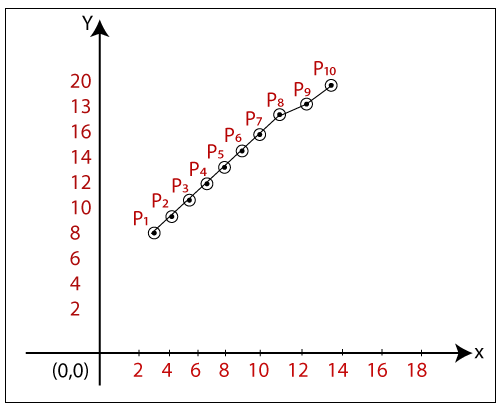
DDA line Drawing Algorithm in Computer Graphics

The coordinates of drawn line are-

P1 = (2, 8)

P2 = (3, 9)

P3 = (4, 10)

P4 = (5, 11)

P5 = (6, 12)

P6 = (7, 13)                                                   

P7 = (8, 14)

P8 = (9, 15)

P9 = (10, 16)

P10 = (11, 17)

Advantages of Digital Differential Analyzer

  • It is a simple algorithm to implement.
  • It is a faster algorithm than the direct line equation.
  • We cannot use the multiplication method in Digital Differential Analyzer.
  • Digital Differential Analyzer algorithm tells us about the overflow of the point when the point changes its location.

Disadvantages of Digital Differential Analyzer

  • The floating-point arithmetic implementation of the Digital Differential Analyzer is time-consuming. 
  • The method of round-off is also time-consuming.
  • Sometimes the point position is not accurate.

Related Topics

Output Devices in Computer Graphics

Computer Graphics Output Devices An output device is a component of hardware or the main physical part of a computer that can be touched and seen. An output device is an electromechanical device. “The...

5 minutes read.

Line Drawing Algorithm in Computer Graphics

“The Line drawing algorithm is a graphical algorithm which is used to represent the line segment on discrete graphical media, i.e., printer and pixel-based media.” A line contains two points....

3 minutes read.

Bresenham’s Line Drawing Algorithm in Computer Graphics

This algorithm was introduced by “Jack Elton Bresenham” in 1962. This algorithm helps us to perform scan conversion of a line. It is a powerful, useful, and accurate method. We...

8 minutes read.

Line Clipping in Computer Graphics

The line clipping is a process in which we can cut the part of the line, which lies outside the view pane. Only those lines are visible, which lie inside the view pane....

13 minutes read.

Rendering in Computer Graphics

Rendering in Computer Graphics Rendering is the operation, by virtue of a software system, of creating a picture from a template. In a specifically defined term or information structures, the model is a...

9 minutes read.

Display Devices in Computer Graphics

The display device is an output device used to represent the information in the form of images (visual form). Display systems are mostly called a video monitor or Video display unit (VDU). Display devices are designed to model, display, view, or display information. The...

6 minutes read.

Clipping in Computer Graphics

“The Clipping is a type of transformation used in computer graphics to remove lines, objects, and segments of lines that are outside the computer screen or viewing pane.” The clipping is a...

2 minutes read.

2D Shearing

We can denote shearing with ‘SHx’ and ‘SHy.’ These ‘SHx’ and ‘SHy’ are called “Shearing factor.” We can perform shearing on the object in two ways- Shearing along x-axis: In this, we...

2 minutes read.

2D Scaling

In scaling, we can expend or compress the size of any object. We can apply scaling on the object by multiplying the original coordinates with scaling factors. The term scaling factor...

2 minutes read.

3D Reflection

The Reflection is a mirror image of the original object. We can differentiate 2D and 3D reflection by adding Z-axis. The Z-axis shows the depth of the surface. In the...

1 minute read.

2D Rotation

The Rotation of any object depends upon the two points. Rotation Point: It is also called the Pivot point. Rotation Angle: It is denoted by Theta (). We can rotate an object in...

1 minute read.

DDA line Drawing Algorithm in Computer Graphics

DDA (Digital Differential Analyzer) Line Drawing Algorithm The Digital Differential Analyzer helps us to interpolate the variables on an interval from one point to another point. We can use the digital Differential Analyzer algorithm...

5 minutes read.

2D Reflection

The Reflection is a mirror image of the original object. In the Reflection process, the size of the object does not change. We can represent Reflection by using four ways- Reflection along...

2 minutes read.

Scan Conversion of a Circle Computer Graphics

A circle is an eight-way symmetric shape. All quadrants of a circle are the same. There are two octants in each quadrant of a circle. If we know the value of any...

3 minutes read.

3d Scaling

The 2D and 3D scaling are similar, but the key difference is that the 3D plane also includes the z-axis along with the x and y-axis. In scaling, we can expend...

2 minutes read.

Computer Graphics Window

“The process of selecting and viewing an image with different views, called windowing.” All the objects in the real world have a size. We can measure the size and location of...

4 minutes read.

2D Transformation in Computer Graphics

Some visuals are transformed into some other graphics by implementing several of the principles known as transformation. There are multiple kinds of transformation, including translation, scaling, rotation, shearing, etc. Whenever...

2 minutes read.

Panning

“Panning is a process or photographic technique that is used to combine slow shutter speed with camera movement to make a speed sense around the moving object.” We can define panning as...

2 minutes read.

Filled Area Primitives Computer Graphics

Filled Area Primitives: Area filling is a method or process that helps us to fill an object, area, or image. We can easily fill the polygon. The polygon filling is...

4 minutes read.

History of Computer Graphics

History of Computer Graphics Computer Graphics (CG) was first developed as a visualization tool. Computer graphics were basically introduced for scientists and engineers in government and corporate research centers, i.e., Bell Labs and Boeing...

4 minutes read.