Display Processor

It is a part of hardware or interpreter which is used to transform display processor code into pictures. It is used to convert digital information from CPU to analog data.

It is a digital-analog conversion which depends on the types of devices and graphics functions. The main function of display processors is called scan conversion.

In this process, contiguous graphics objects have to be separated as collections of ellipse, rectangles, and polygons.

The display processor is also sometimes called a display processing unit (DPU).

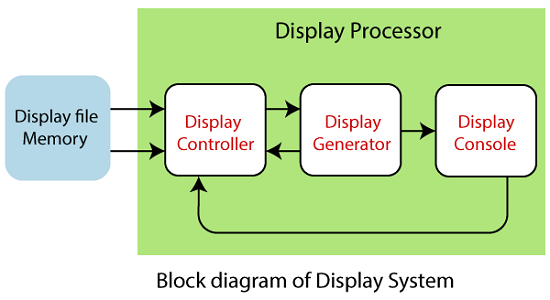
Parts of Display Processor: It has the following four parts:

  1. Display Controller
  2. Display File Memory
  3. Display Generator
  4. Display Console
Display Processor

Display Controller: It is also called the Video controller. It is used to control the operations of the display device. Its functions are as follows:

  • It is used to handle the interrupt.
  • It is used to interpret the instructions.
  • It is also used to manage time.

Display File Memory: It is used to create an image. It is also used for visual object recognition.

Display Generator: It is used to produce the character. It is also used to create curves.

Display Console: It consists of a CRT, Light pen, keyboard, and Deflection system.

Features of Display Processor:

  1. It is used to perform operations such as different line styles, displaying color area, and manipulating and transforming objects on display.
  2. Display Processors were used before the GPU (Graphics Display Processor).
  3. Video Controller is the widely used Display device that is base on CRT (Cathode Ray Tube).
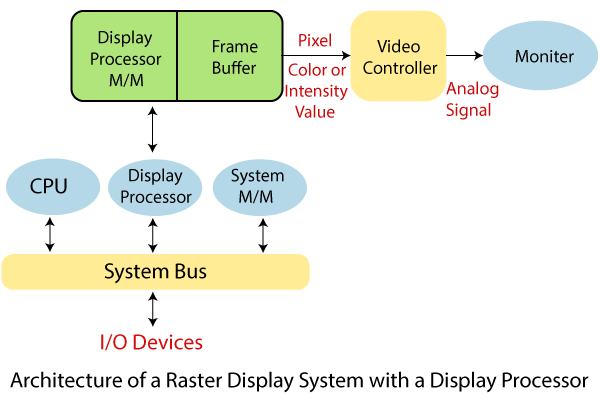
  4. The Display Processor has a separate memory area in addition to the system memory.

Working:

The video controller in the output circuit develops horizontal and vertical drive signals so that the monitosr can be scanned.
Display Processor 1

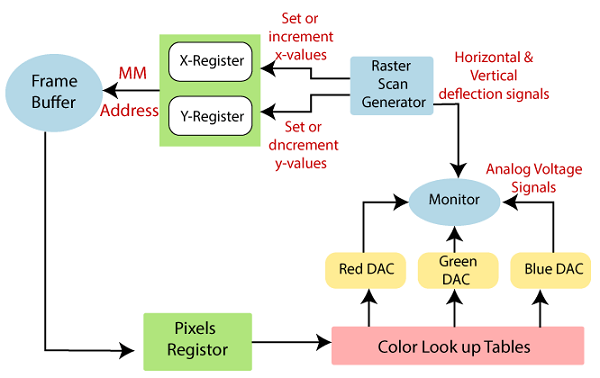
To store the coordinate pixels of the screen, we can use two registers (register X, register Y), as shown in the figure. Suppose that the value of y adjacent scan line has increased from 1 at the bottom of the screen to upward to Ymax, and the screen position or x value has increased 0 to 1 with each scan line —The position of Xmax on the rightmost side.

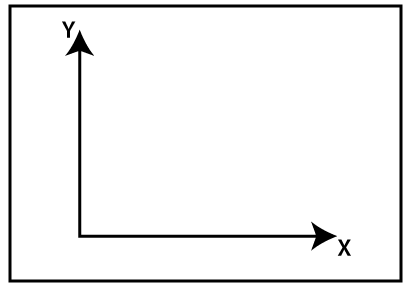
In a standard cartesian coordinate system, the origin is at the lowest-left corner of the screen.
Display Processor 2

Fig: The origin of the coordinate system for the screen position recognition is usually specified in the lower-left case.

At the beginning of the fresh cycle:

The register X is set to 0, and register Y is set to Ymax. This address (X,Y`) is converted into the frame buffer’s memory address where the color value is stored for this pixel location.

The controller has received the color value (In binary form) from the frame buffer. The controller divides it up into three parts and sends every element to an individual DAC(Digital to analog converter).

In turn, these voltages control the intensity of a 3-e beam, which is focused on the (X, Y) screen position by vertical and horizontal drive signals.

For every pixel along with the top scan line, this process is repeated, each time Y increases the X register.

When the pixels are created on the first scan row through Xmax, it increases the X register. Then the X register is set to 0, and the Y register decreases by 1 to access the next scan line.

The pixels are then processed along each scan line, and the process is repeated on the last scan line (Y=0) for each scanning unit pixels are generated.

It is not directly used to control the sharpness of the CRT beam for a display system using a color lookup table buffer value.

Taking the three pixel-color value from the lookup table is used as an index. On each display cycle, this lookup operation is done for each pixel on every display cycle.

The time in the window for viewing or refreshing a single pixel is short. It takes longer to reach the frame buffer each time to read the intensity value of each pixel which is allowed:
Display Processor 3

In single access, several adjacent pixel values are put in the frame buffer and stored in the register.

A one-pixel value is shifted from the register after each acceptable time interval to control the pixel’s hot intensity.

The process is repeated with the next pixel node, and the entire pixel group will be handled in the same way.


Related Topics

Scan Conversion of a Circle Computer Graphics

A circle is an eight-way symmetric shape. All quadrants of a circle are the same. There are two octants in each quadrant of a circle. If we know the value of any...

3 minutes read.

3D Rotation

The 3D rotation is different from 2D rotation. In 3D Rotation we also have to define the angle of Rotation with the axis of Rotation. For Example- Let us assume, The initial...

2 minutes read.

Composite Transformation in Computer Graphics

Composite transformation in Computer Graphics It is possible to integrate a range of transformations or series of transformations into some kind of a single one which is known as composition. The...

6 minutes read.

Zooming

In computer graphics, the term “Zoom is referred as a function, focuses on a particular portion or part of an image and also enlarging the image’s size for greater details.” In windows...

2 minutes read.

Text Clipping

“Text Clipping is a process in which we remove those part (portion) of string that is outside the view pane (window).” Various methods and techniques can do the text clipping. These techniques depend...

2 minutes read.

3d Scaling

The 2D and 3D scaling are similar, but the key difference is that the 3D plane also includes the z-axis along with the x and y-axis. In scaling, we can expend...

2 minutes read.

DDA line Drawing Algorithm in Computer Graphics

DDA (Digital Differential Analyzer) Line Drawing Algorithm The Digital Differential Analyzer helps us to interpolate the variables on an interval from one point to another point. We can use the digital Differential Analyzer algorithm...

5 minutes read.

Transformation

Introduction The term Transformation is generally referred to as converting a graphic into another graphic by applying some rules or algorithms. Sometimes an image or picture can be a combination of lines, rectangle,...

2 minutes read.

2D Translation

We can move any object from one to another place without changing the shape of the object. For Example- Translation of a Point:If we want to translate a point from P (x0,...

1 minute read.

Input Devices in Computer Graphics

An Input device is the piece of computer hardware equipment used to give input to the computer. The input can be in the form of graphics, text, sound, audio, video,...

7 minutes read.

Rendering in Computer Graphics

Rendering in Computer Graphics Rendering is the operation, by virtue of a software system, of creating a picture from a template. In a specifically defined term or information structures, the model is a...

9 minutes read.

2D Reflection

The Reflection is a mirror image of the original object. In the Reflection process, the size of the object does not change. We can represent Reflection by using four ways- Reflection along...

2 minutes read.

Types of Computer Graphics

Types of Computer Graphics The computer graphics contains two types. They are- Raster (Bitmap) graphicsVector graphics Many individuals are likely to consider pictures on computers (or phones, tablets, or some other electronic gadget...

5 minutes read.

Aspect Ratio in Computer Graphics

Aspect Ratio in Computer Graphics You might well understand the concept of Aspect ratio as of now if you know regarding aerial photography or see the configuration portion of any computer...

5 minutes read.

Pointing and Positioning Technique Computer Graphics

Pointing and Positioning Technique: The pointing and positioning are interactions used in computer graphics. A pointing device is also called a Pointing tool. A pointing tool is a hardware component,...

4 minutes read.

2D Rotation

The Rotation of any object depends upon the two points. Rotation Point: It is also called the Pivot point. Rotation Angle: It is denoted by Theta (). We can rotate an object in...

1 minute read.

Applications of Computer Graphics

Applications of Computer Graphics Some applications of computer graphics are mentioned below- Graphical User Interface (GUI): It is a way of interacting with a computer using the icon, ...

2 minutes read.

Animation in Computer Graphics

The word Animation is extracted from a Latin language, "Anima," which means "Soul." TheAnimation is a technology that allows any image object, an entity to walk, talk, or do some...

3 minutes read.

Clipping in Computer Graphics

“The Clipping is a type of transformation used in computer graphics to remove lines, objects, and segments of lines that are outside the computer screen or viewing pane.” The clipping is a...

2 minutes read.

3D Shearing

We can denote shearing with ‘SHx,’ ‘SHy,’ and ‘SHz.’ These ‘SHx,’ ‘SHy,’ ‘SHz’ are called “Shearing factor.” The basic difference between 2D and 3D Shearing is that the 3D plane also...

1 minute read.