
Django Create Project

Django is an open-source free to use web framework which is based on Python. Django uses Model-View-Template as its architecture. The final version of Django was released in 2008. Django is very popular for its rapid development, scalability, clean design, and security. Django provides the solution for basic problems which every web developer faces, and it takes care of most of the hassle of web development so that a programmer does not have to write code from scratch. Django is used by many giants companies such as Instagram, Pinterest, and Spotify, etc. Django is currently at the 6th position among the frameworks based on GitHub projects and StackOverflow questions.

Installation

In this post, we will be making our first project in Django from complete scratch. The first step is to download Python. This is a programming language that is used by Django. To download Python go to the link https://www.python.org/downloads/and click on the download option. If you already have Python, you can check the version by using this command:

Python --version

After installing, to verify the installation, use this command:

Django Create Project

If this commands runs without an error, it means we have successfully installed Python. The next step is to install Django.

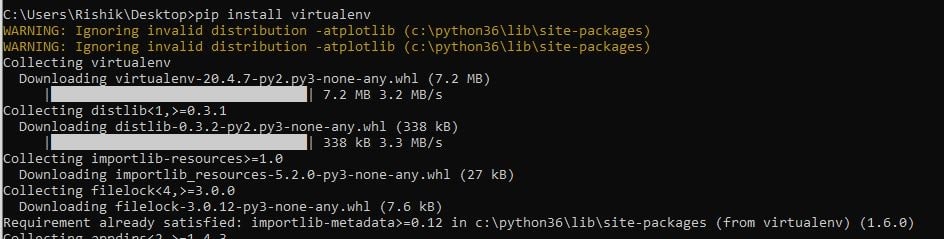
Before actually installing Django, we would like to create a virtual environment where we can store all our project files. Virtual Environments are very useful. They help to keep separate versions of a module for different projects without messing them up. To install the virtual environment, execute this command in your terminal or command prompt.

pip install virtualenv
Django Create Project

After creating the virtual environment, we want to create and activate this environment to use it. To create the virtual environment, go to the directory in which you want to create the environment and then type this command:

Virtualenvmyenv

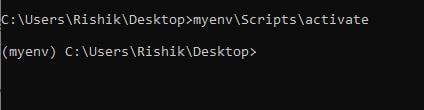
This will create a new directory named myenv in your current directory. To activate this virtual environment we just created, use the command below:

Myenv\Scripts\activate

If the environment is activated, we can see the environment name on the left side of the console.
Django Create Project

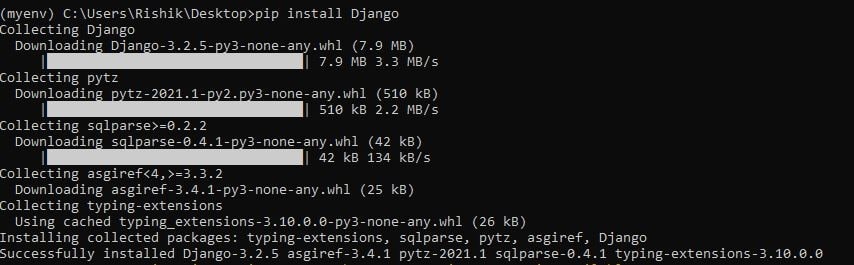
After successfully creating and activating the environment, the next step is to install Django. The easiest way to install Django is by using the python package pip. To install Django run this command in your command-line interface python –  m pip install Django.
Django Create Project

To verify if Django is correctly installed in your local machine or not, execute the following command in the Python console:

Import Django

Django Create Project

If this command does not show any error and Django is installed on your computer, we can check the version of the Django installed by running the below code in the python console.

Print(Django.get_version())

The above command will print the version number of Django.

Creating Project

In Django, there is a difference between a project and an app. Every web application we create is a project, and a project is a sum of applications. An application is a code for a part of the web application, and an application can be reused to make new applications by just making some changes to it.

To start our new project, we have to auto-generate some Django code which will be the building block of our project. This code contains various settings and configurations for the Django project and app. To start creating the project, go to the directory where you want to create your project and run the following command in your command prompt.

django-adminstartprojectmyproject

It will create a project folder in which you can create the files for your apps.  The structure of this directory is:

  • manage.py: It is one of the most important files. This helps us interact with the project through the command line.
  • My project folder: This folder is the actual Python package for our project. This folder contains all the files we will use.
    • __init__.py: This is a Python package.
    • Settings.py: This file contains all the settings of the website. This file stores the configurations of database connections, any apps we create, etc.
    • Urls.py: We declare all the URLs in this file.
    • Wsgi.py: This file serves as an entry point to the WSGI servers and is used to deploy the project.
    • Asgi.py: Similar to WSGI, asgi.py is used to deploy the project in ASGI.

Setting up Database

We can connect our project to a lot of databases. Here we will use sqlite. All the settings for our project is set up in myproject\settings.py file. Database is set up in DATABASE dictionary. To create a connection with SQLite engine, the settings is:

DATABASES = {
   'default': {
      'ENGINE': 'django.db.backends.sqlite3',
      'NAME': 'database.sql',
      'USER': '',
      'PASSWORD': '',
      'HOST': '',
      'PORT': '',
   }
}

Now our project is ready to start the development server navigate to the project directory by cd myproject.

python manage.py runserver

The output of this command will be something like this in the terminal:

Performing system checks...
0 errors found
January 08, 2020 - 15:50:53
Django version 1.8, using settings 'myproject.settings'
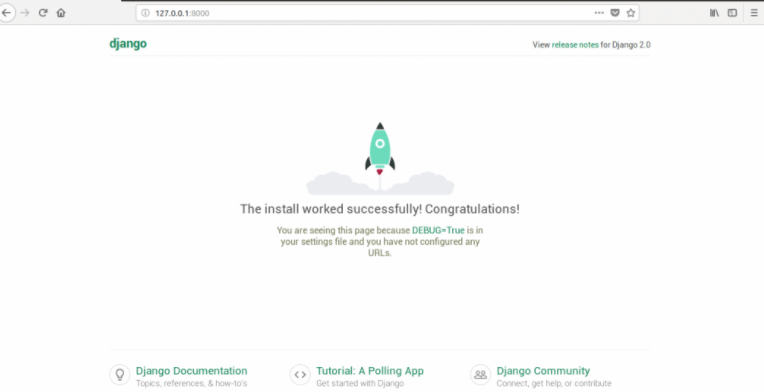
Starting development server at http://127.0.0.1:8000/
Quit the server with CONTROL-C

This output confirms that we have done our first project successfully and have started the development server. Go to the above URL to see the default homepage.
Django Create Project

Related Topics

Django Messages

Django Framework Django is a framework that can make web applications more accessible and faster. Django is an open-source collection of python libraries, and Django can be used for both the...

6 minutes read.

Creating View in Django

Creating View in Django    Django views are a key component of the frameworkbased applications.We are using Python function or class at their simplest, which takes up a web query and returns a web response.Views are used to get objects from the server, change objects if needed, render types, return HTML, and much more. Class Based View and Function based Django has two types of views: views based on functions (FBVs) and views based on class (CBVs).Initially, Django began with only FBVs, but then introduced CBVs as a way to model features so we didn't have to write boilerplate (i.e. the same software) code again and again.CBVs would be a way to increase efficiency, so you don't have to write as much code as you can. CBVs are classes of Python at their heart. Django ships with a range of "model" CBVs with pre-configured features that can be reused and often expanded.Then helpful names are given to these classes that explain what kind of functionality they provide.These are often referred to as "universal views" because they provide solutions to specific needs. The classes have a journal View function, or "view" for short, is simply a Python program that uses a web query and returns a web response. This response may include the HTML content of a web page, or a redirect, or a 404 error, or an XML file, or an image, etc. Example: You use a view to create a web page, remember that you need to connect a view to a URL to see it as a web page. Simple View We will create a simple view in myapplication to say “Welocome to django application” See the following view – from django.http import HttpResponse ...

4 minutes read.

Django CMS

Django is one of the most popular open-source Python web development framework. Developers use Django to build a website from scratch. Like WordPress, Django CMS is also a Content Management...

9 minutes read.

How to Uninstall Django from cmd

Python is an interactive and more accessible language than any other programming language. The python programming language uses a variety of libraries to perform the operations in a faster way....

3 minutes read.

Django Create App

Django is a Python-based web framework that is based on the Model View Template architecture. In this post, we will go through the installation and setup for our first Django...

4 minutes read.

Django ORM

Django is a Python web framework that enables easy and quick web development. Django has a handy and powerful feature called Django Object Relational Mapper, also known as Django ORM,...

3 minutes read.

Django Pagination

Django is an open-source free to use python based web framework. Django provides many inbuilt tools for web developers to provide rapid web development. One of these tools is pagination....

4 minutes read.

Django CSRF

Django is a high-level python based web framework. Django is open source and free to use for all. Django provides many features to web developers like scalability, security, rapid development,...

4 minutes read.

Django Class Based Views

Class-based views were developed to solve the problem of customizing function-based generic views. We can arrange our view code Object-Oriented by using class views. Class-based views do more than function-based...

3 minutes read.

Uses of Django

Django is a free and open-source Python-based web framework, which offers great functionalities to its users. Django was developed in 2003, and the final version was released in 2008 by...

3 minutes read.

Django Create Superuser

For managing the website, we need an Admin while creating the Django application. In order to create the admin user, create superuser command is used. The superuser is called the...

3 minutes read.

Django CMS vs WordPress

Both Django CMS and WordPress belong "Self-Hosted Blogging" or "Content Management System (CMS)" category, that is used to manage digital content. Bloggers usually use these platforms. Django CMS Django is one of...

4 minutes read.

Django Environment Setup

Django is a free and open-source web framework, which uses Python as its programming language. It is based on Model View Template (MVT) architecture. A framework is a collection of...

4 minutes read.

Django Forms

Django is a Python Programming Open Source framework for web development. It was released in 2008 and was developed by two web developers named Adrian Holovaty and Simon Willison. It...

3 minutes read.

Django and React

This article will discuss the overview of Django and React, their advantages, applications, and most importantly, how to implement react in Django. What is Django? Django is a free and open-source web...

6 minutes read.

Django Template System

Django Template System Django allows Python and HTML to be divided, the Python goes into views, and HTML goes into templates. Django relies on the render feature and the language of the Django Model...

5 minutes read.

Best Django courses

In this tutorial, we will see various courses in python Django available on the internet. Django has become popular these days, so courses on it are also increasing day by...

7 minutes read.

How to create an app in Django

Create an application in Django Django is famous for its unique and fully managed application structure. For each functionality, an application can be created as a completely independent module. This article will take...

2 minutes read.

Django Model Fields

In Django, if we want to store the information about anything, we use Models. It contains various fields about the data. Generally, each model represents a database where all the...

4 minutes read.

Django Tutorial

Django Introduction It is a web application framework written in a python programming language. It based on the MVT( Model View Templet) design pattern. It takes a short time to build an application...

2 minutes read.