
Midpoint Circle Drawing Algorithm in Computer Graphics

The midpoint circle drawing algorithm helps us to calculate the complete perimeter points of a circle for the first octant. We can quickly find and calculate the points of other octants with the help of the first octant points. The remaining points are the mirror reflection of the first octant points.

This algorithm is used in computer graphics to define the coordinates needed for rasterizing the circle. The midpoint circle drawing algorithm helps us to perform the generalization of conic sections. Bresenham’s circle drawing algorithm is also extracted from the midpoint circle drawing algorithm. In the algorithm, we will use the 8-way symmetry property.

In this algorithm, we define the unit interval and consider the nearest point of the circle boundary in each step.

Let us assume we have a point a (p, q) on the boundary of the circle and with r radius satisfying the equation fc (p, q) = 0
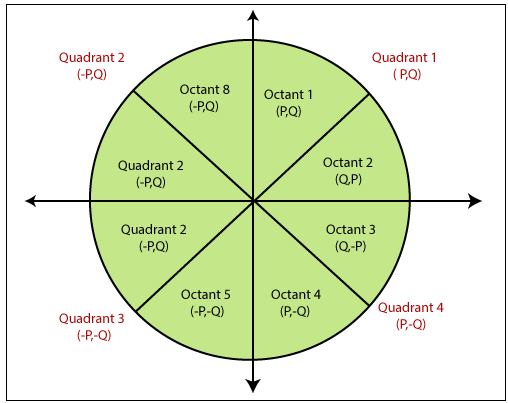
Midpoint Circle Drawing Algorithm

As we know the equation of the circle is –

fc (p, q) = p2 + q2 = r2     …………………………… (1)

If

     fc (p, q) < 0

then

      The point is inside the circle boundary.

If

     fc (p, q) = 0

then

      The point is on the circle boundary.

If

     fc (p, q) > 0

then

      The point is outside the circle boundary.
Midpoint Circle Drawing Algorithm

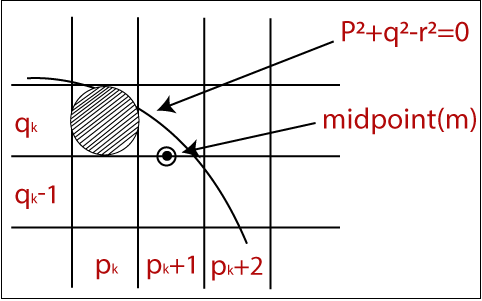
In the figure, we calculate the mid-point (m). The midpoint appears between qk and qk -1.

The currentposition of the pixel = pk +1

The next position of the pixel = (pk +1, qk) and (pk +1, qk - 1)

Now, we will calculate the decision parameter (dk)

dk = (pk +1, qk – 1/2)

Now, we replace all the values with equation (1)

dk = (pk +1)2 + (qk – 1/2)2 – r2                          …………………………………… (2)

Now, there should be two conditions.

Condition 1: If

                          dk is negative

                     then

                            The midpoint (m) is inside the circle boundary    

Condition 2: If

                          dk is positive

                     then

                            The midpoint (m) is outside the circle boundary    

Now, we find the next point of x coordinates. Then,

Pk+1 +1 = Pk+2

Now, we replace all the value of equation (2) with (k+1). We get-

 dk+1 = (pk+1 +1)2 + (qk+1 – 1/2)2 – r2                ……………………………. (3)

Now, we will find the difference between

dk+1 – dk = {(pk+1 +1)2 + (qk+1 – 1/2)2 – r2} – {(pk +1)2 + (qk – 1/2)2 – r2}

               = dk +(2pk +1) + (qk+12 – qk2) – (qk+1 – qk) +1    …………………… (4)

Here, If

                    dk isnegativethen dk+1

          then

                    2pk+1 +1

Otherwise      

                    2pk+1 +1 – 2qk+1

Now, the next coordinate for x and y points

2pk+1 = 2pk +2

2qk+1 = 2qk –2

Now, the initial decision parameter (d0) at the position (p, q) = (0, r)

We put (0, r) in circle equation and we get-

d0 = (1, r – 1/2)

    = (1 + (r –1/2)2 –r2)

    = 5/4 –r  

We only take integer value = 1 – r

Algorithm of Midpoint Circle Drawing

Step 1: Start.

Step 2: First, we allot the center coordinates (p0, q­0) as follows-

             P0 = 0

             q0 =r

Step 3: Now, we calculate the initial decision parameter d0 -

                                                                 d0 = 1 – r

Step 4: Assume,the starting coordinates = (pk, qk)

                  The next coordinates will be (pk+1, qk+1) 

Now, we find the next point of the first octant according to the value of the decision parameter (dk).      

Step 5: Now, we follow two cases-

Case 1: If

                  dk < 0

         then

                  pk+1 =pk + 1

                  qk+1 =qk

                  dk+1 = dk + 2 pk+1 + 1

Case 2: If

                  dk >= 0

         then

                  pk+1 =pk + 1

                  qk+1 =qk –1

                  dk+1 = dk - 2 (qk+1 + 2 pk+1)+ 1

Step 6: If the center coordinate point (p0, q0) is not at the origin (0, 0) then we will draw the points as follow-

For x coordinate = xc + p0

For y coordinate = yc + q0                    {xc andyc containsthe current value of x and y coordinate}

Step 7: We repeat step 5 and 6 until we get x>=y.

Step 8: Stop.

Example: The center coordinates are (0, 0), and the radius of the circle is 10. Find all points of the circle by using the midpoint circle drawing algorithm?

Solution:

Step 1: The given center coordinates of the circle (p0, q0) = (0, 0)

              Radius of the circle (r) = 10

Step 2: Now, we will determine the starting coordinates (p0, q0) as follows-

             P0 = 0

             q0 = r (radius) = 10

Step 3: Now, we will determine the initial decision parameter (d0)

                                d0 = 1 –r

                    d0 = 1 –10

                    d0 = -9

Step 4: The initial parameter d0 < 0 then, case 1 is satisfied.

           pk+1 =pk + 1 = 0 + 1 = 1

                  qk+1 =qk = 10

                  dk+1 = dk + 2 pk+1 + 1 = -9 + 2(1) + 1 = -6

Step 5: The center coordinates of circle are already (0, 0). So, move to next step.

Step 6: We will execute step 4 until we get x >= y.

The table for coordinates of octant 1-

                 dk                dk+1            (pk+1,qk+1)
                   (0, 10)
                 ­-9                   -6                (1, 10)
                 -6                   -1                (2, 10)
                 -1                    6                (3, 10)
                   6                    -3                (4, 9)
                   -3                    8                (5, 9)
                   8                    5                (6, 8)

Now, we will determine the coordinates of the octant 2 by swapping the p and q coordinates.

      Points of Octant 1     Points of Octant 2
               (0, 10)                (8, 6)
               (1, 10)                (9, 5)
               (2, 10)                (9, 4)
               (3, 10)                (10, 3)
               (4, 9)                (10, 2)
               (5, 9)                (10, 1)
               (6, 8)                (10, 0)

Thus, we can find all the coordinates of the circle for all quadrants.

Quadrant 1 (p, q) Quadrant 2 (-p, q) Quadrant 3 (-p, -q) Quadrant 4 (p, -q)
               (0, 10)                (0, 10)                (0, -10)                (0, -10)
               (1, 10)                (-1, 10)                (-1, -10)                (1, -10)
               (2, 10)                (-2, 10)                (-2, -10)                (2, -10)
               (3, 10)                (-3, 10)                (-3, -10)                (3, -10)
               (4, 9)                (-4, 9)                (-4, -9)                (4, -9)
               (5, 9)                (-5, 9)                (-5, -9)                (5, -9)
               (6, 8)                (-6, 8)                (-6, -8)                (6, -8)
               (8, 6)                (-8, 6)                (-8, -6)                (8, -6)
               (9, 5)                (-9, 5)                (-9, -5)                (9, -5)
               (9, 4)                (-9, 4)                (-9, -4)                (9, -4)
               (10, 3)                (-10, 3)                (-10, -3)                (10, -3)
               (10, 2)                (-10, 2)                (-10, -2)                (10, -2)
               (10, 1)                (-10, 1)                (-10, -1)                (10, -1)
               (10, 0)                (-10, 0)                (-10, 0)                (10, 0)

Advantages of Midpoint circle drawing algorithm

  • It is a powerful and efficient algorithm.
  • The midpoint circle drawing algorithm is easy to implement.
  • It is also an algorithm based on a simple circle equation (x2 + y2 = r2).
  • This algorithm helps to create curves on a raster display.

 Disadvantages of Midpoint circle drawing algorithm

  • It is a time-consuming algorithm.
  • Sometimes the points of the circle are not accurate.

Related Post:


Related Topics

Panning

“Panning is a process or photographic technique that is used to combine slow shutter speed with camera movement to make a speed sense around the moving object.” We can define panning as...

2 minutes read.

3d Scaling

The 2D and 3D scaling are similar, but the key difference is that the 3D plane also includes the z-axis along with the x and y-axis. In scaling, we can expend...

2 minutes read.

Scan Conversion in Computer Graphics

“When we represent regular objects in the form of discrete pixels, it is called Scan Conversion.” Every graphics system must transform the primitives into a collection of pixels. The scan conversion is also...

2 minutes read.

Zooming

In computer graphics, the term “Zoom is referred as a function, focuses on a particular portion or part of an image and also enlarging the image’s size for greater details.” In windows...

2 minutes read.

2D Translation

We can move any object from one to another place without changing the shape of the object. For Example- Translation of a Point:If we want to translate a point from P (x0,...

1 minute read.

Line Drawing Algorithm in Computer Graphics

“The Line drawing algorithm is a graphical algorithm which is used to represent the line segment on discrete graphical media, i.e., printer and pixel-based media.” A line contains two points....

3 minutes read.

Computer Graphics Tutorial

Introduction to Computer Graphics Computer graphics is commonly seen as a computer science branch that deals with the computerized image fusion theory and technology. As simple as a triangle outline, a...

6 minutes read.

Bresenham’s Line Drawing Algorithm in Computer Graphics

This algorithm was introduced by “Jack Elton Bresenham” in 1962. This algorithm helps us to perform scan conversion of a line. It is a powerful, useful, and accurate method. We...

8 minutes read.

3D Shearing

We can denote shearing with ‘SHx,’ ‘SHy,’ and ‘SHz.’ These ‘SHx,’ ‘SHy,’ ‘SHz’ are called “Shearing factor.” The basic difference between 2D and 3D Shearing is that the 3D plane also...

1 minute read.

2D Transformation in Computer Graphics

Some visuals are transformed into some other graphics by implementing several of the principles known as transformation. There are multiple kinds of transformation, including translation, scaling, rotation, shearing, etc. Whenever...

2 minutes read.

Color Models in Computer Graphics

"Color model is a 3D color coordinate system to produce all range of color through the primary color set." There are millions of colors used in computer graphics. The light...

3 minutes read.

2D Rotation

The Rotation of any object depends upon the two points. Rotation Point: It is also called the Pivot point. Rotation Angle: It is denoted by Theta (). We can rotate an object in...

1 minute read.

Filled Area Primitives Computer Graphics

Filled Area Primitives: Area filling is a method or process that helps us to fill an object, area, or image. We can easily fill the polygon. The polygon filling is...

4 minutes read.

Polygon Clipping in Computer Graphics

“A Polygon can be described as the enclosed collection or group of the lines.” In a polygon, all lines are connected. Lines can be a combination of edges and vertices,...

4 minutes read.

Scan Conversion of a Circle Computer Graphics

A circle is an eight-way symmetric shape. All quadrants of a circle are the same. There are two octants in each quadrant of a circle. If we know the value of any...

3 minutes read.

History of Computer Graphics

History of Computer Graphics Computer Graphics (CG) was first developed as a visualization tool. Computer graphics were basically introduced for scientists and engineers in government and corporate research centers, i.e., Bell Labs and Boeing...

4 minutes read.

Line Clipping in Computer Graphics

The line clipping is a process in which we can cut the part of the line, which lies outside the view pane. Only those lines are visible, which lie inside the view pane....

13 minutes read.

Aspect Ratio in Computer Graphics

Aspect Ratio in Computer Graphics You might well understand the concept of Aspect ratio as of now if you know regarding aerial photography or see the configuration portion of any computer...

5 minutes read.

Text Clipping

“Text Clipping is a process in which we remove those part (portion) of string that is outside the view pane (window).” Various methods and techniques can do the text clipping. These techniques depend...

2 minutes read.

Composite Transformation in Computer Graphics

Composite transformation in Computer Graphics It is possible to integrate a range of transformations or series of transformations into some kind of a single one which is known as composition. The...

6 minutes read.