
Types of Computer Graphics
Types of Computer Graphics
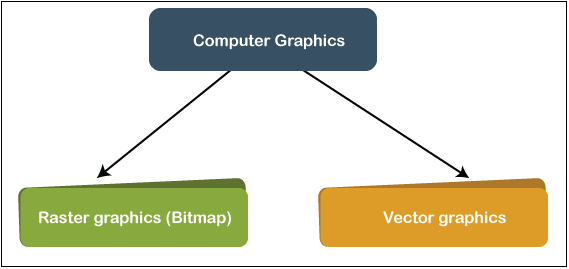
The computer graphics contains two types. They are-
- Raster (Bitmap) graphics
- Vector graphics
Many individuals are likely to consider pictures on computers (or phones, tablets, or some other electronic gadget with a picture interface) without worrying about how the graphic is processed and displayed on the computer device. That's great when you're just a graphic user, but it is essential to note the image’s specific design for all who would like to construct or modify computer graphics images.
Raster (Bitmap) Graphics
You are probably familiar with raster graphics if you have ever captured or downloaded a digital picture; even if you're not conscious, this is what digital pictures are.
By considering the graphics field as a rectangle shape and separating the rectangle into some kind of two-dimensional array of small pixels, a raster represents an image.
For Example- An image generated by a high-resolution digital camera may also contain horizontal and vertical measurements of 4128 pixels and 3096 pixels, enabling the overall image to be 4128 x 3096 = 12,780,288 pixels. Each pixel describes standard pixel values for the picture at that level. (raster graphics typically require significant numbers of pixels, but devices are very adept at handling a large number of objects!).
Here, we have an image to represent the bitmap graphics.
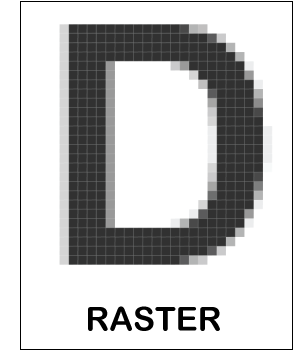
If you enlarge the above image, you can see each pixel of the image. You can now see the borders of the pixels here and measure them to ensure that the picture is actually 16x16 pixels (involving the white pixels at the vertices). The enlarged picture actually looks unconscionably messy, but as the picture will usually not be displayed at this zoom stage, it is decent enough to be used as an icon.
In certain instances, there are several pixels in the bitmap image, like digital photos, that our eye cannot discern them at regular display sizes, so you see the picture as a constant collection of tones.
Without visible loss, bitmap graphics contains a "resolution" that reduces the amount to which you may amplify the picture. Graphics that have better image quality numbers have a higher resolution. Since raster image files are typically huge, being able to aggregate the pixel chart in a certain manner is beneficial, but there are several excellently-known approaches to do this. The drawback is that the worse picture appears to display, the more saturation you apply. JPEG (a standard developed by the Collaborative Photographic Specialists' Group) is one of the best known and is designed to facilitate you to add variable amounts of distortion to digital photos.
For Example- Photoshop, Paint, etc.
Benefits of Raster (Bitmap) Graphics
- It is simple to construct raster files through existing pixel information stored in a sequence in memory space.
- It is also possible to retrieve pixel information stored in a raster file while using a collection of coordinates that enables the information to be characterized in the grid form.
- If available, pixel values can be changed separately or as huge sets by changing a gradient.
- Raster graphics can transform well to external devices like CRTs and printers in spot-format.
Drawbacks of Raster (Bitmap) Graphics
Vector graphics
The optimal key to build a digital picture is to compile a list of commands that explain how to depict the picture and then save the list as an image file. The machine perceives each command and redraws the full image while the file is opened, normally as a bitmap for demonstration purposes. This mechanism is called rasterization.
This can seem to be an overly complicated approach for a graphical picture to be produced. There are several specifications for vector graphics, and some of those (– for example, AI, CDR) are patented. SVG (Scalable Vector Graphics) is one more open vector graphics standard that becomes incredibly famous. A Vector format file can be accessed by opening it with a text editor (like Notepad) software.
Nowadays, vector images are usually placed in graphical file formats like SVG, EPS, PDF, or AI, which are inherently distinct from the more traditional raster image formats such as JPEG, PNG, APNG, GIF, and MPEG4.
For Example- Corel Draw, Adobe Illustrator, etc.
Standards of Vector Graphics
Scalable Vector Graphics (SVG) is the World Wide Web Consortium (W3C) specification for vector format. The norm is complicated and has been extremely slow to be developed due to commercial entities, at least in some parts. There is now some help for displaying SVG information for many internet browsers, but complete implementation of the standard is still relatively uncommon.
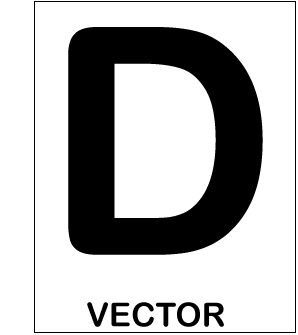
SVG seems to be a basic in recent decades that is entirely separate from the rendering system resolution, usually a printer or display monitor. In essence, Vector format documents are customizable text illustrating both straight and curved routes and other properties. For photos such as basic maps, line diagrams, coats of arms, and flags, which are usually not like pictures or other constant pictures, we prefer SVG. Rendering SVG contains bitmap format conversion at a resolution that is suitable for the current mission. SVG is also a medium for images that are animated.
For smartphones, there is also a variant of Scalable Vector Graphics. The basic format for smartphones is known as SVGT (SVG Tiny version) in general. These graphics can calculate connections and manipulate anti-aliasing as well. They can also be shown as wallpaper.
Standards of Vector Graphics
Usually, vector image editors allow conversion, rotation, mirroring, stretching, skewing, affine transformations, z-order shift broadly, what's in front of what and primitives to be combined into more complicated objects. The set activities on closed curves (union, difference, intersection, etc.) offer greater complex transformations. Vector images are perfect for basic or hybrid designs required being device-independent or do not require to attain a series of pictures.
For instance, a vector-based graphics model is used in PostScript and PDF page description languages.
Conversion between Raster and Vector Graphics
Converting a vector graphic into a raster image is often required, and less. so, converting a raster image into a vector graphic.
Any time when you try to display the content of a vector file, the transformation of vector images to raster happens all the time. The message includes the document’s commands when you access a vector file and creates the outlines into the transient bitmap that it shows for you.
The Software application is required to transform raster to vector images. Typically, the method is called "Tracing." You had to have additional compensation tracing applications years ago, but most vector painting software now offers designed tracing capabilities. As the name indicates, by "sketching around the outlines of the raster, tracing technology operates so that patterns and outlines describing the picture are formed. The effect of the procedure is a collection of mathematical curves representing the vector image generated by the program.
Benefits of Vector Graphics
- Vector files are thin in size since they have less information than bitmap image files.
- Vector images are more versatile than bitmap graphics because the graphical fidelity can be increased up and down quickly without any loss.
- Vector image files have sharper lines compared to rectangular, pixel-based bitmap graphics, so they are stronger than raster images with straight lines and flowing curves.
Drawbacks of Vector Graphics
- When a vector image has minor defects, these are shown when the vector image is greatly expanded.
- A static color or gradient is usually loaded with vector images. Comprehensive picture (photo) attributes cannot be viewed as bitmap graphics.