
Display Devices in Computer Graphics
The display device is an output device used to represent the information in the form of images (visual form). Display systems are mostly called a video monitor or Video display unit (VDU).
Display devices are designed to model, display, view, or display information. The purpose of display technology is to simplify information sharing.
Today, the demand for high-quality displays is increasing.
There are some display devices given below:
- Cathode-Ray Tube(CRT)
- Color CRT Monitor
- Liquid crystal display(LCD)
- Light Emitting Diode(LED)
- Direct View Storage Tubes(DVST)
- Plasma Display
- 3D Display
- Cathode-ray Tube (CRT): Here, CRT stands for Cathode ray tube. It is a technology which is used in traditional computer monitor and television.
Cathode ray tube is a particular type of vacuum tube that displays images when an electron beam collides on the radiant surface.
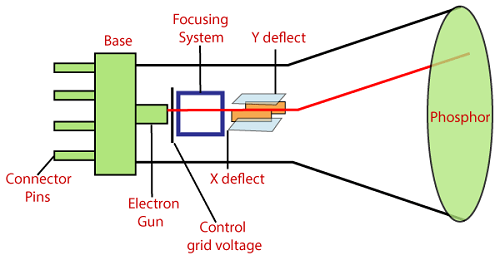
Component of CRT
- Electron Gun: The electron gun is made up of several elements, mainly a heating filament (heater) and a cathode. The electron gun is a source of electrons focused on a narrow beam facing the CRT.
- Focusing & Accelerating Anodes: These anodes are used to produce a narrow and sharply focused beam of electrons.
- Horizontal & Vertical Deflection Plates: These plates are used to guide the path of the electron the beam. The plates produce an electromagnetic field that bends the electron beam through the area as it travels.
- Phosphorus-coated Screen: The phosphorus coated screen is used to produce bright spots when the high-velocity electron beam hits it.
There are two ways to represent an object on the screen:
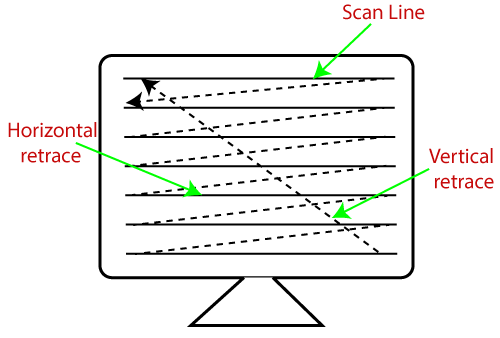
- Raster Scan: It is a scanning technique in which the electron beam moves along the screen. It moves from top to bottom, covering one line at a time.
A raster scan is based on pixel intensity control display as a rectangular box on the screen called a raster.
Picture description is stored in the memory area called as Refresh buffer, or Frame Buffer.
Frame buffer is also known as Raster or Bitmap. Raster scan provides the refresh rate of 60 to 80 frames per second.
For Example: Television
The beam refreshing has two types:
- Horizontal Retracing
- Vertical Retracing
When the beam starts from the top left corner and reaches bottom right, and again return to the top left, it is called the vertical retrace.
It will call back from top to bottom more horizontally as a horizontal reversal.
Advantages:
- Real image
- Many colors to be produced
- Dark scenes can be pictured
Disadvantages:
- Less resolution
- Display picture line by line
- More costly
2. Random Scan (Vector scan): It is also known as stroke-writing display or calligraphic display. In this, the electron beam points only to the area in which the picture is to be drawn.
It uses an electron beam like a pencil to make a line image on the screen. The image is constructed from a sequence of straight-line segments. On the screen, each line segment is drawn by the beam to pass from one point on the screen to the other, where its x & y coordinates define each point.
After compilation of picture drawing, the system cycle back to the first line and create all the lines of picture 30 to 60 times per second.
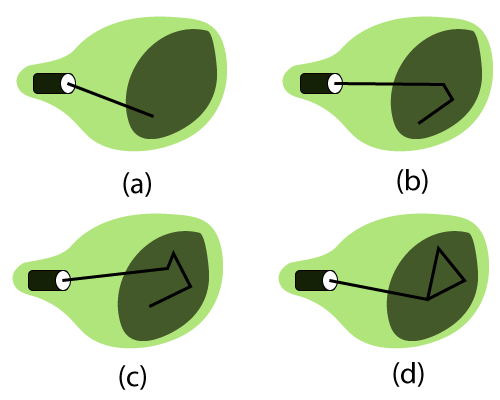
Fig: A Random Scan display draws the lines of an object in a specific order
Advantages:
- High Resolution
- Draw smooth line Drawing
Disadvantages:
- It does only the wireframe.
- It creates complex scenes due to flicker.
2. Color CRT Monitor: It is similar to a CRT monitor.
The basic idea behind the color CRT monitor is to combine three basic colors- Red, Green, and Blue. By using these three colors, we can produce millions of different colors.
The two basic color display producing techniques are:
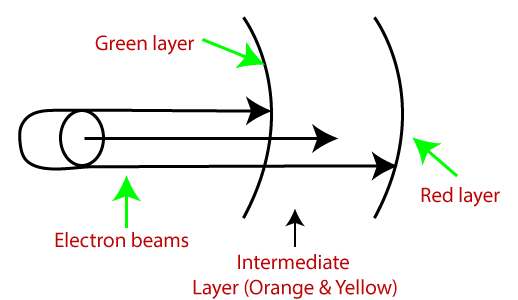
- Beam-Penetration Method: It is used with a random scan monitor for displaying pictures. There are two phosphorus layers- Red and Green are coated inside the screen. The color shown depends on how far the electron beam penetrates the phosphorus surface.
A powerful electron beam penetrates the CRT, it passes through the red layer and excites the green layer within.
A beam with slow electrons excites only the red layer.
A beam with the medium speed of electrons, a mixture of red and green light is emitted to display two more colors- orange and yellow.
Advantages:
- Better Resolution
- Half cost
- Inexpensive
Disadvantages:
- Only four possible colors
- Time Consuming
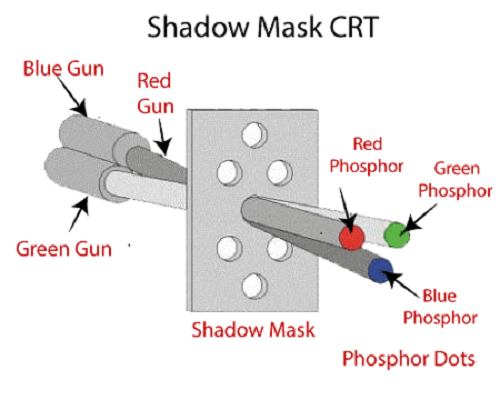
2. Shadow-Mask Method: It is used with a raster scan monitor for displaying pictures. It has more range of color than the beam penetration method. It is used in television sets and monitors.
Structure:
- It has three phosphorus color dots at each position of the pixel.
First Dot: Red color
Second Dot: Green color
Third Dot: Blue color
- It has three different guns. Each for one color.
- It has a metal screen or plate just before the phosphorus screen, named “Shadow-Mask.”
- It also has a shadow grid just behind the phosphorus coated screen with tiny holes in a triangular shape.
Working: A Shadow Mask is a metal plate with tiny holes present inside a color monitor.
A Shadow Mask directs the beam by consuming the electrons so that the beam hits only the desired point and displays a resulting picture.
It has three different guns. These guns direct their beams to shadow mask, which allows them to pass. It is a task of a shadow mask to direct the beam on its particular dot on the screen and produce a picture on the screen.
A Shadow Mask can display a wider range of pictures than beam penetration.
Advantages:
- Display a wider range picture.
- Display realistic images.
- In-line arrangement of RGB color.
Disadvantages:
- Difficult to cover all three beams on the same hole.
- Poor Resolution.
3. Liquid crystal display (LCD): The LCD depends upon the light modulating properties of liquid crystals.
LCD is used in watches and portable computers. LCD requires an AC power supply instead of DC, so it is difficult to use it in circuits.
It generally works on flat panel display technology. LCD consumes less power than LED. The LCD screen uses the liquid crystal to turn pixels on or off.
Liquid Crystals are a mixture of solid and liquid. When the current flows inside it, its position changes into the desired color.
For Example: TFT (Thin Film Transistor)
Advantages:
- Produce a bright image
- Energy efficient
- Completely flat screen
Disadvantages:
- Fixed aspect ratio & Resolution
- Lower Contrast
- More Expensive
4. Light Emitting Diode (LED): LED is a device which emits when current passes through it. It is a semiconductor device.
The size of the LED is small, so we can easily make any display unit by arranging a large number of LEDs.
LED consumes more power compared to LCD. LED is used on TV, smartphones, motor vehicles, traffic light, etc.
LEDs are powerful in structure, so they are capable of withstanding mechanical pressure. LED also works at high temperatures.
Advantages:
- The Intensity of light can be controlled.
- Low operational Voltage.
- Capable of handling the high temperature.
Disadvantages:
- More Power Consuming than LCD.
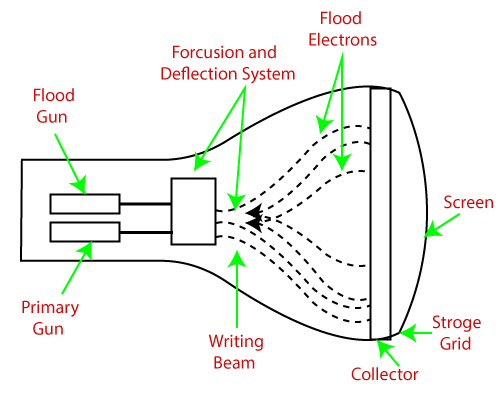
5. Direct View Storage Tube (DVST): It is used to store the picture information as a charge distribution behind the phosphor-coated screen.
There are two guns used in DVST:
- Primary Gun: It is used to store the picture information.
- Flood / Secondary Gun: It is used to display a picture on the screen.
Advantages:
- Less Time Consuming
- No Refreshing Required
- High-Resolution
- Less Cost
Disadvantages:
- The specific part of the image cannot be erased.
- They do not display color.
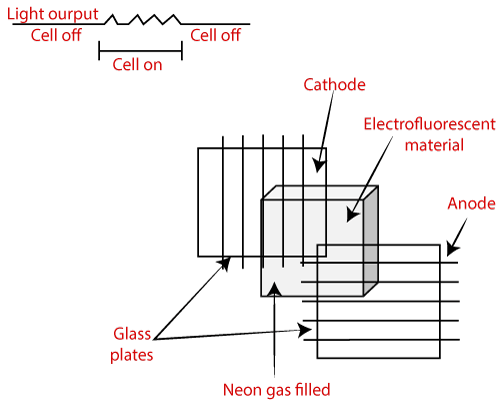
6. Plasma Display: It is a type of flat panel display which uses tiny plasma cells. It is also known as the Gas-Discharge display.
Components of Plasma display
- Anode: It is used to deliver a positive voltage. It also has the line wires.
- Cathode: It is used to provide negative voltage to gas cells. It also has fine wires.
- Gas Plates: These plates work as capacitors. When we pass the voltage, the cell lights regularly.
- Fluorescent cells: It contains small pockets of gas liquids when the voltage is passed to this neon gas. It emits light.
Advantages:
- Wall Mounted
- Slim
- Wider angle
Disadvantages:
- Phosphorus loses luminosity over time.
- It consumes more electricity than LCD.
- Large Size
7. 3D Display: It is also called stereoscope display technology. This technology is capable of bringing depth perception to the viewer.
It is used for 3D gaming and 3D TVs.
For Example: Fog Display, Holographic Display, Retina Display Etc.
Advantages:
- Impressive Picture Quality
- Impressive Picture Quality
- Impressive Picture Quality
Disadvantage:
- Expensive
- Binocular Fusion
Related Posts:
- Computer Graphics Tutorial
- Scan Conversion of an Ellipse Computer Graphics
- Pointing and Positioning Technique Computer Graphics
- Scan Conversion in Computer Graphics
- Scan Conversion of a Circle Computer Graphics
- Mid-Point Line Drawing Algorithm in Computer Graphics
- Bresenham’s Line Drawing Algorithm in Computer Graphics
- Line Drawing Algorithm in Computer Graphics
- Line Clipping in Computer Graphics
- 3D Rotation in Computer Graphics
- 2D Shearing in Computer Graphics