
×

HTML5 Tags

HTML5 Tags

A list of newly included tags is provided in HTML5. These HTML 5 tags (elements) provide a better structure for the document. This list shows description of all HTML 5 tags in alphabetic order.

List of HTML5 Tags

TagDescription
<aside>It specifies that the article is slightly related to the rest of the entire page.
<article>This concept is used in a document to describe an individual piece of content that could be a blog, a magazine, or a newspaper article.
<audio>Audio tags are used in HTML to play audio.
<bdi>This bdi stands for bi-directional isolation, which isolates a part of the text that is formatted in a direction from an external text document.
<canvas>It is used to draw the canvas.
<data>It offers readable machine version of its data.
<detalist>It provides a text field auto-complete feature.
<details>It specifies the required information to be used by the user.
<dialog>It defines one of the dialog boxes or a window.
<figcaption>The <figure> element is used to define captions.
<footer>It defines a footer section
<figure>It defines the photos, diagrams, etc. It is a self-contained material.
<header>It defines a header section.
<mark>It pecifies the content that has been marked or highlighted.
<meter>It is used for measuring the value of the scalar within a given range.
<nav>It is used in the document to define the navigation connection.
<progress>It specifies the progress of the work.
<rp>It defines what to show in a browser that does not support sapphire annotation.
<rt>It determines the characters explanation / pronunciation.
<ruby>It defines the annotation of ruby along with < rp > and < rt>.
<section>In the document it describes a section.
<summary>It specifies the visible heading for < detailed> item.
<svg>It is used to show the shapes.
<time>It is used to define date / time.
<video>It is used to play the HTML video file.
<wbr>It defines the possible line break.

HTML <! DOCTYPE> tag       

In the HTML document, you will often see the <html> tag <! DOCTYPE is html> declaration. HTML is a <! DOCTYPE > tag, which is used to notify the user about the HTML version used in the text. It's called declaration of form of document (DTD).

Technically, <! DOCTYPE > is not a tag / element, it is just a browser instruction on the type of document. It is a null element that does not contain the closing tag and any content within it. There are actually many types of HTML e.g. HTML 4.01 Transitional, 4.01 Frameset, HTML 4.01 Strict, XHTML 1.0 Transitional, XHTML 1.0 Frameset, XHTML 1.0 Strict, XHTML 1.1 etc.

The <! DOCTYPE > declaration refers to Document type Declaration (DTD) in HTML 4.01; since HTML 4.01 was SGML based. But HTML 5 is not language based on SGML.

Syntax

<! DOCTYPE html>

There are following are some specification about the html <! DOCTYPE>

DisplayNone
End tag or start tagStart tag only
UsageStructural

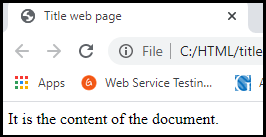
Let's see an example of doctype declaration HTML document.

<html>
<head>
<title>Title web page</title>
</head>
<body>It is the content of the document.</body>
</html>

Output
HTML5 Tags

Related Topics

HTML Code

Before jumping into the topic, let’s understand a common scenario where we have a code snippet in our HTML file. By code snippet, we mean computer code, which is written...

5 minutes read.

HTML Frames

Frames in Html is used to divide the browser into different sections where each section can load different Html documents. Collection of frame is known as Frameset. Creating frames:We use frameset...

2 minutes read.

Html &lt;datalist >Tag

The autocomplete feature in HTML files is provided by the <datalist> tag. It can be used in conjunction with an input tag to enable users to quickly fill out form...

4 minutes read.

HTML <sup> Tag

The HTML sup element is used to describe one or more superscript contents. The sup tag shows a text which is presented above the regular line and half the length...

2 minutes read.

HTML City tag

HTML <City> tag HTML < cite > tag specifies a citation, a reference or title to a creative work, quoted content, books, websites, a research paper, a blog post, a painting,...

3 minutes read.

HTML <span> tag

The span tag in HTML is used as an inline container element to mark up a specific or special chunk of a text or a section of a page. If you...

2 minutes read.

HTML Reset Button

The HTML reset button is used to reset all values in the form. It clears all input fields. Reset is the value of the type attribute of the button element. The...

6 minutes read.

What does HTML stand for?

HTML stands for Hyper Text Markup Language. We use this markup language to design a web page. Web browsers use this language to showcase text, videos, images, audio and other...

6 minutes read.

HTML Date

The input element in HTML has several attributes. One of its attributes is the type attribute which creates a calendar in an order that a user can select a date...

5 minutes read.

HTML Font Size

The HTML <font> tag uses the size attribute to specify the size of the text. We can set the size attribute’s value from 1 to 7. The default size of...

4 minutes read.

Html Wbr Tag

The Line Break Opportunity element A word break opportunity is a place in text from where the browser breaks a line. This opportunity is represented by the element wbr in the...

2 minutes read.

HTML <samp> tag

The Samp tag in HTML is used for defining the sample output from the computer program. This tag is a phrase type tag and a container tag that means the...

2 minutes read.

HTML <table> tag

The Table element If we want to show the data and information in a two-dimensional table with rows and columns, then we can achieve this by using the HTML element <table>. Syntax: <body> <table> <thead> <tr> <thcolspan="#">………….</th> </tr> </thead> <tbody> <tr> <td>……….</td> <td>……….</td> </tr> </tbody> </table> </body> Example: <!DOCTYPE...

9 minutes read.

HTML <u> tag

Underline Element/Tag: The u tag in html is used to specify the important text or phrase by underline. In earlier HTML versions, this element was known as the "Underline" element, and...

5 minutes read.

HTML <style> tag

The section of information that we want to style is contained in html style tag. It includes CSS, which is used to design the text and images in the web page. Syntax: <head> <title>…………....

3 minutes read.

HTML Search Box

The HTML search box is also known as the search bar. It is an input text field that is used to search the content. If the users want to explore...

7 minutes read.

How to add Google Translate Button on your Webpage?

Google translator is a multi-language translator used for translating the webpage. Google develops it. In today's digital age, it is essential because information is available worldwide in some specific language...

5 minutes read.

HTML <strong> tag

The strong element in HTML is used to display the real significant information in bold so that the user or reader will understand it easily. Syntax: <p> <strong>………… </strong> </p> Example Here, we will demonstrate how to...

2 minutes read.

HTML5 Button Tag

HTML Button Tag The < button > tag is used on the webpage to construct a clickable button inside the HTML. Within the < button>....</button > tag, we can place content...

2 minutes read.

HTML Id Attribute

The HTML id attribute represents the unique identifier for an element of the HTML document. Each element has its unique identifier. The id attribute is a global attribute that can be...

12 minutes read.