
MATLAB Control Statements

What are control statements?

The name itself suggests that something is being controlled, these control statements decide or alter the flow of execution ina program. In program, we often need to modify or alter few lines of code, these control statement helps to perform this type of task.

Four categories of control statements are sequence control statements, decision control statements, repetition control statements (looping statements), and case control statements.

MATLAB control statements.
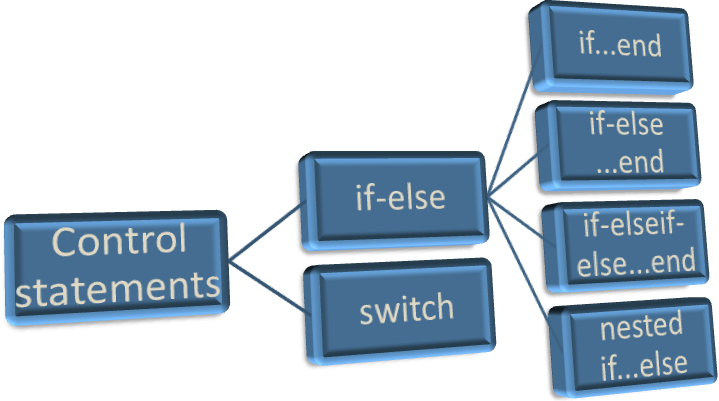
MATLAB Control Statements

If…end

If…end statement helps to execute a block of code by satisfying a condition. The condition is defined by user at the time of coding. This if… block of code is closed with the keyword “end”. We can also use elseif, else if further conditioning is required.

Let us look at the syntax and few examples below.

Syntax:

 if exp1
 set of statements
 end 

Flowchart:
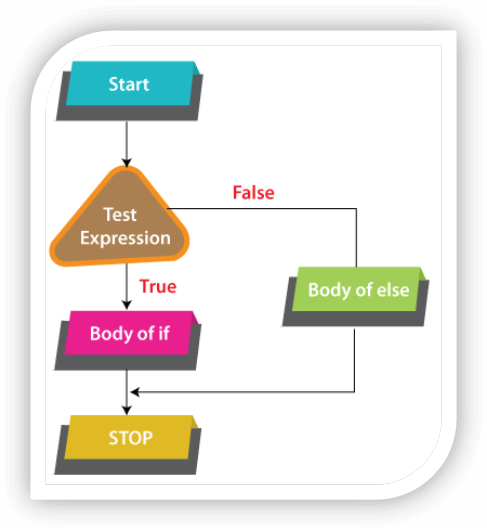
MATLAB Control Statements

Example:

 j = 10;
 if j ~= 0
 disp('Nonzero value')
 end 

Output:

Nonzero value

If-else…end statement

This control statement executes at most one no. of commands on which condition evaluates true, and a default block is evaluated if conditions are not met.

The control flows in this direction à if clauseà1stelseif clause à 2ndelseif clause àelse clause.

Let us look at the syntax and few examples below.

Syntax:

 if exp1
             statements block
 else
             Statements block
 end 

Flowchart:
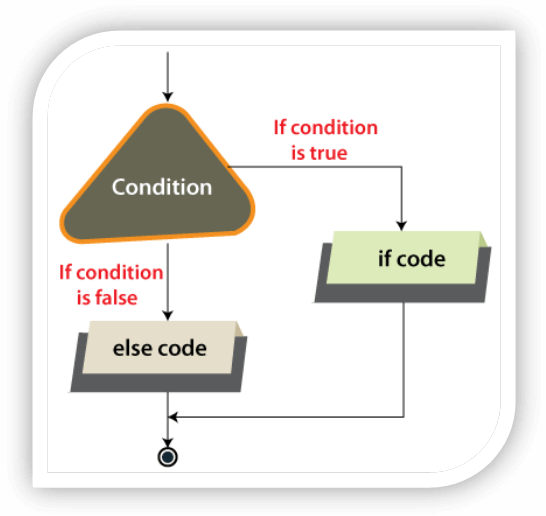
MATLAB Control Statements

Example:

 If size(d) is equal to size(f), arrays are concatenated otherwise an empty array is returned as output.
 d = ones(2,3);
 f = rand(3,4,5);
 ifisequal(size(d),size(f))
    k = [d; f];
 else
 disp('d and f are unequal.')
    k = [];
 end 

Output:

d and f are not the same size.

If-elseif-else….end

This control statement is the extended version of previous control statement, here we keep on adding elseif clause according to our requirement.

Let us look at the syntax and few examples below.

Syntax:

 If exp1
             Statements block
 elseif exp2
             Statements block
 else
             Statements block
 End 

Flowchart:
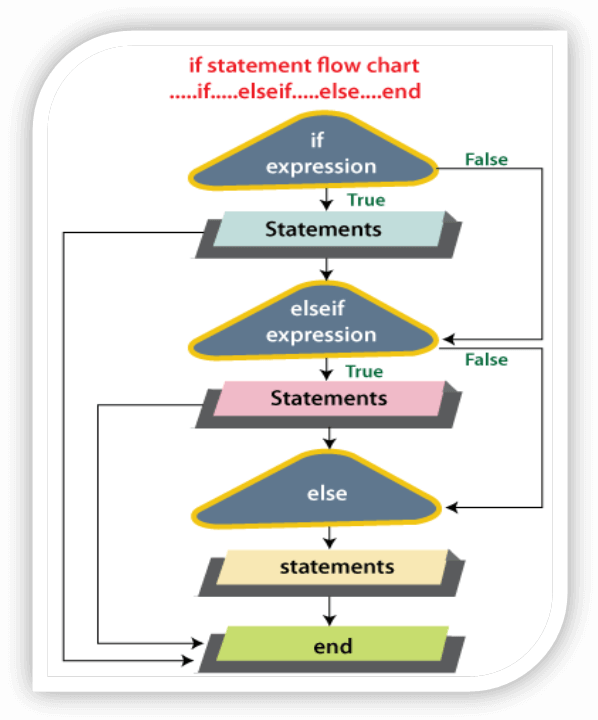
MATLAB Control Statements

Example:

 x = 20;
 min = 2;
 max = 6;
 if (x >= min) && (x <= max)
 disp('within specified range')
 elseif (x > max)
 disp('exceeds maximum ')
 else
 disp(' is below minimum')
 end 

output:

exceeds maximum

Nested if-else

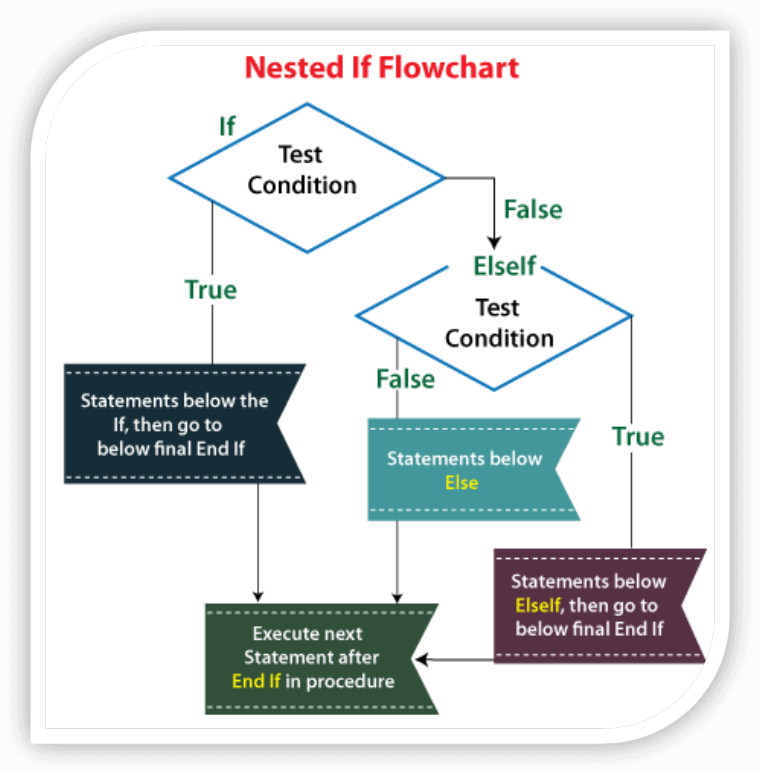
Nested if-else is used when we decide to condition set of statements inside statements, but each if clause requires the end keyword. Let us look at the syntax and few examples below.

Syntax:

 if exp1  
     Statements block 
     if expression  
     Statements block 
     else  
     Statements block 
     end  
 elseif exp2  
     Statements block 
     if expression  
     Statements block 
     end  
 else   
     Statements block 
 end 

At first expression-1 is checked, the following set of statements are executed then control flows to if-else block. Elseif expression2 is further checked weather the condition gets satisfied or not. If none of the above condition is satisfied then at last else-block is executed with the end keyword.

Flowchart:
MATLAB Control Statements

Example:

 k =900;
 i=800;
 if( k ==900)
 if(i==800)
 fprintf('Value of k is 900 and i is 800\n');
 end
 end
 fprintf('value of k is : %d\n', k );
 fprintf('value of i is : %d\n',i); 

output:

 Value of a is 900 and b is 800
 value of a is : 900
 value of b is : 800 

Switch Statement

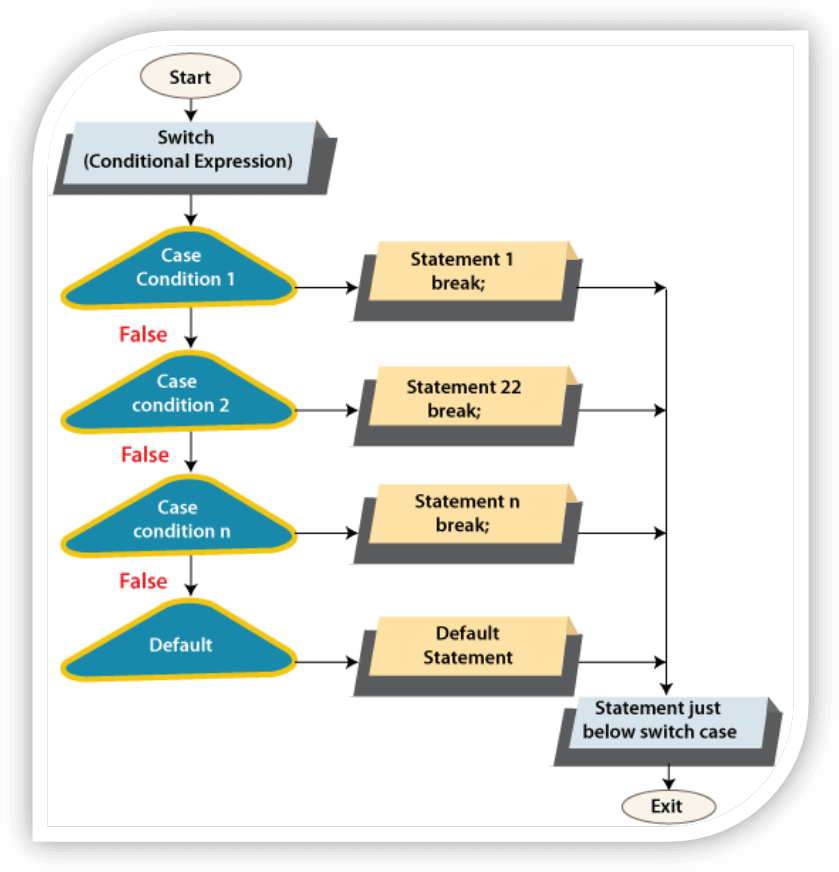
Switch statement can be an alternative of if-else statements, it is used to test a input against set of rules already defined. This control statement executes one of the several group of statements.

Let us look at the syntax and few examples below.

Syntax:

 switch switch_expr  
     case case_exp1  
         set of Statements  
     case case_exp2  
         set of Statements  
     case case_exp..N  
         set of Statements    
     otherwise  
         set of Statements  
 end   

Flowchart:
MATLAB Control Statements

Example:

 % program to convert number to string
 a = input('enter a number from 1 to 7  : ')  
 switch  a  
     case 1  
         disp('number in wordsàone')  
     case 2  
         disp(' number in wordsàtwo')  
     case 3  
         disp(' number in wordsàthree')  
     case 4  
         disp(' number in wordsàfour')  
     case 5  
         disp(' number in wordsàfive')  
     case 6  
         disp(' number in wordsàsix')  
     case 7  
         disp(' number in wordsàseven')  
     otherwise  
         disp('not a valid number')  
 end 

Output:

 enter a number: 4
 number in wordsàfour 

Related Topics

MATLAB Setup And Environment

MATLAB Setup And Environment MATLAB System Requirements As we have already discussed the prerequisite to begin the learning journey of MATLAB now let us drive into some technical system requirements. RAMàMinimum 4GB or...

3 minutes read.

Matlab Graphic image

Matlab’s Graphic image Images are stored as arrays of numeric data in MATLAB® environment, so you can perform various sort of analysis on them to better visualize it. Picture Processing applications are given...

3 minutes read.

MATLAB special graphic function

In this section, we portray a greater amount of MATLAB's illustrations graphic functions and the most well-known methods of controlling and redoing graphics. Let’s type help designs, help graph2d (for...

7 minutes read.

Matlab DFT and IDFT

Matlab Program- (DFT and IDFT of a sequence) Program for DFT (Discrete Fourier change) and IDFT (Inverse discrete Fourier change) of a sequence. Program explanation: In Arithmetic, the discrete Fourier change (DFT) changes...

3 minutes read.

MATLAB Program - To Solve Differential Equation Using Euler’s Method

Using Euler's method to solve differential equation Can you imagine a point where we do not use differential equation to solve differential condition? Truth be told, there are a few different...

3 minutes read.

MATLAB Loops

Loops in programming Concept of looping is used to execute instructions repeatedly. It helps coders to reduce lines of code by setting a condition. In looping first a condition is fixed,...

3 minutes read.

MATLAB Simulink examples

We will discuss few examples to understand different use-cases of MATLAB’s Simulink. Simulink is basically MATLAB-based. Its essential interface is a graphical square charting apparatus and an adaptable arrangement of square...

4 minutes read.

Matlab Simulink

What is Simulink? Simulink is a re-enactment and model-based plan climate for dynamic and installed frameworks, incorporated with MATLAB. Simulink, additionally created by "MathWorks", is an information stream graphical programming language apparatus...

7 minutes read.

matlab polynomials

In mathematics, a polynomial is an articulation comprising of indeterminates factors and the respective coefficients, that includes just the tasks of augmentation, expansion, deduction, and non-negative whole number exponentiation of...

4 minutes read.

Matlab Calculus

Analytics Calculus is significant in various fields like designing, physical science, and different sciences, yet the estimations are finished by machines or PCs, regardless of whether they are into Physics...

3 minutes read.

MATLAB Variables

What are variables? A variable is a storage location or a container to store or hold data. In programming, variables are used to reservedata created by the programmers so that it...

4 minutes read.

Matlab Algebra

Up until now, we have seen that every one of the models work in MATLAB just as its GNU, then again called Octave. In any case, for addressing fundamental mathematical...

6 minutes read.

MATLAB Vector

Introduction to MATLAB vector Vectors are one of the representations of arrays. It tends to be addressed in two different ways line(row) vector and section(column) vector. A vector is defined as...

5 minutes read.

Matlab Matrix

Matlab Matrix What is a Matrix? a rectangular array of expressions arranged in particular rows and columns that is treated as a solitary substance and controlled by specific standards. MatlabMatrix A Framework called matrix,...

5 minutes read.

MATLAB Control Statements

What are control statements? The name itself suggests that something is being controlled, these control statements decide or alter the flow of execution ina program. In program, we often need to...

3 minutes read.

Differentiation in Matlab

Differentiation in Mathematics In maths, Derivatives are an essential device of math or calculus. For instance, derivative of the situation of a moving article regarding time is the item's speed: this...

6 minutes read.

MATLAB Data types

What is Data Type? A data type is a classification that helps to decide what class of value a variable can reserve in programming. And also, what sort of operations can...

6 minutes read.

MATLAB Linear Convolution problem solving

What is linear convolution? In science (specifically, useful examination), convolution is a numerical procedure on two capacities (f1 and g1) that communicates how the state of one is adjusted by the...

4 minutes read.

MATLAB Features

MATLAB Features MATLAB (abbreviation for matrix laboratory) is an interactive programming environment that eases high-power computations in the IT world. Initially, it was developed with the intention of matrix calculation only....

4 minutes read.

MATLAB Operators

What is an Operator? A specific operation is performed by using a symbol which is called an operator. Example: A+B, where A, B are called operand and '+' is called operator. If you...

8 minutes read.