
Projection in Computer Graphics
Projection Introduction: The technique projection was invented by the Swiss mathematician, engineer, and astronomer "Leonhard Euler Around" in 1756. The "Episcope" was the first projection system.
“Projection is a technique or process which is used to transform a 3D object into a 2D plane." In other words, we can define "projection as a mapping of points P (x, y, z) on to its image P' (x,' y,'z') in the projection plane or view plane, which create the display surface.”
Types of Projection:
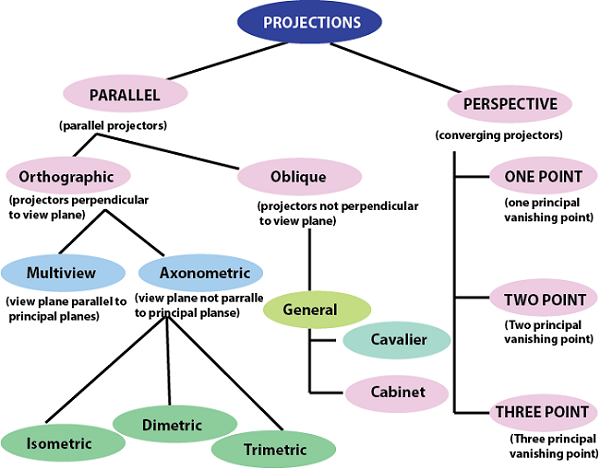
There are two types of projection.
Perspective Projection:
In the perspective projection, the distance of the project plane from the center of projection is finite. The object size keeps changing in reverse order with distance.
Perspective projection is used to determine the projector lines come together at a single point. The single point is also called "project reference point" or "Center of projection."
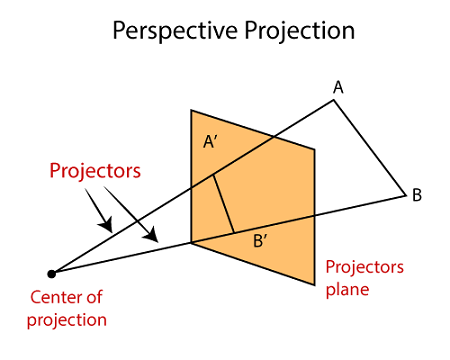
- Characteristic of
Perspective Projection:
- The Distance between the object and projection center is finite.
- In Perspective Projection, it is difficult to define the actual size and shape of the object.
- The Perspective Projection has the concept of vanishing points.
- The Perspective Projection is realistic but tough to implement.
- Vanishing Point: Vanishing point can be defined as a point in image plane where all parallel lines are interlinked. The Vanishing point is also called “Directing Point.”
Use of Vanishing Point:
- It is used in 3D games and graphics editing.
- It is also used to represent 3D objects.
- We can also include perspective in the background of an image.
- We can also insert the shadow effect in an image.
Types of Perspective Projection:
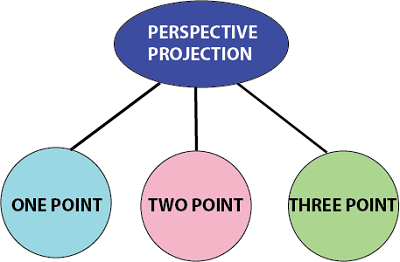
There are three types of Perspective Projection.
- One Point: A One Point perspective contains only one vanishing point on the horizon line.
It is easy to draw.
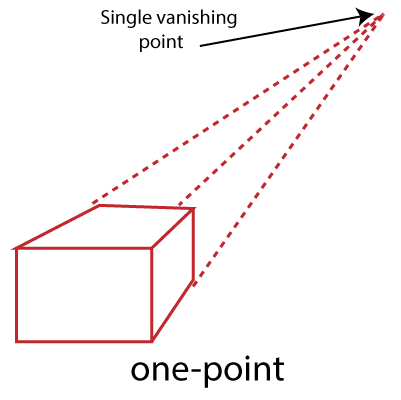
Use of One Point- The One Point projection is mostly used to draw the images of roads, railway tracks, and buildings.
2.Two Point: It is also called "Angular Perspective." A Two Point perspective contains two vanishing points on the line.
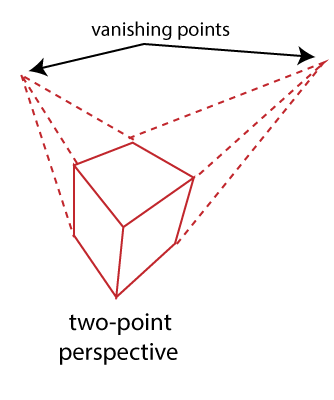
Use of Two Point- The main use of Two Point projection is to draw the two corner roads.
3.Three-Point- The Three-Point Perspective contains three vanishing points. Two points lie on the horizon line, and one above or below the line.
It is very difficult to draw.
When we see an object from above, than the third point is below the ground. If we see an object from the below, than the third point is in the space above.
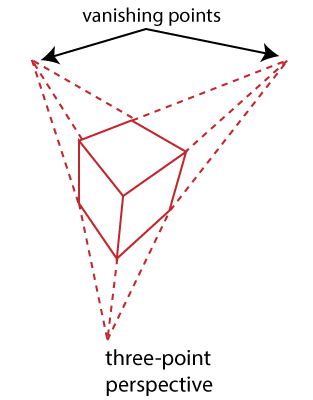
Use of Three-Point: It is mainly used in skyscraping.
Advantages:
- Better Look
- Clear Representation
Disadvantages:
Difficult to Draw
Not Suitable for many-dimensional images
Parallel Projection:
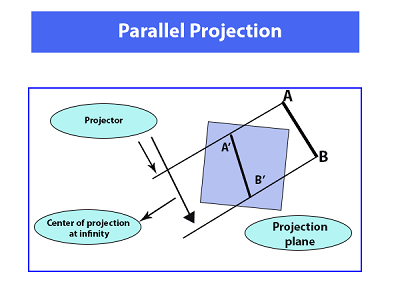
In Parallel Projection, the distance of project plane from the center of projection is infinite. We can specify the direction of projection instead of the center of the projection. We can connect the projected vertices through the line segment.
The parallel Projection eliminates the Z-Coordinate. And the parallel lines from each vertex in the object are enhanced until the lines intersect the view plane.
- Characteristic of
parallel Projection:
- In parallel Projection, the projection lines are parallel to each other.
- There is the least amount of distortion within the object.
- The lines that are parallel to the object are also parallel to the drawing.
- The view of Parallel Projection is the less realistic cause of no foreshortening.
- The Parallel Projections are good for accurate measurements.
Types of Parallel Projection
There are two kind of parallel Projection:
- Orthographic projection: In the Orthographic Parallel Projection, the Projection is perpendicular to the view plane.
The Orthographic Projection is divided into two parts-
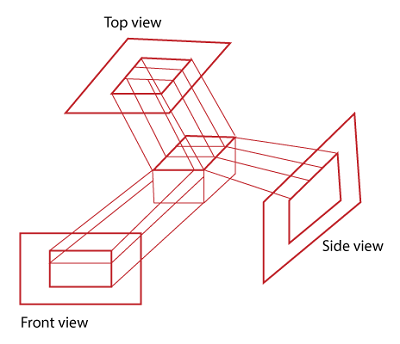
- Multiview
Orthographic Projection: In Multiview
Orthographic Projection, we can represent the two-dimensional Orthographic
image into a three-dimensional object. The Multiview Orthographic Projection
Includes-
- Front View
- Top View
- Side View
- Axonometric Orthographic Projection: The Axonometric Orthographic Projection is used to construct the pictorial representation of an object. The sight lines are perpendicular to the projection plane.
The Axonometric Orthographic Projection includes-
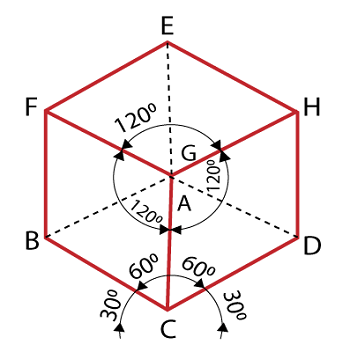
- Isometric: In Isometric, we can represent the three-dimensional objects into two-dimensional drawings visually. The Angle between the two co-ordinate is 120 degrees.
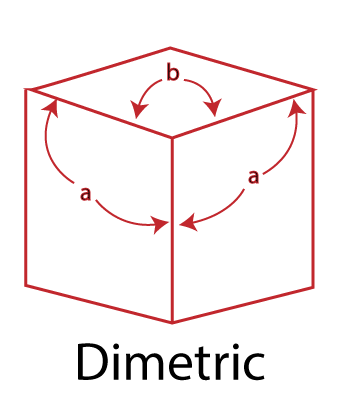
2. Dimetric: In Dimetric Projection, the view direction of the two axes are equal, and the direction of the third axis is defined individually.
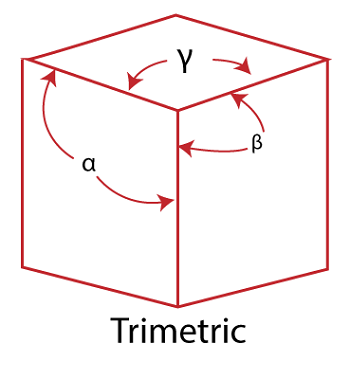
3. Trimetric: In the Trimetric Projection, the view direction of all three axes is unequal. The scale of all three angles is defined individually.
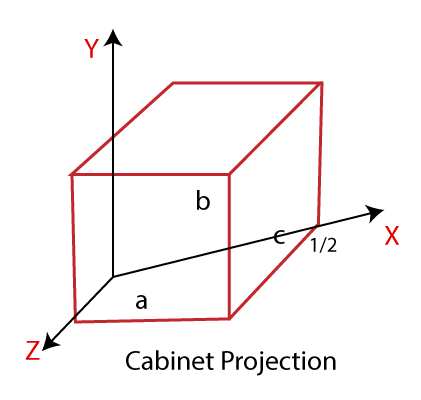
- Oblique Projection: In the Oblique Parallel Projection, the direction of projection is not normal to projection of plane. It is a simple technique that is used to construct two-dimensional images of three-dimensional objects.
The Oblique Projection is mostly used in technical drawing.
The Oblique Projection is divided into two parts-
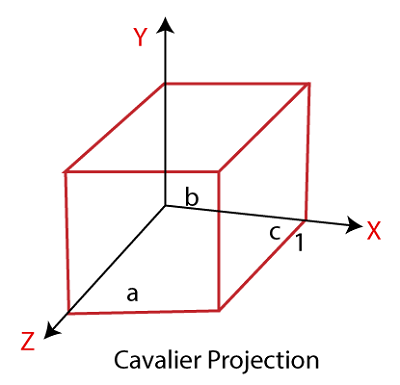
- Cavalier: In cavalier Projection, there is an angle between the Projection and Projection Plane is 45 degrees.
- Cabinet: In Cabinet Projection, there is an angle between Projection and Projection Plane is 63.4 degrees.
Advantages:
- Good for exact Measurement
- Parallel lines remain parallel
Disadvantages:
- Less Realistic Looking
- Angles are not preserved