
×

Batch Operating System

Computers were once quite huge devices that operated from a console. Tape drives, punch cards, line printers were often utilized for the output, and tape drivers or card readers for input. The system had no direct user interface, and jobs were executed in a batch system. Users must independently prepare each job to be executed on these systems, also called batched operating systems.

In the 1950s and 1960s, there were no sophisticated operating systems, intricate computer architectures, or supplementary memory devices. Punched cards or magnetic tapes were utilized as input and output, and enormous mainframe computers were employed to handle the data. At the time, a scarcity of hard drives was the main issue.

Data was delivered in groups or batches, and only one job could be completed. The batch operating system resolves the setup time problem.

In this post, you will learn about the batch operating system, its kinds, how it functions, and its benefits and drawbacks.

Batch Operating System: What is it?

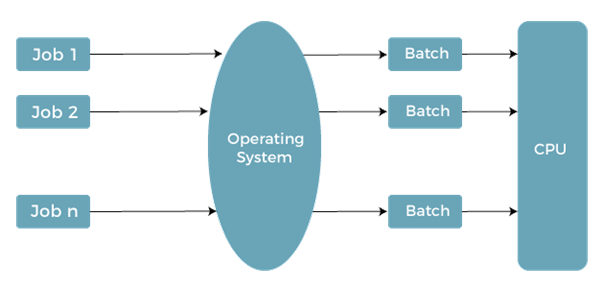
The tasks were carried out in groups. In the past, each person had a mainframe, which was a single computer. Users using batch operating systems don't speak to the machine directly. To expedite processing, jobs with related needs are combined and carried out together. After handing the operator their codes, the programmer's group programs with comparable requirements into batches.
Batch Operating System

The batch operating system groups jobs that carry out similar tasks. These work groupings are handled as a batch and carried out concurrently. These batch-processing tasks are carried out by a machine running this operating system:

  1. A job is a single entity with a predetermined order of orders, information, and programs.
  2. Processing occurs first come, first served, in the order, they are received.
  3. The operating system releases its memory when a job has been completed successfully.

Batch operating system types

The two basic types of batch operating systems are. These are listed below:

  1. Simple batch operating system.
  2. Multiprogramming operating system.

Simple batch operating system

The work was then given to the computer operator, who typically used a punch card to complete it. After a period—days, hours, or minutes—the production became visible.

Transferring control from one task to another was its primary function. To increase processing speed, jobs with comparable criteria were grouped and processed via the processor. The software made use of the operators to construct batches with related requirements. When new batches are available, the computer executes them one at a time. Typically, this system scans a series of jobs, each with a control controller and predetermined work responsibilities.

Multiprogramming batch operating system

Because they are executed on a first-come, first-served basis, jobs operate sequentially. Job scheduling is made feasible, much like with a disc, when numerous jobs are stored on a direct access device. The ability to multi-program is a crucial component of task scheduling.

The operating system chooses one job, and it starts running in memory. Avoid sitting still in a multiprogramming system since the operating system could move to another job. The CPU is returned after the completion of the job that is currently in the wait state.

Why do people utilize batch operating systems?

Large repetitive tasks may be completed with batch operating systems without communicating with the computer to tell it what more you need to do when you finish.

Old batch operating systems were not interactive. Therefore, the user was not involved in the process of running the program. Currently, interactions are supported by batch operating systems. For instance, if you plan a task, the computer will notify the processor when the appointed time has passed.

How does the Batch Operating System function?

Jobs are handled according to first-come, first-served principles. A task's memory is released after completion, and its output is moved into an output spool for subsequent printing or processing. The batch operating system needs more room for user engagement. The user is free when the machine takes over their work. The batch processing system may also be used to update data associated with any transactions or records.

Batch operating system's role.

The "Batch Monitor," situated at the bottom end of the main memory, does most of the work in a batch processing system. The jobs can now be pooled together on a disc for batch processing. They are then grouped, with related work assigned to the same batch. The consequence was that the batch operating system automatically executed the batch jobs one at a time, saving time by executing each operation once. As a result of the quicker turnaround, the system improved.

Batch operating system characteristics

The Batch Operating System has a variety of features. Here are a few of them:

  1. The term "job" refers to the directives the user and the software are expected to carry out.
  2. The operator analyses the user's commands and generates a group of commands with related characteristics.

Related Topics

Distributed Shared Memory

Distributed Shared Memory is a process of managing memory over more than one node and makes inter-process communication which transfers to end users. It is a mechanism that allows user...

2 minutes read.

Process State in OS

The Process passes from different states, from its formation to completion. The following are the states of the Process. NewReadyRunningBlock or WaitTerminated or CompletedSuspend readySuspend wait or suspend blocked 1. New: - The state in which a process...

2 minutes read.

FCFS Scheduling in OS

FCFS: First Come First Serve Scheduling in OS FCFS is a non-preemptive and preemptive scheduling algorithm that is easy to understand and use. In this, the process which reaches first is...

3 minutes read.

Ubuntu Operating System

Ubuntu Operating System Ubuntu is an open-source and a Linux based operating system. Ubuntu is developed for the Network Servers, Computers, and Smartphones. The Ubuntu operating system was developed by Canonical...

3 minutes read.

Difference between Protection and Security in Operating System

Some operating system mechanisms facilitate us to stop tampering with logical and physical resources. Some of these methods are security and protection. Protection and security are distinct concepts, despite the...

3 minutes read.

Android Operating System

What is Android Operating System? Android is a Linux-based and open-source operating system mainly established for mobile devices like tablet computers and Smartphones. The Android operating system was established by the...

5 minutes read.

N-Step-SCAN Disk Scheduling

Before you study about N-Step-SCAN Disk Scheduling, it requires prerequisite of what is Disk Scheduling Algorithms: Operating systems use disc scheduling to schedule I/O requests that arrive at the disc....

4 minutes read.

Need of Operating System

There are various needs of operating system: Managing Input-Output UnitThe Operating system as a platform for application programsMultitaskingConsistent user interface Managing Input-Output Unit: - With the help of the operating system, the...

2 minutes read.

Feedback Queue in Operating System

In a computer or a laptop, there is a processor which do all the tasks. The processor cannot do all the tasks at a time. So, the tasks will be...

3 minutes read.

Look Disk Scheduling

Look Disk Scheduling Look disk scheduling is another type of disk scheduling algorithm. Look scheduling is an enhanced version of SCAN disk scheduling. Look disk scheduling is the same as SCAN disk scheduling,...

4 minutes read.

File in Operating System

What is File in Operating System?  A file is defined as a collection of the interrelated information that is stored in the secondary memory or the non-volatile memory such as optical...

4 minutes read.

Operating System Tutorial

What is an Operating System? An Operating System is a System Software that handles the resources of a computer such as computer hardware and software and offers frequent services to the...

7 minutes read.

Process Schedulers and Process Queue in OS

Process Schedulers There are various types of Process Schedulers: Long Term SchedulerShort Term SchedulerMedium Term Scheduler                                            Long Term Scheduler: - Long term scheduler is also referred to as Job Scheduler. The task of the Long-term...

3 minutes read.

What is Demand Paging?

Demand Paging is defined as a process in which the pages are loaded into the memory (when the page fault occurs) or on-demand. It consists of the following steps: If there is...

4 minutes read.

Components of Operating System

Components of Operating System: An operating system is a complex and vast system. We can only create the operating system by dividing it into small parts. Each part must be...

5 minutes read.

Bit Vector in Operating System

What is Bit vector? Bit vector is one of the most important methods used in the free space management of operating system. Free space management which is used by the operating...

3 minutes read.

Test Set Lock Mechanism | Operating System

Modification in the Assembly Code The problem in the lock variable is that, in some cases, the process reads the previous or old value of the lock variable and enters into the critical...

4 minutes read.

Two Phase Locking Protocol

What is two phase locking? Two-phase locking is a concurrency control method in a database and transaction processing system. It ensures that transactions are executed in a serializable manner by requiring...

4 minutes read.

HRRN Scheduling in OS

Highest Response Ratio Next (HRRN) Scheduling in OS Highest Response Ratio Next Scheduling is a Non-Preemptive Scheduling algorithm. This algorithm provides the benefits of the shortest job first scheduling algorithm and also removes...

6 minutes read.

File Allocation Methods in Operating System

A file allocation method is a way that an operating system stores and retrieves files on a storage device, such as a hard drive or SSD. The file allocation method...

4 minutes read.