
MS-DOS Operating System
It is also referred to occasionally as "DOS", an abbreviation for disc operating systems. Operating systems with a graphical user interface (GUI) in different iterations of the graphical Microsoft Windows operating system eventually replaced it. Several comparable command-line disc operating systems are sometimes referred to as DOS.
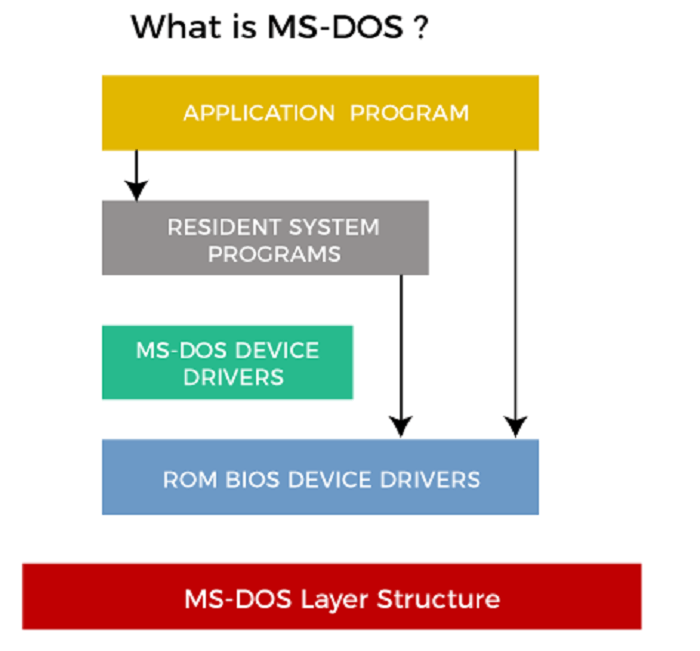
Several rival products were made available during the x86 platform's existence, and MS-DOS went through eight versions before development stopped in 2000. The operating system, application software, and user data were first stored and accessed using floppy discs and Intel 8086 CPUs running on computer hardware.
Microsoft's transformation from a provider of programming languages to a multifaceted software development organization was an important product, supplying crucial financial and promotional resources. Additionally, it served as the foundational operating system on which early GUI versions of Windows ran. Progressive version updates brought feature support for newer CPUs, quickly changing computer architectures and compatibility for additional mass storage devices in ever-larger sizes and formats.
Working of DOS
The procedure a computer goes through to start up is called the boot process. For a machine running one of the six-disc operating systems listed below, for example:
- The Master Boot Record is read by the read-only memory (ROM) bootstrap loader before it transfers control to it.
- The boot record starts the computer by loading the disc operating system into memory and giving it control.
- Data from a magnetic disc is transferred to the computer's primary memory, the random access memory.
- The computer offers several application programming interfaces (APIs) for applications, such as character input/output, memory management, program loading, termination, and managing user input through a keyboard.
- The OS further offers file management, which groups, reads, and writes data stored on storage. A hierarchical system comprising folders, subdirectories, and files is used to arrange the files.
An interface for a disc operating system is not graphical (GUI). Users must put instructions in the command line to specify their desired activities because the interface is character-based.
Features of DOS
Here are some characteristics that make a disc operating system stand out:
- MS-DOS does not support GUIs and does not recognize mouse inputs.
- A disc operating system controls files and directories and enables the loading and running of programs. It can manage resource allocation and manage hardware like discs and memory.
- It is an operating system designed for a single user that performs several functions to ensure systems are running properly.
- The File Allocation table is a tabular structure used to hold these IDs.
- MS-DOS needs a concept of user responsibilities, supports a multiuser operating system, and is less secure. Due to its simple interface and few functionalities, it is incredibly light.
Limitations of DOS
Here are certain restrictions placed on the disc operating system, including:
- Built-in security: Built-in security features like file ownership and permissions are not present in DOS.
- No multiuser or multitasking: It is also non-multiuser and non-multitasking compatible. Although it can only run one application simultaneously, it offers direct access to the underlying hardware and fundamental I/O system.
- Difficult user interface: To execute applications and other OS activities, a user must input instructions and memorize commands. It is tough for novices to utilize because of this method.
Types of MS-DOS Commands
A command is a directive issued to a computer to carry out a certain task. Each operation can be carried out by one of the several MS-DOS commands, which are kept on the disc in the DOS directory. There are two categories of MS-DOS commands: internal commands and external commands.
- Internal Command: The command interpreter file stores internal commands, which are built-in into MS-DOS (COMMAND.COM). DATE, TIME, DIR, VER, and other internal commands are a few of them. If the system runs at the prompt (C:>) level, these commands are stored in memory.
- External Command: A separate program file (.com) called an external command is located in the DOS directory.
Other disc operating systems, however, offer CLIs that are case-sensitive. The following are DOS commands.
| Command | Description |
| dir | List every file in a given directory or subdirectory. |
| CD or CHDIR | Move or go to a certain directory. |
| RD or RMDIR | Delete the directory. |
| TREE | Show every directory route. |
| PATH | Determine the order of the executable files' search path. |
| SUBST | A string alias is used in place of the pathname. |
| FORMAT | A disk's formatting for DOS files. |
| COPY | Copy all of the files, folders, and subdirectories. |
| Del | Removing files. |
| Ren or rename ATTRIB | Change a file's or directory's name. To display or set file characteristics. |
| BACKUP | Back up your folders and files. |
| PROMPT | Alter the DOS prompt. |
| Delete | Removes all folders, files, and files from a machine. |
| Help | Lists the available commands or provides extra details regarding a particular command. |
| Mkdir or md | Establishes a fresh subfolder. |
| Move | Transfers files or folders across drives or between directories. |
| Type | Shows a file's contents on the screen. |
| * | A character that acts as a wildcard and stands in for one or more characters shared by several files. |
| ? | A character that acts as a wildcard and stands in for any character that is shared by several files. |
MS-DOS files and file names
Handling disc files is one of the OS's main responsibilities. A file may be made up entirely of data, or it may include software that instructs the computer on how to carry out a certain operation. Every file has a distinct filename used to locate it on the disc. In MS-DOS, a filename consists of a name and an extension.
An extension of three characters is allowed for each filename. There is a period after the name and before the extension. As a delimiter, the period shows where one part of the filename finishes and the following one starts. When identifying files that are connected in some way, an extension is typically utilized. The following characters may be used in a filename and extension according to MS-DOS:
- Letters A–Z in uppercase and lowercase.
- 0 through 9 numbers o $ # & @ () special characters! ^ ` ~ { }
Any additional characters, including spaces, used in a filename will result in the name ending there. Because certain applications could employ them as delimiters or for other specific functions, it is generally recommended to avoid using special characters in filenames.
Additionally, MS-DOS assigns unique meanings to the extensions BAT, COM, EXE, and SYS, which is why you should only sometimes use them with your data files. Examples of acceptable and undesirable filenames are shown below.
Valid MS-DOS Filenames:
- BEERSLAW.
- DAT.
- 1.