
Single-User Operating System
An operating system designed and intended to be used on a computer or device with a single user at a time is known as a single-user operating system. Devices like wireless phones and two-way message systems frequently employ this operating system.
One of the most crucial applications used on a computer, the operating system, is in charge of managing various functions. It controls hardware connectivity, the efficient use of other apps, memory utilization, and other resource management. One program or application can only be used simultaneously in a single-task operating system. A computer or device designed to execute numerous programs simultaneously is less helpful.
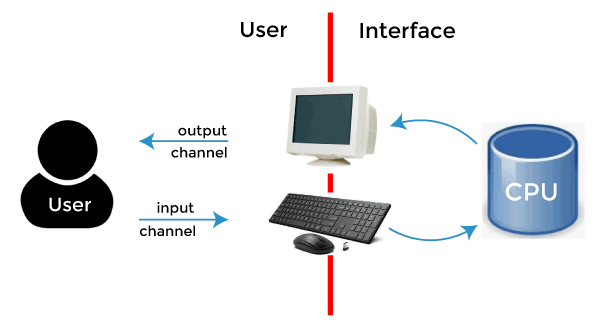
Multiple apps and programs can run simultaneously on a multitasking operating system. This is frequently used on computers when someone wants to utilize the internet, a graphical editing application, a media player programme, play music, and take notes in a basic word processing program. This would be impossible for a single-task OS to accomplish, yet multitasking systems can manage all of these tasks. Instead, a single-user multitasking operating system is utilized in this situation.
Even though this operating system may establish a network connection with other computers, it is still only used by one person. The computer is a single-user system as long as there is just one monitor, keyboard, and other input devices.
A single-user operating system, commonly referred to as a single-tasking operating system, is made specifically for personal computers. One person can only use the computer at once. The single-user operating system permits one user at a time to access your computer, but it occasionally supports numerous profiles. Additionally, it may be applied in professional settings and other situations.
Therefore, the provision of a memory protection, fire protection, and security system is not necessary for this operating system. The machines using this operating system only have one CPU, which can only run one software. One user at a time is given access to all the system's resources, including the CPU and I/O devices.
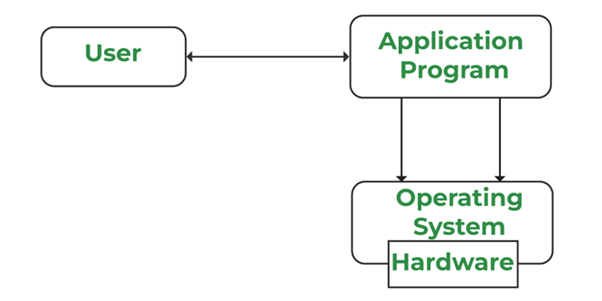
The operating system for a single user is for PCs with single computer support. Another user cannot communicate with another active user in this operating system. One kernel image will operate simultaneously as the main component of the single-user operating system; there is no additional capability to run more than one kernel image.
Single-User Operating System Types
Two categories can be used to categorize single-user operating systems, such as:
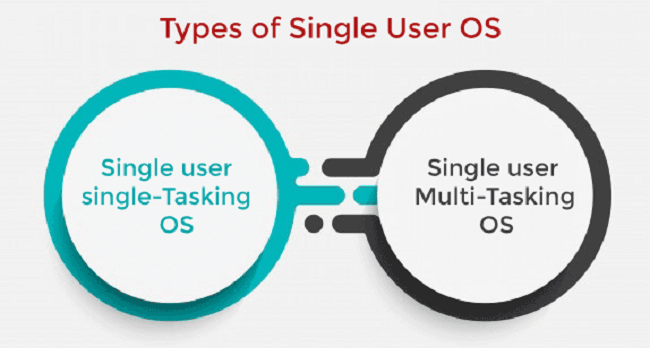
Individual User Operating system for a single task
An operating system permits a single user to run a single application simultaneously. Some operations are completed in a single frame, such as printing paper and downloading photos and movies.
This operating system was created with wireless phones and two-way messaging specifically in mind.
As in MS-DOS and Palm OS (Used in Palm-held computers).
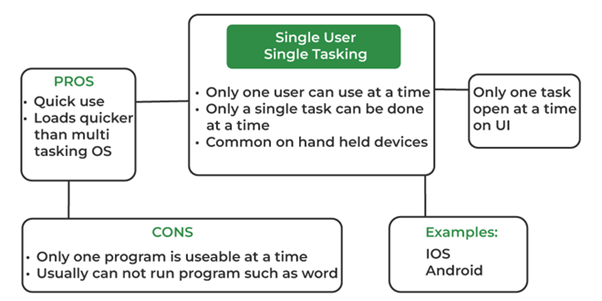
This operating system was created specifically for two-way messaging systems and cellular phones. Only one user can complete one job at a time in the single-user single-tasking operating system. Some operations are completed in a single frame, such as printing paper and downloading photos and movies. Think about MS-DOS, Palm OS, etc.
Benefits:
It offers the following benefits:
- Less memory is used by this operating system.
- It is economical.
Disadvantage:
- Less enhanced
Solitary-User Multitasking Operating System
A single user may execute numerous applications simultaneously thanks to the operating system, enabling simultaneous multitasking. On personal computers and laptops, this kind of operating system is present. Microsoft Windows is the most widely used single-user multitasking system. Preemptive or cooperative single-user multitasking is also possible.
- Pre-emptive: The operating system allows one slot for each program to divide up the available central processing time.
- Cooperation: This is accomplished by counting on each process to provide time for other processes in a certain way. A user may carry out many activities, for instance, snapping pictures while recording video or making computations in Excel sheets. The Single-Person Multitasking operating system was created only for one user, yet that user may do several tasks simultaneously. For instance, on Windows, Linux, and Mac OS, you may type any text while browsing the internet, downloading photographs, watching movies, etc.
Benefits
It offers the following benefits:
- Time-saving.
- High output in a short period.
- Multiple tasks use less memory than one task does.
Disadvantage:
- Require more room;
- Be more complicated
Characteristics of single-user operating systems
The user of a single-user operating system can benefit from the following features, for example: o It does not employ a scheduling procedure for I/O.
- It requires less user scheduling.
- It is solely intended for one-time usage.
- It is designed to do only a few tasks at a time.
- It doesn't employ MMU
- .Understanding user commands.
- File administration.
- Memory control.
- Input/output control.
- Resource distribution.
- A memory management (MMU) unit is not used.
- It is designed to complete just one task at a time.
- The users' schedule is utilized less frequently.
- I/O does not employ a scheduling procedure.
- I am managing the procedure.
Single-user operating system functions.
A single-user operating system's primary functions are explanation and description. Here are several other single-user OS features, including:
- Understanding user commands: It receives the user's commands and communicates them to the rest of the operating system. It may be menu-driven, command-driven, or a GUI with a WIMP system. The user interacts with this operating system area to command the machine.
- File management: This regulates how backup storage is set up. It uses a portion of the disc as a file catalog, which contains information about where the disc's data is kept. A hierarchical filing system is used to organize files, keeping them in various directories and subdirectories.
- Memory management: This regulates where data and applications are stored in the system's primary memory. Multiple programs can run simultaneously in memory on many operating systems. Memory management ensures that no software replaces any other program (including the OS itself).
- Input/output management: It facilitates communication between input and output devices and the computer system. It manages the data flow from peripherals to the CPU.
- Resource Allocation: The OS assigns resources to other apps and programs. For instance: Scheduler to time-share processors, such as batch, in the foreground or background.
- Memory management, such as transferring memory contents to hard discs and virtual memory paging.
- Assures hardware devices are accessible to drivers.
- Mechanisms for accounting and restriction enforcement, such as the number of pages printed and the file space allotted to each user.
- Managing Processes: It manages disruptions and regulates processes. The kernel controls interrupt and maintain processes (when a program executes, it begins a process that may launch other processes).
- Understanding user instructions: By the name, we may infer that the remainder of the operating system receives the user's orders. Here, the user interacts with the OS component that allows them to direct the machine.
- File administration: File management regulates how backing storage is organized. The hierarchical filing system divides directories and subdirectories into distinct groups for storing files. A portion of a disc is utilized as a file catalog, holding information on the material stored there.
- Memory Control: Because many operating systems let running two or more applications simultaneously in memory, this prevents overwriting from happening. Additionally, it manages the programs and data kept in the memory.
- Input-output administration: It facilitates interaction between the computer and input-output systems. It facilitates a data flow between the CPU and peripherals.
- Resource Distribution: The OS is in charge of allocating resources to other applications. For instance, memory management (MMU) involves shifting memory contents to hard drives.
The enforcement of restrictions, such as those on page printing.
Additionally, it guarantees that drivers have access to hardware. - Controlling Procedures: Its job is to manage disruptions and regulate procedures.
Single-user operating system examples
Different operating systems include DOS, Windows 3x, Windows 95, 97, and 98. Additionally, Symbian OS is a single-user OS for mobile devices.
Because only one program is focussed on at a time, these systems are sometimes known as single application OSs. These systems can process data in a queue and use fewer resources. These systems effectively handle routine operations like paying employees' wages or processing payroll.
Single-user operating systems have advantages.
Operating systems designed for a single user focus on processing that uses fewer resources. One user uses a single interface when functioning in a single-user mode. No other operating system interferes with the processing in these systems. Here are some more benefits of single-user operating systems.
- Supports one user at a time: Only one person can be active in these systems. Therefore, no other user will be able to interfere with the programs. Additionally, all computer resources in these systems are consumed by user demands.
- Simple to maintain: These systems use fewer resources and are less complicated, making them simple to keep up with and troubleshoot. In a multi-user operating system, more resources are required and often consumed.
Less likelihood of damage since fewer requests are made at once for the hardware and software in these systems. These systems don't provide longer load times either.
- Focus on one task at a time: A modern operating system allows for the simultaneous execution of several tasks. While several programs and processes run simultaneously, only one task executes simultaneously on a single-user OS. As a result, these systems may produce fewer results at once.
- This operating system uses less RAM.
- Simple to maintain
- Lower risk of harm.
- Because this is a single-user interface, only one user's duties may be completed in time.
- This operating system only allows one person to operate simultaneously, preventing interruptions for other users.
- This operating system only allows one person to operate simultaneously, preventing interruptions for other users.
Problems with Single-User Operating Systems
Additionally, there are several drawbacks to single-user operating systems, such as:
- Projects take longer to finish: As you are aware, no multiple jobs are running simultaneously, and numerous tasks are waiting for the CPU. As a result, these systems react to processes more quickly. The system will become sluggish, and reaction time will increase.
- Higher idle time: These devices remain idle while just one job is active, and this activity doesn't need memory or I/O utilization. But some tasks call for those tools. As a result, only one activity may be carried out at once, and subsequent tasks must wait until the initial work is accomplished—ineffective utilization of the CPU, memory, and disc I/O results.
- It is limited to doing just one duty.
- The OS is not used to its full potential and sits idle most of the time.
- Projects take longer to finish.
- The response time is quick.
Single-User vs. Multi-User OS Differences
The following list outlines the differences between single-user and multi-user operating systems:
| Terms | Single-user operating system | Multi-user operating system |
| 1. Definition | A single user can only access the computer system at once using a single-user operating system. | A system that enables several users to access a computer system simultaneously is known as a multi-user operating system. |
| 2. Bootloader | The bootloader installs the whole CPU's resources into a single superuser's profile. | Based on the importance of the users, the bootloader allocates CPU resources. |
| 3. Super User | A superuser controls system upkeep and change-making to ensure the system functions as intended. | A multi-user operating system does not have a superuser since each entity is in charge of its operations. |
| 4. Complexity | Single-User Operating Systems are straightforward to create. | The complexity of Multi-User Operating Systems derives from the fact that they must utilize sophisticated methods to distribute resources across several users. |
| 5. Performance | One task is only carried out at a time. | Schedules several jobs for completion at any rate. |
| 6. Example | Personal computers, MS-DOS, Windows 95, Windows NT, Windows 2000, etc. | Linux and Unix Distributed OS, mainframes, IBM AS400, etc. |