
×

5 Goals of Operating System

An Operating System (OS) is system software that acts as an interface or bridge between the hardware of a computer and the end user.

Operating System reduces the communication barrier between the user and the system and helps the user to communicate easily with the computer.

Every computer system requires an operating system to run its applications and programs. Applications like Browsers, MS Office, Notepad, Games, and many more require some space or can be an atmosphere to perform their tasks.

This operating system is an essential need or requirement of a system such as a laptop, computer, iPad, mobile phone, etc. With OS, the user can communicate and perform any task on the system.
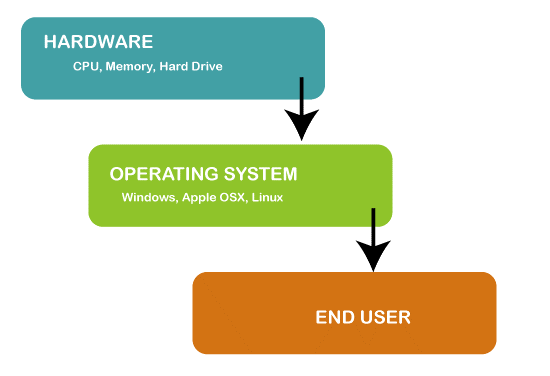
5 goals of operating system

Examples of Operating Systems

There are various types of operating systems which are available in the market:

  • Windows
  • Android
  • iOS
  • Mac OS
  • Linux
  • Chrome OS
  • Windows Phone OS

Goals of Operating System

There are mainly 2 goals of the operating system:

  • Convenience
  • Efficiency

The other 3 goals are:

  • Portability and Reliability
  • Hardware Abstraction
  • Security

1. Convenience

An Operating System's primary and first goal is to provide a friendly and convenient environment to the user. It is optional to use Operating System. Still, things become harder when the user has to perform all the process scheduling and convert user commands to machine language so that system can perform tasks. So, we use an Operating System to act as a bridge between us and the computer hardware. We only have to give commands to the system, and OS will take the instructions and do the rest of the work. Because of this operating system should be convenient to use and operate by the user.

2. Efficiency

The second and important goal of an Operating System is efficiency. An operating system should utilize all the resources efficiently. The management of resources and programs should be done so that no resource is kept idle and memory is used for no use.

3. Portability and Reliability

The operating system can work/operate on different machines with different processors and memory configurations. This makes the operating system more reliable.

Also, the operating system can protect itself and the user from accidental damage from the user program.

4. Hardware Abstraction

The operating system can conceal or can be said to control all functions and resources of the computer. The user can give commands and access any function or resource of the computer without facing any difficulties. In this way, the Operating system communicates between the user and computer hardware.

5. Security

An operating system provides the safety and security of data between the user and the hardware. OS enables multiple users to securely share a computer(system), including files, processes, memory, and device separately.

Functions of the Operating System
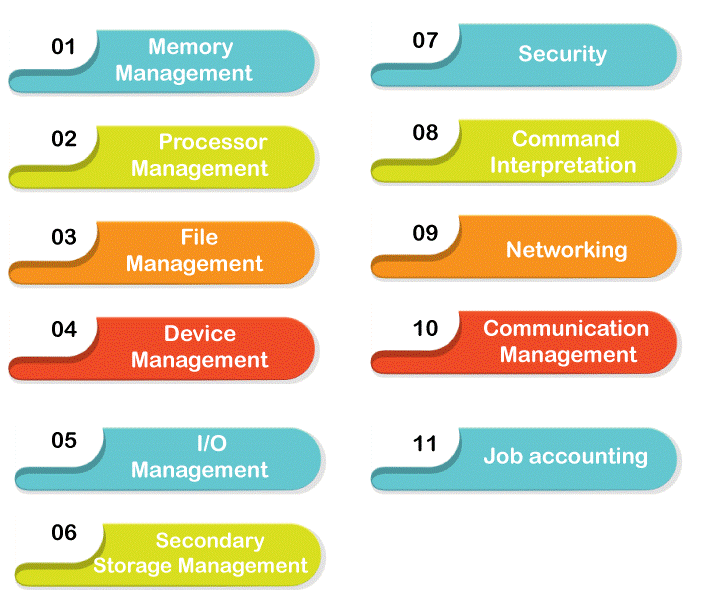
5 goals of operating system

To achieve the goals of an Operating system, the Operating System performs several functionalities, which are:

  • Process ManagementThe CPU executes many instructions for users at a time. Besides, user's commands, the CPU has some of its activities to perform, called processes. CPU has to complete all the tasks assigned to it. So, it solves the problem by giving a certain amount of time to a particular task. The operating system's function is to create and delete both user and system processes that are being executed or do not need to execute them.
  • Memory Management: Various tasks and commands fetched by the CPU are stored in the memory for execution. The operating system keeps track of which part of the memory is currently being used. Allocating and de-allocating the memory as per need. And decides which process should be loaded in the memory when it is available.
  • I/O Device Management: Various I/O devices are present in a system. Only OS has access to these devices. So, the Operating System must allow the use of I/O devices by the various processes requiring these resources.
  • File Management: There are various files, folders, and directory systems in a particular computer. Computers can store the files in magnetic tape, hard disk, local folder, etc. The operating system manages all these. The function of the OS is to create and delete files and folders. Mapping of files and directories to the disk. Backing up data to non-volatile memory.
  • Virtual Memory: Operating system loads some of the files, programs, and applications that are larger than the main memory in a memory which is called virtual memory.
  • Job Accounting: Job Accounting is a system available in the operating system that helps track system resource usage. It keeps track of the time and resources used by various processes and users.

Related Topics

Segmentation in Operating System

The term segmentation in operating system refers to the division of computer memory into segments. Segmentation is a technique used by many modern operating systems to provide better memory management....

4 minutes read.

Evolution of Operating System

Evolution of Operating System The evolution of various types of operating systems can be briefly described as follows: Serial Processing Since 1950, the operating system started to be in use. Before 1950, there...

5 minutes read.

Free Space Management in Operating System

What is Free Space Management? The system always keeps the records of the free disks blocks for allocating space to files when they are created. To use the space free from...

4 minutes read.

Advantages of UNIX Operating System

What is UNIX OS? UNIX is a family of multitasking, multiuser operating systems that are used on a wide variety of computer platforms. It was developed in the late 1960s and...

4 minutes read.

Can a Computer Run Without the Operating System

Computers may function right out of the box, mostly due to operating systems. Nowadays, there are probably already some pre-installed apps in a new computer when you buy one. Have...

9 minutes read.

Process State in OS

The Process passes from different states, from its formation to completion. The following are the states of the Process. NewReadyRunningBlock or WaitTerminated or CompletedSuspend readySuspend wait or suspend blocked 1. New: - The state in which a process...

2 minutes read.

Bit Vector in Operating System

What is Bit vector? Bit vector is one of the most important methods used in the free space management of operating system. Free space management which is used by the operating...

3 minutes read.

Round-Robin Scheduling Algorithm in OS

Round-Robin is a Preemptive Scheduling Algorithm and is the most commonly used algorithm in CPU Scheduling.In this, each Process is assigned with a fix time interval to execute, which is...

5 minutes read.

What is Context Switching

Context Switching is the switching of CPU from one process to another process. Context switching means storing the process state so that we can reload the process when needed, and the execution...

3 minutes read.

Difference between Rotational Latency and Disk Assess Time in Disk Scheduling

Disk scheduling is used by operating systems to arrange the arrival of I/O requests to the disc. Disk scheduling is necessary because several I/O requests may occur from various processes,...

4 minutes read.

Kernel in OS

What is Kernel in OS? The kernel is the core component in the operating system. The job of the kernel is to handle the communication between the hardware and the software. ...

2 minutes read.

Distributed Shared Memory

Distributed Shared Memory is a process of managing memory over more than one node and makes inter-process communication which transfers to end users. It is a mechanism that allows user...

2 minutes read.

Process Scheduling in Operating System

Process Scheduling is an essential component of a Multiprogramming Operating System. So now let’s understand how it works by taking a real-life example. Suppose that you want to call someone...

6 minutes read.

Thrashing in Operating System

A virtual memory system's poor performance when the same pages are loaded repeatedly due to a lack of main memory to store them in secondary memory is referred to as...

3 minutes read.

Linux Operating System

What is Linux? The Linux operating system is used on various devices, including cellphones, automobiles, supercomputers, household gadgets, personal computers, and business servers. You can find Linux on your phones, thermostats, vehicles,...

8 minutes read.

Non-Contiguous Memory Allocation in Operating System

Memory is nothing but a storage space where various data are stored. We can store data in temporary and permanent memory as per our future requirements for data. We can...

9 minutes read.

Process Schedulers and Process Queue in OS

Process Schedulers There are various types of Process Schedulers: Long Term SchedulerShort Term SchedulerMedium Term Scheduler                                            Long Term Scheduler: - Long term scheduler is also referred to as Job Scheduler. The task of the Long-term...

3 minutes read.

N-Step-SCAN Disk Scheduling

Before you study about N-Step-SCAN Disk Scheduling, it requires prerequisite of what is Disk Scheduling Algorithms: Operating systems use disc scheduling to schedule I/O requests that arrive at the disc....

4 minutes read.

File Allocation Methods in Operating System

A file allocation method is a way that an operating system stores and retrieves files on a storage device, such as a hard drive or SSD. The file allocation method...

4 minutes read.

Dining Philosophers Problem in Operating System

Edsger Wybe Dijkstra was a well-known Dutch scientist. He was the first person ever to present the Dining Philosophers Problem in the stream of Computer Science. The dining philosophers problem...

5 minutes read.