
Swapping in Operating System
Swapping in operating systems refers to temporarily transferring a program or process from main memory to a secondary storage device, such as a hard drive or solid-state drive when there is not enough available main memory to run the program or process. This allows the operating system to continue running multiple programs and processes concurrently, even if there is insufficient main memory to hold them simultaneously. Swapping is a shared memory management technique that maximizes available memory resources and improves the system's multitasking capabilities. It is managed by the operating system's virtual memory manager and is transparent to the user.
Before we delve into the details of swapping, it is essential to understand memory management and the different types of memory that an operating system uses.
Memory Management
Memory management is an essential aspect of any operating system. It refers to how a computer's central processing unit (CPU) and operating system (OS) handle the allocation and deallocation of memory to programs and processes. Memory management allows an operating system to efficiently use the available memory resources, ensuring that each program or approach has the memory it needs to function correctly.
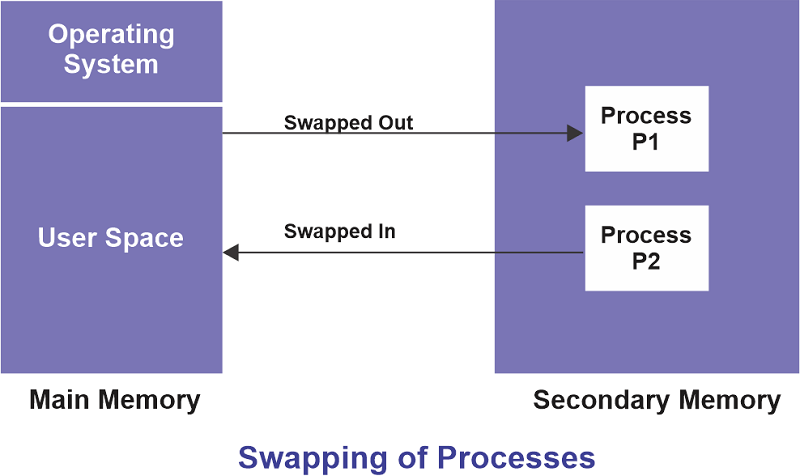
One important aspect of memory management is swapping. Swapping is moving a program or process from main memory to a secondary storage device, such as a hard drive or solid-state drive when there is not enough available memory to run the program or process. The program or methodology is temporarily "swapped out" of the main memory, and another program or process is "swapped in" to take its place. This allows the operating system to continue running multiple programs and processes concurrently, even if there is insufficient main memory to hold them simultaneously.
Types of Memory in Operating System
- Main memory (also known as RAM or random-access memory) is the primary memory used by a computer to store data and instructions for the CPU to access and execute. It is fast and volatile, meaning it is wiped clean when the laptop is powered off.
- Secondary storage (also known as external or non-volatile memory) is a slower but more persistent type of memory used to store data and programs that are not currently in use. Examples of secondary storage devices include hard drives, solid-state drives, and external hard drives.
- Virtual memory allows a computer to extend the amount of main memory available by temporarily transferring data and instructions to secondary storage when the main memory is full. Virtual memory is a combination of central and secondary storage managed by the operating system's virtual memory manager.
Benefits of Swapping in an Operating System
Swapping is a shared memory management technique operating systems use to maximize the use of available memory resources. It has several benefits, including:
- Improved multitasking: Swapping allows an operating system to run multiple programs and processes concurrently, even if there is not enough main memory to hold them all at the same time. This improves the system's multitasking capabilities and allows users to run more programs simultaneously.
- Increased program size: Swapping allows programs and processes to be larger than the available main memory, as they can be swapped in and out as needed. This allows for more complex and feature-rich programs to be developed and run on a system.
- Enhanced memory utilization: Swapping helps to ensure that the available main memory is used efficiently. When a program or process is no longer needed, its memory can be freed up and used by another program or method. This helps to prevent memory waste and ensures that the main memory is used effectively.
How Swapping Works in OS
When a program or process is executed, the operating system loads it into main memory from secondary storage. Suppose the program or process requires more memory than is available in the main memory. In that case, the operating system may begin to swap out inactive programs and techniques to make room for the new program or process.
The operating system maintains a list of programs and processes in the main memory and a list of those that have been swapped out to secondary storage. When a program or methodology is needed again, it is swapped back into the main memory from secondary storage. This process is transparent to the user and the program or method.
Conclusion
Swapping is a crucial aspect of memory management in operating systems. It allows an operating system to efficiently use the available memory resources and improve multitasking capabilities by temporarily transferring programs and processes to secondary storage when the main memory is full. This allows for larger and more complex programs to be run on a system and helps to ensure that the available main memory is used effectively. Understanding how swapping works and its benefits can help users to optimize their use of memory resources and improve the performance of their systems.