×

Operating System Services

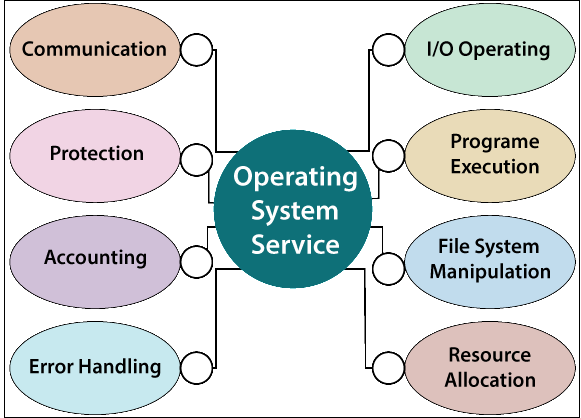
The Operating System provides various types of services:  

  1. I/O operation
  2. Program execution
  3. File system manipulation
  4. Communication
  5. Error Handling
  6. Resource allocation
  7. Accounting
  8. Protection
Operating System Services

1. I/O Operation: - To execute a program, needs I/O, which consists of a file, or I/O device. Due to the protection and effectiveness, users are not able to manage the I/O device, so the operating system helps the user to perform I/O operations such as read and write operations in a file. The Operating system offers the facility to access the I/O device when needed.

2. Program execution: - Operating System is responsible for loading a program into memory and then executing that program. Operating System helps us to manage different tasks from user programs to the system programs such as file server, name server, printer spooler, etc. Each of these tasks is sum-up as a process. A process may consist of complete execution context like data to manipulate, OS resources in use, registers, code to execute, etc.

The operating system performs the following tasks for program management:

  • Executes the program.
  • Load the program into memory.
  • Operating system offers a procedure for process synchronization.
  • Operating system offers a procedure for deadlock handling.
  • Operating system offers a method for process communication.
  • Manages the program’s execution.

 3. File System Manipulation

A file is a collection of information. For long term storage computer stores, the file is placed on the disk, and disk is the secondary storage. For example - Magnetic disk, CD, DVD, Magnetic tape. Each storage media has different properties or capabilities such as capacity, speed, data access, and data transfer method.

For easy and effective usage, the File system is organized in the form of directories, and the directories contain files and other directions.

The operating system performs the following activities for File System Manipulation.

  • It offers an interface so that we can easily create and delete files.
  • It offers an interface to create and delete directories.
  • It offers an interface so that we can create a backup of the file.
  • With the help of the operating system, we can access the program for performing an operation on a file.

4. Communication

The Operating system offers the facility of communication. The Process requires information exchange with another process. For executing a process on the same computer or different computer systems, it communicates with the help of the operating system. Communication between the processes is done with the help of message passing and shared memory.

5. Error Handling

The Operating system provides the service of error handling. An error may arise anywhere, like in I/O devices, Memory, CPU, and in the user program. The Operating system takes appropriate action for each error to ensure consistency and correct computing.

6. Resource allocation

In a system, when multiple jobs are executing concurrently, then resource allocation must be needed for each job. Resources include main memory storage, file storage, CPU cycles, and I/O devices. The operating system handles every type of resource by using schedulers. With the help of CPU scheduling, the task of resource allocation can be performed.

7. Accounting

Accounting service of the operating system helps to keep track of the system usage means which users use the resources for how much time and what type of resources are used by the system.

8. Protection: - If the computer system has different users and permits the concurrent execution of the various processes, then it is must to protect the processes from one another’s activities.


Related Topics

Linux Operating System

What is Linux? The Linux operating system is used on various devices, including cellphones, automobiles, supercomputers, household gadgets, personal computers, and business servers. You can find Linux on your phones, thermostats, vehicles,...

8 minutes read.

CPU Scheduling in OS

What is Scheduling? Scheduling is the process that is used to share the computing resources such as memory, processor time, and bandwidth to the different processes, data flows, threads, and applications that need...

5 minutes read.

Deadlock Avoidance

Deadlock Avoidance In an operating system, for deadlock avoidance, we perform the following: We only grant the request of the resources if the resulting state of the system will not cause any deadlock in the...

3 minutes read.

Can a Computer Run Without the Operating System

Computers may function right out of the box, mostly due to operating systems. Nowadays, there are probably already some pre-installed apps in a new computer when you buy one. Have...

9 minutes read.

Difference between SCAN and FCFS Disk Scheduling Algorithm

SCAN / Elevator Algorithm A different form of disc scheduling method is the SCAN disc scheduling algorithm. We move the disc arm in a certain direction in this process (the direction...

3 minutes read.

Difference between Rotational Latency and Disk Assess Time in Disk Scheduling

Disk scheduling is used by operating systems to arrange the arrival of I/O requests to the disc. Disk scheduling is necessary because several I/O requests may occur from various processes,...

4 minutes read.

Process Schedulers and Process Queue in OS

Process Schedulers There are various types of Process Schedulers: Long Term SchedulerShort Term SchedulerMedium Term Scheduler                                            Long Term Scheduler: - Long term scheduler is also referred to as Job Scheduler. The task of the Long-term...

3 minutes read.

Components of Operating System

Components of Operating System: An operating system is a complex and vast system. We can only create the operating system by dividing it into small parts. Each part must be...

5 minutes read.

Batch Operating System

Computers were once quite huge devices that operated from a console. Tape drives, punch cards, line printers were often utilized for the output, and tape drivers or card readers for...

4 minutes read.

Bit Vector in Operating System

What is Bit vector? Bit vector is one of the most important methods used in the free space management of operating system. Free space management which is used by the operating...

3 minutes read.

Difference between Protection and Security in Operating System

Some operating system mechanisms facilitate us to stop tampering with logical and physical resources. Some of these methods are security and protection. Protection and security are distinct concepts, despite the...

3 minutes read.

Feedback Queue in Operating System

In a computer or a laptop, there is a processor which do all the tasks. The processor cannot do all the tasks at a time. So, the tasks will be...

3 minutes read.

Ubuntu Operating System

Ubuntu Operating System Ubuntu is an open-source and a Linux based operating system. Ubuntu is developed for the Network Servers, Computers, and Smartphones. The Ubuntu operating system was developed by Canonical...

3 minutes read.

Operating System Properties

The Properties of Operating System are: Batch processingMultitaskingMulti-programmingInteractivityReal-Time SystemDistributed Environmentspooling 1. Batch Processing In Batch Processing, the OS first gathers the data and programs together in a batch, then processing starts. The operating system...

3 minutes read.

Process State in OS

The Process passes from different states, from its formation to completion. The following are the states of the Process. NewReadyRunningBlock or WaitTerminated or CompletedSuspend readySuspend wait or suspend blocked 1. New: - The state in which a process...

2 minutes read.

DOS Operating System

What is DOS Operating System? An operating system that runs from a hard disk drive is known as the DOS (Disk Operating System).In other words, DOS (Disk Operating System) is defined...

7 minutes read.

Process Synchronization | Operating System

Process Synchronization Process Synchronization means managing the process in such a manner so that no two processes have access to share similar data and resources. We can use Process Synchronization in a Multi-Process System...

4 minutes read.

SJF Scheduling in OS

Shortest Job First (SJF) Scheduling in OS Shortest Job First is a Preemptive or Non-Preemptive algorithm. In the shortest job first algorithm, the job having shortest or less burst time will...

4 minutes read.

Round-Robin Scheduling Algorithm in OS

Round-Robin is a Preemptive Scheduling Algorithm and is the most commonly used algorithm in CPU Scheduling.In this, each Process is assigned with a fix time interval to execute, which is...

5 minutes read.

Evolution of Operating System

Evolution of Operating System The evolution of various types of operating systems can be briefly described as follows: Serial Processing Since 1950, the operating system started to be in use. Before 1950, there...

5 minutes read.