
×

Banker’s Algorithm in Operating System

What is Banker’s Algorithm?

Bankers algorithm is an algorithm which is used for deadlock avoidance and resource allocation. It was established by Edsger Dijkstra. The reason behind the name ‘banker’s algorithm’ is that it is mostly used in banking systems. Banker’s algorithm helps to identify whether a loan should be provided or not.

Characteristics of Banker’s Algorithm

The characteristics of Banker’s algorithm are:

  1. If a process demands the resources, then it has to wait.
  2. Banker’s algorithm consists of advanced features for maximum resource allocation.
  3. In the banker’s algorithm, various resources are maintained that fulfill the needs of at least one client.
  4. In the system, we have limited resources.
  5. In the banker’s algorithm, if the process gets all the needed resources, then it is must to return the resources in a restricted period.

Disadvantages of Banker’s Algorithm

The disadvantages of banker’s algorithm are:

  1. During processing, it does not permit a process to change its maximum need.
  2. All the processes should know in advance about the maximum resource needs.
  3. Banker’s algorithm permits the requests to be provided in constrained time, but for one year which is a fixed period.

 Data Structures used to implement the Banker’s Algorithm

There are four types of data structures used to implement Banker’s algorithm:

  1. Available
  2. Max
  3. Allocation
  4. Need

1. Available

  • Available is a one-dimensional array. The size of the array is ‘m’ which is used to determine the number of available resources of each kind.
  • Available[j] = k indicates that we have ‘k’ instances of ‘Rj’ resource type.

2. Max

  • Max is a two-dimensional array. The size of the array is ‘n*m’. The max data structure is used to determine the maximum number of resources that each process requests.
  • Max[i, j] = k indicates that ‘Pi’ can demand or request maximum ‘k’ instances of ‘Rj’ resource type.

3. Allocation

  • Allocation is a two-dimensional array, and the size of the array is ‘n*m’, which is used to define the number of resources of each kind presently assigned to each process.
  • Allocation[i, j] = k indicates that currently process ‘Pi’ is assigned ‘k’ instances of ‘Rj’ resource type.

4. Need

  • Need is a two-dimensional array. The size of the array is ‘n*m’. Need is used to define the remaining resources which are required for each process.
  • Need [i, j] = k indicates that for the execution of ‘Pi’ process, presently ‘k’ instances of resource type ‘Rj’ are required.

Banker’s algorithm comprises of two algorithms:

  1. Safety algorithm
  2. Resource request algorithm

1. Safety algorithm

The safety algorithm is used to check the system state means whether the system is in a safe state or not.

The safety algorithm contains the following steps:
Banker’s Algorithm

2. Resource Request Algorithm

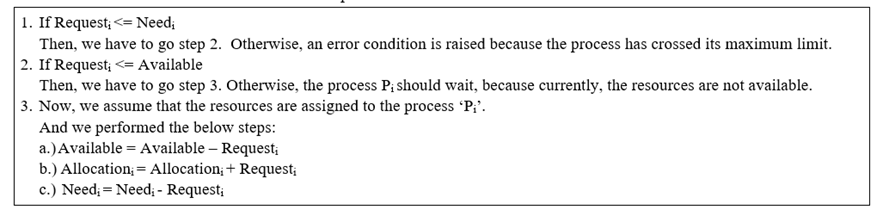
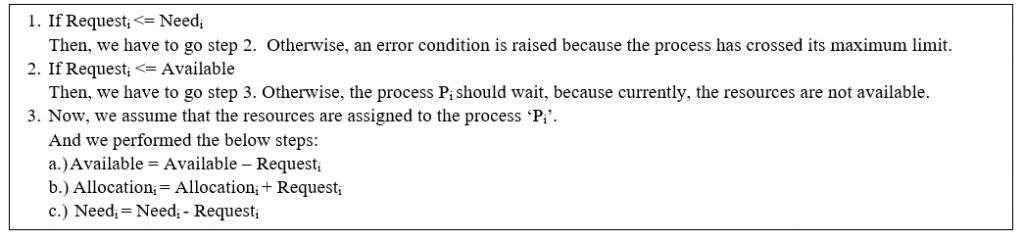
Let Requesti is the request array for the process ‘Pi’. Requesti [j] = k means ‘Pi’ process needs k instances of Rj resource type. At the time   when a process Pi demands  resources, then we follow the below steps.
Banker’s Algorithm

Example of Banker’s Algorithm

Consider the following snapshot of a system:

Processes Allocation
A   B    C
      Max
A   B   C
Available
A   B   C
      P0 1     1     2  4    3    3   2    1    0
      P1 2     1     2  3    2    2  
      P2 4     0     1  9    0    2  
      P3 0     2     0  7    5    3  
      P4 1     1     2  1    1    2  
  1. calculate the content of the need matrix?
  2. Is the system in a safe state?
  3. Determine the total amount of resources of each type?

Solution:

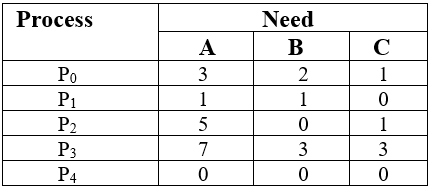
1. Content of the need matrix can be calculated by using the below formula

Need = Max – Allocation
??
2. Now, we check for a safe state

Safe sequence:

  1.  For process P0, Need = (3, 2, 1) and

                           Available = (2, 1, 0)

             Need ? Available = False

   So, the system will move for the next process.

2. For Process P1, Need = (1, 1, 0)

                  Available = (2, 1, 0)

    Need ? Available = True

              Request of P1 is granted.

                ?                          Available = Available +Allocation

                                                              = (2, 1, 0) + (2, 1, 2)

                                                             = (4, 2, 2) (New Available)

3. For Process P2, Need = (5, 0, 1)

                   Available = (4, 2, 2)

     Need ? Available = False

So, the system will move to the next process.

4. For Process P3, Need = (7, 3, 3)

                  Available = (4, 2, 2)

          Need ? Available = False

So, the system will move to the next process.

5. For Process P4, Need = (0, 0, 0)

                   Available = (4, 2, 2)

              Need ? Available = True

                Request of P4 is granted.

                ?                          Available = Available + Allocation

                                        = (4, 2, 2) + (1, 1, 2)

                                        = (5, 3, 4) now, (New Available)

6. Now again check for Process P2, Need = (5, 0, 1)

                                               Available = (5, 3, 4)

                                          Need ? Available = True

                Request of P2 is granted.

                ?                          Available = Available + Allocation

                                                             = (5, 3, 4) + (4, 0, 1)

                                                             = (9, 3, 5) now, (New Available)

7. Now again check for Process P3, Need = (7, 3, 3)

                                              Available = (9, 3, 5)

                                          Need ? Available = True

                Request of P3 is granted.

                ?                          Available = Available +Allocation

                                                             = (9, 3, 5) + (0, 2, 0) = (9, 5, 5)

8. Now again check for Process P0, = Need (3, 2, 1)

                                                      = Available (9, 5, 5)

                         Need ? Available = True

So, the request will be granted to P0.

Safe sequence: < P1, P4, P2, P3, P0>

The system allocates all the needed resources to each process. So, we can say that system is in a safe state.

3. The total amount of resources = sum of columns of allocation + Available

                                                             = [8 5 7] + [2 1 0] = [10 6 7]


Related Topics

Thrashing in Operating System

A virtual memory system's poor performance when the same pages are loaded repeatedly due to a lack of main memory to store them in secondary memory is referred to as...

3 minutes read.

CPU Scheduling in OS

What is Scheduling? Scheduling is the process that is used to share the computing resources such as memory, processor time, and bandwidth to the different processes, data flows, threads, and applications that need...

5 minutes read.

Feedback Queue in Operating System

In a computer or a laptop, there is a processor which do all the tasks. The processor cannot do all the tasks at a time. So, the tasks will be...

3 minutes read.

Monitors in Operating System

Monitors in Operating System Monitors are used for process synchronization. With the help of programming languages, we can use a monitor to achieve mutual exclusion among the processes. Example of monitors:...

3 minutes read.

Operating System Properties

The Properties of Operating System are: Batch processingMultitaskingMulti-programmingInteractivityReal-Time SystemDistributed Environmentspooling 1. Batch Processing In Batch Processing, the OS first gathers the data and programs together in a batch, then processing starts. The operating system...

3 minutes read.

Commercial Mobile Operating Systems

Introduction to Commercial Mobile Operating Systems A computer program's common services are managed by an operating system (OS), which also handles computer hardware and software resources. The user can communicate with...

7 minutes read.

Paging and Segmentation in OS

What is Paging in OS? Paging is a storage technique used for memory management. In paging, the (OS) Operating System retrieves the processes from the secondary memory into the main memory,...

6 minutes read.

Two Phase Locking Protocol

What is two phase locking? Two-phase locking is a concurrency control method in a database and transaction processing system. It ensures that transactions are executed in a serializable manner by requiring...

4 minutes read.

Fixed Partitioning in Operating System

Fixed Partitioning in OS Fixed Partitioning is also known as Contiguous memory allocation. Fixed Partitioning is the easiest method, which is used to load more than one process into the main memory. In Fixed...

5 minutes read.

Difference between Rotational Latency and Disk Assess Time in Disk Scheduling

Disk scheduling is used by operating systems to arrange the arrival of I/O requests to the disc. Disk scheduling is necessary because several I/O requests may occur from various processes,...

4 minutes read.

Producer-Consumer Problem in OS

What is Producer-Consumer Problem? The Producer-Consumer problem is a classical problem. The Producer-Consumer problem is used for multi-process synchronization, which means synchronization between more than one processes. In this problem, we have one producer...

4 minutes read.

Free Space Management in Operating System

What is Free Space Management? The system always keeps the records of the free disks blocks for allocating space to files when they are created. To use the space free from...

4 minutes read.

MS-DOS Operating System

It is also referred to occasionally as "DOS", an abbreviation for disc operating systems. Operating systems with a graphical user interface (GUI) in different iterations of the graphical Microsoft Windows...

5 minutes read.

Types of Operating System

There are various types of operating system: Simple Batch Operating SystemMultiprogramming batch Operating SystemTime-sharing Operating SystemMultiprocessor Operating SystemDistributed Operating SystemNetwork Operating SystemReal-time Operating SystemMobile Operating System Simple Batch operating system In the simple batch operating system, there is no direct communication between...

6 minutes read.

Semaphore in Operating System

What is Semaphore in Operating System Semaphore is defined as an integer variable which is used to solve the problem of the critical section in process synchronization. In semaphore, we use...

3 minutes read.

SCAN Disk Scheduling Algorithm

SCAN Disk Scheduling Algorithm The SCAN disk scheduling algorithm is another type of disk scheduling algorithm. In this algorithm, we move the disk arm into a specific direction (direction can be moved towards...

4 minutes read.

File in Operating System

What is File in Operating System?  A file is defined as a collection of the interrelated information that is stored in the secondary memory or the non-volatile memory such as optical...

4 minutes read.

Operating System Services

The Operating System provides various types of services:   I/O operationProgram executionFile system manipulationCommunicationError HandlingResource allocationAccountingProtection 1. I/O Operation: - To execute a program, needs I/O, which consists of a file, or I/O device. Due to the protection...

3 minutes read.

Simple Structure in Operating System

An operating system is a piece of software that lets the user applications talk to the hardware of the system. Because it is such a complicated structure, the operating system...

3 minutes read.

Real-time Operating System

In this essay, we will thoroughly understand the real-time operating system. Real-Time Operating System: What do you mean? For any task to be completed, a real-time operating system (RTOS), a special-purpose operating...

5 minutes read.