
Computer Graphics Tutorial
Introduction to Computer Graphics
Computer graphics is commonly seen as a computer science branch that deals with the computerized image fusion theory and technology. As simple as a triangle outline, a computer-generated image may represent a scene. The computer has become a powerful tool for producing images quickly and economically.
When a computer is used to create images, the same process is followed as creating images manually. The process's primary computational steps give a boost to several important computer graphics areas.
Also on computers, the term computer graphics covers almost everything. Here in the computer graphics program's classroom, we think of computer graphics as drawing images on machines, often known as rendering. The images can be photos, sketches, animations, or pictures of items imagined. Or they may be pictures, we cannot see directly, like internal body parts.
We have put a great deal of our time to develop how computer images can replicate real-world scenes. We want objects on computers not only to look more real, but also their colors to be more realistic and how different materials appear. We can call it "real synthesis of the image."
The term computer graphics has been used to define "almost everything on the computer, including text or sound." Generally, the term computer graphics refer to the following things:
- Computer representation and manipulation of image data.
- Various technologies for creating and manipulating images.
- Computer graphics study is a sub-field of computer science that studies methods for digitally incorporating and manipulating visual content.
The next area of computer graphics that deals with the placement of a triangle is called transformation. Here we can use matrices to get the mapping of a triangle in image space. We can also set up the transformation matrix to control the location and orientation of the displayed image. We can also resize the triangle.
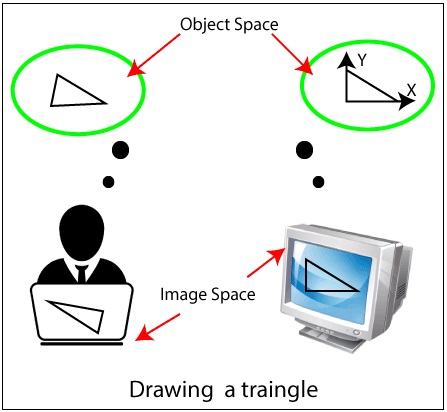
Definition of Computer Graphics-Computer graphics can be a series of images which is most often called a video or single image. Computer graphics is the technology that concerns with designs and pictures on computers. That’s why, computer graphics are visual representations of data shown on a monitor made on a computer.
“Computer graphics is the use of a computer to define, store, manipulate, interrogate, and represent the pictorial output.” An image in computer graphics is made up of a number of pixels.
Types of Computer Graphics
There are two kinds of computer graphics are-
- Interactive Computer Graphics
- Non-Interactive Computer Graphics
Interactive Computer Graphics
In interactive computer graphics, users have some controls over the image, i.e., the user can make any changes to the image produced.
Interactive Computer Graphics involves computer-user two-way communication.
For Example:
- Ping-pong game.
- Drawing on touch screens.
- Display weather forecast or other moving charts/graphs on the screen.
- Animating pictures or graphics in movies.
- Graphics animation in video games.
Working of Interactive Computer Graphics
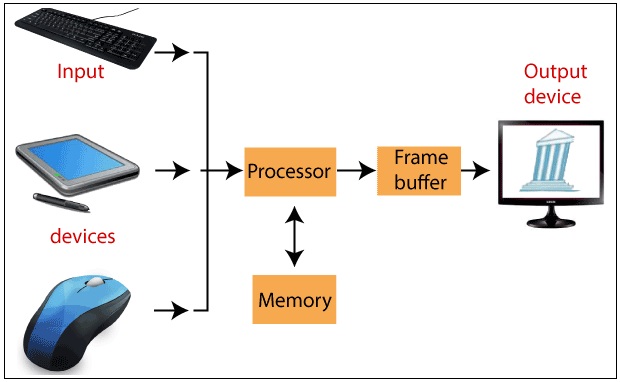
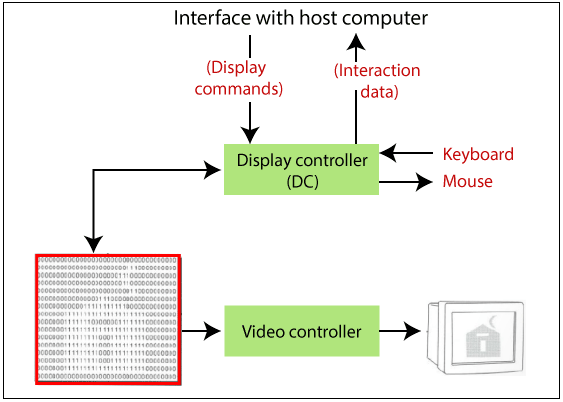
The modern display of graphics is very simple to build. It is composed of three components:
- Display controller or video controller
- Digital memory or frame buffer
- Television monitor
1. Display controller or video controller- It's a Memory Buffer and TV Monitor interface. Its task is to pass Frame Buffer's contents to the monitor. The display controller reads each continuous byte of Memory frame buffer data and converts 0's and 1's into appropriate video signals.
In today's term, the display controller is recognized as a display card, and one of our choices can be a VGA(Video Graphics Array) card with a resolution of 640x480. Display Controller is also capable of displaying the image in colors.
2. Digital memory or frame buffer-This is a place where images and pictures are stored as an array (matrix of 0 & 1, 0 represents darkness, and 1 represents image or picture). It is also called a frame buffer.
In today's term frame buffer is called V-RAM (video RAM), and it helps to store the image in bit form. It helps to increase the speed of graphics.
3. Television monitor- Monitor helps us to view the display, and they make use of CRT(Cathode ray tube) technology.
Advantages
- Superior Quality.
- More accurate outcomes or products.
- Increased Productivity.
- Lower cost of development.
- Increases the ability to understand information and interpret patterns significantly.
Non- Interactive Computer Graphics
Non-interactive computer graphics are also known as passive computer graphics. It is a type of computer graphics in which the user has no control over the image. The photo is completely controlled by the instructions of the program, not by the user.
For Example:
- Screen savers.
- Map representation of the data.
- Graphic elements are used in the text, document, and PDF presentation.
- Static images are used in mobile applications and websites.
- Business graphics are used as brochures, business cards, menu of the hotel.
Representation of graphics
We can represent the graphics by following two ways:
- Raster (Bitmap) Graphics
- Vector Graphics
1. Raster Graphics: In raster graphics, the image is presented as a rectangular grid of colored squares.
Raster images are also called bitmap images. Bitmap images are stored as the collection of small individual dots called pixels.
Bitmap images require high resolution and anti-aliasing for a smooth appearance.
For example- Paint, Photoshop, etc.
2. Vector Graphics: In vector graphics, the image is represented in the form of continuous geometric objects: line, curve, etc.
Vector images are not based on pixel pattern. They use mathematical formulas to draw line and curves. The lines and curves can be combined to create an image.
For Example- PowerPoint, Corel Draw, etc.
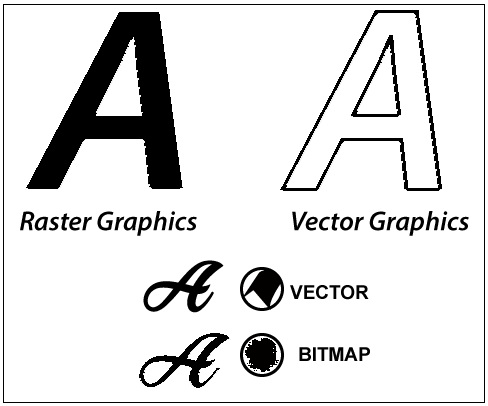
Fig: Raster (Composition of Paths) Vector (Composition of Pixels)
Difference between Raster and Vector Graphics:
| Raster Graphics | Vector Graphics |
| Raster images are the collection of the pixel. | The Vector images are composed of paths. |
| Scan conversion is required. | Scan Conversion is not required. |
| Raster Graphics are less costly. | Vector Graphics are more costly compared to raster graphics. |
| Raster image takes less space to store. | Vector image takes more space. |
| Raster graphics can draw mathematical curves, polygons, and boundaries. | Vector graphics can only draw continuous and smooth lines. |
| File Extension: .BMP, .TIF, .JPG etc. | File Extension: .SVG, .PDF, .AI etc. |
Computer Graphics Topics
- Introduction of Computer Graphics
- History of Computer Graphics
- Types of Computer Graphics
- Application of Computer Graphics
- Input Devices
- Output Devices
- Display Devices
- Display Processor
- Image Representation
- Color Models
- Animation
- Projection
- Transformation
- 2D Translation
- 2D Rotation
- 2D Scaling
- 2D Reflection
- 2D Shearing
- 3D Translation
- 3D Rotation
- 3D Scaling
- 3D Reflection
- 3D Shearing
- Computer Graphics Window
- Panning
- Zooming
- Clipping
- Line Clipping
- Point Clipping
- Text Clipping
- Polygon Clipping
- Scan Conversion
- Line Drawing Algorithm
- DDA Line Drawing Algorithm
- Bresenham’s Line Drawing Algorithm
- Mid-Point Line Drawing Algorithm
- Scan Conversion of a circle
- Bresenham’s Circle Drawing Algorithm
- Midpoint Circle Drawing Algorithm
- Scan Conversion of an Ellipse
- Pointing and positioning Techniques
- Filled Area Primitives
Misc
- 2D Transformation in Computer Graphics
- 3D Transformation in Computer Graphics
- Types of Computer Graphics
- Resolution in Computer Graphics
- Anti-aliasing in Computer Graphics
- Aspect Ratio in Computer Graphics
- Composite Transformation in Computer Graphics
- Flood Fill Algorithm in Computer Graphics
- Homogeneous Coordinates in Computer Graphics
- Boundry Fill Algorithm in Computer Graphics
- B-spline curve in Computer Graphics
- Illumination Model in Computer Graphics
- Parallel Projection in Computer Graphics
- Perspective Projection in Computer Graphics
- Pixel in Computer Graphics
- Rendering in Computer Graphics