
×

Array Command in AutoCAD

AutoCAD's Array Command From the command line, creates duplicates of anything in a pattern.

Creates nonassociative, 2D rectangular or polar arrays using historical command line behavior.

The copies may take a long time to produce if the array contains a big number of items. The maximum amount of array items you may produce in a single command is 100,000 by default.

Makes duplicates of items that are organized in a pattern. 

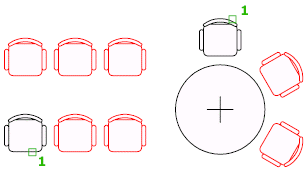
In a rectangular, polar, or route array, you can replicate objects with regular spacing.
Array Command in AutoCAD

You choose the arrangement pattern once you've selected the items you wish to replicate, which are referred to as the source objects.

What exactly is the distinction between Copy and Array?

The copy command copies the components in a certain sequence that we specify. The array, on the other hand, is used to duplicate objects in a predetermined sequence that have predefined angles and numbers (rectangular, polar, or path array).

The following are the three categories of arrays:

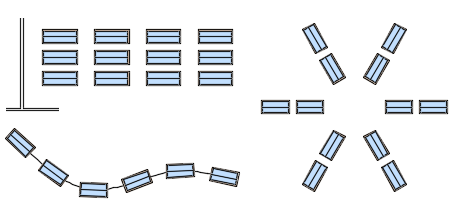
  • Rectangular
    Duplicates an object in any number of rows, columns, or levels.
    The rectangular array is the division of an object into rows, columns, and levels to create a rectangle.
    Using the Rectangular Array in AutoCAD, we may make many copies of an item in the shape of a rectangle.
  • Path
    Distributes copies of the chosen object evenly along a path or a segment of a path.
    You'll also need a line, polyline, 3D polyline, spline, helix, arc, circle, or ellipse to act as the route in a path array.
    The route array is the order in which copied items are arranged along a given path. It is possible to close or open the route.
    The objects are placed on the path using the Path array command. A polyline can also be used to make a route.\
  • Polar
    In a circular pattern, evenly distributes duplicates of the object around a center point or rotating axis.
    Here's an example of how these arrays may be used to arrange display tables:
Array Command in AutoCAD

Each array item, which might be made up of numerous objects, is referred to as an array element. You may also provide a block as the array's source object.

Attribute objects cannot be arrayed and are filtered out of the selection set automatically.

Arrays: Associative and Non-Associative

In the ARRAY command, you may specify whether an array is associative or non-associative by default.

  • Associative arrays offer the advantage of being easily modifiable in the future. Similar to a block, array components are contained in a single array object. In an associative array, you may adjust the amount of these objects as well as their spacing. Using the grips on the array or the Attributes panel, you may change the array's properties like spacing and number of objects.
  • The main advantage of associative arrays is that the items within them preserve their associations, making it extremely simple to change the layout, spacing, and position of an array. This is a lot faster than moving individual things around.
  • If an associative array is asymmetrical or uneven, you can burst it to get individual, non-associated items. The ARRAYCLASSIC command, which is the earlier version of ARRAY, may still be used to generate non-associative arrays.
  • After you terminate the ARRAY command, non-associative arrays become independent objects.

Note that blocks nested in associative array objects are not selected or counted by Quick Select.

An Associative Array's elements can be changed.

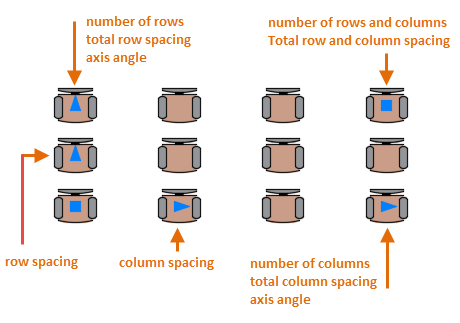
Associative arrays can be changed directly using grips, using the grip menu choices that display when you hover over a grip, or by using the ARRAYEDIT command from the contextual tab or at the Command prompt. Here are the key controls for a rectangle array of seats, for example. Controls for path arrays and polar arrays are similar.
Array Command in AutoCAD

You may still change the entries in an associative array after it has been created:

Edit an array's source item. The source item will be immediately updated in all cases. Remove one or more of the array's elements.

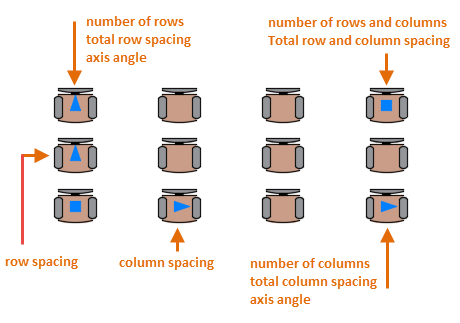
Select objects to replace one or more elements in the array. Objects connected with the array item can also be added or removed. Two of the top row's tables were removed, and the first column's display tables were replaced with a shorter version.
Array Command in AutoCAD

The array remains associative after these changes, and the spacing and angles between the elements can be dynamically changed in a single operation.


Related Topics

Overkill Command in AutoCAD

Getting rid of overlapping objects in AutoCAD In the command bar, enter the word OVERKILL.Choose every item you wish to be eliminated of duplicates. To accept the drawing chosen, press enter. Review...

4 minutes read.

Rectangle command in AutoCAD

The rectangle command is used to create rectangles in our drawing. We can create rectangles randomly by specifying the points and also by specifying the values of length and width. METHOD 1:-...

3 minutes read.

Slot Command in AutoCAD

Including blind and through slots Securing Slots The Holes panel drop-down on the Content tab of the ribbon contains the Through Slot command. The Select a Slot - Through dialogue box appears...

4 minutes read.

Annotation command in AutoCAD

When the project's author is not there, AutoCAD annotation gives the project all of its meaning and its purpose to the eyes of someone viewing it. Additionally, annotations can assist...

3 minutes read.

Loft command in AutoCAD

The loft command in AutoCAD is used to create 3D solid or surface. The 3D solid or surface is formed within the space between various cross sections.  Find in command window. The...

6 minutes read.

tcount command in AutoCAD

You can now automatically keep track of the number of blocks and other objects you have in your AutoCAD drawing file thanks to a new feature in AutoCAD 2022 and...

3 minutes read.

AutoCAD Free Download

How to Get a Free AutoCAD Download and Install A new tab will open immediately to the AutoCAD free trial page when you click the Download button on the sidebar. To get...

4 minutes read.

AutoCAD Blocks

cad-blocks.net is a well-organized, contemporary, and easy-to-navigate website where you can download over 5,000 CAD blocks files (dwg files) for use in architectural projects or designs using AutoCAD and other...

6 minutes read.

Point Command in AutoCAD

Points in AutoCAD 2D may provide excellent reference points for additional drawings. In this post, we'll demonstrate how to construct single and multiple points in AutoCAD 2D, along with the...

1 minute read.

Script Command in AutoCAD

What exactly is AutoCAD scripting? Scripting is another means of automating processes in AutoCAD that does not need the use of programming languages such as VBA or Auto LISP. Script files...

3 minutes read.

Attedit command in AutoCAD

At the Command prompt, modify a block's attribute data. You may filter the properties that need to be changed based on the attribute tag, the current value, or the selected...

4 minutes read.

Extrude command in AutoCAD

In AutoCAD 3D, the extrude function is useful. Extrude pushes up the surface, creating a 3D solid from a 2D closed shape or a 3D surface from an object with open...

4 minutes read.

Copy Command in AutoCAD

Using Two Points to Copy an Object Select the Home tab > Modify panel > Copy option.Press Enter after selecting the items to copy.Set a starting point for the copy.Make a...

3 minutes read.

AutoCAD Tree Blocks

AutoCAD is widely used for landscaping, garden design, and architecture in general. Plant and tree design in AutoCAD may be rather time-consuming. Designing plants that complement the artwork requires time...

5 minutes read.

Isoplane command in AutoCAD

It's possible that you'll need to create isometric drawings if you operate in the plant business. If you use AutoCAD, you might wish it was simple. You may. By merely changing...

3 minutes read.

AutoCAD 2d Drawing

What is AutoCAD 2D drawing? The act of making and altering technical drawings, as well as annotating designs, is known as 2D drafting and drawing. Drafters create floor plans, construction permit...

3 minutes read.

Stretch command in AutoCAD

How to use Stretch command in AutoCAD 1) This command in AutoCAD is excellent and helpful. Use the Stretch command to quickly move or alter any items, such as a door...

4 minutes read.

Inquiry command in AutoCAD

Pick an inquiry type, then choose the data by following the on-screen directions. Once the investigation is complete, you may copy the data to another file, such a Microsoft Excel...

3 minutes read.

Wipeout Command in AutoCAD

Use the Wipeout command to conceal some drawing elements without erasing them. It is a background-colored item with concealable edges that have a different hue. To conceal a region in a...

4 minutes read.

AutoCAD Drawing

CAD software superior to hand-drawing The user may incorporate accurate measurements in their designs using CAD software. When creating in CAD, it is also much easier to make changes to a...

10 minutes read.