
MySQL Union
MySQL contains the same categories of data in a different table. Sometimes, you require multiple tables to collect data together. MySQL union is a function to combine two table's data on a single page.The union in MySQL removes duplicate rows from the tables and returns unique data in a result set. The union displays the output of more than one table. MySQL union working procedure starts with the SELECT statement. The "UNION" keyword requires at least two tables for their combination. You can also select a column list from several tables.
When the MySQL union shows the entire row's of the two tables in a single set, it is called a "UNION ALL" command. This command works with several conditions and clauses in the MySQL query. The "UNION ALL" does not remove duplicate data from the table.
Rules of the MySQL Union
- The union must need the same name and number of the column of the table.
- The column list of the tables must be in the same order for the union query.
- The table columns have to be similar for the combined similar type of data on one page.
- The SELECT and UNION statements are necessary to display table output.
- MySQL clauses use for showing output as per the required condition.
Syntax of the MySQL Union function
MySQL union for two table's syntax shows below.
SELECT column_1, column_2 FROM first_table
UNION
SELECT column_1, column_2 FROM second_table;
Syntax of the multiple MySQL Union function
MySQL union for two table's syntax shows below.
SELECT column_1, column_2 FROM first_table
UNION
SELECT column_1, column_2 FROM second_table
UNION
SELECT column_1, column_2 FROM third_table;
Syntax of the MySQL Union ALL function
MySQL union for two table's syntax shows below.
SELECT column_1, column_2 FROM first_table
UNION ALL
SELECT column_1, column_2 FROM second_table;
The setting of the MySQL Union
- Creates the first table with required columns and their data type.
- Insert values in the first table as per requirement.
- Show the first table's data using the output query.
- Create the second table with required columns and their data type.
- Insert values in the second table as per requirement.
- Show the second table's data using the output query.
Examples of the UNION and UNION ALL
Example1:In this example, you can use a single union function for combining two tables. This function uses technology and a study table. Here, both table has same column name and its data types.
mysql> SELECT department_id, name, admissions FROM Technology
UNION
SELECT department_id, name, admissions FROM STUDY;
Output
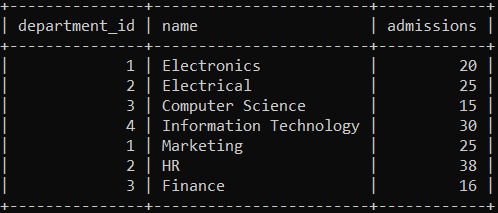
This output shows combine information of the technology and study tables. The first four rows represent the technology table. The last three rows represent the study table. You get three columns and seven rows using the union function.
Example2: This example uses multiple union functions for combining more than two tables. You can combine more than two tables using the union function and removes duplicate functions. Here, the example combines technology, study, and arts tables.
mysql> SELECT department_id, name, admissions FROM Technology
UNION
SELECT department_id, name, admissions FROM STUDY
UNION
SELECT department_id, name, admissions FROM ARTS;
Output
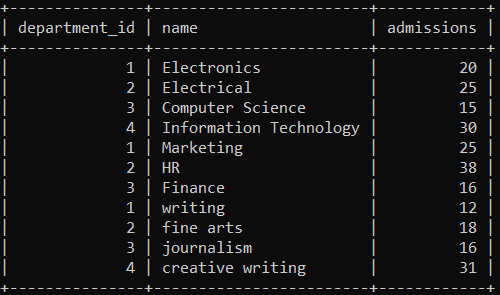
The above image displays eleven rows and three columns of the three tables. You can see table data as per the table's position with the union function. This function removes duplicate information and displays the original value of the tables. The first table, which is technology, contains the first few rows of the table.
Example3: This example uses the ORDER BY clause with the union function. This clause comes with the "ASC" keyword for ascending order. The "name" columns display in the required order.
mysql> SELECT department_id, name, admissions FROM Technology
UNION
SELECT department_id, name, admissions FROM STUDY
ORDER BY name ASC;
Output
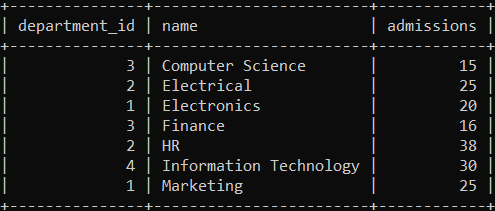
This output image returns table information in the ascending order of the name column. This clause applies to the two tables simultaneously and combines information from the first alphabet to the last alphabet.
Example4:MySQL "union all" query works with a required column of the table. This function gives three columns of the technology and study tables. You do not need any clause and condition for the combined two table’s information.
mysql> SELECT department_id, name, admissions FROM Technology
UNION ALL
SELECT department_id, name, admissions FROM STUDY;
Output
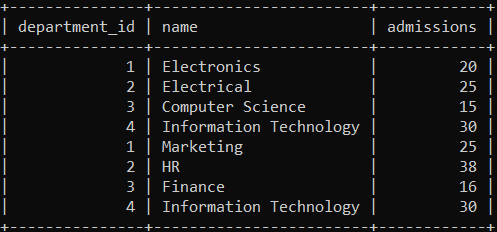
The "union all" function's output returns all information of the given table. The above image returns all similar and different value contains in the table.
Example5:Execute the following query to get the working procedure of the union function. This function works on an entire table of the database. It returns unique and combined information of the tables.
mysql> SELECT * FROM Technology
UNION
SELECT * FROM STUDY;
Output
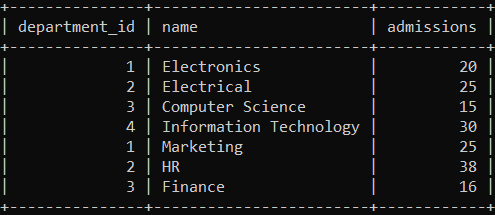
You can able to display different information using the union function. The first table shows all information but the second table shows only three rows of the table. The second table removes the last row, similar to the first table.
Example6: This example works with multiple "union all" functions in the MySQL query. The union all function combines more than two tables in one table.
mysql> SELECT department_id, name, admissions FROM Technology
UNION ALL
SELECT department_id, name, admissions FROM STUDY
UNION ALL
SELECT department_id, name, admissions FROM ART;
Output

Here, you can see three different table's data in one image. You can categories the different tables using department id columns. The output image returns the entire information of the technology, arts, and study tables.
Example7: This example works with the "union all" function and the "order by" clause without specifying any order.
mysql> SELECT department_id, name, admissions FROM Technology
UNION ALL
SELECT department_id, name, admissions FROM STUDY
ORDER BY name;
Output
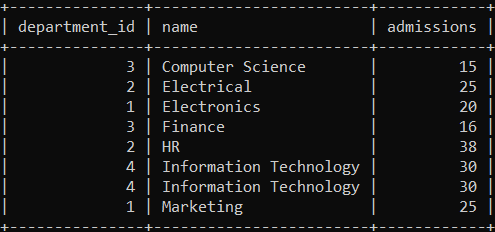
The union all function returns table data with an order of the name column. This order by clause sets ascending by default.
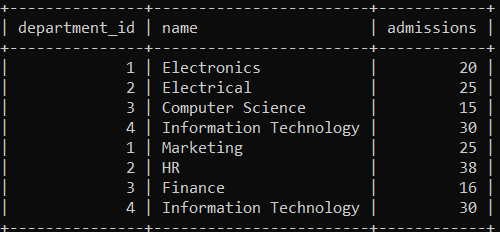
Example8:The "union all" function applies with the select all (*) columns of the table. This function works on the entire table format and data.
mysql> SELECT * FROM technology
UNION ALL
SELECT * FROM study;
Output
Differences between UNION and JOIN in MySQL
The following table shows similarities and differences between UNION and JOIN.
| UNION | JOIN |
| The union combines the result set of the multiple tables. | The join combines the many tables' data using conditions. |
| MySQL union combines multiple table data into a new row of the table. | MySQL join combines multiple table data into a new row of the table. |
| The selected columns of the table are the same. | The selected columns of the table are similar or different. |
| The union removes duplicate data and display distinct data. | The join displays distinct and duplicate data. |
Differences between UNION and UNION ALL
The following table shows similarities and differences between UNION and UNION ALL.
| UNION | UNION ALL |
| The union combines the result set of the multiple tables. | The union all combines the result set of the multiple tables. |
| The union removes duplicate data from the tables. | The union ALL removes duplicate data from the tables. |
| The union is lower than UNION ALL function. | The UNION ALL is higher than the UNION function. |