
×

MySQL COALESCE function

This statement displays the first non-null value of the table data. The COALESCE function returns a null value when all values of the table are null or do not find any non-null value.

Syntax

The COALESCE function syntax shows below.

COALESCE (data1, data2, data3, dataN);

The COALESCE function syntax with table shows below.

SELECT COALESCE (column_name, expression) FROM table name;

The COALESCE function with WHERE clause syntax shows below.

SELECT * FROM table name WHERE COALESCE (column_name);

Prerequisite

  • Create table in the database with data type and key.
mysql> CREATE TABLE `marks` (
  `roll_no` INT NOT NULL,
  `name` VARCHAR(45) NULL,
  `physics` INT NULL,
  `chemistry` INT NULL,
  `maths` INT NULL,
  `english` INT NULL,
  PRIMARY KEY (`roll_no`));
  • Insert value in the table as per requirement.
  • The below command shows the table format and its information.
mysql> Select * from marks;

Use of the COALESCE function

The following are the uses of coalesce function:

  • The COALESCE function is used to compare the column data between null and not null values.
  • This function is used to find the not null values in the table columns.
  • This COALESCE function determines and maintains table data according to null and not null values.

Example of the COALESCE function

Example1: Execute the following query to know about the "COALESCE" statement.

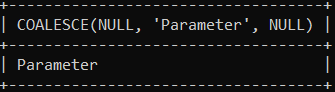
mysql> SELECT COALESCE(NULL, 'Parameter', NULL);

Output

Executing the statement will show the below output:
MySQL COALESCE function

The image shows the output as a "parameter" value. If a single value is available, then the "COALESCE" function returns it.

Example2: The below query shows the working procedure of the "null" values and their output.

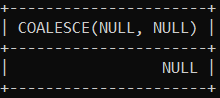
mysql> SELECT COALESCE(NULL, NULL);

Output

Executing the query will return the NULL value because it does not have any non-value.
MySQL COALESCE function

Example3: This example will explain the "COALESCE" function with the table. Here, we applied this function to the single column of the table.

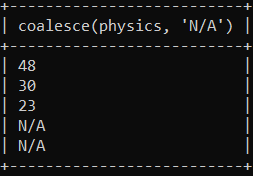
mysql> select coalesce(physics, 'N/A') from marks;

Output

Executing the query will return the below output where we can see that the null value of the physics column replaces it with the "N/A" keyword.
MySQL COALESCE function

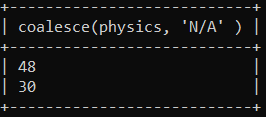
Example4: Execute the following query to know how the "COALESCE" function work with the WHERE condition. Here, this function applies to the single column of the table.

mysql> select coalesce(physics, 'N/A' ) from marks WHERE roll_no < 3;

Output

This query shows the below result:
MySQL COALESCE function

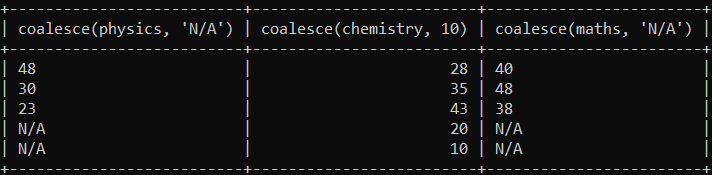
Example5: Execute the following query to know about the "COALESCE" statement used in the multiple columns of the table.

mysql> select coalesce(physics, 'N/A'), coalesce(chemistry, 10) , coalesce(maths, 'N/A')  from marks;

Output

It gives the below result where we can see that the null value of the given column replaces with a given value.
MySQL COALESCE function

Example6: This example explains the COALESCE function with the ORDER BY clause. Here we have applied this function to the multiple columns of the table. The "ORDER BY" clause applies to the descending order on the column.

mysql> select coalesce(physics, 'N/A'), coalesce(chemistry, 10) , coalesce(maths, 'N/A')  from marks WHERE roll_no < 4 ORDER BY physics DESC;

Output

Executing the query return the below result:

MySQL COALESCE function

Related Topics

MySQL Tutorial

In this tutorial, you will get information about the MySQL management system. This tutorial will cover the basic and advanced level MySQL concepts with examples that will help you become...

5 minutes read.

MySQL Clauses

MySQL Clauses MySQL system clauses are keywords or statements to handle information. It helps to operate a group of the data and apply it to require conditions. The clauses apply conditions...

16 minutes read.

MySQL Data Types

Introduction of the Data types In the data file, we have several information such as names, numbers, marks, and other information. This information specifies categories such as numbers, characters, and decimal...

8 minutes read.

MySQL DATEDIFF() function

In this context, we will learn how we can use the MySQL DATEDIFF() function with proper syntax and good examples. Introduction of MySQL DATEDIFF() function DATEDIFF() function in MySQL is used to...

3 minutes read.

MySQL RIGHT JOIN

MySQL right join links two tables with each other. The left table column connects with the complete right side table. Each row of the right table tries to connect with...

4 minutes read.

MySQL ASIN() Function

In this context we will learn how we can use the ASIN() function in MySQL with proper syntax and good example. Introduction of MySQL ASIN() function The arc sine value of a...

2 minutes read.

MySQL INSERT() Function

In this context, we will learn how we can use the MySQL INSERT() function with proper syntax and good examples. Introduction of MySQL INSERT() function Basically, in MySQL, the INSERT function is...

2 minutes read.

MySQL Vs MongoDB

What is MongoDB? MongoDB is a distributed, open-source, cross-platform document-based database which was created to scale and develop applications simply. It was created as a NoSQL database by MongoDB Inc. MongoDB gets...

6 minutes read.

MySQL CURRENT_DATE() Function

In this context, we will learn how we can use the MySQL CURRENT_DATE() function to get the current date, and we will see in the two formats, such as strings...

2 minutes read.

MySQL CROSS JOIN

MySQL CROSS JOIN combines all possibilities of the two or more tables and returns the result that contains every row from all contributing tables. It links several columns from the...

4 minutes read.

Clustered vs Non-Clustered Index

Clustered vs. Non-Clustered Index The difference between clustered and non-clustered index is the most famous question in the database-related interviews. Both indexes have the same physical structure and are stored as...

2 minutes read.

MySQL MONTHNAME() function

In this context, we will learn how we can use the MySQL MONTHNAME() Function with proper syntax and good examples. Introduction of MySQL MONTHNAME() function In MySQL the MONTHNAME() Function is used...

3 minutes read.

MySQL SEC_TO_TIME() function

In this context, we will learn how we can use the MySQL SEC_TO_TIME() function with proper syntax and good examples. Introduction of MySQL SEC_TO_TIME() function This function in MySQL is used to...

2 minutes read.

MySQL FIELD() function

In this context, we will learn how we can use the MySQL FIELD() function with proper syntax and good examples. Introduction of MySQL FIELD() function The index position of a mentioned value...

3 minutes read.

MySQL INNER JOIN

MySQL inner join connects two tables by using their common columns. It is the basic join of the MySQL system. It is used to returns only those results from the...

4 minutes read.

MySQL LEAST function

This statement displays the smallest value of the table. The LEAST function returns a null value when the table contains a null value. If the table contains all numerical values,...

2 minutes read.

MySQL DELETE JOIN

Sometimes join becomes complicated and unwanted. In such cases, we can delete the unwanted joins in the tables. You can delete inner join, left join, right join as per requirement....

3 minutes read.

MySQL String Function

The string function is used to maintain and operate string values. This function modifies the string data as per function. We can do the concatenation, conversion, removal and replacing the...

4 minutes read.

MySQL LOAD_FILE() function

In this context, we will learn how we can use the MySQL LOAD_FILE() function with proper syntax and good examples. Introduction of MySQL LOAD_FILE() function The LOAD_FILE() function in MySQL reads a...

3 minutes read.

MySQL Prefix index

Prefix index This index query creates an index column in the string or character column. MySQL system can create multiple indexes in the table. It will create in a table as...

3 minutes read.