
MySQL Data Types
Introduction of the Data types
In the data file, we have several information such as names, numbers, marks, and other information. This information specifies categories such as numbers, characters, and decimal values. The number shows numerical data type, and the text shows string data type. MySQL data type identifies the data category such as integer, string, float, and other.
MySQL data type mostly uses numbers, dates, images, files, and text information in the table. MySQL creates a column in the database table. Each column contains a specific type of information. The data assign MySQL data type with required size.
MySQL data type includes various specifications to operate the data of a web application.
- The data type stores value with categorization in the data table.
- The data type decides if the value is an index in the table or not.
- MySQL data type allows storing specific memory size information.
- The data type provides either constant size or customizable size data.
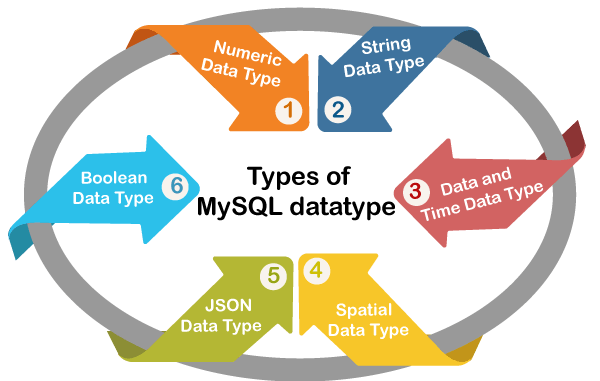
MySQL assists SQL data types in many formats. Following is the data type category, and its description is given below.
- Numeric data type: This data type specifies a numerical value and number.
- String data type: This data type specifies a character, binary data, enum, and text.
- Date and time data type: This data type allows data, time, and year.
- Spatial data type: It is allowed to geographical data and geometrical information.
- JSON data type: This data type stores the JSON file.
- Boolean data type: MySQL database does not carry a Boolean value. The database uses a small integer data type [TINYINT(1)] as a Boolean data type. It holds the data in a similar way as that of numerical data types.
Syntax
MySQL assigns any data type with a column in the interfaces. Most data type is required to create table and alter table. You modify and operate table data with the help of respective data types. The basic syntax of MySQL data type is given below.
Column_name data_type (size)
Mostly, the data type is used to create a new table. The data type syntax is displayed below.
 CREATE TABLE table_name (
 column_name DATA_TYPE, column_name  DATA_TYPE (size)
 );
Here each column assigns the required data type. The table uses either similar data types or mixed data types to stores several data.
Numerical Data types
The numerical data type is used to store the numerical, Boolean value. It works for arithmetic operations and decides Boolean conditions. The following categories are classified as per data size and data format.
| Numerical Data Types | Function and description |
| INT | The signed integer value limit is -2147483648 to 2147483647. The unsigned integer value range is from 0 to 4294967295. The range of integer data types is up to 11 digits. |
| MEDIUMINT | The signed medium integer value limit is between -8388608 and 8388607. The unsigned medium integer value limit is 0 to 16777215. The range of medium integer data types is up to 9 digits. |
| BIGINT | The signed significant integer value is between -9223372036854775808 and 9223372036854775807. The unsigned extensive integer value range is between 0 and 18446744073709551615. The range of large integer data types is up to 20 digits. |
| SMALLINT | The signed small integer value range is between -32768 and 32767. The unsigned small integer value range is 0 to 65535. The range of small integer data types is equal to 5 digits. |
| TINYINT | The signed tiny integer value range is between -128 and 127. The unsigned tiny integer value limit is between 0 and 255. The range of small integer data types is equal to 4 digits. |
| FLOAT | This data type stores precision floating-point value. This data type does not carry unsigned values. The float requires display length and the number of decimals. |
| DOUBLE | The data type stores double-precision and floating-point numbers. The double data type does not carry unsigned values. The double data type requires display length and the number of decimals. |
| DECIMAL | This data type stores fixed floating-point values. The float requires display length and the number of decimals. It does not support unsigned value. |
| BIT | This data type stores bit values. The bit value range is from 1 to 64. |
The following example displays numerical data type working procedures.
Examples of numerical data type
1) Example: The numerical data type's example is shown below.
Create table with column and its data type. Execute below query.
 mysql> create table datatypes(
     ->     number INT AUTO_INCREMENT PRIMARY KEY,
     ->     name VARCHAR(255),
     ->     mark FLOAT(5, 2),
     ->     mobile BIGINT);
Query OK, 0 rows affected, 1 warning (1.16 sec)
Output
Execute the query given below to get output.
mysql> describe datatypes;
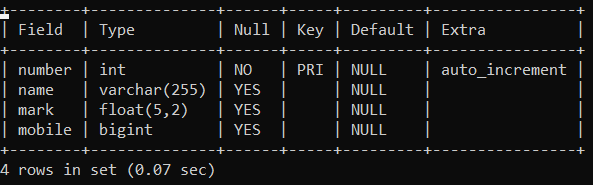
You will get a table with four columns. The four columns store information of different data types.
2) Example: Insert a value of string data types.
See the int, float, bigint data type's value in the table. Execute the below query.
 mysql> insert into datatypes(number, name, mark, mobile)
     -> values(1, 'mysql', 83.38, 1098234567);
Query OK, 1 row affected (0.24 sec)
Output
Execute query given below to get output.
mysql> select * from datatypes;
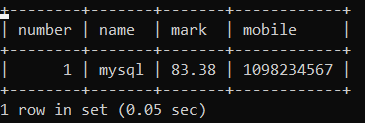
You will get the table with four columns and its value. The four columns store different types of information. You can store numbers, decimal numbers, and large-size numerical values as per data requirements.
String Data Types
The string data type stores characters, text, large text, binary data (images), and enum.
| String Data Types | Function and description |
| CHAR | This data type stores non-binary characters or strings. A stable length string supports the data type. The CHAR does not need to define the size of the string. This data type length is from 1 to 255 characters. |
| VARCHAR(Size) | This data type stores non-binary characters or strings. The data type supports variable-length string. The VARCHAR(25) defines the size of the string. This data type length is from 1 to 255 characters. |
| BINARY | The data type stores binary characters or strings. The data type supports fixed-length string. This data type length is from 1 to 255 characters. |
| VARBINARY | This data type stores binary characters or strings. The data type supports variable-length string. It defines the size of the string. |
| TEXT | This data type stores non-binary string or text. It supports 64KB data, such as 65 535 characters. |
| TINYTEXT | This data type stores non-binary small text or messages. It supports 255 Bytes data, such as 255 characters. |
| MEDIUMTEXT | The data type stores non-binary medium text. It supports 16MB data, such as 16,777,215 characters. |
| LONGTEXT | The data type stores non-binary long text or message. It supports 4 GB data such as 4,294,967,295 characters. |
| BLOB | The data type stores small binary files and images. It supports 64 KB data. |
| MEDIUMBLOB | This data type stores binary medium size files and images. It supports 16 MB of data. |
| LONGBLOB | The data type stores binary long-size files and images. It supports 4 GB of data. |
| TINYBLOB | The data type stores binary smallest size files and images. It supports 255 Bytes data. |
| ENUM | This data type stores a stable list of values. Enum data type either null or store value. The data type is set in all columns of the table. |
The following example displays the working procedure of the string data type.
Examples of string data type
1) Example: The string data type's example shows below.
Create table with column and its data type. Execute below query.
 mysql> create table datatypes(
     -> number INT NOT NULL PRIMARY KEY,
     -> name VARCHAR(45) NOT NULL,
     -> password BINARY(20),
     -> COMMENT TINYTEXT );
Query OK, 0 rows affected, 1 warning (1.16 sec)
Output
Execute the below query to get output.
mysql> describe datatypes;
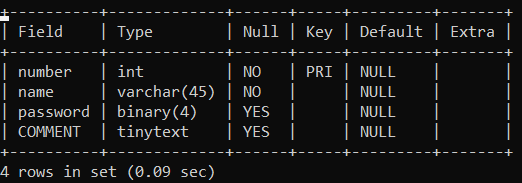
You will get a table with four columns. The four columns store information of different data types.
2) Example: Insert a value of string data types.
See the varchar, binary, tinytext data type's value in the table. Execute below query.
 mysql> insert into datatypes(number, name, password, COMMENT)
 values(1, 'mysql', '1010',' good to learn');
Query OK, 1 row affected (0.24 sec)
Output
Execute below query to get output.
mysql> select * from datatypes;
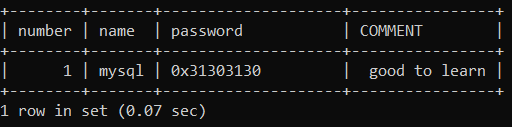
You will get the table with four columns and its value. The four columns store different types of information. You can store text, binary value, characters, or string using string data type.
Date and Time Datatypes
This data type stores value of date and time. The combination of data and time is displayed using MySQL data types. You can see below the MySQL date and time data types with its function.
| Data and Time Data Types | Function and description |
| DATE | The "date" data type stores and displays only data. It stores the date in the year – month – day format. Syntax: yyyy – mm – dd Example: 2021 – 0 3 – 15 |
| DATETIME | The "datetime" data type stores and displays date and time together. It stores the date in the following format. Year (YYYY) – month (MM) – date(DD) hour (hh) : minute (mm) : second (ss) Example: 2021 – 03 – 15 8:30:45 |
| TIME | The "time" data type stores and displays time. It stores the time in hour (hh) : minute (mm) : second (ss) format. Example: 8:30:45 |
| TIMESTAMP | The "timestamp" data type stores date and time together without using a hyphen. It stores in the following format. Year (YYYY) month (MM) date(DD) hour (hh) minute (mm) second (ss) Example: 2021031583045 |
| YEAR | The "year" data type stores and displays only years. This data type stores the year in (YYYY) or (YY) format. Example: 2021 or 21 |
The date and time data types example is shown below.
Examples of date and time data type
1) Example: Create a table with a column and its data type. Execute the below query.
mysql> create table datatypes (time TIME, date DATE, year YEAR, dateandtime DATETIME);
Query OK, 0 rows affected (0.47 sec)
Output
Execute the below query to get output.
mysql> describe datatypes;
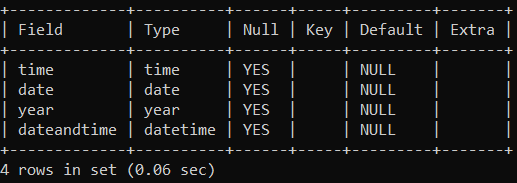
You will get a table with four columns. The four columns store the information of the date, time, and year.
2) Example: Insert a value of date and time data types.
See the time, date, year, and datetime data type's value in the table. Execute the below query.
mysql> insert into datatypes (time, date, year, dateandtime) values ('07:30:34', '2021-02-25', '2021', '2021-03-15 8:30:45');
Query OK, 1 row affected (0.11 sec)
Output
Execute the below query to get output.
mysql> select * from datatypes;
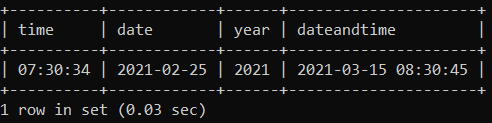
You will get the table with four columns and its value. The column stores date and time in a different form. The table displays date and time in various ways. You can store either time, year, and date or combine date and time.
Spatial Data types
The spatial data type stores geographical data and geometrical information. You can see below the MySQL spatial data types with its function. This data type represents roads, lakes, towns, and many places. The earth-related data is stored and operated by using this data type.
The geographical data types show any place like road, lake, etc. The geometry data types show buildings, houses, etc.
| Spatial Data Types | Function and description |
| GEOMETRY | This data type stores multidimensional, special, and non – linear values |
| GEOMETRYCOLLECTION | This data type stores collection of geometry values. The geometry has a multidimensional shape. |
| LINESTRING | This data types stores curve values. The curve value means one or more than one point value. |
| MULTILINESTRING | This data type stores collection of curve values. |
| MULTIPOINT | This data type stores collection of point values. The point value means value multiple of X – Y coordination. |
| Multipolygon | This data type stores collection of polygon values. These are complex two-dimensional shapes and multiple polygons. |
| POINT | This data type stores point value. The point value means the value of X – Y coordination. |
| POLYGON | This data type stores polygon values. The polygon shape means triangle, pentagon, hexagon, and other two-dimensional shapes. |
MySQL interface creates any data with the help of these data types. This data type helps to categorize a web application's information. The data type helps to manage data such as searching, sorting, and update.