MySQL MIN function
The MIN() function determines the minimum or lowest value of the data set. This function works on numerical data type values. If the table displays zero value, then the row does not exist in the table column. The MIN function returns a minimum or least value of the single or multiple columns.
Syntax
The basic MIN () function syntax shows below.
MIN(function_expression)MySQL MIN () function with the table syntax shows below.
SELECT MIN(function_expression) FROM Table_Name WHERE condition;Description
- The MIN() function returns a minimum value of the table.
- The "function_expression" represents the value of data for function operation.
- The "WHERE" clause applies conditions on the MIN() function.
Prerequisite for MIN function
- Create a new table with the below statement.
mysql> create table pen (

    product_id int NOT NULL,

    product_name varchar(100) NOT NULL,

    available_quantity int,

    required_quantity int,

    Date date

    );
- Insert the data in the table as per data type.
mysql> insert into pen(product_id,

product_name,

available_quantity, required_quantity,

Date)

VALUES

(1, 'ink pen', 78, 45, '2021-07-01'),

(2, 'ball pen', 100, 65, '2021-07-01'),

(3, 'color pen', 78, 45, '2021-08-24'),

(4, 'brush pen', 80, 50, '2021-11-21'),

(5, 'craft pen', 95, 55, '2021-07-01'),

(6, 'sketch pen', 100, 65, '2021-10-13');
- You can refer to the table structure and information using the SELECT query.
mysql> SELECT * FROM pen;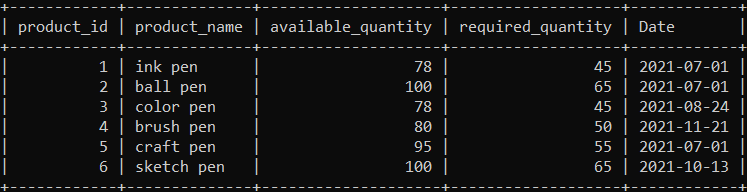
Examples of the MIN function
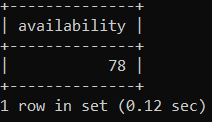
1) Example: The basic MIN function example shows below. Execute the following query to show the minimum number of the available quantity in a table.
mysql> SELECT MIN(available_quantity) AS availability FROM pen;Output
2) Example: The MIN function with the date value example shows below. The following example shows the lowest date of the table.
mysql> SELECT MIN(Date) AS date FROM pen;Output
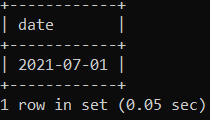
The minimum function returns the first date of the month or year. The smallest and first date of the table is the first day with seven months in the table.
3) Example: The MIN function with the "DISTINCT" and the "WHERE" clauses example shows below. In this example, we use the "DISTINCT" clause with the "available_quantity" column, and the "WHERE" clause executes the "greater than" condition on the "available_quantity" column.
mysql> SELECT MIN(DISTINCT available_quantity) AS availability FROM pen WHERE available_quantity > 80;Output
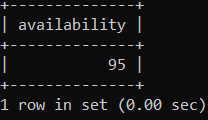
Executing the query will return the smallest number after the 80's value in the table. This column shows the "95" value as the output of the function.
4) Example: The MIN functions with multiple columns example shows below.
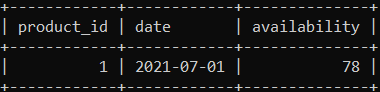
The below query uses the product_id, date, and available_quantity columns to return the minimum value from the table.
mysql> SELECT MIN(product_id) AS number, MIN(Date) AS date, MIN(available_quantity) AS availability
FROM pen;
Output
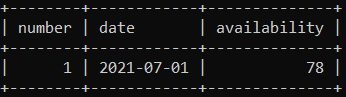
The minimum function works on multiple tables' columns simultaneously. Each column shows its smallest value without disturbing the entire row.
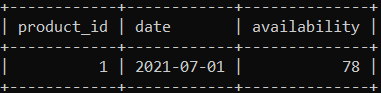
5) Example: The MIN functions with the "WHERE" clause example shows below.
mysql> SELECT MIN(product_id) AS product_id, MIN(Date) AS date, MIN(available_quantity) AS availability
 FROM pen WHERE product_id < 4;
Output
6) Example: The MIN functions with the "WHERE" clause and "AND" operator example shows below. Here the "where" clause comes with the "less than" and "greater than" condition, and the "AND" operator works on the "available_quantity" and "product_id" columns.
mysql> SELECT MIN(product_id) AS product_id, MIN(Date) AS date, MIN(available_quantity) AS availability
 FROM pen WHERE available_quantity < 80 AND product_id < 3;
Output
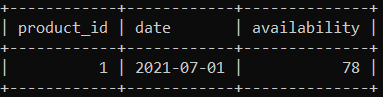
The output image displays the value between the "AND" condition. The product_id is "1" because of the "less than 3" condition. The availability shows a "78" value due to the "less than 80" condition.
7) Example: The MIN functions with the "GROUP BY" clause example shows below. This example uses the min() function with the "group by" clause.
mysql> SELECT MIN(product_id) AS product_id,
MIN(Date) AS date,
MIN(available_quantity) AS availability
FROM pen
GROUP BY available_quantity;
Output
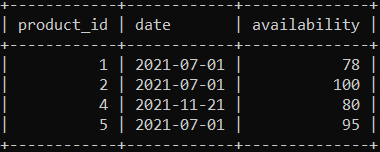
The GROUP BY clause displays the output as per the grouping of the given columns. The table removes the third and sixth rows of the table. The available_quantity or availability column removes duplicate values and shows only single value rows.
8) Example: The MIN functions with the "GROUP BY" and "HAVING" clause example shows below.
mysql> SELECT MIN(product_id) AS product_id,
mysql> SELECT MIN(product_id) AS product_id,
MIN(Date) AS date,
MIN(available_quantity) AS availability
FROM pen
GROUP BY available_quantity
HAVING available_quantity > 80;
Output
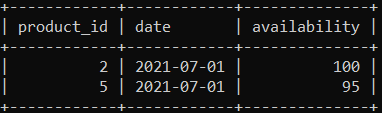
The above image gives two rows as per the "group by" and "HAVING" conditions. The group by clause removes a similar value of the "availability" columns. The having clause displays greater than 80 quantities value of the table.
9) Example: The MIN functions with the "ORDER BY" clause example shows below. In this statement, the "ORDER BY" clauses display in a particular order based on the specified column.
mysql> SELECT MIN(product_id) AS product_id,
MIN(Date) AS date,
MIN(available_quantity) AS availability
FROM pen
ORDER BY available_quantity ASC;
Output