
MySQL Command line client Basic Queries
MySQL – command line client Basic Queries
There are many queries to work with the MySQL command-line client. Today, we will explore MySQL basic queries and their function. The MySQL query helps to display the working procedure of the commands in the command-line client.
Sometimes, you need mathematical operations, date, time, and software information. You get this extra information without disturbing the data. MySQL installer has features to execute the basic query without using the table. MySQL command-line client query gives some information about a command. The following queries display the information to the developer.
Version
MySQL installation has many versions. The popular version is MySQL 5.0. Currently, MySQL 8.0.x version is available on the official website. If you are confused about the software version then, use the below query. The below query will display the available MySQL version.
mysql> SELECT VERSION();
MySQL command-line client will give the information about the software version.
OUTPUT
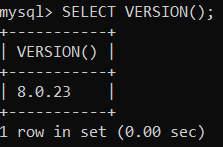
As shown in the above image, the MySQL installer works on the "8.0.23" version.
User
MySQL interface supports more than one user. Every user contains tables and database/schemas. If you want to get a MySQL username then, use the MySQL USER query.
mysql> SELECT USER();
OUTPUT
MySQL command-line client gives the username.
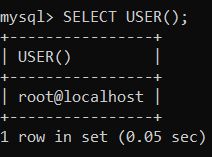
The above query will result in the username as "root@localhost". This is the most commonly used username.
Date and Time
Sometimes, an application requires displaying the current date and time. MySQL does not require coding or an algorithm to fetch the time and date. You do not need to store any data about time and date. MySQL displays the current date and time using the below queries.
Examples of the date and time
1) Example
The following statement will display the current date.
mysql> SELECT CURRENT_DATE();
OUTPUT
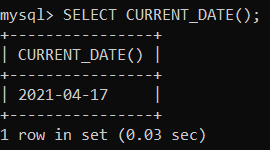
MySQL command-line client gives the current date in the output.
2) Example
The following statement will display the current time.
mysql> SELECT CURRENT_TIME();
OUTPUT
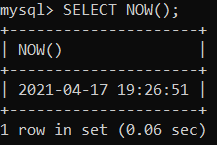
MySQL command-line client gives the current time in output.
3) Example
The following statement will display the current date and time.
mysql> SELECT NOW();
OUTPUT
MySQL command-line client gives the current date and time in output.
4) Example
The following statement will display the current year.
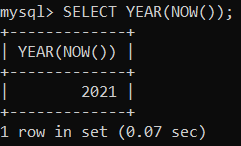
mysql> SELECT YEAR(NOW());
OUTPUT
MySQL command-line client gives the current year in output. The query displays "2021" present year.
Calculator
MySQL has easy features to get mathematical operations. You can do arithmetical operations using MySQL command-line client. You get the output of the mathematical equation. The following query is used to get the mathematical outputs.
Examples of the calculator
1) Example
The following query will display the SIN operation and its output.
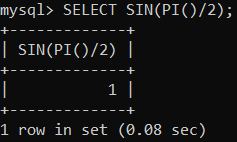
mysql> SELECT SIN(PI()/2);
OUTPUT
MySQL command-line client works on the SIN operation.
As shown in the above output image, the first row displays the mathematical equation, and the second row displays the output of the equation, which is "1".
2) Example
The following query will display the arithmetic operation and its output.
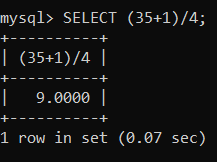
mysql> SELECT (35+1)/4;
OUTPUT
MySQL command-line client gives an output of the arithmetic operation.
As shown in the above output image, the first row displays the arithmetic equation. The second row displays the output of the equation, which is "9.0000".
3) Example
The following query will display the value of operators.
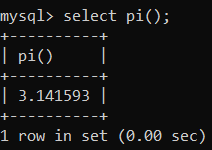
mysql> SELECT pi();
OUTPUT
MySQL command-line client gives a value of "PI."
As shown in the above output image, the first row displays the operator, which is "pi." The second row displays the value of "pi," which is "3.141593".
4) Example
The following query will display the value of trigonometry operators.
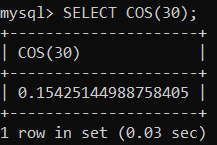
mysql> SELECT COS(30);
OUTPUT
MySQL command-line client gives a value of "COS (30)."

As shown in the above output image, the first row displays the operator, which is "COS (30)." The second row displays the value of "pi," which is "0.15425144988."
MySQL command line client symbol
MySQL command-line client displays several signs after query. This symbol indicates some incomplete features.
| Prompt Symbol | Function of symbol |
| mysql> | This symbol is essential for the command-line client interface to execute a query. This symbol is shown before every statement in the command line. It represents interface availability for new queries or statements. |
| -> | This symbol represents the waiting for the next line. If you use multiple line commands and the command incompletes, then probably the sign has occurred. You should complete the SQL query and execute it. |
| '> | If you use multiple line commands and query uses (') single quotes symbol. Then this symbol represents waiting for the next line. The query starts with a single quotes symbol but does not end with it. The command-line client interface displays symbols to know incomplete statements. |
| "> | Suppose you use multiple line commands and query uses (") double-quotes symbol. Then this symbol represents waiting for the next line. The query starts with double quotes symbol but does not end with it. The command-line client interface displays symbols to know incomplete statements. |
| `> | The query starts with a backtick symbol but does not end with it. The command-line client interface displays these symbols to know incomplete statements. This symbol represents waiting for the next line. |
| /*> | The query starts with the /* symbol but does not end with it. The command-line client interface displays these symbols to know incomplete statements. This symbol represents waiting for the next line. |
The following examples and output are display functions of the MySQL command-line client symbol.
1) (mysql>)
You write a new query on the command-line client. This symbol comes before each MySQL statement for executing it. It is essential to operate data using a command-line client interface.
The following statement shows the meaning of the symbol.
mysql>
You can see the image to learn about a symbol. You are ready to write MySQL statements in the command line client.
2) (->)
This symbol helps to know about an incomplete query. If the MySQL statement is not wrong but only incomplete, this symbol displays a command-line client. You complete the statement and executes it.
The following statement shows the meaning of the symbol.
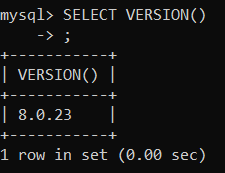
mysql> SELECT VERSION()
-> ;

If your query is incomplete, then you get the above symbol. This symbol gives you the option to complete the query.
3) ('>)
This symbol helps to know about an incomplete query. If the MySQL statement is not wrong but only incomplete, this symbol displays a command-line client.
Sometimes data needs to use conditions in the statement. The SQL query uses single quotes symbol to represent the "varchar" data type condition. If the symbol starts but does not end, this new line occurred in the command line.
The following statement shows the meaning of the symbol.
mysql> select * from mysql_tutorial where level = 'beginners AND index_number = 1;
'>
The statement is incomplete and forget to place ending single quotes ('). Place the "new command" and write the MySQL statement again.
'> '\c

See the above image to know about execution and how to end the incomplete statement.
4) (">)
This symbol helps to know about an incomplete query. If the MySQL statement is not wrong but only incomplete, this symbol displays a command-line client.
Sometimes data needs to use conditions in the statement. The SQL query uses double quotes symbol to represent the "varchar" data type condition. If the symbol starts but does not end, this new line occurred in the command line.
The following statement shows the meaning of the symbol.
mysql> select * from mysql_tutorial where level = "beginners AND index_number = 1;
">
The statement is incomplete and forget to place ending single quotes ('). Place the "new command" and write the MySQL statement again.
"> "\c

See the above image to know about execution and how to end the incomplete statement.
New command
Sometimes, MySQL command-line client works on incomplete or wrong queries. The statement stuck into the wrong query. You do not write a query or complete it. The "\c" keyword helps to create a new line. The command line can use the "\c" symbol with single quotes, double quotes, or as it is.

You see, the first statement is incomplete and stuck into the wrong query. If you want to new command line, then "\c" is required.
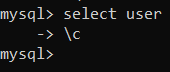
You see the above image. After the new command line symbol, you can write a new query. This symbol uses with double quotes sign.

You use a new command line symbol without other symbols for simple statements.
Rules of MySQL Command line client
MySQL command-line client has several rules to write a statement.
1) Rule: MySQL supports a Case-sensitive statement. You can use any case of the letter.
2) Rule: MySQL interface executes and operates more than one query. After, one query you must place a comma symbol (", "). You can give a semicolon after the last query.
3) Rule: In the end, you should complete the MySQL query with a semicolon. The interface displays error without a semicolon (";") sign.
Rule1
MySQL command-line client does not support the case-sensitive statement. The database statement with a different case gives below.
1) Example: The given MySQL statement writes in an uppercase format.
Mysql> SELECT CURRENT_DATE();
OUTPUT
MySQL command-line client gives an uppercase output below.
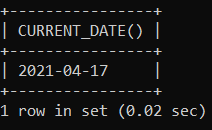
You see the current date using the uppercase format query.
2) Example: The given MySQL statement writes in a lowercase format.
Mysql> SELECT current_date();
OUTPUT
MySQL command-line client gives a lowercase output below.
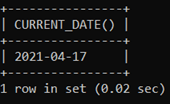
You see the current date using a lowercase format query.
3) Example: The given MySQL statement writes in both uppercase and lowercase formats.
Mysql> SELECT CURRENT_date();
OUTPUT
MySQL command-line client gives both lowercase and uppercase output below.
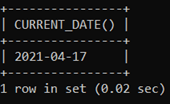
You see the current date using uppercase and lowercase format queries.
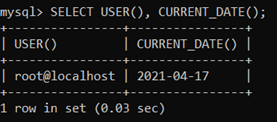
4) Example: The given MySQL statement writes in a lowercase format.
Mysql> select current_date();
OUTPUT
MySQL command-line client gives a lowercase output below.
You see the current date using any sentence case format query.
Rule2
MySQL can use More than one statement in the command-line client. The given example displays the procedure of the multiple statements in the command line.
1) Example: The given example uses two MySQL statements simultaneously.
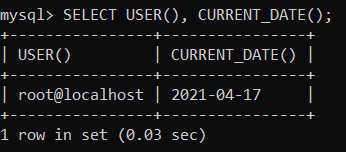
mysql> SELECT USER(), CURRENT_DATE();
OUTPUT
The output of the MySQL command-line client gives below.
The output displays the user of MySQL software and the current date.
2) Example: The given an example uses more than two MySQL statements simultaneously.
mysql> SELECT version(), user(), now();
OUTPUT
MySQL command-line client gives a two statement output below.
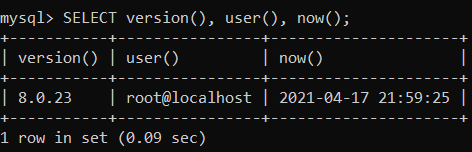
The output displays version of MySQL software, a user name of MySQL software. The current date and time also display in the output.
Rule3
The MySQL command requires a semicolon at the end of the query. If you do not use a semicolon, then the command-line client shows an error. Sometimes, you get the symbol "->" to use a semicolon and complete the query. The "semicolon" symbol essential to execute a query.
mysql> SELECT USER();
OUTPUT
MySQL command-line client gives the basic rule output below.
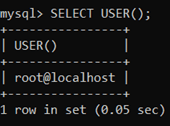
The output displays the "root@localhost" user name.
MySQL command-line client is a popular and easy way to handle data of a web application. It works for the student, software designer, and developer.