
×

Git bisect

Git bisect Overview

The bisect command in Git is a utility tool that lets you identify an offending commit. Consider an instance where you came across a bug in your source code file and are pretty unsure when it came into your visibility. Therefore, if you know where your commit works and where it doesn't, you don't need to trace the offending commit manually. This work will be done by the git bisect command.

The workflow of the git bisect command makes use of a binary search algorithm to find out the history of popped-out bugs in your project. Whenever you come across a bug, you simply tell it a bad commit. Whenever you already know that bug will be introduced, you call it a good commit. You can simply bisect the shallow points between the bad and good commit endpoints until you find out that this command is narrowing the proximity of the exact introduced bug.
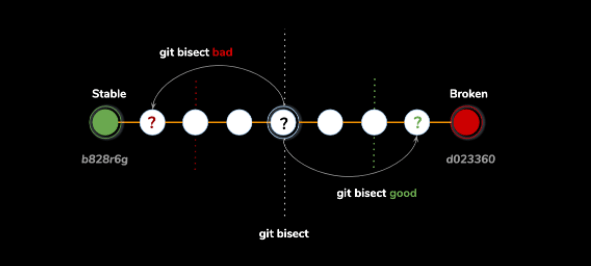
Git bisect

Additionally, the git bisect command is also used to check the commit history of your project. Consider an instance where your commit made a bug fix and has improved the performance. In such a case, it is good to carry out good and bad commits so that you can reconsider the bug if introduced again and easily be able to fix it so that it doesn't hamper the benchmark of your project's performance.

Modes of operation

There are certain modes of operation that you perform while using the bisect command in Git. There are basically two modes of operations involving in the bisection of Git called Manual mode and Automate mode.

Manual Mode

In this mode, consider that the ‘test suite’ you assigned didn't work out for finding the bug. The flow of design was unable to automatically detect it. How will you find out where the bug was introduced? Thus, git bisect has a manual mode for this kind of situation. The workflow is defined as follows:

 # start up git bisect
 $ git bisect start
 # give git a commit where there is not a bug
 $ git bisect good a09c728
 # give git a commit where there is a bug
 $ git bisect bad b6a0692 

Here, the git is going to split the revision in half by making use of the binary search algorithm and loading it up for you. This command will ask you which type of commit is bad or good. You just need to answer the bisect whether it is good or bad and it will handle the rest by quickly checking out the narrow points in the offending commit. Additionally, the number of good or bad commits in your source file will tell you the actual time how long the process will take. Although you may do it individually if time is confined by your rules.

Automate Mode

You have already know how to manually find the bugs using manual mode in git bisect. We can also automate it. You can simply just pass the git bisect script and take a check of each commit with the script in the revision list. Your script should end with non-zero value return status if it fails. Therefore, your test suite automatically does that for you. To carry out this operation, we can use the following commands.

 # get it ready
 $ git bisect start
 $ git bisect good c09c789
 $ git bisect bad e6a01756
 # give git a command to run against each commit
 $ git bisect run rspec spec/features/my_broken_script.rb 

The same process will be carried out as discussed earlier with manual mode. The git will handle the whole process automatically and will check out each revision by running the command and recording the instances. Within a couple of minutes, git will show the actual offending commit. The only disadvantage of using this mode is that your name is present on the commit.

Summary

The main function of git bisect is to hunt down the bugs restricting you to implement some important features in your project. The bisect command lets you manually check the bugs and carry out debugging methods as shown in the above points or simply automate your bug hunting method at a glance. The only downside with automation is that the name pops out while you commit the commit whether it is good or bad. This may disclose your identity to the bisect command and it may create a problem with authentication.


Related Topics

wxpython - Major Classes

wxpython - Major Classes The original wxWidgets is written in the C++ programming language and it has a huge library for classes. The classes are used for building GUI using wxWidgets...

9 minutes read.

Git Prune

Git Prune: The prune command in Git is an integrated utility tool that is primarily used for cleaning up the unreachable or "orphaned" objects present in Git. The concept of...

4 minutes read.

Github Version Control System

As discussed earlier, Github is a decentralized open-source version control software independently owned and managed by Microsoft. It is free and has tremendous features that work in close integration with...

5 minutes read.

Git Version Control Comparison

Version Control Comparison: Choosing the best version control framework is quite a difficult task for most of the users because of available plenty options. While choosing the right version control...

4 minutes read.

Git Squash

Git Squash How to Squash? The squash command in Git is used to suppress or subdue the previous commits into one unit. It is quite interesting to note that squash is not...

3 minutes read.

Git Revert

Git Revert The term revert in Git is generally used to rollback changes. The operation involves getting the previously modified versions or simply applying the changes back to where they previously...

4 minutes read.

Git Upstream and Downstream

Git Upstream and Downstream Upstream and downstream in Git are usually defined with the context of a repository. In general terms, upstream refers to the location through which we clone the...

4 minutes read.

Git Tutorial

Git tutorial Overview: Git was created by Linus Torvalds in 2005. Today, Git is a Microsoft-owned company after the approval of the CEO of the EU. In this tutorial, we will...

4 minutes read.

Python wx module

Python wx module Introduction Python provides us a wxpython module which we usually call as Python wx module. The wxpython module is allow us to create a very high functional GUI...

4 minutes read.

Git submodule

Git submodule Overview Git submodules allow you to keep a git repository as a subdirectory of another git repository. Git submodules are simply a reference to another repository at a particular...

4 minutes read.

Git Cherry-Pick

Git Cherry-Pick In Git, the cherry-pick command is used to make the target commit changes and place them on the HEAD of the currently checked-out branch. It is done to either...

3 minutes read.

Git Ignore

Git Ignore: In general terms, a gitignore file is used to specify the intentionally untracked files that Git shout ignore. It doesn't affect the other files as they are already...

3 minutes read.

Git daemon

Git daemon Overview In a version control system, the daemon is a very simple server for the Git repository. In technical terms, it is a simple TCP command that listens to...

4 minutes read.

Terminologies in Git

Terminologies in Git Git is a tool that covered vast terminology and jargon, which can often be difficult for new users or learners. Let's have a look at the commonly used...

4 minutes read.

Git Blame

Git Blame Overview The blame command is an extensively used utility tool for configuring various options and troubleshooting. It is a high-end sophisticated and versatile tool for displaying the metadata that...

4 minutes read.

Git Workflow

Git Workflow: Being one of the best version control systems for your projects, Git is not just about handling projects but also to collaborate and release management. It gives you...

3 minutes read.

Git diff

Git diff Overview The diff command in Git is generally a function that inputs two data sets and rolls out the changes made between them. It is a multitasking tool that...

3 minutes read.

Git reflog

Git reflog: The Git reflog or Reference Logs is a rare command that is used to record logs when certain branches along with references were once updated in the local...

4 minutes read.

Git Reset

Git Reset: The reset command in Git is quite complex and a great tool to undo changes. There are some strict invocations or forms of undoing changes in Git. These...

4 minutes read.

Git bisect

Git bisect Overview The bisect command in Git is a utility tool that lets you identify an offending commit. Consider an instance where you came across a bug in your source...

3 minutes read.