
Computer Fundamentals Tutorial
What is a Computer?
"The computer is an electronic device that store, retrieve and process the data in binary form according to our need. It takes some input, process it, and produces some output". The word computer is derived by the Latin word "computare," which means that "to calculate and programmable machine."
The computer is work according to the individual instructions; there is no IQ level in computers like a human being.
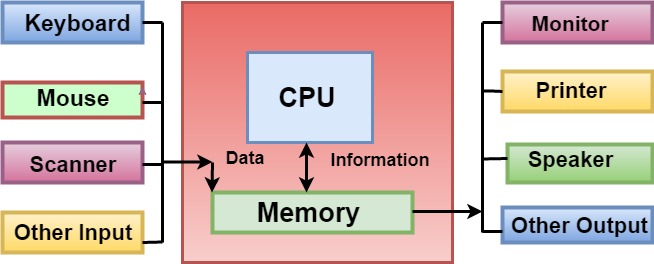
Fig: The whole working of the Computer System.
The computer can process both numerical and non-numerical (arithmetic and logical) calculations. Mostly, the computer operations are related to manipulation of data, which is stored in different types of memory.
The bit is the smallest unit of computer memory, the group of eight bits is known as Byte. The computer can be instructed to carry out sequences of arithmetical and logical operations automatically by computer programming, and it works with the software program. The computer shows the decimal number through a string of binary digits; the word computer usually refers to the central processing unit and internal memory.
Computer Fundamentals Index
- Computer Introduction
- Types of computer
- Characteristics of computer
- Uses of computer
- History of Computers
Computer Languages
- Computer Languages
- Low Level language
- Middle level Language
- High level language
Computer Generation
- Generation of Computers
- First Generation of Computer
- Second generation of Computers
- Third generation of Computers
- Fourth generation of Computers
- Fifth generation of Computers
- Sixth Generation of Computer
Peripheral Devices
Components
Memory
- Computer Memory
- Registers
- Memory Hierarchy
- RAM Vs ROM
- Understanding file sizes (Bytes, KB, MB, GB, TB, PB, EB, ZB, YB)
Computer Network
Computer Virus
Computer Ports
How
- How to hack a computer
- How much do Computer Programmers make
- How does a Computer work
- How to associate a file with a program
- How does a computer convert text into binary
- How does a computer process data into information
- How to fix a CD-ROM DVD
- How to fix the no input signal
- How to install computer memory
- How to associate a file with a program
- How to log out of your operating system
- How do I change my name on Google
- How to installation or uninstallation Microsoft Paint
- How to fix a not a valid Win32 application error
- How to fix missing Microsoft Windows .dll files
- How to use a computer keyboard
- How to erase my hard drive and start over
- How can I test how many words I can write a minute
- How to shut down a computer
- How do I open and edit the Windows registry
- How to edit the registry from the command line
- How to restart Microsoft Windows
- How to install a computer processor
- How to open Microsoft Paint
- How to fix problems in Windows after installing new software
- How to enable or disable the preview pane of Microsoft Outlook
- How to open a Microsoft .wps or Works file in Word
- How to view the HTML source code in Microsoft Word
- How to View or Change the Screen Resolution of a Monitor
- How to Connect and Install a Computer Keyboard
- How to Delete Temporary Files in Windows 10
- How to determine Which Version of Microsoft Office I'm using
- How to find out how much hard drive space is available
- How to Fix PC Stuck on Verifying DMI Pool Data
- How to choose which items show in the notification area
- How to find similar images using Search by Image
- How to fix Low Memory and out of memory errors
- How To Replace the CMOS Battery
- How do I Update my Antivirus Program
- How to fix a general protection fault
- How to Identify problems in the Windows Device Manager
- How can the Base be Shown
- How to test if a Website or Web Page is down
- How Much is 1 Byte, Kilobyte, Megabyte, Gigabyte, etc
- How to fix a CMOS checksum error
- How to Fix a Windows CD-ROM, DVD, or Disc Drive Issue
- How to Open Safe Mode
- How to Password Protect Files and Folders in Windows
- How to Reset CMOS or BIOS Settings
- How to use Computer Keyboard
- How do double space or change line spacing in Microsoft Word
- How do I know if I have Windows Administrator Rights
- How many cores does my computer have
- How to Create a Directory or Folder
- How to Enter and Exit the BIOS or CMOS Setup
- How to change Windows Compatibility mode
- How to clear your internet browser history
- How to Connect Computer Speakers
- How to Copy a Web Page Link or URL
- How to install a Hard Drive or SSD
- How to Open the Windows Control Panel
- How to split a screen in Windows
- How to copy text from a scanned PDF
Questions
- Who invented Computer
- What are the advantages of the Internet?
- What are the disadvantages of the Internet?
- Is my computer 64 bit?
- What is Edge Computing?
- What is a Router?
- What is Monitor
- What is Printer
- What is a Web Browser
- What is Microphone
- What is a Webcam
- What is PC
- What is Keyboard
- What is Motherboard
- What is WAP
- What is URL
- What is a Digital Assistant
- When was the first Computer Invented
- What is Modem
- What is Firmware
- What is Imperative Programming
- What is Protocol
- What is Safe Mode
- What is Device Driver
- What is Hybrid Topology
- What is Mesh Topology
- What is Procedural language
- What is a hyperlink
- What is a Username
- Who invented the Internet
- What is Video Card
- What is Sound Card
- What is Binary
- What does Alt+B do
- What does Alt+D do
- What does Alt+E do
- What does Alt+Esc do
- What does Alt+R do
- What does ALT + Q do
- What does Alt + Tab do
- What is Data Manipulation
- What is a touch screen
- What is Back Panel
- What is Analog Monitor
- What is AR lens
- What is an ATX Style Connector
- What is a File System
- What is Hard Disk Drive (HDD)
- What is a boot device
- What is accessibility
- What is Line In
- What is network Interface card (NIC)
- What is Optical Disk
- Where can I ask questions on the internet
- What is Auto Rotate
- What is CAD (Computer-aided design)
- What is Cable Modem
- What is Home Page
- What is boot menu
- What is braille reader
- What is flash memory
- What is Windows
- What is Clipboard
- What is Cyber Warfare
- What is Myspace
- Why has my IP address changed
- What is Jacquard Loom
- My computer is running slow, what steps can I do to fix it
- What is a Kensington Lock
- What is a multicore processor
- What is automation
- Are smartphones and tablets computers
- What is a Login Script
- What is a Loosely Typed Language
- What is Multitasking?
- Why my computer monitor shows no display or black screen
- What is REM
- What is Parallelization
- What is Overtype mode
- What is open with
- What is Bracket
- What is an Online Service
- What is REM
- What is Parallelization
- What is Overtype mode
- What is open with
- What is Bracket
- What is an Online Service
- What is the Pg Dn Key (Page Down Key)
- What is the Pg up Key (Page up Key)
- What is Palmtop Computer
- What is a Processing Device
- What is a Print Preview
- What is the Print Screen Key
- What can I do if my computer or laptop is lost or stolen
- What is a Model Number
- What are the currently available antivirus programs
- What are Toggle keys
- What is a Case fan
- What is a Silicon Chip
- What is a Slate PC
- What is a TAB stop
- What is an Octothorpe
- What is Task Pane
- What is Task View
- What is the svchost.exe file used for in Windows
- Where can I find free online virus scanners
- Why am I unable to increase the resolution in Windows
- What is Autofill
- When I click my mouse, it sometimes double-clicks
- What is Scratch
- What is UDIMM
- What is MsConfig
- What is an Expansion Card
- What is an Executable File
- What is an Elevated Command Prompt
- What is an AC Adapter
- What is AIMBOT
- What is a Software Suite
- What is a LED Monitor
- What does Alt + X do
- What does alt + space do
- What does Alt + O do
- Now that I’ve got a Computer, what can i do
- What is a Punch Card
- What is RDIMM
- What is Select All
- What is Serial number
- What is Thermos flask
- What programs can I use for speech recognition
- What are the Advantages of Computers
- What are the Disadvantages of Computers
- What does Alt + T do
- What Hardware Device Drivers should be Updated
- What is a Desktop
- What is a Ring Topology
- What is CMOS
- What is a Directory
- What is a Mechanical Mouse
- What is a Plotter
- What is a Variable
- What is an Icon
- What is Data
- What is HDMI
- What is Remote
- What is Right-Click
- What is SMPS
- Why does my Laptop not turn on
- What is a Copyright
- What is a Cordless Mouse
- What is a CSV file
- What is a Joystick
- What is a Start Button
- What is a Taskbar
- What is an Alignment
- What is an Output Device
- What is Cat 5
- What is Google Chrome
- What is Post
- What are Recordable DVD Drives
- What Does Alt + F4 Do
- What Does Alt + L Do
- What is a bit (Binary Digit)
- What is a cable
- What is a Calculator
- What is a capacitor
- What is a Cold Boot
- What is a Dialog Box
- What is a Dual-boot
- What is a Slide
- What is A4
- What is AM
- What is Barcode Reader
- What is EHCI
- What is a Header
- What is a Joystick
- What is a Secondary Storage Device
- What is Access Time
- What is Account Sharing
- What is an Asterisk
- What is Asynchronous DRAM
- What is Back Quote
- What is BIOS
- What is Borderless Printing
- What is Case Badge
- What is CD-ROM
- What is Chat Slang
- What is Composite
- What is RJ Cable
- What Are Bottom Row Keys
- What is SAN
- What is Tray
- What is VDU
- What Does Alt + M Do
- What Does Alt + P Do
- What is a Cell
- What is a Command Key
- What is a key Combination
- What is a Menu Bar
- What is a Startup
- What is a T
- What is Chat
- What are the F1 through F12 keys
- What does Alt + Enter do
- What Does Alt + Home DO
- What does Alt + R do
- What does Ctrl + B do
- What Does Ctrl + Enter Do
- What Does Ctrl + R Do
- What does Ctrl + G do
- What does Ctrl + 9 do
- What does Ctrl + End do
- What does Ctrl + O do
- What Does Ctrl + P do
- What Does Ctrl + Q do
- What is a Colon
- What is a Core
- What is Apple Touch Icon
- What is Clock
- What is Code
- What is Computer Crime
- What is Ctrl
- What is DAT
- What is Data diddling
- What is Date
- Why won't my computer turn on
- What Does Alt + N Do
- What does ctrl + 2 do
- What does ctrl + space do
- What does Ctrl + W do
- What does Ctrl + T Do
- What Does Ctrl + 2 do
- What does Ctrl + 5 Do
- What are the most common file types and file extensions
- What is PROM
- What is End Key
- What is Dial-up
- What is Decentralized System
- What is Ctrl + Click
- What is Blogger
- What is an Indent
- What is Aero Peek
- What is Accumulator
- What is a Workbook
- What is a Ribbon
- What is a footer
- What is a file
- What is a digital camera
- What is a Decision Box
- What is a Dead Halt
- What is a Custom-built PC
- What is a Current Directory
- What is a Curly Bracket
- What is a Copy Con
- What is a Command button
- What is a Column
- What is a Chart
- What is 104 Keyboard
- What does the Ctrl + Shift + End do
- What does Ctrl + X do
- What Does Ctrl+Shift+G Do
- What does Ctrl + Esc do
- What does Ctrl + E do
- What does Ctrl + D do
- What does Ctrl + 8 do
- What are Sticky keys
- What Does Ctrl + Shift + Esc Do
- What is Settings
- What is Task Manager
- What is Taskbar
Difference
- Difference between hardware and software
- Difference between multiprocessor and distributed systems
- Difference between Desktop and Laptop
- Difference between File and folder
- Difference between Hard Copy and Soft Copy
- Open Source Programs vs Closed Source Programs
- Difference between Optical Fibre and Coaxial Cable
- Difference between Website and Webpage
- Difference between Classes and Objects
Misc
- Quantum Computing
- Computer Software
- Autoexec.bat and config.sys info
- Update an Antivirus
- Use of Internet
- Advantages and disadvantages of Email
- Computing Power
- Internet Explorer Shortcut Keys
- Advanced Encryption Standard (AES)
- Augmented Reality
- Infrastructure Readiness Check
- Top 10 Internet tips and tricks
- Introduction and Features of FoxPro
- Features of Multimedia
- Top 10 online services and applications
- Receiving S.M.A.R.T. status bad backup and replacing error
- Version Control System
- Uninstalling Software or Apps in Windows
- Data Warehouse
- Increase or decrease font size in Word using keyboard shortcuts
- Mouse not detected or working in Windows
- Computer Cleaning Information and Steps
- Function Keys on Keyboard
- Windows 7 Alt+Tab won’t stay on top or stick
- 10 Essential Examples of Web Browsers
- Binary Subtraction using 2’s Complement
- Case Sensitive Languages
- Computer Pioneers and people who are CEO
- Microsoft Word Shortcut Keys
- Parts of Computers Names, Definitions and Images
- ROM and its Types
- Antivirus Program