
VB.NET Continue Statement
VB.NET Continue Statement: The utilization of Continue statement is performed such that the loop repetitions can be skipped and continue with the next iteration. The body of loops like For, While, Do While are written using Continue Statement when having a condition for any of them. .
Difference between Continue and Exit Statement
In the Exit Statement, when Exit Statement occurs, the loop operation is stopped immediately or it exits the loop.
On the other hand, in the Continue Statement, the particular iteration process is skipped and then continue with the next iteration with no need of ending the ongoing loop.
Syntax:
Continue {Do | For | While}
Flowchart: Continue Statement
This is the flowchart description for the Continue Statement in the VB.NET language.
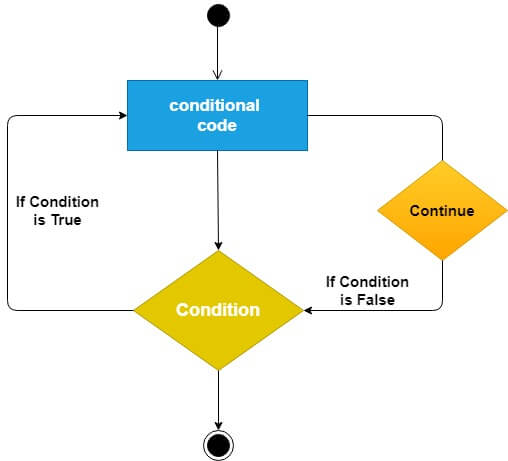
The above figure shows the Continue Statement flow. In this, a Continue Statement is entered within a loop such that the specific iteration is skipped.
Mostly, a Continue Statement is used when a condition is provided.When the given condition is correct, the particular iteration is skipped at once and the control moves to the starting of the loop for creating the further iteration.
Here are some examples showing the use of loop in continue statement. In these examples, the code execution is skipped and the controls are directed to the start of the loop to create multiple statements in the program in VB.NET.
Use of the statement of continue in the While End loop
Example 1: Write a simple program using the Loop End Statement.
Continue_While.vb
Imports System
Module Continue_While
Sub Main()
 'Declaration and initialization of variable i
Dim i As Integer = 5
'Define the While Loop Condition
While i < 15
If i = 11 Then
 Console.WriteLine(" Skipped number is {0}", i)
i += 1 ' skip the define iteration
Continue While
End If
Console.WriteLine(" Value of i is {0}", i)
 i += 1 ' Update the variable i by 1
End While
Console.WriteLine(" Press any key to exit...")
Console.ReadKey()
End Sub
End Module
Output:
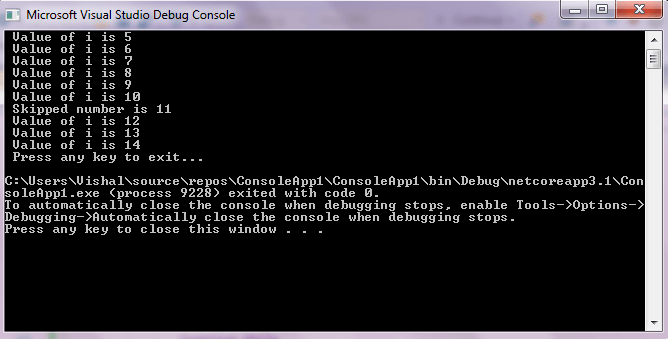
Use of Continue statement in For Next loop
Example 2: Write a simple program to print the number from 10 to 1 with Continue Statement in For Next loop.
Continue_For.vb
Imports System
Module Continue_For
 Sub Main()
    'Declaration and initialization of variable i, num
        Dim i As Integer = 15
        Dim num As Integer
        'Define the For Loop Condition
        For i = 15 To 1 Step -1
  If i = 7 Then ' if i = 7, it skips the iteration
 num = i 'Assign the skip value to num variable
Continue For ' Continue with Next Iteration
  End If
 Console.WriteLine(" Value of i is {0}", i)
Next
 Console.WriteLine(" Skipped number is {0}", num)
  Console.WriteLine(" Press any key to exit...")
Console.ReadKey()
End Sub
End Module
Output:
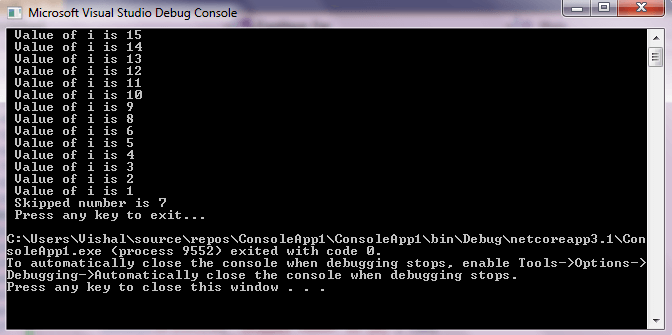
Use of Continue statement in Do While loop
Example 3: Write a simple program to Understand the use of Continue Statement in Do While loop.
Continue_Do_While.vb
Imports System
Module Continue_Do_While
  Sub Main()
    'Declaration and initialization of local variable
       Dim i As Integer = 15, num As Integer
      'Definition the Do While Loop
  Do
      If i = 17 Then
      num = i
     i += 1 ' skip the define iteration
    Continue Do
End If
            Console.WriteLine(" Value of i is {0}", i)
            i += 1 ' Update the variable i by 1
        Loop While i < 25
        Console.WriteLine(" Skipped number is {0}", num)
        Console.WriteLine(" Press any key to exit...")
        Console.ReadKey()
    End Sub
End Module
Output:
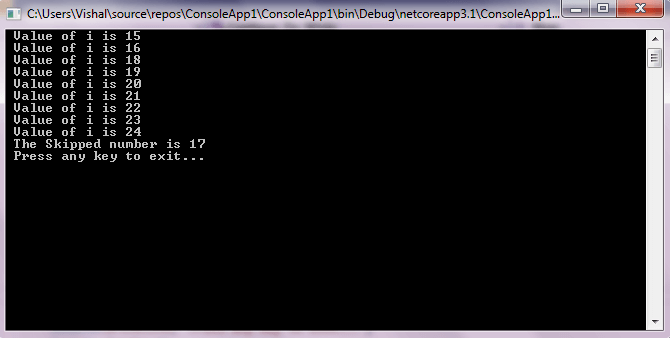
The Continue statement causes the loop to skip remaining part of its body and immediately retest its condition prior to reiterating. It works somewhat like the Exit statement. Instead of forcing termination, it forces the next iteration of the loop to take place, skipping any code in between.
For the For...Next loop, Continue statement causes the conditional test and increment portions of the loop to execute. For the While and Do...While loops, continue statement causes the program control to pass to the conditional tests.