
DBMS Joins: Inner, Outer, Natural and Self Join
Joins are the combination of related tuples from the two different relations or tables into a single type. It is similar to the Cartesian product except the fact that in Cartesian product operation, a user gets all the possible combinations of relations. While in joins operation use
r gets only those combinations that satisfy some matching conditions between two relations. A relation can also join to itself, which is called as a self-join.
Join operation combines two tuples from different relations if and only if the following conditions are satisfied:
- There must be a common attribute in both the relation.
- Join condition must be satisfied.
Join = Cross Product + Condition
There are following different type of joins:
- Inner Join or Equi Join
- Outer Join
- Natural join
- Self-join
1. Inner Join or Equi Join
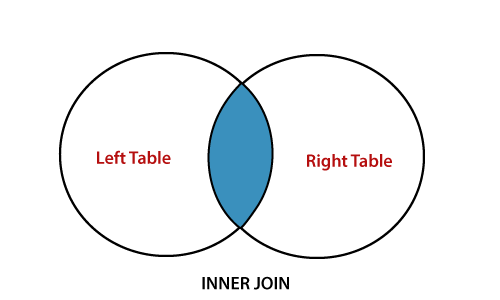
Inner Join or Equi Join is represented by (=) equal sign and displays all the records which are common between two relations. If no record is selected, return NULL. The query of Inner join compares each tuple of Relation1 with each tuple of Relation2 to find all pairs of rows which satisfy the join condition. When the join condition is satisfied, attribute values for each matched pair of tuples of A and B are combined into a resultant tuple.
Syntax:
Relation1.attribute_name = Relation2.attribute_name
Example:
Table: student
| Student_id | Name | Age |
| 101 | RS | 20 |
| 102 | TK | 21 |
| 103 | Sk | 20 |
Table: Course
| Course_id | Student_id | Course_name |
| 401 | 101 | B.tech |
| 402 | 102 | MCA |
| 403 | 103 | MCA |
Query: Display the name of student who study in each course
- ? Name(?(student.Student_id =Course.Student_id)(student x course))
Output:
| Name |
| RS |
| TK |
| Sk |
2. Outer Join
The Outer Join displays all records from both the participating relation which satisfy the join condition along with tuples which do not satisfy the join condition.
An outer join is mainly of three types:
- Left Outer join
- Right Outer join
- Full Outer join
Left Outer Join
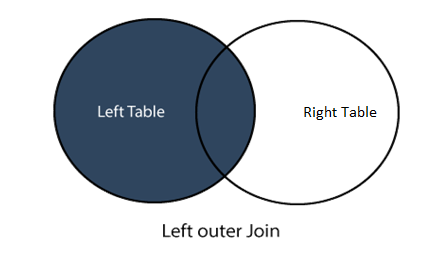
The left outer join is represented by (?) symbol and displays all the tuples from the left relation and the matching tuples from the right relation. If there is exists no matching record in the right relation, it displays the NULL value.
Syntax:
Relation1 ? Relation2
Example:
Table: student
| Student_id | Name | Age |
| 101 | RS | 20 |
| 102 | TK | 21 |
| 103 | Sk | 20 |
| 104 | Pk | 21 |
Table: Course
| Course_id | Student_id | Course_name |
| 401 | 101 | B.tech |
| 402 | 102 | MCA |
| 403 | 103 | MCA |
- (Student ? Course)
Output:
| Student_id | Name | Age | Course_id | Course_name |
| 101 | RS | 20 | 401 | B.tech |
| 102 | TK | 21 | 402 | MCA |
| 103 | Sk | 20 | 403 | MCA |
| 104 | Pk | 21 | NULL | NULL |
Right Outer Join
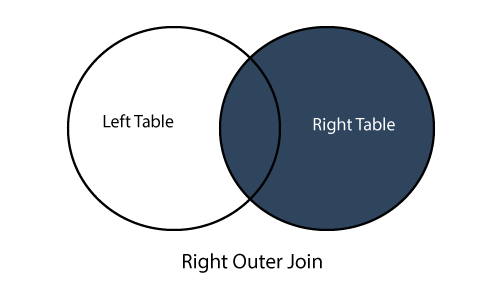
The right outer join is represented by (?) symbol and displays all the tuples from the right relation and the matching tuples from the left relation. If there is exists no matching record in the left relation, it displays the NULL value.
Syntax:
Relation1 ?Relation2
Example:
Table: student
| Student_id | Name | Age |
| 101 | RS | 20 |
| 102 | TK | 21 |
| 103 | Sk | 20 |
Table: Course
| Course_id | Student_id | Course_name |
| 401 | 101 | B.tech |
| 402 | 102 | MCA |
| 403 | 103 | MCA |
| 404 | MBA |
- (student ? Course)
Output:
| Student_id | Name | Age | Course_id | Course_name |
| 101 | RS | 20 | 401 | B.tech |
| 102 | TK | 21 | 402 | MCA |
| 103 | Sk | 20 | 403 | MCA |
| NULL | NULL | NULL | 404 | MBA |
Full Outer Join
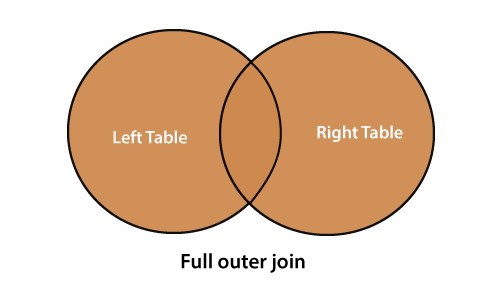
The full outer join is represented by(?) symbol and combines the results of both right and left outer joins and returns all (matching or unmatching) records from both the relation.
Syntax:
Relation1 ? Relation2
Example:
Table: student
| Student_id | Name | Age |
| 101 | RS | 20 |
| 102 | TK | 21 |
| 103 | Sk | 20 |
Table: Course
| Course_id | Student_id | Course_name |
| 401 | 101 | B.tech |
| 402 | 102 | MCA |
| 404 | MBA |
- (student ? Course)
Output:
| Student_id | Name | Age | Course_id | Course_name |
| 101 | RS | 20 | 401 | B.tech |
| 102 | TK | 21 | 402 | MCA |
| 103 | Sk | 20 | NULL | NULL |
| NULL | NULL | NULL | 404 | MBA |
3. Natural Join
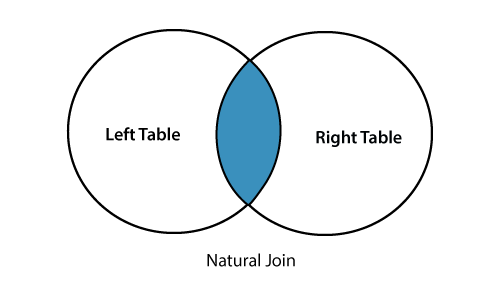
Natural Join is represented by a (?) symbol, and it is a type of Inner join which is based on attributes having the same name and datatype present in both the relations to get joined.
Difference between Inner join and Natural join
- Inan inner join, a user has to specify a join condition to join the two relations. Whereas in the natural join, a user doesn't specify a join condition. Users just write the two relation names without any condition. Then the natural join will automatically check for equality between the records for every column existing in both relation.
Syntax:
Relation1 ?Relation2
Example:
Table: student
| Student_id | Name | Age |
| 101 | RS | 20 |
| 102 | TK | 21 |
| 103 | Sk | 20 |
Table: Course
| Course_id | Student_id | Course_name |
| 401 | 101 | B.tech |
| 402 | 102 | MCA |
- (student ? Course)
Output:
| Student_id | Name | Age | Course_id | Course_name |
| 101 | RS | 20 | 401 | B.tech |
| 102 | TK | 21 | 402 | MCA |
4. Self-Join
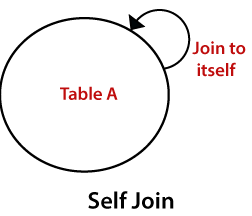
A self-join is a join in which a relation is joined with itself (which is also known as Unary relationship), especially when the relation has a foreign key which references to its own primary key. To join a relation to itself means that each tuple of the relation is combined with itself and with every other tuple of the relation. It can be viewed as a join of two copies of the same relation.
Example:
Table: student
| student_id | Name | Course | Class_representative |
| 101 | RS | MCA | 101 |
| 102 | TK | MBA | NULL |
| 103 | Sk | MCA | 101 |
| 104 | Pk | MBA | NULL |
Query: Display the name of student who are class representative
- ? a.student_id, a.Name,b.Course, b.Name(? a.student_id = b.Class_representative) (a.student x b.student))
Output:
| student_id | Name | Course | name |
| 101 | RS | MCA | RS |
| 101 | RS | MCA | SK |