
File Organization in DBMS
File Organization in DBMS: A database contains a huge amount of data, which is stored is in the physical memory in the form of files. A file is a set of multiple records stored in the binary format.
In the database management system, the file organization describes the logical relationship among the various stored records. In simple words, we can say that this technique defines how the file records are mapped onto disk blocks.
File Organization is also defined as storing the files in a specific order.
Objectives of File Organization
Following are the few objectives of the database file organization:
- By using file organization, the records should be read/retrieved/accessed as fast as possible.
- Any user can easily and quickly perform the operations such as insert, update, and delete on the records present in the database.
- The storage cost is minimal because the information should be stored efficiently.
- There is no other copy of records that should be induced as a result of operations.
Types of File Organization
Following are the various methods which are introduced to organize the files in the database management system are:
- Sequential File Organization
- Hash File Organization
- Heap File Organization
- Clustered File Organization
- B+ Tree File Organization
Sequential File Organization
It is a method in which the files are stored and sorted one after another on disk. This method is so simple for file organization.
This file organization arranged the records in either descending or ascending order of the key column. As the files are sorted in a specific order, so the binary search technique can be used to reduce the time in searching a file.
Following are the two different ways of implementing this method:
1. Pile File Method
In this sequential file organization method, the files are entered in the same sequence in which they are inserted into the database tables. This method is so simple.
When any user inserts the new record, the record is then placed at the end of that file. If we delete or update the record, then the record is searched in the blocks of memory. Once it is found, then that founded record is marked for deleting. And, the new block of record will be entered.
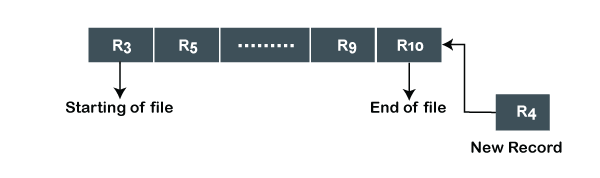
Insertion of New record using Pile File Method:
Suppose the four records are already stored in the sequence. And, we want to insert the new record (R4) in the sequence, then the R4 record will be placed at the end of the sequence.
2. Sorted File Method
In this sequential organization method, the records are sorted based on the key attribute or another key when they are entered into the database system.
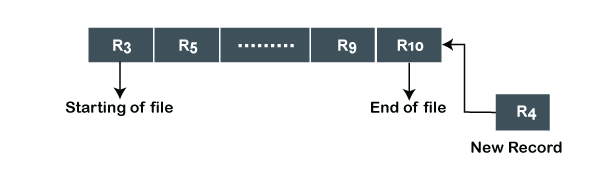
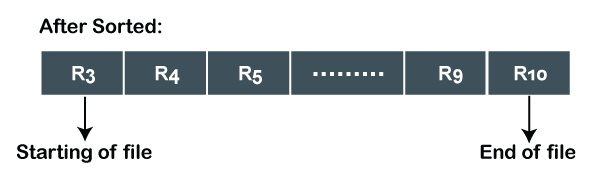
Insertion of New record using Sorted File Method:
Suppose the five records are already stored in a sorted manner. And, you want to enter the new record (R4) between the existing records, firstly it will be placed at the end of the file, and then it will sort the specified sequence.
Advantages of Sequential File Organization
Following are the benefits or advantages of sequential file organization:
- It is a fast and efficient method for the huge amount of data.
- This method does not require so much effort to store the data in the database.
- It is basically used for generating reports and calculating the statistical data.
- Storing the files in this method is cheaper.
Disadvantages of Sequential File Organization
Following are the two limitations or disadvantages of sequential file organization:
- The sorted file method of sequential file organization is inefficient because it takes more space and time for sorting the records.
- It is a time-consuming process.
Heap File Organization
Heap file organization is the most simple and basic type of file organization. Sometimes, the heap file is also called the unordered file. This type of organization works with the blocks of data, and the new record is inserted at the last page of the file. This type of file organization does not require any sorting for sorting the records.
If there is insufficient space in the last data block, then the new data block is added to the file. And, then we can easily insert the record in that data block. This makes the insertion of records very efficient.
As there is no particular ordering to the field values, so the linear search must be performed for accessing the records from the file. The linear search access the blocks from the file until the data is found.
In the heap file organization, each record has an ID which is unique, and every page or every data block of the file is of the same size.
If we want to delete the record from the file, then the required record has to be accessed, and then the marked record to be deleted, and after then the block is written back to the disk. The block which contains the deleted record cannot be used as again.
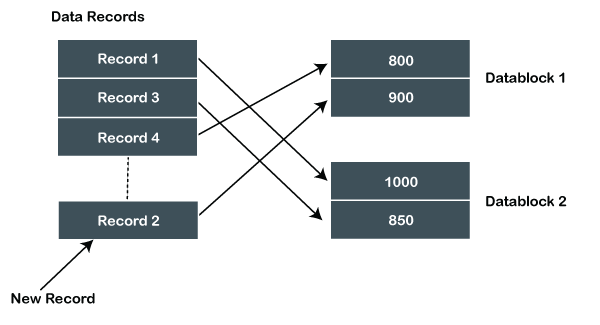
Insert New Record using Heap File Organization
Suppose the three records are already stored in a heap, and we want to insert the new record Record2 in that heap. Let's suppose that Data Block 2 is full. Then the Record2 will be added in any one of the data blocks selected by the database system. Let's say Data Block 1.
If we want to update, search, or delete the record from the heap file, then we have to read the file from starting until the required record is not found. Suppose, if the database contains a huge amount of data, then the operations take a lot of time for performing on the record because the records are not sorted or not specified in some order.
Advantages of Heap File Organization
- For the small database systems, users can access the records fastly than the sequential file organization.
- It is a simple file organization method.
- It is the best method for loading a large amount of data in the database at a time.
Disadvantages of Heap file Organization
- It is not efficient for large database systems because this method takes more time for performing the operations on the data.
- The main disadvantage of this file organization is that there is a problem with an unused block of memory.
Hash File Organization
This file organization uses the hash function for calculating the block addresses. The output of the hash function provides the disk location where the data is actually stored.
The non-key field on which the hash function is generated is called the hash column, and the key column on which the hash function is generated is called a hash key.
Advantages of Hash File Organization
- Users can access the record at a fast speed because the address of the block is known by the hash function.
- It is the best method for online transactions like ticket booking, online banking, etc.
Disadvantages of Hash File Organization
- There is more chance of losing the data. For Example, In the employee table, when the hash field is on the Employee_Name, and there are two same names – 'Areena', then the same address is generated for both. In such a case, the record which is older will be overwritten by newer.
- This method of file organization is not correct in that situation when we are searching for a given range of data because each record in the database file will be stored at a random address. So, in this condition, searching for records is not efficient.
- If we search on those columns which are not hash columns, then the search will not find the correct data address because the search is done only on the hash columns.
B+ Tree File Organization
B+ Tree is a data structure, which uses a tree-like structure for storing and accessing the records or data from the file.
It is an enhanced method of an ISAM (Indexed Sequential Access Method). This file organization stores that data which is not fit in the system’s main memory.
This file organization uses the concept of key-index. This concept uses the primary key for the sorting of records. An index value of the database record is the record address of the file.
B+ tree is the same as a binary search tree. But, this type of tree can have more than two children. In this type of file organization, all the records or information are stored at the leaf nodes. And the intermediate nodes act as the pointer to the nodes which store the records, i.e., leaf nodes. Intermediate nodes in the tree do not contain any information. Following diagram shows how the values are stored in the B+ Tree File organization:
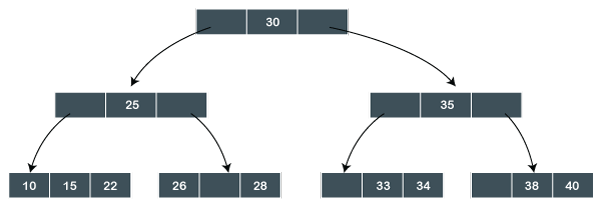
In this B+ tree, 30 is the only root node of the tree, which is also known as the main node of the B+ tree. There exists an intermediary layer with the nodes, which stores the address of the leaf nodes, not the actual records. Only the leaf nodes contain the records in the order which is sorted.
In the above B+ tree, only one leaf node exists whose values are: 10, 15, 22, 26, 28, 33, 34, 38, 40. As all the leaf nodes of the tree are sorted, so the records can be easily searched.
Advantages of B+ tree File Organization
- Traversal of records is easy and quick in the B+ tree file organization.
- As all the records are stored in the leaf nodes, so searching for the records becomes very simple.
- It is the balanced tree structure. So, the operations like insert, update or delete do not affect the performance of the B+ tree.
- The structure of the B+ tree grows or shrinks automatically if the number of records increases or decreases. So, there are no limitations on its size.
Disadvantages of B+ tree File Organization
- The one disadvantage of this file organization is that it is not efficient for the static tables or methods.
Clustered File Organization
Cluster is defined as "when two or more related tables or records are stored within the same file". The related column of two or more database tables in the cluster is called the cluster key. And this cluster key is used to map the two tables together.
This method minimizes the cost of accessing and searching the various records because they are combined and available in a single cluster.
Example:
Suppose we have two tables whose names are Student and Subject. Both of the following given tables are related to each other.
| Student_ID | Student_Name | Student_Age | Subject_ID |
| 101 | John | 20 | C01 |
| 102 | Robert | 20 | C04 |
| 103 | Anik | 21 | C01 |
| 104 | James | 22 | C02 |
| 105 | Trump | 21 | C03 |
| 106 | Charles | 20 | C04 |
| 107 | Deny | 20 | C03 |
| 108 | Varun | 21 | C04 |
Student
| Subject_ID | Subject_Name |
| C01 | Math |
| C02 | Java |
| C03 | C |
| C04 | DBMS |
Subject
Therefore, both these tables 'student' and 'subject' are allowed to combine using a join operation and can be seen as following in the cluster file.
| Cluster Key | ||||
| Subject_ID | Subject_Name | Student_ID | Student_Name | Student_Age |
| C01 | Math | 101 | John | 20 |
| 103 | Anik | 21 | ||
| C02 | Java | 104 | James | 22 |
| C03 | C | 105 | Trump | 21 |
| 107 | Deny | 20 | ||
| C04 | DBMS | 102 | Robert | 20 |
| 106 | Charles | 20 | ||
| 108 | Varun | 21 |
Student + Subject
If we have to perform the insert, update and delete operations on the record, then we can perform them directly because the data is sorted on that key with which searching and accessing is done. In the given table (Student + Subject), the cluster key is a Subject_ID.
Types of Cluster File Organization
In the database, cluster file organization is categorized into two different types:
1. Indexed Cluster
2. Hash Cluster
Indexed cluster
In this type of cluster, records are grouped or combined on the basis of the cluster key and then stored together. As we described in the above example, both the table's records are combined on the cluster key, so student + Subject is an example of an Indexed cluster.
Hash Cluster
In this type of cluster file organization, end-users can easily generate the hash key for the cluster key and store the records of both database tables with the same generated value of the hash key.
Advantages of Clustered File Organization
- This type of file organization is used in the database at the time when there is an urgent request for combining the database tables.
- When there is one to many mapping between the database tables, then this method is much efficient.
Disadvantages of Clustered File Organization
- For large databases, the performance of this method is less.
- This method cannot be used at that time when there is any alter in the joining condition.