
×

ER Diagram for Banking System in DBMS

Entity Relationship Diagram

Entity Relationship Diagrams, or ER Diagrams for short, are diagrams that show the relationships among entity sets that are stored in databases. Alternatively said, ER diagrams assist in describing the logical layout of databases. Entities, attributes, and relationships are the three fundamental ideas on which ER diagrams are based. Entities, traits, and relationships are all represented as rectangles, ovals, and diamond shapes in ER diagrams.

At first impression, a flowchart and an ER diagram are similar. The ER Diagram is a particular model, nevertheless, because of the multiple specific symbols and their associated meanings. The entity framework architecture is shown in the ER Diagram. The relationship between the entities that will be recorded in a database is shown in an entity relationship diagram (ER Diagram). The ER Diagram illustrates how a database is structured. With the aid of specialized symbols, it serves as a foundation for defining the connections between database entities. Entities, attributes, and relationships make up the core three elements of an ER diagram.

The relationship between the objects Student and Course is depicted in the diagram below. A student and a course have a many-to-many relationship since different students may choose the same course and a student may choose multiple courses. Stu Id, Stu Name, and Stu Age are characteristics of the student object. Aspects of the course object include Cou ID and Cou Name.

Entity Relationship Diagram of Bank

The ER diagram of Bank is described as follows:

  • Bank has clients.
  • Names, codes, and the main office address are used to identify banks.
  • The branches of banks.
  • Branch no., Branch name, and Branch Address are used to identify branches.
  • Name, customer ID, phone number, and address are used to identify customers.
  • One or more accounts may be open for a customer.
  • The account no., acc type, and amount are used to identify accounts.
  • Customers may apply for loans.
  • The loan id, loan type, and amount are used to identify loans.
  • Loans and accounts are connected to the bank branch.

ER Diagram for Banking System:
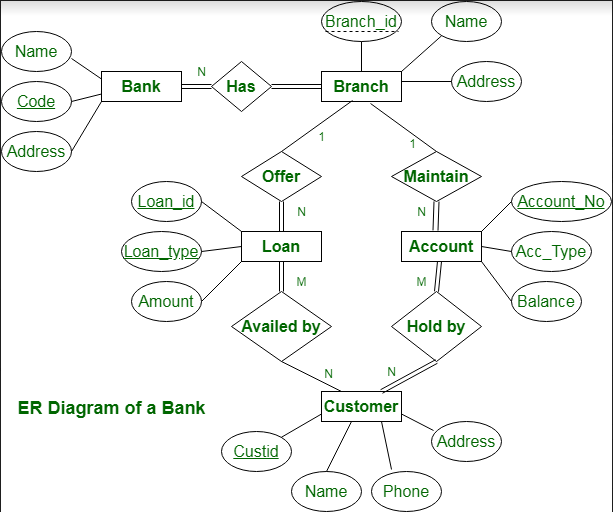
ER Diagram for Banking System

This bank ER diagram shows important details about the bank, including things like branches, clients, accounts, and loans. It enables us to comprehend the connections between various elements.

Entities and their Characteristics:

  • Bank entity:Bank Name, Bank Code, and Bank Address are characteristics of a bank entity.
    Code is the Bank Entity's Primary Key.
  • Customer entity:Customer id, Name, Phone Number, and Address are the attributes of a customer entity.
    The primary key for the customer entity is customer_id.
  • Branch entity:Branch id, Name, and Address are the attributes of a branch entity.
    The Branch Entity's Primary Key is Branch id.
  • Account Entity: Account number, Account Type, and Balance are its attributes.
    The primary key for the account entity is account number.
  • Loan Entity: Loan id, Loan Type, and Amount are its attributes.
    The primary key for the loan entity is loan id.

In relationships, and Branch are related one to many.

Branches of the Bank = >1: N

A branch cannot be a member of more than one bank at a time, hence the relationship between a bank and a branch is one to many.

Maintain branch accounts => 1: N

One Account cannot belong to many Branches, whereas one Branch may have numerous Accounts. As a result, the connection between a Branch and an Account is one to many.

Branch Loan Offers =>1: N

One Loan cannot belong to more than one Branch, hence the relationship between a Branch and a Loan is one to many in nature.

Customers' account balance => M: N

The relationship between an account and a customer is one of many to many since one customer may hold multiple accounts in addition to one account being held by one or more customers.

Loan taken out by the customer = >M: N (Assume loan can be jointly held by many Customers).

One customer may have multiple loans, and one loan may be used by one or more customers, hence there is a many-to-many relationship between loans and customers.

Conclusion

Entity Relationship Diagrams, or ER Diagrams for short, are diagrams that show the relationships among entity sets that are stored in databases. Alternatively said, ER diagrams assist in describing the logical layout of databases.

Entities, attributes, and relationships are the three fundamental ideas on which ER diagrams are based. Entities, traits, and relationships are all represented as rectangles, ovals, and diamond shapes in ER diagrams.


Related Topics

Query optimization in DBMS

Choosing an effective execution strategy to execute a query is a process known as query optimization. After the decision-making process of query parsing, which determines how many distinct ways a given...

5 minutes read.

B+ (Plus) Tree in DBMS

What is a B+ tree? The B+ tree is known as a balanced binary search tree. in this tree, we can store the data in the form of nodes. B+ tree...

9 minutes read.

BCNF in DBMS

BCNF stands for Boyce–Codd Normal Form. What is the Normal form? The normal form is mainly used to reduce the redundancy of the database tables. Or we can say that the normal form...

4 minutes read.

Aggregate Functions in DBMS

Aggregate Functions in DBMS: Aggregate functions are those functions in the DBMS which takes the values of multiple rows of a single column and then form a single value by...

2 minutes read.

What is RDBMS?

To discuss the Relational Database Management System, there are some terms and concepts you need to know. Database Any collection of related information is called a database. The phone book is...

5 minutes read.

Applications of DBMS

There are various fields where a database management system is used. Following are some applications which make use of the database management system: 1. Railway Reservation System: In the railway reservation...

7 minutes read.

Network model in DBMS

Network model: The many-to-many relationship between the database constraints is represented hierarchically by the Network Model in DBMS. It is a straightforward and straightforward database model. Due to the Network Model...

4 minutes read.

3- Tier Architecture in DBMS

Three-tier architecture is an application software architecture that arranges the output into three parts or tiers that are:  the presentation tier, where the user interacts with the application; the application...

4 minutes read.

Difference between Relational and Non-Relational Databases

Databases have become an integral part of our lives, from powering big websites like Amazon and Netflix to everyday tasks like remembering our passwords. With such an indispensable role in...

7 minutes read.

Trigger in DBMS

Trigger in DBMS: A trigger is a procedure of SQL statements, which is automatically fired when the DML statements are executed on the table of the database. Triggers are the...

3 minutes read.

DBMS Data Independence: Logical and Physical

Data Independence in DBMS: Data independence is a concept of DBMS which alters the schema of the database at one level of the database system without altering the schema definition...

2 minutes read.

DBMS Keys: Primary, Super, Candidate, Foreign

In database management system, keys play an important role which is used for identifying unique records by the combination of one or more fields in the database table. Keys also allows you to...

3 minutes read.

Disadvantages of DBMS

Disadvantages of DBMS With the vast list of advantages, there are some following disadvantages or limitations of the database management system. 1. High Cost The high cost of software and hardware is the...

2 minutes read.

Components of Relational Database Management System

A relational database management system compromises various component. Tables, records, attributes, instances, schemas and keys together form a relational database. In this page, we will discuss each component of RDBMS in...

4 minutes read.

Red-Black Tree Properties in DBMS

What is a Red-Black Tree? A red-black tree is a kind of self-balancing binary search tree. The extra bit that each node keeps denoting "color"-either "red" or "black"-is needed to keep...

3 minutes read.

Candidate Key in DBMS

Candidate key in DBMS: The candidate key is a single column or the set of columns that uniquely identifies the rows of data in the database table. It is a...

2 minutes read.

Redundancy in DBMS

Data redundancy is a situation that is created in the database in which the same amount of data is stored in two different places. The different places are found in a...

3 minutes read.

DBMS Examples

Introduction to DBMS A database management system (DBMS) is a software application that is designed to manage and organize data stored in a database. It is responsible for storing, retrieving, and...

4 minutes read.

What is Non-Relational Database

Databases can be sorted as either relational or non-relational. Non-relational data sets are now and again alluded to as "NoSQL," which represents Not Only SQL. The principal difference between these...

4 minutes read.

What is a Cloud Database

Cloud computing is the process of commoditizing data storage and processing time using standardized technologies. Cloud databases are databases that are hosted on cloud computing platforms such as Salesforce, GoGrid,...

4 minutes read.