
×

ER Diagram of Company Database in DBMS

Entity Relationship Diagram

Entity Relationship Diagrams, or ER Diagrams for short, are diagrams that show the relationships among entity sets that are stored in databases. Alternatively said, ER diagrams assist in describing the logical layout of databases. Entities, attributes, and relationships are the three fundamental ideas on which ER diagrams are based. Entities, traits, and relationships are all represented as rectangles, ovals, and diamond shapes in ER diagrams.

At first impression, a flowchart and an ER diagram are similar. The ER Diagram is a particular model, nevertheless, because of the multiple specific symbols and their associated meanings. The entity framework architecture is shown in the ER Diagram. The relationship between the entities that will be recorded in a database is shown in an entity relationship diagram (ER Diagram).

The ER Diagram illustrates how a database is structured. With the aid of specialized symbols, it serves as a foundation for defining the connections between database entities. Entities, attributes, and relationships make up the core three elements of an ER diagram.Entity-Relationship Diagrams, also referred to as ER Diagrams, are used to examine database structure. It demonstrates the connections between entities and their characteristics. An ER Model gives people a way to communicate.

Er Diagram for Company Database

The following is an explanation of the company's ER diagram:

  • The business has numerous departments.
  • There may be numerous locations for each department.
  • A department's name, D no, and location are used to identify it.
  • A manager is in charge of a specific department.
  • Numerous projects are connected to each department.
  • An employee's name, ID, address, DOB, and date of joining are used to identify them.
  • An employee only works in one department, however they may work on multiple projects at once.
  • We also record how many hours a worker spends on a particular project.
  • Each employee has a dependent, who is also known by their D name, gender, and relationship.

The company's ER diagram is described as follows:

  • The company has many departments.
  • Multiple locations may exist for each department.
  • A name, D no, and location are used to identify departments.
  • A manager has control over a specific department.
  • There are various projects connected to each department.
  • Name, ID, address, DOB, and date of joining are used to identify employees.
  • While an individual only works in one department, they may be involved in multiple projects.
  • We also record how many hours a certain employee spends working on a particular project.
  • Every employee has a dependent, and each dependent has a D name, a gender, and a relationship.
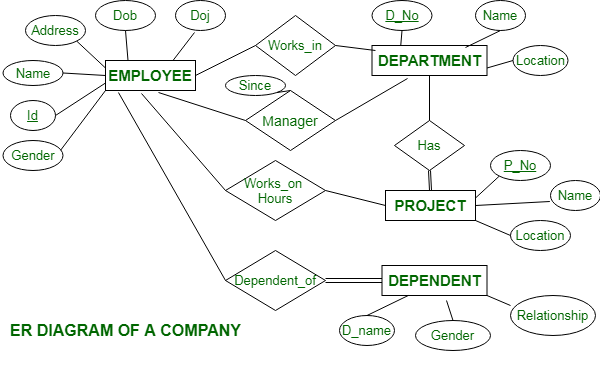
Er Diagram for Company Database

Relationships are:

  • Employees work in departments, however only one employee can work in many departments at the same time.
  • Manager manages a department; employee reports to the manager of the department, who also keeps track of the employee's joining date.
  • Department has numerous projects. However, one project cannot fall under multiple departments.
  • Employee works on project - One employee works on a variety of projects, and the hours worked on each project are tracked.
  • Each employee has dependents, according to the employee. There is only one employee reliant on each dependent.

Conclusion

         Entity Relationship Diagrams, or ER Diagrams for short, are diagrams that show the relationships among entity sets that are stored in databases. Alternatively said, ER diagrams assist in describing the logical layout of databases. Entities, attributes, and relationships are the three fundamental ideas on which ER diagrams are based. Entities, traits, and relationships are all represented as rectangles, ovals, and diamond shapes in ER diagrams.

At first impression, a flowchart and an ER diagram are similar. The ER Diagram is a particular model, nevertheless, because of the multiple specific symbols and their associated meanings. The entity framework architecture is shown in the ER Diagram. The relationship between the entities that will be recorded in a database is shown in an entity relationship diagram (ER Diagram).

The ER Diagram illustrates how a database is structured. With the aid of specialized symbols, it serves as a foundation for defining the connections between database entities.Entity-Relationship Diagrams, also referred to as ER Diagrams, are used to examine database structure. It demonstrates the connections between entities and their characteristics. An ER Model gives people a way to communicate.


Related Topics

B+ (Plus) Tree in DBMS

What is a B+ tree? The B+ tree is known as a balanced binary search tree. in this tree, we can store the data in the form of nodes. B+ tree...

9 minutes read.

Domain Constraints in DBMS

Introduction about DBMS:- DBMS stands for DataBase Management System. DBMS(DataBase Management System) is a type of software by which we can save and retrieve the user's data with the security process....

3 minutes read.

Relational Algebra in DBMS

Relational Algebra is a widely used procedural query language, which takes instances of one or more relation as an input and generates a new relation as an output. It uses a different...

6 minutes read.

Advantages of B-Tree in DBMS

A self-balancing search tree is the B-Tree. It is assumed that everything is in the main memory in most other self-balancing search trees (such as AVL and Red-Black Trees). We must...

3 minutes read.

Functional Dependencies

Functional Dependencies (FD) in the relational database management system occurs when one attribute in a relation uniquely determines other attribute in that relation. It describes the relation between the attributes. The term functional...

2 minutes read.

Applications of DBMS

There are various fields where a database management system is used. Following are some applications which make use of the database management system: 1. Railway Reservation System: In the railway reservation...

7 minutes read.

Fragmentation in Distributed DBMS

Fragmentation is a course of isolating the entire or full information base into different sub tables or sub relations with the goal that information can be put away in various...

4 minutes read.

Components of DBMS

The database management system (DBMS) represents an essential tool for processing data within effectively structured structures. The database management system consists of important components that work together to maintain the...

6 minutes read.

Difference between File System and DBMS

What is File Management System? A file management system is a collection of programs that manage and store data in files and folders in a computer hard disk. A file management...

9 minutes read.

DBMS Tutorial | Database Management System

Database Management System (DBMS) tutorial is all about managing and maintaining the data effectively. Our DBMS tutorial is designed for beginners as well as professionals. What is Data? Data is a real-world...

5 minutes read.

ACID Properties in DBMS

A transaction in a database has the following four properties, known as ACID properties. These properties are used to maintain the consistency of the database in the case of system failure and concurrent...

4 minutes read.

DBMS Schedule

A schedule is a process of combining the multiple transactions into one and executing the operations of these transactions in a predefined order. A schedule can have multiple transactions in it, each transaction...

2 minutes read.

Levels of Locking in DBMS

There are several levels of locks that can control the access to the elements stored at various levels in the Database. There can be multiple levels of the locks. These...

6 minutes read.

States of Transaction in DBMS

Transaction States A transaction passes through many different states in its life cycle. These states are known as transaction states. A transaction can be in one of the following states in the database: Active statePartially...

3 minutes read.

What is RDBMS?

To discuss the Relational Database Management System, there are some terms and concepts you need to know. Database Any collection of related information is called a database. The phone book is...

5 minutes read.

Schedule in DBMS

Schedule A sequence of statements that specify the sequential order in which the statements of concurrent transactions are executed. The transaction will get committed when it executes the instructions successfully without any...

4 minutes read.

Serializability in DBMS

Serializability in DBMS Serializability is the concept in a transaction that helps to identify which non-serial schedule is correct and will maintain the database consistency. It relates to the isolation property of transaction in...

3 minutes read.

Attributes in DBMS

What is Attribute? An attribute is an element in the database management system that describes the property or certain characteristics of the database entity. It is a crucial element of the...

3 minutes read.

DBMS Examples

Introduction to DBMS A database management system (DBMS) is a software application that is designed to manage and organize data stored in a database. It is responsible for storing, retrieving, and...

4 minutes read.

Data Models in DBMS

Data Models in DBMS Data models are the models explaining the logical structure of the database systems. They describe the entities, attributes, and the relationship among the data elements of the...

8 minutes read.