
×

DBMS Keys: Primary, Super, Candidate, Foreign

In database management system, keys play an important role which is used for identifying unique records by the combination of one or more fields in the database table. Keys also allows you to establish the relationship between the database tables.

Different types of keys

  1. Primary key
  2. Super key
  3. Candidate key
  4. Foreign key
  5. Alternate key or Secondary key
  6. Composite key

Primary key

A primary key is a field or a set of fields in a database table that uniquely identifies each record in that table. In a table, there can be more than one candidate key from which one of the key is selected as a primary key.

  • The value of the primary key field cannot be NULL.
  • A table is allowed to have only one primary key.
  • The value of a primary key field should always be unique.

Example:

In the Student table, Student_id can be a primary key since it is unique for each student. In the Student table, we can even select Aadhar_Number as a primary key as it is also unique.

Table: Student

Student_id Name Department_id Aadhar_Number

Primary key

Super Key

A super key is a set of single and multiple key attributes which is used to identify records in a table. The super key is a superset of the candidate key.
The set of all attributes or fields to identify the tuples in a relation is called the trivial super key.

Example:

Table Student:

Student_id Name Department_id


Following are the examples of a super key for the table Student:

1. Student_id
2. (Student_id, Name)
3. (Name, Department_id)

Candidate key

A minimal (minimum) set of attributes that can uniquely identify each record in a relation is called a candidate key. It is a subset of a super key.

  • The value of the candidate key field must be unique and always be not NULL for every tuple.
  • There can be more than one candidate key in a table or a relation.
  • Removing any field from the candidate key fails in identifying each record uniquely.

Example:

Table student:

Student_id Name Department_id

Following are the examples of candidate key for above table:

1. Student_id
2. (Student_id, Name)

Foreign key

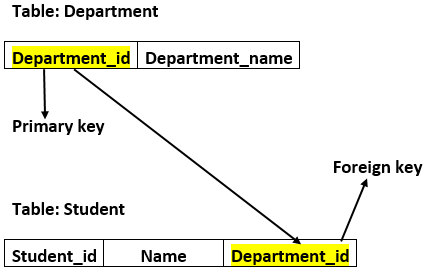
A foreign key is anattribute in one table that acts as a primary key in another table. The foreign key is useful for establishing the relationship between two tables in a database.

Example:

In a college, every student study in a specific department, and department and student are two different entities. So you cannot store the information of the student in the department table. That's why we relate these two tables using the primary key of one table.

Example:
We create the primary key on the field department_idof the DEPARTMENT table.
Now in the student table, Department_id is the foreign key, and both the tables are linked.
Alternate key

Those keys which are not selected as the primary key from the candidate keys are called as the alternate keys. These keys are also known as the secondary keys.

Example:
Table student:

Student_id Name Department_id

The example of candidate key for above table:(Student_id, Name)

Composite key

A composite key is a key which is a combination of two or more fields (attributes) that uniquely identify each record in the table.

Example:

Table student:

Student_id Name Department_id


The examples of the composite key for above table: (Name, Department_id)


Related Topics

Advantages of B-Tree in DBMS

A self-balancing search tree is the B-Tree. It is assumed that everything is in the main memory in most other self-balancing search trees (such as AVL and Red-Black Trees). We must...

3 minutes read.

Meta Data in DBMS

Metadata: Metadata is simply described as information about information. It indicates that the data is described as well as its context. It makes data easier to find, interpret, and organize. I'll...

4 minutes read.

Checkpoint in DBMS

A checkpoint in DBMS is used to define a point of the transaction that is in a consistent state and then all the transactions will be in the committed state...

4 minutes read.

Functional Dependencies

Functional Dependencies (FD) in the relational database management system occurs when one attribute in a relation uniquely determines other attribute in that relation. It describes the relation between the attributes. The term functional...

2 minutes read.

ER Diagram for Company Database in DBMS

What is ER Diagram? An ER diagram (short for Entity Relationship Diagram), also known as an ERD, is a diagram that shows the relationships of a set of entities stored in...

7 minutes read.

Cardinality in DBMS

Cardinality in DBMS Cardinality is the relationship between two or more entities (table). It shows how all the entities are connected. In DBMS, all the entities and tables are interconnected with...

2 minutes read.

Concurrent Execution of Transaction

In the transaction process, a system usually allows executing more than one transaction simultaneously. This process is called a concurrent execution. Advantages of concurrent execution of a transaction Decrease waiting time or...

4 minutes read.

Disadvantages of DBMS

Disadvantages of DBMS With the vast list of advantages, there are some following disadvantages or limitations of the database management system. 1. High Cost The high cost of software and hardware is the...

2 minutes read.

Difference between Relational and Non-Relational Databases

Databases have become an integral part of our lives, from powering big websites like Amazon and Netflix to everyday tasks like remembering our passwords. With such an indispensable role in...

7 minutes read.

Founder of DBMS

The first database management system was built to automate the business of the General Electric Company. It was built by a small group of programmers. The Integrated Data Store IDS...

4 minutes read.

Foreign key in DBMS

Foreign key in DBMS: The Foreign key is a field or the set of fields in the relational database table, which points to the existing field in another table. It...

2 minutes read.

Structure of DBMS

DBMS means Database Management System, which is a tool or software used to create the database or delete, or manipulate the database. Query Processor, Storage Manager, and Disk Storage are the...

3 minutes read.

Redundancy in Database Management System

Redundancy in a database management system (DBMS) refers to the duplication of data within the database. This duplication can occur in multiple ways, such as having multiple copies of the...

13 minutes read.

What is a Database

A database is a structured collection of data that is often kept electronically on a computer system. Typically, a database is managed by a database management system (DBMS). Together, the...

9 minutes read.

Inference Rules

Armstrong’s axioms are the complete set of basic inference rules used to infer all the functional dependencies on the relational database. An inference rule is a type of assertion that a user can...

2 minutes read.

DBMS Tutorial | Database Management System

Database Management System (DBMS) tutorial is all about managing and maintaining the data effectively. Our DBMS tutorial is designed for beginners as well as professionals. What is Data? Data is a real-world...

5 minutes read.

Query optimization in DBMS

Choosing an effective execution strategy to execute a query is a process known as query optimization. After the decision-making process of query parsing, which determines how many distinct ways a given...

5 minutes read.

What is RDBMS?

To discuss the Relational Database Management System, there are some terms and concepts you need to know. Database Any collection of related information is called a database. The phone book is...

5 minutes read.

Domain in DBMS

Constraints: Constraints in DBMS are a set of guidelines that guarantee that authorized users who modify the database do not alter the consistency of the data. Constraints are expressed in DDL...

3 minutes read.

Trigger in DBMS

Trigger in DBMS: A trigger is a procedure of SQL statements, which is automatically fired when the DML statements are executed on the table of the database. Triggers are the...

3 minutes read.